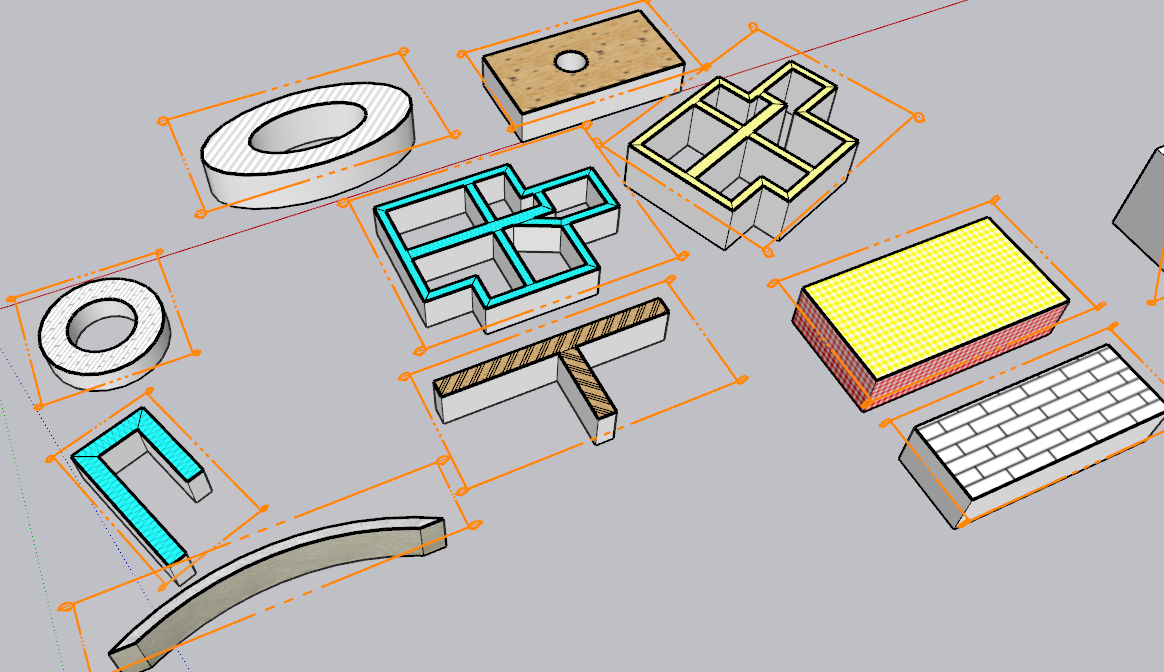
🔌 Easy Offset | Offset selected faces in SketchUp in positive and negative offsets. Download

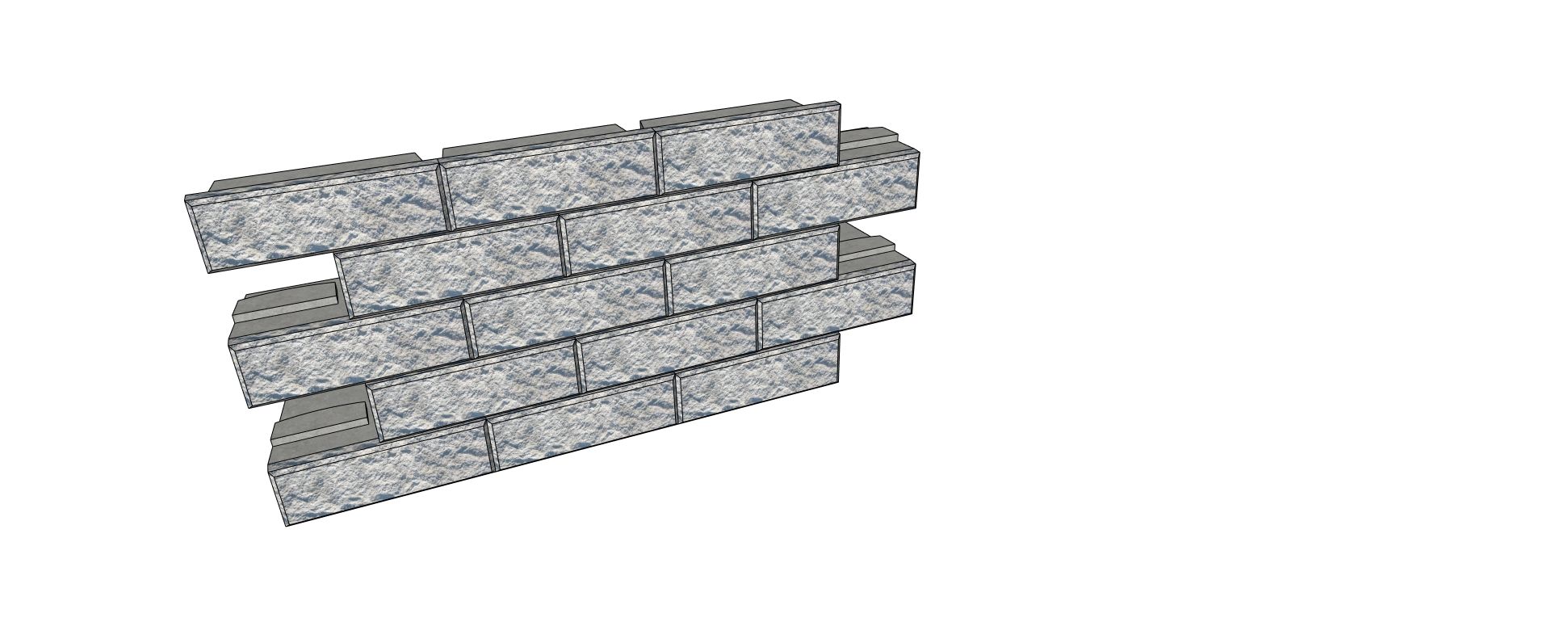
  • Help with ProfileBuilder4 Wallblocks

    Extensions & Applications Discussions
    4
    1
    0 Votes
    4 المشاركات
    68 المشاهدات
    Rich O BrienR
    Did you uncheck Max ?
  • Modelling a tramway

    Gallery
    477
    1 Votes
    477 المشاركات
    186k المشاهدات
    jo-keJ
    This is really a fun project. From start to end less then 24 hours. Im former times (15 years ago) we had something like speedmodelling- challenge at sketchucation. I do it sometimes for me to practice. [image: 1768751049746-berliner-platz001-resized.jpg]
  • [Plugin] FredoSection - v1.5a - 15 Jan 26

    Plugins
    15
    8
    4 Votes
    15 المشاركات
    590 المشاهدات
    fredo6F
    @sayerdesign Currently, the Vector hatching is not customizable but I can easily add any type of hatching, including with dashed lines, mutliples, etc..... For a general customization of vector patterns, this should be possible based on providing a reptable component. However, I am interested in seeing the kind of patterns you want for plywood, solidwood and stone, and why raster images would not work.
  • Thinking of our Majid today

    Corner Bar
    20
    5 Votes
    20 المشاركات
    404 المشاهدات
    L
    Looking forward to hearing from Majid
  • Scene animation with Animator

    Unsolved Animator Beta
    74
    0 Votes
    74 المشاركات
    1k المشاهدات
    ntxdaveN
    Hope someone can tell me what I am doing wrong. SketchUp file I used for the movie: Camera and Animations.skp Here is the movie that was produced by Animator. Camera and Animations.mp4 So if you download the SketchUp file and then click on each of the scene tabs and compare that to what was generated by Animator, I have the following comments/questions: On each of the scenes, there should be text that tells which scene you are viewing. On each of the scenes, there should be an object (one that I wanted to add a motion to later) The text on each of the scenes is controlled by a tag/layer which Animator seems to be ignoring. The object (that I wanted to animate) on each of the scenes is also controlled by a tag/layer which Animator seems to be ignoring I used the tag/layer visibility controller for all of the movie. However, I have to admit that I added that feature as the last item. Should I have done that before taking the pictures? You will notice that for each of the scenes I used the camera option to use the scene. I have also tried doing the whole thing with the current view option for capturing the camera. But I got the same results when trying that way. Again, am I doing something wrong? What I would like for Animator to do is give me the same results as if you click on the scene tabs one at a time and the transition in Animator would be the same as it happens in native SketchUp. @fredo6 is that possible? If so, this would give me (I think) the capability I have been trying to achieve.
  • EasyOffset / my new plugin #3

    Extensions & Applications Discussions
    9
    2
    4 Votes
    9 المشاركات
    120 المشاهدات
    HornOxxH
    @slbaumgartner said in EasyOffset / my new plugin #3: Thank you slbaumgartner for your valid comments on this. My little tool is anything but ‘smart’. For complex geometries, I actually use more suitable and of course better offset tools. For complex and also multiple face selection, I really like Tig's Smart Offset, for example...
  • I need this plugin in Vietnam.

    Plugins
    1
    0 Votes
    1 المشاركات
    34 المشاهدات
    لم يرد أحد
  • Free of 2026

    Freeware
    7
    0 Votes
    7 المشاركات
    129 المشاهدات
    pilouP
    https://www.youtube.com/watch?v=rZ3-KNRVsTo free!
  • [Plugin] Sculpt Tools v 1.0...

    Plugins
    100
    0 Votes
    100 المشاركات
    127k المشاهدات
    S
    I gave the code of this plugin to ai, and asked him to write a manual, here it is.Sculpt Tools Manual.pdf
  • [Plugin] MultiTags for Sketchup

    Extensions & Applications Discussions extensions
    22
    0 Votes
    22 المشاركات
    3k المشاهدات
    B
    Thanks! Gave it a try but no go, ah well....much appreciated for the help however....
  • Delete Used Components

    Extensions & Applications Discussions
    5
    0 Votes
    5 المشاركات
    74 المشاهدات
    Dave RD
    @Gus-R said in Delete Used Components: Dave, by used I mean existing components. I do use purge unused by I wanted to get rid of a bunch of cabinet pulls. OK. So you could have used the process I described, right clicking on the component thumbnail and selecting Delete. Would be faster than digging though Outliner, especially if the components are nested in groups or larger components.
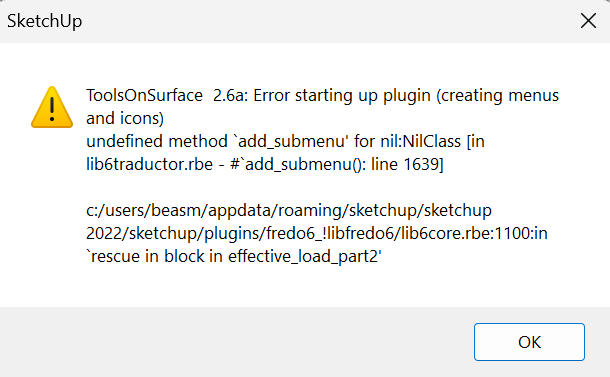
  • Help with Tools on surface plugin

    Extensions & Applications Discussions
    3
    1
    0 Votes
    3 المشاركات
    40 المشاهدات
    TIGT
    Also... have you installed the latest LibFredo6 and restarted SketchUp ?
  • FREDOSCALE license not recognised

    Extensions & Applications Discussions
    4
    1
    0 Votes
    4 المشاركات
    50 المشاهدات
    Rich O BrienR
    @zain01 said in FREDOSCALE license not recognised: Thanks Rich I wasn't aware you can allocate the seats yourself. Duh You can have 3 seats at anytime active. But you need to release seats to go to a fourth device. You have multiple ways to release: Sketchucation Tools [image: 1768474179400-6038c168-d107-43f5-9832-1ebc19b982bd-image.png] Extension Licesnse Dialog [image: 1768474214181-f74777da-cc23-4d57-9c7b-9f1564c5dde0-image.png] Or your dashboard [image: 1768474253428-cc0fd414-b6dd-4a71-9597-47d95ffa4844-image.png]
  • shortcuts not retained in 2026 when Sketchup restarts

    SketchUp Discussions
    11
    0 Votes
    11 المشاركات
    139 المشاهدات
    TIGT
    On PCs in v2026.1 some nitwit swapped the order in the Preferences >Shortcuts listed for the Edit commands for Copy Ctrl+C and Ctrl+Insert, and also the Cut [+X/+Insert] and Paste [+V/+Insert] etc, so the Edit menu now gives you an illogical listing because the long established ones now come second and so they aren't listed in that menu. They still work, Unfortunately they are hardwired and not editable in Preferences>Shortcuts. Hopefully common sense will revert this weirdness in the next update.
  • Rayscaper New Releases

    Extensions & Applications Discussions rayscaper render
    401
    1 Votes
    401 المشاركات
    25k المشاهدات
    A
    @Krass Thank you for your efforts.
  • [Plugin] LordOfTheToolbars - v2.9c - 20 Dec 24

    Plugins
    471
    4
    1 Votes
    471 المشاركات
    340k المشاهدات
    O
    @taoklai I had to revert to the previous version of D5 livesync in my case. You should do that with Enscape for a while, until Fredo find a fix.
  • Poly Haven Scene.

    WIP
    15
    1
    1 Votes
    15 المشاركات
    196 المشاهدات
    Mike AmosM
    https://app.bugsplat.com/v2/crash?database=SU26Win&id=72320#overview
  • FredoScale Compatibility issues with SU 2026

    Plugins
    7
    0 Votes
    7 المشاركات
    405 المشاهدات
    fredo6F
    There is a general problem with the TAB key in SU2026. The Tab key is not sent after a few hits. This concerns mainly Windows, but other weird problems have been detected on Mac. The issue was logged to the Sketchup team. So, we'll probably have to wait for SU2026.2. On my side, I logged the problem with the following video. Bug TAB in SU2026.1.mp4
  • [Plugin] SceneTextureSwitcher v1.3

    Plugins
    6
    2 Votes
    6 المشاركات
    236 المشاهدات
    J
    is there any tutorial or video for this i follow the step but i don't get it why its not working on me
  • Medeek Floor

    Plugins
    143
    1 Votes
    143 المشاركات
    12k المشاهدات
    medeekM
    Version 1.1.3 - 01.13.2026 Enabled custom overhangs for sheathing. Added a "Remove Overhang" parameter to selectively control the sheathing overhang. [image: 1768338040933-floor_su295_800-resized.jpg] Update per customer request. This feature is identical to the overhang feature included with steel decks and will allow the user to set an overhang and then selectively assign specific edges which do not have the overhang enabled. Tutorial #20 explains how this feature works: https://youtu.be/1kIk0HBeyn8