Thanks for clarifying. It didn't used to be. previous versions did not have a shortcut for Exit. I've been using it for hide rest model since the early days of sketchup. It's frustrating they made it hard coded with this release (I'm not even sure why they need a shortcut to Exit).
Oops, your profile's looking a bit empty! To help us tailor your experience, please fill in key details like your SketchUp version, skill level, operating system, and more. Update and save your info on your profile page today!
Check out Febhouse | New extensions for Shadow Analysis in SketchUp Download
J
Offline
Best posts made by joshvt
-
RE: shortcuts not retained in 2026 when Sketchup restarts
Latest posts made by joshvt
-
RE: shortcuts not retained in 2026 when Sketchup restarts
Thanks. Ctrl+C and Ctrl+V work about 75% of the time. I'm trying to recreate/ observe the situation where they don't work, but haven't figured it out yet. Ctrl+C works less frequently than Ctrl+V, which is odd.
-
RE: shortcuts not retained in 2026 when Sketchup restarts
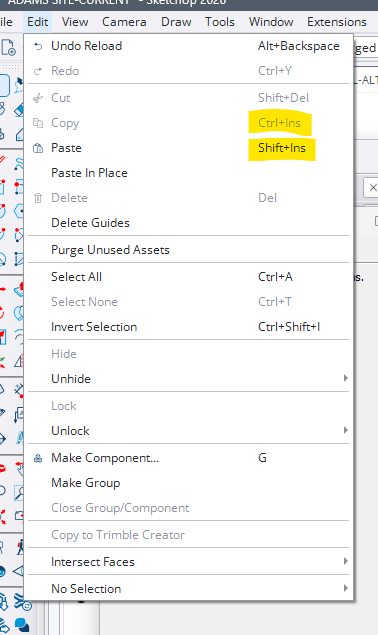
My second day of using 2026 and I've been having issues with copy and paste working inconsistently (I use Ctrl+C, Ctrl+V- just like every other windows program) Just noticed that sketchup 2026 edit menu shows the shortcuts for these as Ctrl+Ins, Shift+Ins. Presumably this is related to the insconsistent behavior I am experiencing when using the old/ standard shortcuts. Makes total sense to use a shortcut with keys on the opposite side of the keyboard... thanks Sketchup.... unreal.
-
RE: shortcuts not retained in 2026 when Sketchup restarts
Thanks for clarifying. It didn't used to be. previous versions did not have a shortcut for Exit. I've been using it for hide rest model since the early days of sketchup. It's frustrating they made it hard coded with this release (I'm not even sure why they need a shortcut to Exit).
-
RE: shortcuts not retained in 2026 when Sketchup restarts
@TIG
Thanks for the response and suggestions.Sketchup will retain Shift+Q when I restart it.
I ran repair and it did not change anything.
The fact that I when I type Ctrl+Q in the preferences the "+" is unresponsive so it will not add it to the assigned box is strange. But I can add Shift+Q to the assigned box and sketchup will then retain it when restarted.
So I guess this is an annoying bug and I need to train myself to use a new shortcut.
-
shortcuts not retained in 2026 when Sketchup restarts
Forever, I have used ctrl+Q as a shortcut for hide/ show rest of model when editing blocks or components. I recently updated to 2026 and it appears ctrl+q is now the default shortcut for file>exit. I tried to change the shortcut in preferences, but it will not let me assign ctrl+Q as the shortcut for show/hide rest of model when going through the preferences window.
So I exported my preferences from 2025 and then imported them to 2026. When i imported, It asked if I wanted to reassign the ctrl+Q shortcut, i said yes and got my desired ctrl+Q function back. Problem is when i close out of sketchup and reopen it, it does not remember the ctrl+Q and reverts back to the file>exit. How do I get sketchup to remember the shortcut? (Hoping i don't need to pick a different shortcut since I have used ctrl+Q forever and it's ingrained in my workflow brain!)
Thanks.
-
RE: Measurement window location in 2025
Yes, windows. for some reason was having trouble floating/ undocking it. figured that out and put it where I want it. Thanks for responding.
-
Measurement window location in 2025
I recently updated to 2025. The measurement window is now in the bottom left corner instead of the bottom right. Is there a way to make it go to the bottom right where it used to exist?
-
RE: Boxx 4150 Xtreme?
the quote i have for the boxx is for $2800. specs that differ from your assumptions are:
8GB DDR3-1600 (figure I can add more later if needed)
NVIDIA Quadro K600 1GB (what compromises am I making here?)
1TB 7200rpm sata -rep suggested this would be ok since it has 24GB SSD Cache- would like some input here. I need the 1TB capacity as I have a lot of data that needs to exist on this machine.
When I go to jncs and select options that seem close, it says the price is $2271 (that is using a gtx770 video card which i am guessing is better than the boxx card- I don't know which one listed would be more comparable?) That is also before liquid cooling which the BOXX includes. The gap is narrower than you mentioned.
If you can't tell by now, my knowledge of hardware is elementary- i replaced a power supply once and added a new hard drive but that is about the extent. A lot of the forums I have been on suggest modding or building systems to save some money. Frankly, while tinkering actually sounds fun, I have my hands full running a business and meeting deadlines. Downtime is expensive so I place a fair amount of value on a machine that will be reliable out of the box/ doesn't need to have the hood up on day 1, will perform and today and for a reasonably long time, and offers the piece of mind of a warranty for when something does go wrong. I am willing to pay a bit more for these things. Given this, I would love to know if anyone has experience with JNCS from this perspective.
Thanks!
-
RE: Boxx 4150 Xtreme?
while we are at it, I am considering a new monitor as well- prob 24", maybe 27" what do you think of this one http://www.amazon.com/Samsung-T24B350ND-24-Inch-LED-Lit-Monitor/dp/B007ILEHNU