🔌 Easy Offset | Offset selected faces in SketchUp in positive and negative offsets. Download

  • [Plugin] SceneTextureSwitcher v1.3

    Plugins
    6
    2 Votes
    6 المشاركات
    238 المشاهدات
    J
    is there any tutorial or video for this i follow the step but i don't get it why its not working on me
  • Medeek Floor

    Plugins
    143
    1 Votes
    143 المشاركات
    12k المشاهدات
    medeekM
    Version 1.1.3 - 01.13.2026 Enabled custom overhangs for sheathing. Added a "Remove Overhang" parameter to selectively control the sheathing overhang. [image: 1768338040933-floor_su295_800-resized.jpg] Update per customer request. This feature is identical to the overhang feature included with steel decks and will allow the user to set an overhang and then selectively assign specific edges which do not have the overhang enabled. Tutorial #20 explains how this feature works: https://youtu.be/1kIk0HBeyn8
  • [Plugin] Universal Importer - v1.2.6 - 30 July 2024

    Plugins
    446
    1 Votes
    446 المشاركات
    457k المشاهدات
    K
    Hi, Just found your Universal plugin today, I've been wanting something like that for a long time!! It seem to work fine for me exporting dxf files from lightburn except that anything that is a curve is chopped up into dashed lines. Squares come in fine but circles or curves get the dash effect. Any thoughts? Thanks
  • Free de 2026

    Français
    5
    1
    0 Votes
    5 المشاركات
    94 المشاهدات
    pilouP
    Edge Flange + SubDiv Beta9 by Max Smirnov [image: 1768324447649-giufo.gif] Banana [image: 1768324459907-unnafo.jpg]
  • [REQ] PDF Importer

    Plugins
    20
    0 Votes
    20 المشاركات
    1k المشاهدات
    Dave RD
    @FlorinAp that's exactly the same as it's been on Mac forever. The developers have indicated that vector import is on their roadmap.
  • 0 Votes
    5 المشاركات
    57 المشاهدات
    S
    @Rich-O-Brien thanks
  • [Plugin] Zero Tilt Camera

    Plugins
    18
    0 Votes
    18 المشاركات
    15k المشاهدات
    F
    Finally, i think i figured it out - the best description for this one is "perspective perpendicular center view", i used it a lot through the first button of Curic Align View, and now through Dezmo Dice "center (front, left, right, back) view". Somebody please tell me if I'm wrong.! It is very useful, and in SketchUp, there is no way that you can manually and precisely achieve this.
  • Help with plugin

    Extensions & Applications Discussions
    9
    0 Votes
    9 المشاركات
    191 المشاهدات
    Dave RD
    @panixia said in Help with plugin: is definitely not the best for textured models tho. I know that. I was only responding to the OP's comment that SketchUp 2017 won't import .stl files. I agree that other formats would likely be better.
  • [Plugin Library] LibFredo6 - v15.8b - 12 Jan 26

    Plugins
    2k
    3
    0 Votes
    2k المشاركات
    4m المشاهدات
    panixiaP
    @fredo6 LOTT v2.6a - 31 Oct 23 I never updated it, because I understood that you had to remove features in latest versions, so I followed the general rule "If ain't broke don't fix it".. should I update?
  • Unability to activate my license

    SketchUp Bug Reporting
    3
    1
    0 Votes
    3 المشاركات
    41 المشاهدات
    TIGT
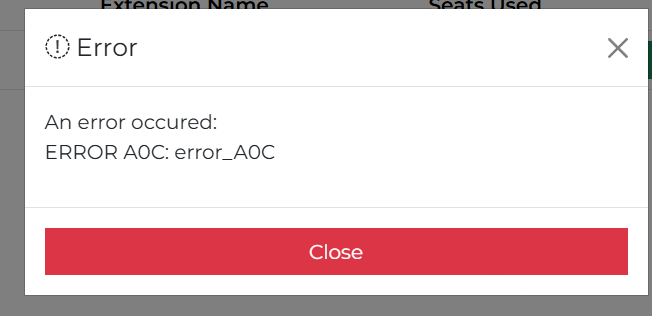
    While you are preparing the info for Rich can I also ask: the A0C error means the computer name and what's in the license file don't match., so have you changed your computer name ? Or copied license files between different computers ? Or perhaps your computer-name [or even user-name?] contain non-standard characters [like accented letters or other non-standard characters] - the Microsoft requirement is for computer names to have only ASCII alphanumeric characters [A-Za-Z0-9] and a few common punctuation characters, and not following this can result in weird issues when comparing licenses and computers etc - I am guessing you are perhaps french so accents could be the issue...
  • 2d tools

    Newbie Forum sketchup
    8
    0 Votes
    8 المشاركات
    340 المشاهدات
    TIGT
    V8.0 is released https://sketchucation.com/pluginstore?pln=2Dtools Or via the ExtensionStore dialog. It fixes a glitch with v2026 whereby some MAC users could not get the TAB key press/up to work to open dialogs in some tools, and some PC users had to press/up 4 times to make TAB work. But <=2025 users had no issues. I've now improved the onKeyUp methods to optimize TAB use in v2026, but it can still be flaky for some users. including me needing 4x press/up! So as an additional option I've added one press/up on the Shift key which will also open the dialogs, in certain tools like LineStyle and Hatching. The Help pages explain this dialog opening more fully. Please try and report back issues...
  • Undo history list

    Plugins
    10
    0 Votes
    10 المشاركات
    4k المشاهدات
    F
    Yes, there is one with a visual history - Samuel Tallet visual_history But, in my experience, it requires some solid CPU...
  • [Plugin] Quick selection

    Plugins
    3
    2
    1 Votes
    3 المشاركات
    166 المشاهدات
    F
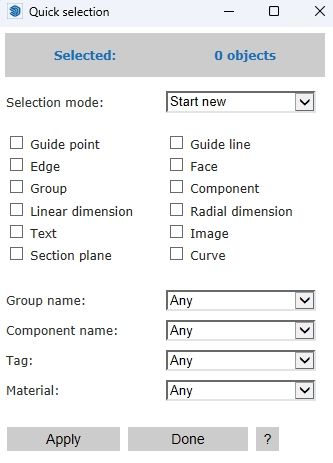
    This extension is very useful, with an exception - by default, it selects hidden objects and tags, and there is no way to change that behaviour.
  • TIG 2D Tools Line Style and Hatch Dialog Box Not Opening

    SketchUp Bug Reporting
    7
    0 Votes
    7 المشاركات
    176 المشاهدات
    TIGT
    A new signed Version 8.0 of the toolset is available as an RBZ in the PluginStore https://sketchucation.com/pluginstore?pln=2Dtools or for AutoInstall/Update through the ExtensionStore dialog. It addresses the TAB keycode weirdness recently reported when trying to open a dialog for certain tools, like LineStyle and Hatching etc. The TAB press/up was itself introduced for >=v2020 when the right-click in empty-space context-menu option was removed from the Ruby API. It had to be a TAB press/up because MAC has always ignore a simple TAB press. Recently it's been found that in v2026 on a MAC a TAB press/up sometimes fails to work at all, and other times on PCs x4 press/up were needed to get TAB to call the dialog - whilst weirdly some users experienced no issues with it at all, on either OS ! I have now error trapped the keycode capture for TAB as best I can, note that on <=v2025 there's no problems with TABx1 press/up [sadly my own PC still needs TABx4 press/up with v2026], and TABx1 may work with v2026 for some users and OSs, BUT as a fallback I've now introduce an alternative additional key press/up - Shift - which [I hope] works with one press/up on any OS and SketchUp version. So if you have any v2026 TAB annoyance you can now just press/up the Shift key instead to open the dialogs. Please try it and report any issues. I've updated the More-Info>Release-Notes and the toolset's Help HTML files to reflect these changes.
  • Drink driving?

    Corner Bar
    6
    0 Votes
    6 المشاركات
    95 المشاهدات
    L
    Looks like a case of poor engineering to me
  • Playing arround with Sketchup diffusion

    Gallery
    99
    0 Votes
    99 المشاركات
    5k المشاهدات
    jo-keJ
    @Rich-O-Brien a friend of mine (working at the tramwaycompany) is doing the prints for me. [image: 1767956369041-2025-12-02-11.07.48-resized.jpg] another person is doing the paintings [image: 1767956656600-a841e357-bd1c-456b-b2a2-5be5b996cf13.jpg] [image: 1767956673368-720c0ebb-7db0-4098-912b-77e021ba416c-resized.jpg]
  • Many projects

    Gallery
    303
    2 Votes
    303 المشاركات
    26k المشاهدات
    jo-keJ
    @Rich-O-Brien Yes, all the furniture is custom-made. Here are some examples of small bathrooms and utility rooms: https://www.doerr-ma.de/index.php?id1=22&id2=43
  • [Tutorial] Animator Quick Start

    Animator Beta render plugins extensions
    135
    0 Votes
    135 المشاركات
    753k المشاهدات
    ntxdaveN
    Does anyone know of a way to modify/control the transition from one clip to another. I have several clips but you just get a quick change from a clip to the next one. I would like to see some capability like fade out the current/ending clip and then starting the next clip.
  • [Plugin] MaterialConsolidator

    Plugins
    59
    0 Votes
    59 المشاركات
    42k المشاهدات
    Didier BurD
    @ramiduscz Hi, Which texture replacer are you using ? ThomThom's 'material replacer' (works like a charm, although you need to replace materials one by one. It respects UV's if tou hit the Ctrl key. [https://extensions.sketchup.com/extension/4137f7fc-a81f-4ef9-9ec8-b6dd8a0d9086/material-replacer](link url)
  • Pour changer un peu...

    Français
    1k
    0 Votes
    1k المشاركات
    321k المشاهدات
    pilouP
    Ah oui c'était pas du pipo! Excellent! https://www.arte.tv/fr/videos/RC-027513/twin-peaks/