@FlorinAp that's exactly the same as it's been on Mac forever. The developers have indicated that vector import is on their roadmap.
Oops, your profile's looking a bit empty! To help us tailor your experience, please fill in key details like your SketchUp version, skill level, operating system, and more. Update and save your info on your profile page today!
Check out Febhouse | New extensions for Shadow Analysis in SketchUp Download
 D
Offline
D
Offline
Posts
-
RE: [REQ] PDF Importer
-
RE: [REQ] PDF Importer
SketchUp 2026 on Winodws imports PDF files natively. No need for an extension.
-
RE: Help with plugin
@panixia said in Help with plugin:
is definitely not the best for textured models tho.
I know that. I was only responding to the OP's comment that SketchUp 2017 won't import .stl files. I agree that other formats would likely be better.
-
RE: Help with plugin
@Jspro said in Help with plugin:
my experience is sketchup (2017) will only accept and recognize a SKP file
That's not correct. You can import .stl files into SketchUp 2017.
Presumably you have Blender since you have a Blender file. Open the file in Blender and export a .stl file as Rich suggests. Then use File>Import in SketchUp to import the file.
-
RE: SCFLicense: Extension Licensing on Sketchucation
@Mvmcneil ahh ... Good that you got it sorted. Two different extensions and two different licenses. Both a good to have, though.
-
RE: SCFLicense: Extension Licensing on Sketchucation
Are you sure you are trying to activate RoundCorner and not Fredo Corner?
-
RE: Export to .3ds takes forever
The developers haven't have made any changes to SketchUp 2021 since late in 2021. The .3ds exporter in SketchUp 2021 wouldn't have been changed, either. You can be certain that the developers won't be looking at the exporter in old, unsupported versions of SketchUp.
Maybe there's something in your model that is resulting in the slow down. You could share the .skp file. We could try the export in the current version and see what happens.
@onzki said in Export to .3ds takes forever:
I’m using 2021 Pro
Your profile says you are using SketchUp 2024. Do you get a different export result with that version?
-
RE: Small Engines and Stuff
A compound steam engine directs the exhaust steam from the first cylinder (smallest one) into the next cylinder which is larger. In the case of a triple expansion engine, a third cylinder (largest of the three) gets the steam from the second cylinder. This works because the steam still has energy to expand after the first and second cylinders. It does require the cylinders get progressively larger.
-
RE: Small Engines and Stuff
Thanks. No scavenger system for the exhaust. It's just dumped out into the room. On the other hand it's only compressed air going in.
-
RE: Small Engines and Stuff
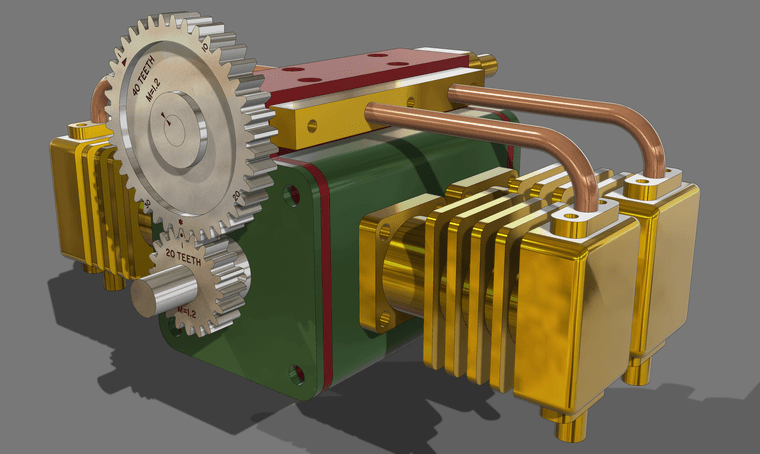
Here's a little boxer engine intended to run on compressed air. For reference, the large gear is about 50mm dia.Like usual I haven't added screws
-
RE: Create new or adjust materials
@ntxdave said in Create new or adjust materials:
The only problem I am having now is that when I rotate the object (actually the camera)
So you mean orbit the camera?
@ntxdave said in Create new or adjust materials:
the image on the back side of the heart comes and goes
Sounds like Z-fighing. Make the image of the heart a texture and apply it to just the back face of the heart. Turn on Hidden Geometry so you can paint the back separately from the rest.
-
RE: Create new or adjust materials
You appear to have Back Edges turned on. K is the default keyboard short. Tap it and the Back Edges should turn off.
Are you rotating the object or orbiting the camera?
@ntxdave said in Create new or adjust materials:
I do have an F1 key but I am having some new problems.
What problems? F1 is a hard coded shortcut so you can change that one.
-
RE: TIG Weld Shortcut Setting
@ntxdave said in TIG Weld Shortcut Setting:
I will try @Rich-O-Brien’s approach as well.
It's not a different approach. I just demonstrated what Rich wrote.
You're starting to worry me Dave.
-
RE: TIG Weld Shortcut Setting
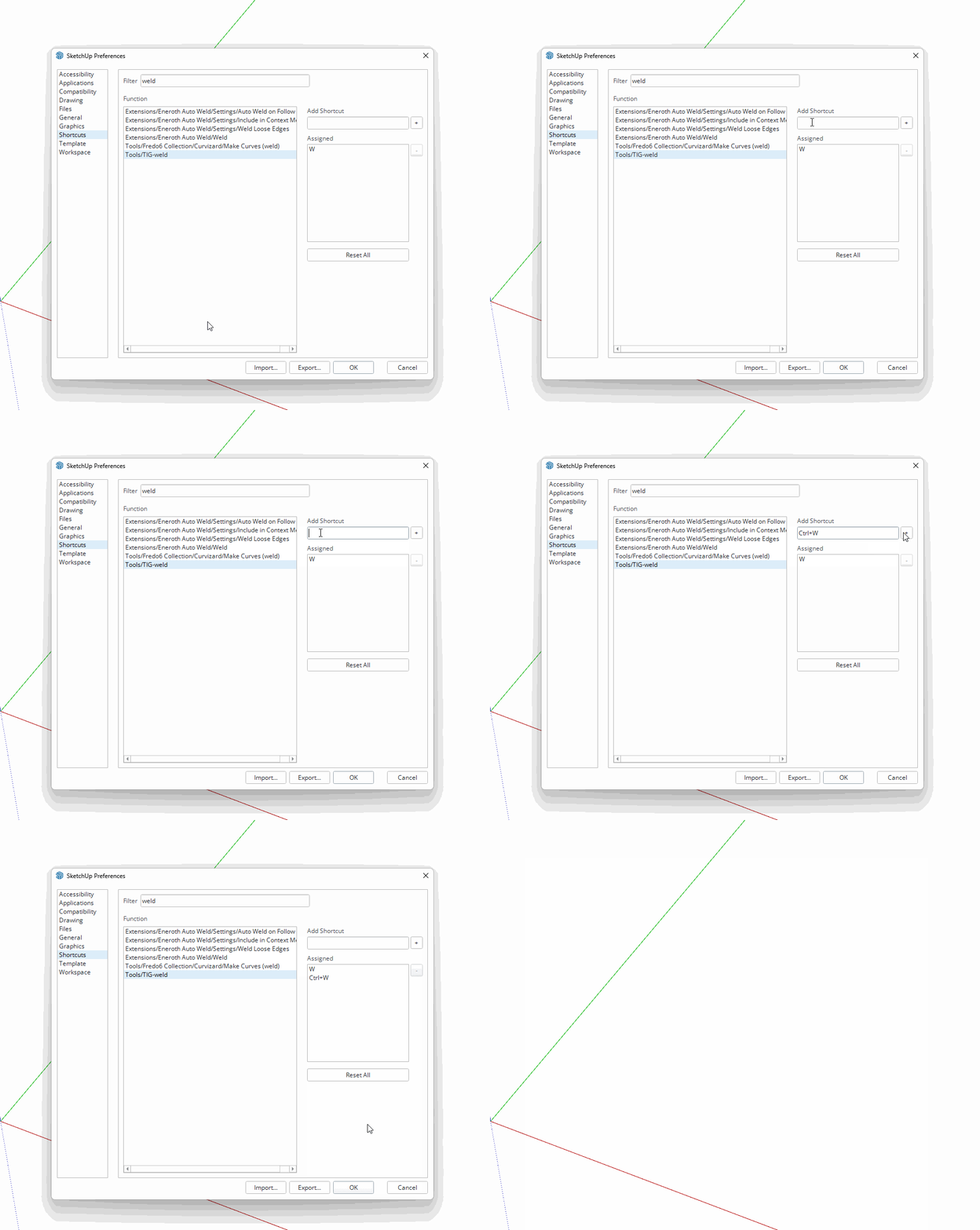
@ntxdave said in TIG Weld Shortcut Setting:
I thought the Help file said you can these two keys.
You can use Ctrl and Alt for some keyboard shortcuts. Also Shift. But you can't assign keyboard shortcuts that are assigned by the operating system. Ctrl+A, Ctrl+C, Ctrl+V, for example are hard coded so you cannot assign them to other things in SketchUp.
-
RE: TIG Weld Shortcut Setting
Sure. I use W for it.
