sketchucation logo sketchucation
    • Login
    1. Home
    2. simon le bon
    3. Posts
    Oops, your profile's looking a bit empty! To help us tailor your experience, please fill in key details like your SketchUp version, skill level, operating system, and more. Update and save your info on your profile page today!
    πŸ”Œ Easy Offset | Offset selected faces in SketchUp in positive and negative offsets. Download
    Offline
    • Profile
    • Following 0
    • Followers 0
    • Topics 52
    • Posts 1,017
    • Groups 1

    Posts

    Recent Best Controversial
    • RE: Making tyres in SU

      Hi,
      Definitely a useful thread with great tips and tricks πŸ‘ πŸ˜‰

      @gaieus said:

      Good. What are you rendering it with? It looks like Kerkythea. IMO a little (bit more enhanced?) bumpiness would add to it. Of course, eventually there needs to be some environment for a render to look good (even for the reflections as there needs to be something reflected...)

      my quote:
      This tutorial Making Bump Maps in SKP from CanonFodder000 on Deviant Art

      http://fc08.deviantart.net/fs71/f/2010/248/e/9/making_bump_maps_in_skp_by_canonfodder000-d2y3poi.png

      simon

      posted in Newbie Forum
      simon le bonS
      simon le bon
    • RE: [Plugin] SplitUp

      Ah OK!

      The explanation is very clear and makes sense. Thank you Massimo πŸ˜‰

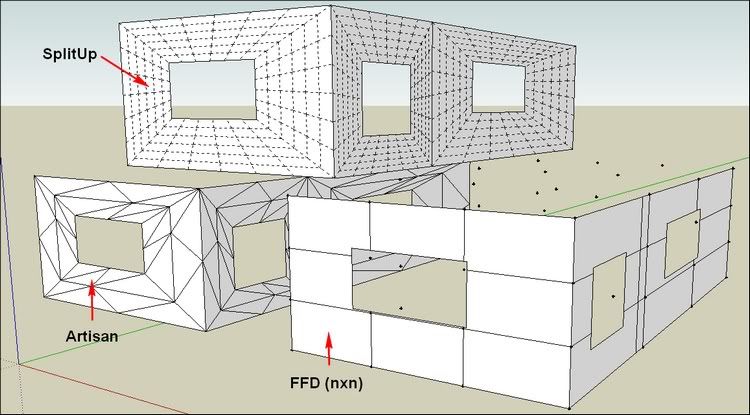
      The other tools I know which are able to subdivide are Artisan and FFD1 and FFD2

      http://i274.photobucket.com/albums/jj245/Spendauballet/SketchUp/SplitUP_001.jpg

      In this occurrence, SplitUp is widely the better one πŸ‘ πŸ˜‰ thank you Rich and TIG++

      Simon

      posted in Plugins
      simon le bonS
      simon le bon
    • RE: [Plugin] SplitUp

      Hi Rich and all,

      Your ruby tools collection is growing very nicely (I'm using your pen tools for a little while and like it a lot πŸ˜‰ )

      Concerning SplitUp, I am in limbo πŸ˜•
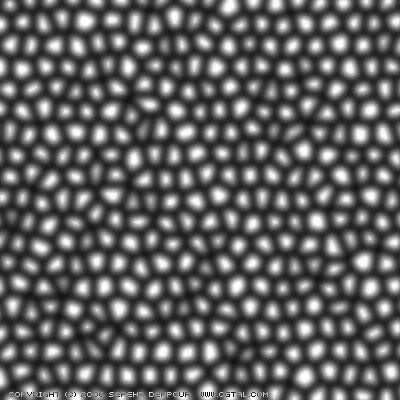
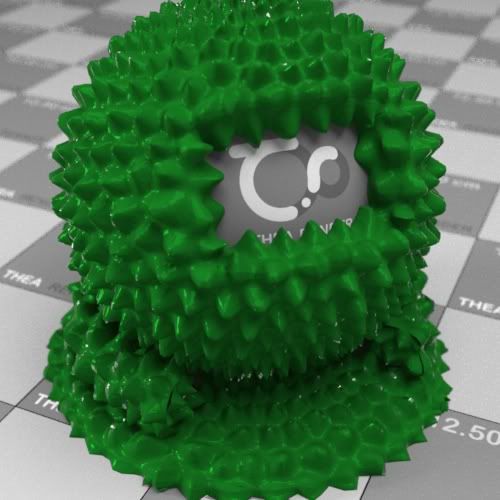
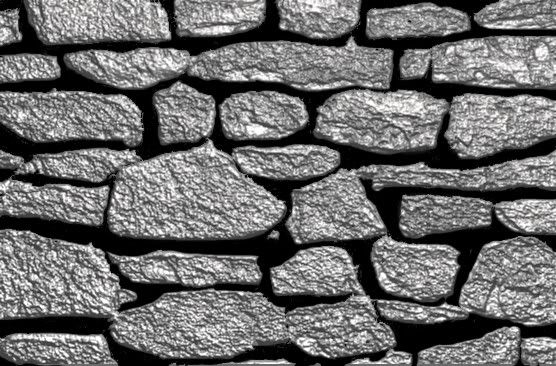
      I know what is a displacement map but I can't figure out how SplitUp can help 😳
      Could you give the idea ?

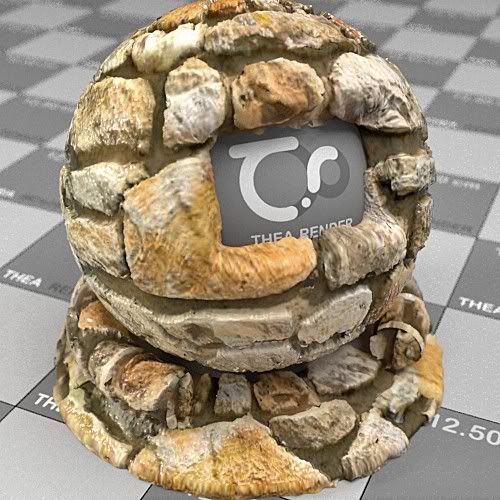
      http://i274.photobucket.com/albums/jj245/Spendauballet/TheaRender/Khashak-map.jpg

      http://i274.photobucket.com/albums/jj245/Spendauballet/TheaRender/Khashak-map_ball.jpg

      http://i274.photobucket.com/albums/jj245/Spendauballet/TheaRender/StoneBumpmap_Sim4.jpg

      http://i274.photobucket.com/albums/jj245/Spendauballet/TheaRender/StoneDispMap_handPainted_Ball_2b.jpg

      Cheers,
      Simon

      posted in Plugins
      simon le bonS
      simon le bon
    • RE: [Plugin] CameraKeyMaker 1.0 (Update 2011-04-09)

      Hi John,

      Thank you for your cent.

      Y
      @unknownuser said:

      our output image dims ratio is 1.333, if the window isn't a same ratio it causes problems on mac's...

      I have tried a 16/9 format (ratio: 1.66 ) but I don't notice any different result ❓

       if @save_image
              keys = {
               ;filename => @fileName,
               ;width => 1000,
               ;height => 602,
      

      I have downloaded and used [Plugin] Camera Stats by MartinRinehart : it confirms my fields of view

      Cheers,
      simon

      PS: I just have sent a PM to macgile . wait and see. πŸ˜’

      posted in Plugins
      simon le bonS
      simon le bon
    • RE: [Plugin] CameraKeyMaker 1.0 (Update 2011-04-09)

      Hi TIG,

      "crop" is probably a wrong word I have used. I tell this way to express that the 30° telephoto produces like a zooming into the field. (oups my english 😳 )

      @tig said:

      try changing those
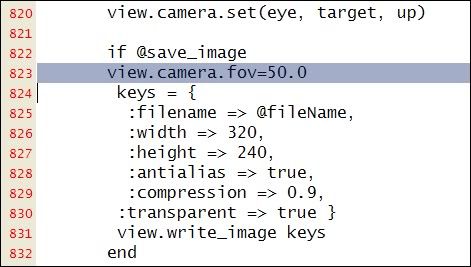
      Also perhaps add view.camera.fov=50.0 before 'keys' ???
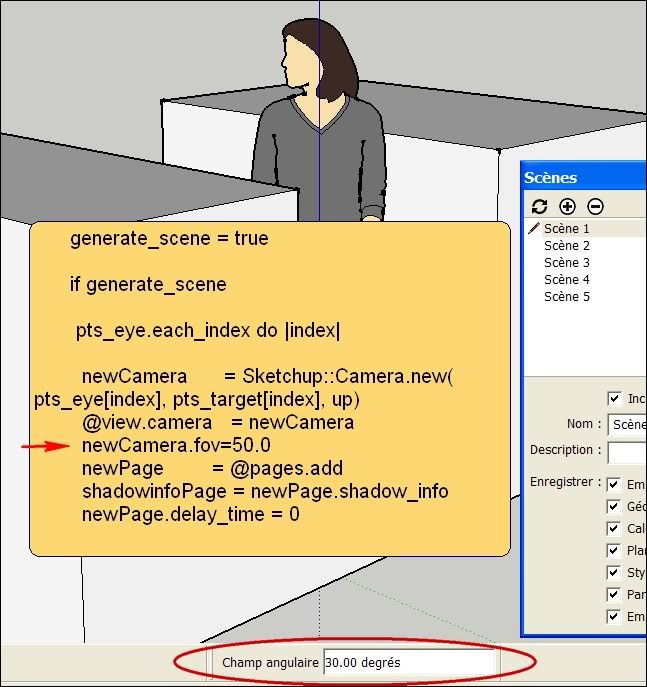
      Also ' newCamera' is set perhaps you need to set newCamera.fov=50.0 too ?

      They both don't change the 30Β° scenes output

      first try:

      http://i274.photobucket.com/albums/jj245/Spendauballet/SketchUp/2012-01-08_220506.jpg

      second try:

      http://i274.photobucket.com/albums/jj245/Spendauballet/SketchUp/2012-01-08_215157.jpg

      I believe in the second one because:

           generate_scene = true
      
            if generate_scene
      

      is the place where I'm searching to change the camera opening field. Is the way I have add the line is good?

      πŸ˜• s

      posted in Plugins
      simon le bonS
      simon le bon
    • RE: [Plugin] CameraKeyMaker 1.0 (Update 2011-04-09)

      Hi TIG,

      I've just tried what you were recommending

      @tig said:

      Perhaps the line
      @camera = @view.camera
      could be followed by
      @camera.fov = 50.0
      or whatever fov-angle you'd like ?

      Resulting to this change, the camera is set to 50Β° as soon as I activate CameraKeyMaker tool . But when my Alt+Q camera shots are done and I clic "Enter" to call the SET UP SCENES and "OK" , created scenes are still cropped back to camera 30Β°.
      I have made a search on "30°" into the ruby txt, but the specified string was not found. 😞

      Do you have any other idea?

      πŸ˜• simon

      posted in Plugins
      simon le bonS
      simon le bon
    • RE: [Plugin] CameraKeyMaker 1.0 (Update 2011-04-09)

      Hi Tig, πŸ˜„

      Thanks for the advice. I shall try this tomorrow.

          • simon
      posted in Plugins
      simon le bonS
      simon le bon
    • RE: [Plugin] CameraKeyMaker 1.0 (Update 2011-04-09)

      Hi macgile,

      I'm using/learning your tool since few days. After a hard start, I now begin to tame it pretty well. I understand now how I can manage the bezier camera path. It is a cool tool πŸ‘ πŸ˜„ and the exported animations are nicely fluid πŸ‘ πŸ‘
      I begin to see some requests to ask for.
      But the main thing I'm confronted in is a problem of angle of camera.

      I just have finished a complex camera path with a complex model and have launched CameraMaker scenes maker. I realize something I hadn't noticed in my trainings: is that animation uses a fixed camera angle of 30Β° !! This is too short!
      Standard angle in sketchup is 35Β° , I for my part have made the all camera path with a wider angle of 50Β°. Now my animation is to much cropped. πŸ˜’

      I have tried to update the scenes one by one (the firsts of my 69 scenes!) with this 50Β° angle but it seems that some geometry don't display satisfactorily.

      Do you think it is possible to do something ? or it is a big update of the code!

      Cheers,
      Simon.

      posted in Plugins
      simon le bonS
      simon le bon
    • RE: [REQ]plugin which ONLY reverses purple faces

      Hum!2 I'm too much in the hurry to post: excuse me..

      Dear TIG I just have made a first quick test of your [Plugin] Fix Reversed Face Materials

      @tig said:

      My FixReversedFacesMaterials tool flips faces where you have applied a material to the back and it's wrongly oriented.
      It flips the face and reapplied the material, keeping UV-mapping etc.

      very powerful tools to help to export a model in a rendering application πŸ‘ πŸ˜‰
      -Fix Reversed Face Materials
      -Fix Reversed Face Materials [Forced]
      -Reverse Faces and Materials
      -Delete Back-Materials

      it seems to me that the main purpose is basically to bring materials to front, changing if necessary back textured faces by front textured faces.

      A common question: ❓ When both front and back faces are textured, How can we know what face is front, what face is back.The Entity Info box don't reply

      @tig said:

      Model in Monochrome mode with a distinct back face color, if you make a reverse face select it and use Reverse on it.
      It's almost essential to have a shortcut set to Reverse.
      I have one set, and also Orient with it+Shift.

      Yes shortcuts are a good idea. But that want to say that each face have to be treated one by one πŸ˜•

      simon

      posted in Plugins
      simon le bonS
      simon le bon
    • RE: [REQ]plugin which ONLY reverses purple faces

      @unknownuser said:

      well this plugin reverses my materials too i have to reapply materials [too much time wasted] on the white face that faces me now.

      Hum! I just come back to test this plugin with textures applied: and effectively with this one too, textures are washed 😞 .

      simon

      posted in Plugins
      simon le bonS
      simon le bon
    • RE: [REQ]plugin which ONLY reverses purple faces

      @john2 said:

      i used reversing plugins found here, but the problem is that my selection comprises of both white and purple faces. i only want 2 reverse purple faces.

      Hi John,
      I think [Plugin] Front Face - 1.2from Tomasz (SU2TH & SU2KT Developer) is the solution you are searching. πŸ˜‰

      -once the tool is activated you just have to "fly" with the mouse over the purple faces you want to reverse. White faces aren't touched πŸ‘
      -A simple icon is available to launch it
      simon

      posted in Plugins
      simon le bonS
      simon le bon
    • RE: Re: Some Funny Pics.

      http://i274.photobucket.com/albums/jj245/Spendauballet/generalPicts/Ab-Hancer.jpg

      posted in Corner Bar
      simon le bonS
      simon le bon
    • RE: A Thread for Fine Design

      some nice entries (clicable πŸ˜‰ 😞

      Crystal Bubble: See The World By Living Your Life In Transparency

      http://cdn.bitrebels.netdna-cdn.com/wp-content/uploads/2011/02/Crystal-Bubble-Transparent-Concept-Living-2.jpg

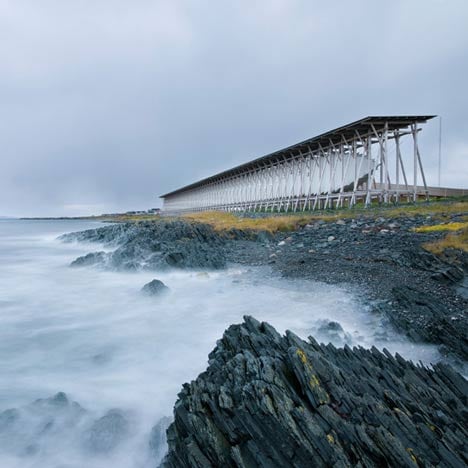
      Steilneset Memorial
      Architect Peter Zumthor designed this memorial on an island in Norway to commemorate suspected witches who were burned at the stake there in the seventeenth century

      http://static.dezeen.com/uploads/2011/12/dezeen_Steilneset-Memorial-by-Peter-Zumthor-and-Louise-Bourgeois_1top.jpg

      Unit Fusion Housing Project by Y Design Office
      International design and research collaborative Y Design Office has sent us the proposal Unit Fusion, a modular, plug-in high-rise residential typology for Hong Kong.
      (Like A sketchUp tower with its plugins? πŸ˜† )

      http://www.bustler.net/images/news2/unit_fusion_housing_project_by_y_design_office_01_1.jpg

      http://www.bustler.net/images/news2/unit_fusion_housing_project_by_y_design_office_11_1.jpg

      *simon

      posted in Corner Bar
      simon le bonS
      simon le bon
    • RE: A Thread for Fine Design

      @dale said:

      @unknownuser said:

      Sure dear Dale: sources are linked to the pictures πŸ˜‰

      I would ask how you do that, but that would admit that I don't know how πŸ˜„ (which I don't, so ... How did you do that?)

      πŸ˜„ In fact it's very simple,, but alas don't work with our Upload attachment manager! ( In case you will have to register to a free service like Photobucket to link your pictures)
      Very often you can right clic on a picture and choose to open it on another tab or just copy the link

      You just have to attach a the url to your picture like this.

      [url=http://www.xyz.com][img]xyz.jpg[/img][/url]
      

      exemple with this "natural" fine design πŸ˜†

      [url=http://www.parismatch.com/Conso-Match/Voyage/Photos/Hawaii-dans-le-ventre-de-la-vague/Transparences-oceaniennes-81755/][img]http://photo.parismatch.com/media/photos2/4.-photos-conso/voyages/vagues-a-hawaii/vague-hawaii-2/535073-1-fre-FR/4-photos-conso-voyages-vagues-a-hawaii-Vague-Hawaii-2_galleryphoto_paysage_std.jpg[/img][/url]


      http://photo.parismatch.com/media/photos2/4.-photos-conso/voyages/vagues-a-hawaii/vague-hawaii-2/535073-1-fre-FR/4-photos-conso-voyages-vagues-a-hawaii-Vague-Hawaii-2_galleryphoto_paysage_std.jpg


      http://photo.parismatch.com/media/photos2/4.-photos-conso/voyages/vagues-a-hawaii/vague-hawaii-6/535135-1-fre-FR/4-photos-conso-voyages-vagues-a-hawaii-Vague-Hawaii-6_galleryphoto_paysage_std.jpg

      πŸ˜‰ simon

      posted in Corner Bar
      simon le bonS
      simon le bon
    • RE: A Thread for Fine Design

      @dale said:

      Hey Simon
      I agree with dozer, great knives. Thanks. Do you remember the source for these?

      Sure dear Dale: sources are linked to the pictures πŸ˜‰


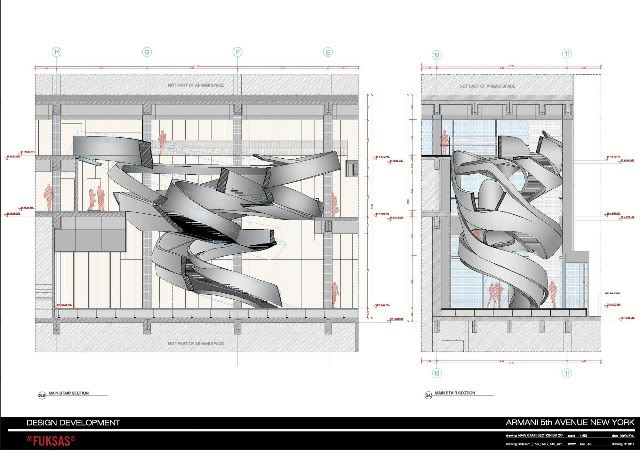
      The following Armani Fifth Ave. / Massimiliano & Doriana Fuksas Stairs would be a very nice modeling exercise to offer in challenge to all users, as all necessary plans, elevations and photos of this complex organic architectural element are present in the link πŸ˜‰ πŸ‘ πŸ‘

      (one more time pictures are linked πŸ˜‰ )

      http://i274.photobucket.com/albums/jj245/Spendauballet/generalPicts/1670760641_l1000070-1.jpg


      http://ad009cdn.dyn.archdaily.com/wp-content/uploads/2009/03/714942908_stairs-renders-03-528x373.jpg

      stairs-sections-02

      http://i274.photobucket.com/albums/jj245/Spendauballet/generalPicts/1864870572_stairs-sections-02.jpg

      Cheers,
      simon

      posted in Corner Bar
      simon le bonS
      simon le bon
    • RE: [Plugin]Hole on Solid tool v1.6.3 upadate Jan 09, 2012

      Update in Jan 03,2012
      :Add new function,Punching multiple holes.

      @unknownuser said:

      It would be very interesting to drill holes by lot in case of large number of windows for exemple...

      this new enhancement is working very fine πŸ‘

      http://i274.photobucket.com/albums/jj245/Spendauballet/SketchUp/HoleonSolidtool_tak2hata_010.jpg

      Congratulations dear tak2hata πŸ‘ πŸ‘ You've mastered herein a pretty good tool β˜€

      @cocotier
      Please remember that
      This tool is intended to make holes on "solids" -> closed volumes set as group or component. This is not completely true since the following enhancement:
      Update in Dec 14 ,2011:
      Hole on unoccluded faces group(Tentative)
      The group or component walls we want to pierce don't have to be solid anymore πŸ‘

      simon

      posted in Plugins
      simon le bonS
      simon le bon
    • RE: [Tutorial] Industrial staircase handrail.

      Hi Irwan πŸ˜„

      @unknownuser said:

      what rendering application did you use for it?

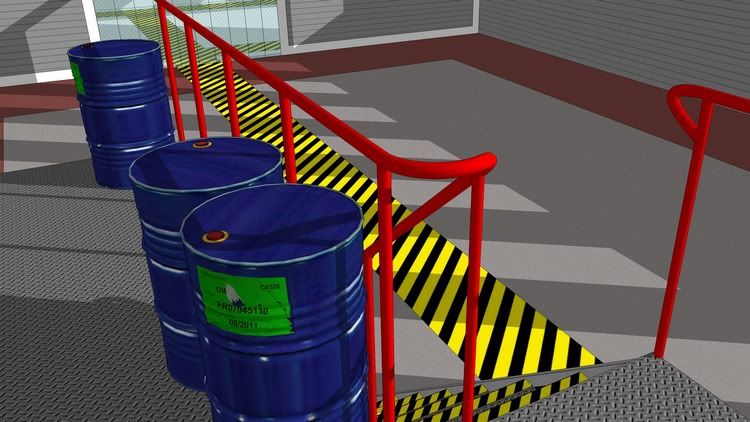
      ❓ πŸ˜’ 😎 No rendering in this case. All is simply SketchUp!
      @unknownuser said:

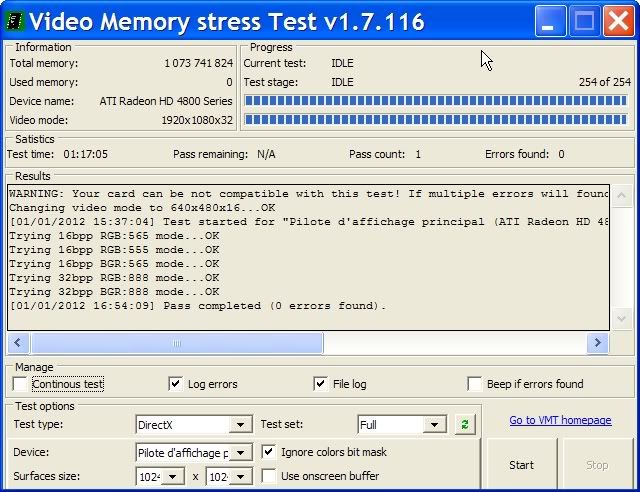
      by the way, how is your graphic adapter now? any luck with the artifacts on the screen yet?

      I'm still searching.
      With your Video Memory Test (which is a portable handy little app) I know that my GPU ram is clean

      http://i274.photobucket.com/albums/jj245/Spendauballet/generalPicts/VideoMemoryTest_2012-01-01.jpg

      I'm now going to upgrade my video drivers..

      Hum! πŸ˜’ You still haven't the reply to your previous question..

      With my best, simon.

      posted in SketchUp Tutorials
      simon le bonS
      simon le bon
    • RE: [Tutorial] Industrial staircase handrail.

      Hi Irwan,

      it is silly but I don't understand exactly what you mean (I'm french with low english language)

      I have initiated something which is an unnecessary complex solution, and each one had bring his own one, that bringing the interest of the thread.

      Whatever, I am still pleased with the result of this unique curve that I had tried to make fitting artistically to the rails...

      http://i274.photobucket.com/albums/jj245/Spendauballet/SketchUp/EscalierIndustriel_rampeMetal_Suite2-750.jpg

      and also a bit proud of the UV mapping of these barrels made with a little series of phone pictures πŸ˜‰

      Happy New Year β˜€

      simon>.

      posted in SketchUp Tutorials
      simon le bonS
      simon le bon
    • RE: [Plugin] Clines on Axes at Point & Normal v1.2

      Hi TIG,

      It is just installed and already love it πŸ‘
      these two new tools are very useful in my actual study of sketching architecture.

      And the toolbar shared with WorkPlane is top.

      Thank you, thank you...

      Simon.

      PS: What would eventually be nice: using chosen length guide lines. I remark that working with a great number of guide lines leads to (pollute) vanish the visibility of a drawing. I prefer since a while using limited guide lines created with Jim's Construction Line Tool that I copy and move, rather than those infinite guide lines.

      posted in Plugins
      simon le bonS
      simon le bon
    • RE: Need information on Square Bug

      Thank you Guys for your advices in this issue.

      It appears also to me that the problem don't come from SU itself but that SU just reveals..

      I just have downloaded the last drivers package for my video card:
      CARTE_GRAPHIQUE SAPPHIRE HD4870-1024 Vapor-X ( 11133-16-20R ) = ->> ATI Radeon HD 4800 Series (PL2409HD).

      I'm also watching for "Repair Tool of the Week: Video Memory Stress Test"

      In case of any interest to SketchUp users, I shall report πŸ˜‰

      ++Simon.

      posted in SketchUp Bug Reporting
      simon le bonS
      simon le bon
    • 1
    • 2
    • 6
    • 7
    • 8
    • 9
    • 10
    • 50
    • 51
    • 8 / 51