[Plugin] CameraKeyMaker 1.0 (Update 2011-04-09)
-
Trying out CameraKeyMaker on a winXP. Doesn't behave like the video tutorial. (BTW, is there supposed to be audio with that video?)
Although Alt-Q does add a key frame, I cannot use the orbit tool to reposition the camera. The CameraKeyMaker feedback onscreen disappears & as far as I can tell the script ends.
What is available is a dotted sphere to mark position. I clicked on that & circled a cube. Hitting enter did send the key frames to scenes. But the scenes created this way do not orbit the cube.
Is there a new version available yet? (The version I am trying out does not iclude the 1.0 designation anywhere in its name or files).If I could get it to work it would be a great feature.
Thanks,
-=Zip -
Hi macgile,
I'm using/learning your tool since few days. After a hard start, I now begin to tame it pretty well. I understand now how I can manage the bezier camera path. It is a cool tool

 and the exported animations are nicely fluid
I begin to see some requests to ask for.
But the main thing I'm confronted in is a problem of angle of camera.I just have finished a complex camera path with a complex model and have launched CameraMaker scenes maker. I realize something I hadn't noticed in my trainings: is that animation uses a fixed camera angle of 30° !! This is too short!
Standard angle in sketchup is 35° , I for my part have made the all camera path with a wider angle of 50°. Now my animation is to much cropped.
I have tried to update the scenes one by one (the firsts of my 69 scenes!) with this 50° angle but it seems that some geometry don't display satisfactorily.
Do you think it is possible to do something ? or it is a big update of the code!
Cheers,
Simon. -
Perhaps the line
@camera = @view.camera
could be followed by
@camera.fov = 50.0
or whatever fov-angle you'd like ? -
Hi Tig,
Thanks for the advice. I shall try this tomorrow.
-
-
- simon
-
-
-
Hi TIG,
I've just tried what you were recommending
@tig said:
Perhaps the line
@camera = @view.camera
could be followed by
@camera.fov = 50.0
or whatever fov-angle you'd like ?Resulting to this change, the camera is set to 50° as soon as I activate CameraKeyMaker tool . But when my Alt+Q camera shots are done and I clic "Enter" to call the SET UP SCENES and "OK" , created scenes are still cropped back to camera 30°.
I have made a search on "30°" into the ruby txt, but the specified string was not found.
Do you have any other idea?
 simon
simon -
The screen size [width/height etc] is set in code later on - perhaps this is cropping the image ?
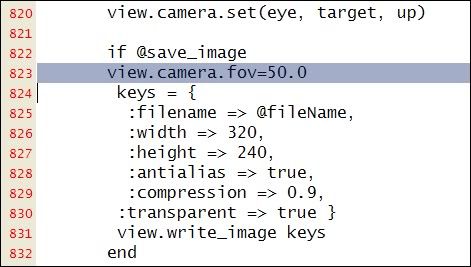
I don't use this tool so I am winging it hereview.camera.set(eye, target, up) if @save_image keys = { ;filename => @fileName, ;width => 320, ;height => 240, ;antialias => true, ;compression => 0.9, ;transparent => true } view.write_image keys endhave you tried changing those ?
Trying changing the width/height proportions...Also perhaps add
view.camera.fov=50.0before 'keys' ???
Also 'newCamera' is set perhaps you need to setnewCamera.fov=50.0too ? -
Hi TIG,
"crop" is probably a wrong word I have used. I tell this way to express that the 30° telephoto produces like a zooming into the field. (oups my english
 )
)@tig said:
try changing those
Also perhaps addview.camera.fov=50.0before 'keys' ???
Also 'newCamera' is set perhaps you need to setnewCamera.fov=50.0too ?They both don't change the 30° scenes output
first try:
second try:
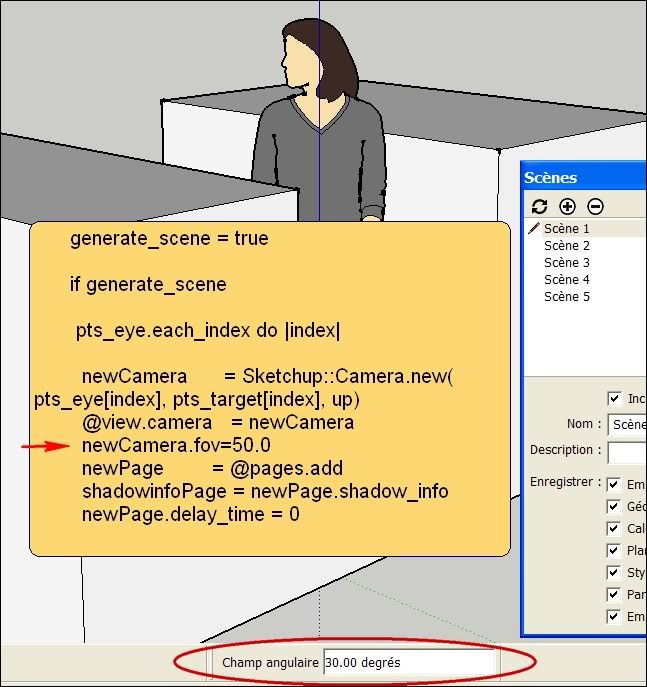
I believe in the second one because:
     generate_scene = true

      if generate_scene
is the place where I'm searching to change the camera opening field. Is the way I have add the line is good?
s -
hi,
Your output image dims ratio is 1.333, if the window isn't a same ratio it causes problems on mac's...
or you could try running Martin's camera Stats, might show you what's happening.http://forums.sketchucation.com/viewtopic.php?t=27835
john
-
Hi John,
Thank you for your cent.
Y
@unknownuser said:our output image dims ratio is 1.333, if the window isn't a same ratio it causes problems on mac's...
I have tried a 16/9 format (ratio: 1.66 ) but I don't notice any different result

 if @save_image
        keys = {
         ;filename => @fileName,
         ;width => 1000,
         ;height => 602,
I have downloaded and used [Plugin] Camera Stats by MartinRinehart : it confirms my fields of view
Cheers,
simonPS: I just have sent a PM to macgile . wait and see.
-
I see there is a preview recently posted on YouTube for version 2.0 of this tool.
-
Great plugin! very nice!

but... any news on this fov problem?!? with a camera always jumping to 30° fov it's pretty useless for me...
-
@richardu said:
I see there is a preview recently posted on YouTube for version 2.0 of this tool.
Can you post a link? I can´t find it.
-
-
-
fantastic, thanks very much
-
..bute are you sure it runs also within su8 ?
-
@livioe said:
..bute are you sure it runs also within su8 ?
It should work.
Incompatibility is usually 'backwards' to earlier versions, that don't have all of the newer version's tools.
Why not just install it and try it out.
The worst that can happen is it doesn't work !
Check that you have indeed installed it as directed [a common pitfall] !!
If so then uninstall the few files you have installed. -
Hi,
This plugin for me is very useful but I work on Mac and it didn't work because de keys codes and pathname are different between Pc and Mac.
I have done changes in camera_key_maker.rb and the plugin works on Mac now.
I use Apple Extended Keyboard.CHANGES KEYS CODE lines 295 to 360
ONKEYDOWN (CAMERA MANUAL ANIMATION)
------------------------------------
def onKeyDown(key, x, y, view)
# 63234 LEFT, 63235 RIGHT, 63232 UP, 63233 DOWN
if  @points_eye.size > 0
 size = (@points_eye.size) -1

 #previous/next Key   <--[--1] || [++1]-->
  **%(#BF0000)[if key == 63234 or key == 63235]**

  **%(#BF0000)[if key == 63234 # LEFT <--]**
   if @index && @index > 0
    @index -= 1
    eye    = @points_eye.at(@index)
    target = @points_target.at(@index)
   else
    @index = size
    eye    = @points_eye.at(size)
    target = @points_target.at(size)
   end
  else # RIGHT -->
   if @index && @index < size
    @index += 1
    eye    = @points_eye.at(@index)
    target = @points_target.at(@index)
   else
    @index = 0
    eye    = @points_eye.at(0)
    target = @points_target.at(0)
   end
  end # key 63234

  @camera.set eye, target,  @up.clone
  Sketchup::set_status_text("Llave de Cámara: #{@index+1}", SB_PROMPT)
  view.animation = nil
  @edit_cam    =  false
  @draw        =  true
  view.invalidate

 end # key 63234/63235

 # PLAY PREVIEW
**%(#BF0000)[if key == 63232 # UP]**

  @edit_cam = false

  if @points_eye and @points_eye.size > 1
   $preview  = true
   view.animation = CameraAnimation.new(@points_eye, @points_target)
   #view.animation = cam_anim
   #place to last camera key
   @index    = (@points_eye.size) -1
  end
  #Animation stopped"
 end # 63232

 # EDIT current position camera key
 %(#BF0000)[**if key == 63233 # DOWN**]
  @edit_cam = true
  Sketchup::set_status_text("Editar Llave de Cámara: #{@index+1} , Editar curva manualmente solo Vistas [Arriba-Abajo-Izquierda-Derecha]", SB_PROMPT)
 end # key 63233

end # @points_eye.size > 0

@draw = true
view.invalidate
end #onKeyDown
CHANGES PATHNAME
line 637: pathname = Sketchup.find_support_file "camera_path.html" ,"Plugins/CameraKeyMaker"
-
Just installed this plugin through sketchucation tools, works fine though when I press enter nothing happens, must be missing something here....?
-
macgile -Something else caught my eye... in the '8.0th SketchUp' parody animation you have a clever treatment for the beam of the spotlights. I'm assuming this piece is still native sketchup...? so I'm guessing you used tubes of semi-transparent white material & hid all the edges? Or is there more to it - please share, I'd love to know.


Hello! It looks like you're interested in this conversation, but you don't have an account yet.
Getting fed up of having to scroll through the same posts each visit? When you register for an account, you'll always come back to exactly where you were before, and choose to be notified of new replies (either via email, or push notification). You'll also be able to save bookmarks and upvote posts to show your appreciation to other community members.
With your input, this post could be even better 💗
Register Login


Advertisement