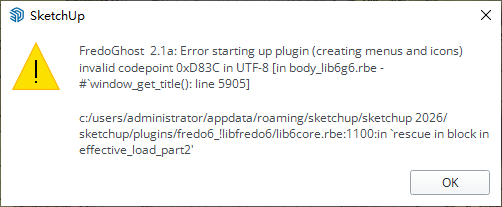
⚠️ Important | Libfredo 15.6b introduces important bugfixes for Fredo's Extensions Update
  • Flatten surface / vertices to selected face

    4
    0 Votes
    4 Posts
    214 Views
    TIGT
    My old script https://sketchucation.com/pluginstore?pln=dropverts ?
  • Fredo Thrupaint not appearing on menu bar

    2
    1 Votes
    2 Posts
    40 Views
    Rich O BrienR
    Do you have Libfredo v15 installed? https://sketchucation.com/pluginstore?pln=LibFredo6 You also need Sketchucation Tools 4.4.1 for licensing https://sketchucation.com/plugin/696-sketchucationtools
  • [Plugin] Shape Bender Beta

    1k
    0 Votes
    1k Posts
    2m Views
    TIGT
    When you say 'not accepting it on download' it is unclear. Have you installed it using the Extensions > Extension Manager ? If so restart SketchUp and it should appear in the Toolbars list and under the Extensions submenu 'Chris Fullmer Tools'. It is an older extension and is unsigned. This means that SketchUp will not load it unless the Extension Manager's Loading Policy is set to 'Unrestricted'. After resetting that you need to restart SketchUp to sync everything...
  • [plugin] Fixed Area

    6
    0 Votes
    6 Posts
    4k Views
    B
    Is there a way to read the Ruby Console if SketchUp Completely crashes? There are no errors in the Ruby Console when i start but when i use the plug-in it lets me select the face, select the edge and then when i place (rubber band) the edge to the new place and click the button. its a full close of SketchUp?
  • [Plugin] FredoTools::ColorPaint - v1.2a - 02 Nov 19

    9
    0 Votes
    9 Posts
    14k Views
    fredo6F
    @Daantje Possibly, you can use ThruPaint, which includes the same color fans but also displays the color names. [image: 1744213987132-7babf36a-b906-4ac9-8038-4d9a623fa18e-image.png]
  • [Plugin] Slicer5

    336
    0 Votes
    336 Posts
    309k Views
    C
    @Dave-R said in [Plugin] Slicer5: l Please explain. Thanks, Steve
  • Foundation Plugin

    439
    0 Votes
    439 Posts
    429k Views
    medeekM
    Version 2.0.4 - 03.27.2025 Enabled removal of individual anchor bolts for stemwall step foundations. Enabled addition of custom location anchor bolts for stemwall step foundations.
  • [Plugin] ReGlue

    35
    1 Votes
    35 Posts
    13k Views
    designerbursaD
    module Reglue extend self # Menü öğesinin eklenme konumunu belirleyen değişken SUPPORT_MENU_POSITION ||= Sketchup::Menu.instance_method(:add_item).arity != 1 ? 8 : nil def glue_components_to_faces model = Sketchup.active_model selection = model.selection if selection.empty? UI.messagebox("Hata: Hiçbir seçim yapılmadı!") return end faces = selection.grep(Sketchup::Face) components = selection.grep(Sketchup::ComponentInstance).select { |comp| comp.glued_to.nil? } if faces.empty? || components.empty? UI.messagebox("Hata: Lütfen hem yüzeyleri hem de yapıştırılabilir bileşenleri seçin!") return end model.start_operation("Bileşenleri Yüzeylere Yeniden Yapıştır", true) components.each do |component| closest_face = find_closest_aligned_face(component, faces) component.glued_to = closest_face if closest_face end model.commit_operation end def find_closest_aligned_face(component, faces) component_normal = component.transformation.zaxis faces.min_by { |face| face.normal.angle_between(component_normal) } end unless @loaded UI.add_context_menu_handler do |menu| selection = Sketchup.active_model.selection next if selection.empty? has_faces = selection.any? { |entity| entity.is_a?(Sketchup::Face) } has_glueable_components = selection.any? { |entity| entity.is_a?(Sketchup::ComponentInstance) && entity.glued_to.nil? } if has_faces && has_glueable_components position = SUPPORT_MENU_POSITION menu.add_item("Reglue", position) { glue_components_to_faces } end end @loaded = true end end
  • [Plugin] Triangulate Points

    23
    0 Votes
    23 Posts
    32k Views
    TIGT
    Version 2.0 is available from the PluginsStore. https://sketchucation.com/pluginstore?pln=TIG_points_cloud_triangulation It fixes issues with delauney3.rb using Constants in away that newer SketchUp versions Ruby chokes on, t also includes some tweaks of the main code - Layers v. Tags etc, and the RBZ is now signed...
  • [Plugin] slavne: FitParts cut list generator

    8
    0 Votes
    8 Posts
    2k Views
    O
    how can i buy???
  • Getting Error Message When Converting STEP File

    1
    1
    0 Votes
    1 Posts
    34 Views
    No one has replied
  • [Plugin] Sculpt Tools v 1.0...

    99
    0 Votes
    99 Posts
    126k Views
    J
    @ntxdave Not that I know of. But it's simple. Create or import a mesh with a high-ish polygon count. Hover over an icon in the Sculpt Tools toolbar and the name of the tool will appear by the mouse cursor. Click on "Bulge" and then click on the mesh with the left mouse button. The mesh will deform, creating a bulge. Press and hold shift and the Bulge tool turns into the "Push" tool, which will create the opposite effect of pushing into the mesh. The "Smooth" tool is useful for smoothing out the mesh, creating a uniformity in the polygons. Adjust brush radius and strength in the settings, which is the top button in the toolbar.
  • AIM SketchUp to AI modelling plugin

    2
    0 Votes
    2 Posts
    118 Views
    Rich O BrienR
    They keep added to this extension. Its a clever tool no doubt.
  • [Plugin] TIG-Smart_offset

    143
    0 Votes
    143 Posts
    170k Views
    TIGT
    The latest version works fine for me too, across all newer SketchUp versions. What is your exact issue ?
  • [Plugin][$] FredoSpline - v2.6a - 01 Apr 24

    147
    4
    0 Votes
    147 Posts
    168k Views
    R
    @fredo6 could "smooth curve" from the attached video be implemented? https://youtu.be/iqz2EwF16-w?si=x4gxUOCjS2uR9VOg&t=151 "project to scene" script at 1:59 is also fabulous
  • Medeek Project

    51
    0 Votes
    51 Posts
    1k Views
    medeekM
    Version 1.2.5 - 02.28.2025 Fixed a critical bug with the estimating module (wall sheathing 2).
  • Fredo Animator

    6
    1
    0 Votes
    6 Posts
    147 Views
    J
    Ok, makes sense. Thank you
  • Is there a bulk license for all plugins instead of buying one by one ?

    2
    0 Votes
    2 Posts
    67 Views
    Rich O BrienR
    You can buy Fredo Bundle: https://sketchucation.com/purchase-smart.php?plugin=fredoscale It is the 2nd buying options. Pay attention to what is in the bundle. Not all of Fredo extensions are in the Bundle
  • Fredo6 Plugins - Price increase as of 03 Jun 2024

    5
    3 Votes
    5 Posts
    412 Views
    Rich O BrienR
    Go here: https://sketchucation.com/plugin-list.php Pick any Fredo extensions included in a the bundle and then pick the Bundle option For example if you pick FredoScale: https://sketchucation.com/purchase-smart.php?plugin=fredoscale You'll see option for Bundles
  • [Plugin] Lines to tubes

    131
    0 Votes
    131 Posts
    283k Views
    TIGT
    Being 'unsigned' need not be a problem. Edit your native Extension Manager settings - Loading Policy > Unrestricted Restart SketchUp and version-compatible, but 'unsigned', extensions [i.e. usually older] will then load OK. Only install extensions from trustworthy sources - like SketchUcation, the Extension-Warehouse and a few developers' sites which offer direct downloads...

Advertisement