Check out Febhouse | New extensions for Shadow Analysis in SketchUp Download
  • [Plugin][$] FredoGhost - v2.1a - 01 Apr 24

    56
    4
    0 Votes
    56 Posts
    63k Views
    E
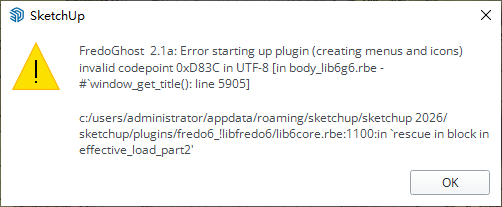
    [image: 1761912291323-e3ceb7bd-1f3e-4b62-a688-edca78ba4304-image.png] After using fredoghost in the model, there will be a warning as shown in the figure when the model is opened again. In addition, lord of toolbar cannot be used normally in version 2026, and it will disappear after adding a custom toolbar and restarting.
  • OBJexporter v3

    3
    0 Votes
    3 Posts
    410 Views
    J
    @panixia thanks
  • Warning and Toolbar Issues After Using Fredoghost

    1
    1
    0 Votes
    1 Posts
    122 Views
    No one has replied
  • [Plugin] Projections version 2a UPDATED

    145
    0 Votes
    145 Posts
    236k Views
    C
    Thank you @Glenn-at-home
  • 2016 compatible Curvizard?

    1
    0 Votes
    1 Posts
    146 Views
    No one has replied
  • [Plugin] Volume Calculator v2.0 20111004

    13
    0 Votes
    13 Posts
    15k Views
    C
    thank you good work
  • [PLUGIN] Flowify v1.1.0 (updated 150327)

    126
    0 Votes
    126 Posts
    219k Views
    panixiaP
    @gibblersnort sorry for the late reply, can you share a screenshot of your problem? The plugin is not supposed to highlight anything. You have just to select a grop than you want to deform and a PROPER "flowify rig" and then run the command.
  • Click2flip for SketchUp 2026

    2
    0 Votes
    2 Posts
    307 Views
    TIGT
    It works just fine in v2026. I just tried it, have you ? The PluginStore listing might say compatibility up to v2025 but that's because I haven't updated the page yet. [EDIT: just added it] Until a few days ago there was no v2026 or v2025 checkbox on the PluginStore !
  • [Plugin] Material Tools

    124
    0 Votes
    124 Posts
    199k Views
    V
    @thomthom Same error as the others above. - When running "List textures in console", an empty console appears (in SketchUp 2025). Any solutions?
  • Valiarchitects - plugins

    94
    0 Votes
    94 Posts
    29k Views
    M
    I just checked the website and it is functioning fine for me. I'm not sure if Chuck still watches the forum, but you can email him here: https://valiarchitects.com/contact
  • S4U Make Face

    2
    0 Votes
    2 Posts
    657 Views
    Dave RD
    The author of s4u Make Face started selling it before February, 2019. See this post. s4u Stair was a paid extension at least in 2020.
  • [Plugin] Very fast texture writer

    44
    0 Votes
    44 Posts
    96k Views
    TIGT
    Probably OK - try it...
  • Mine is not working anymore.

    2
    0 Votes
    2 Posts
    520 Views
    Rich O BrienR
    You'll need to contact the developer. We don't sell this tool. We host the trial version.
  • reset licenses

    2
    1 Votes
    2 Posts
    799 Views
    Rich O BrienR
    Email support@sketchucation.com
  • Fragen zur CurviLoft Installation

    3
    0 Votes
    3 Posts
    929 Views
    Dave RD
    @Rosketch install the Sketchucation ExtensionStore (it is required for license management, anyway) and use it to install Curviloft and the required LibFredo6. Once they are installed go to Tools>Fredo6 Collection>Curviloft>License. [image: 1758372625336-screenshot-9_20_2025-7_47_46-am.png] In the license panel click on Purchase License. [image: 1758372646150-screenshot-9_20_2025-7_48_14-am.png]
  • [Plugin] 3D Text Editor

    202
    0 Votes
    202 Posts
    219k Views
    P
    @Dave-R Thanks!
  • I'm looking for a plugin

    1
    1
    0 Votes
    1 Posts
    554 Views
    No one has replied
  • no funciona sketchucation

    1
    1
    0 Votes
    1 Posts
    422 Views
    No one has replied
  • [Plugin] Descaler v1.1 20121218

    32
    0 Votes
    32 Posts
    28k Views
    A
    @yeehaa123 Thanks a lot, this really helped! The previous version sometimes not only 'reset' the scale but also distorted the geometry of objects. With your suggested change everything works as it should now. Much appreciated!
  • More Fredo6 plugins becoming paid extensions

    165
    0 Votes
    165 Posts
    107k Views
    Dave RD
    @Steve-Rugg said in More Fredo6 plugins becoming paid extensions: how do I know what extensions that covers? Each license is for a single extension. The extension is named in the license file. This is a license for FredoCorner. [image: 1757987169018-screenshot-9_15_2025-8_44_26-pm.png] As for which one you bought, click on PluginStore and then My Licenses. [image: 1757987376316-screenshot-9_15_2025-8_47_41-pm.png]

Advertisement