That's a very cool axe!
Oops, your profile's looking a bit empty! To help us tailor your experience, please fill in key details like your SketchUp version, skill level, operating system, and more. Update and save your info on your profile page today!
⚠️ Important | Libfredo 15.6b introduces important bugfixes for Fredo's Extensions Update
P
Offline
Posts
-
RE: Rayscaper New Releases
@Krass, those are nice renders!
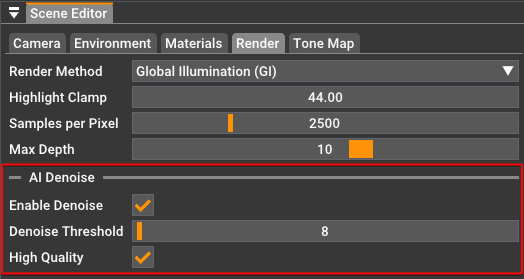
By external denoiser, do you mean the one in Rayscaper or something else?
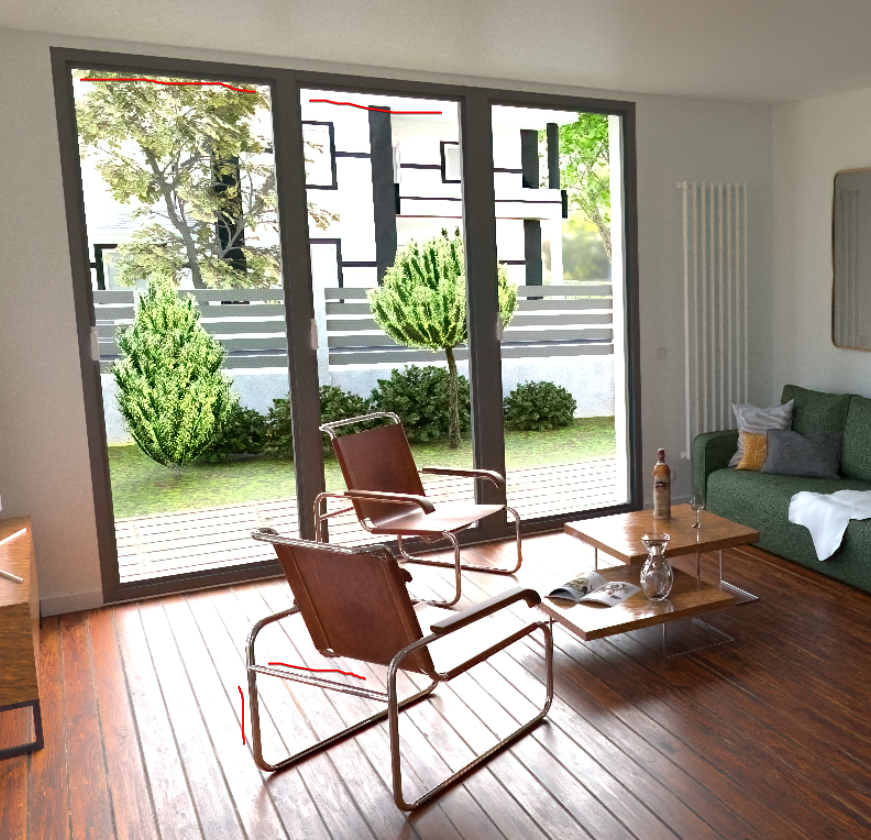
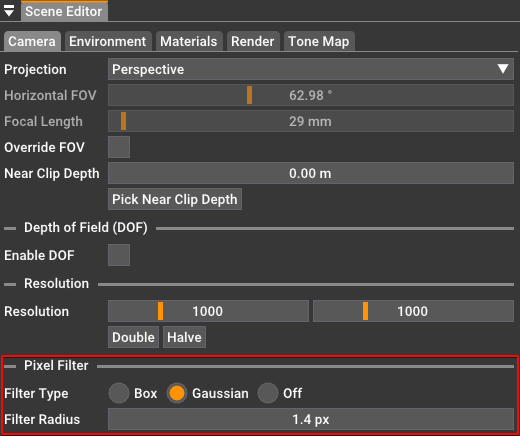
Pixel filtering can also help to get rid of some of the jagged lines:
Happy Rendering!
Thomas -
RE: House Practice
I'm developing an affordable alternative for Twilight: https://sketchucation.com/plugin/2677-rayscaper. I'd love to hear your thoughts if you've tried it yet. Even if you think it sucks, it's valuable input for me on how to improve.
Cheers,
Thomas -
RE: Edit_transform not available in the C-API?
@dan rathbun said:
The C API is mainly written to act upon files.
There is only some limited things you can do with "live" models.
Currently, the C API cannot be used to modify the active model.
You can get the active edit path via: SUModelGetActivePath()
... and from it the transform via: SUInstancePathGetTransform()Thanks, Dan, for the information! I solved it in my code by having a ModelObserver, implementing onActivePathChanged, and passing it to my C-extension code.
Even though you cannot modify the active model, you still need to know the edit transformation for some cases. If a user opens a model to edit, if you query the instance transformation, it will be a world-coordinate transformation instead of a transformation relative to the parent. My C code assumes transformations relative to the parent, so I must calculate that using the edit transformation. You probably already knew this, but I'm putting it here for posterity.
Cheers,
Thomas -
RE: Rayscaper New Releases
-
RE: A piece from my real job, not really sketchup related.
Wow, thanks for sharing @Box. It's great to get some insight into the process. Now I want to see pictures of the boat as well

-
RE: Rework of 12 year old model.
-
RE: Rayscaper New Releases
@sashapepperspray said in Rayscaper New Releases:
@pixelcruncher Hello, I have downloaded sketchup 2025 and rayscaper doesn't work, it just says idle and doesn't render, (and do you have plans to incorporate sketchup's pbr materials into rayscaper's materials?) thanks
SketchUp 2025 is now supported in version 0.9.44 Beta. Let me know if there are any issues.
I plan to map SketchUp's PBR material to Rayscaper's PBR material in one of the upcoming releases.
Cheers,
Thomas -
RE: My City
What a stunning place to live! Thanks for sharing.
It's crazy to think about having a metropolis surrounded by nothing. If I look at some of the houses in your renders, it seems like a pretty affluent city. What is the economic driver in Perth? How does the cost of living compare to the rest of Australia? If I recall correctly, Sydney has an insane cost of living.
I was lucky enough to visit Sydney, the Blue Mountains, and the Gold Coast, but I hope to visit Perth one day.
Cheers,
Thomas -
RE: [WIP] Reconstruction of my favorite disco Palladium New York
Nice model, great render.
-
RE: Rayscaper in SU 2025
@ntxdave PBR materials aren't supported yet in Rayscaper, but they will be soon...
-
RE: PFAS chemical exposure (Heads up)
@L-i-am Sorry to hear about your health issues! Get well soon.
-
RE: Rayscaper New Releases
The next release is coming soon. I was working on a lot of internal stuff in the engine. In the future, I plan to do more frequent releases, as they give me a tighter feedback cycle and make the process less lonely.
-
RE: Genius small house
@L-i-am said in Genius small house:
@pixelcruncher A new container (40ft) is about $2600 USD the rest of it I have no idea. But I think the skope of works would be cartage, siteworks, Fitout, container mods, electrics, plumbing.
I find this idea of building affordable detached housing very appealing, especially since I live in a country where affordable housing for younger generations is becoming increasingly difficult.
It's probably not too pricey once you build them in bigger batches. I would install such containers on my lot if my kids want something like that.
-
RE: Rayscaper New Releases
@nickchun Thanks for the kind words! That made my day!
Cheers,
Thomas -
RE: My Architect ai.
Hey @kacper7
I'm the creator of Rayscaper, a render program: https://rayscaper.com/ - How easy is it with your software to inpaint things or edit the render without actually changing the mood of the render? I see people here on the forum using Rayscaper render and then using ComfyUI to add people or vegetation. I'm not well-versed in AI models per se, but I see you offer API integration. So I wonder if I could use that to sprinkle some AI features on top of my own software.
See for example this post: https://community.sketchucation.com/post/1616622
Cheers,
Thomas -
RE: Rayscaper New Releases
Yes, @Mike-Amos, I also check "transparent shadows" on Pixel cruncher's advice. But I do indeed go up to 35,000 SPP with a 2K resolution. I don't activate denoiser, and if your graphics card is sufficient, it's still fast. Probably 20 or 30 minutes of rendering time.
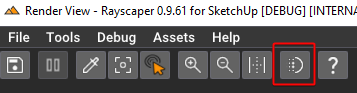
@Krass - I'm not sure if you've already noticed, but the denoiser is no longer destructive. You can disable/enable it in the viewport without having to restart the render. So you can actually check if the image looks good without having to go all the way to 35,000 samples/px:
-
RE: Rayscaper New Releases
I created a hotfix for a crash and updated to version 0.9.68 Beta - please ensure you get that one.
Hey, Rayscaper users!
A new release, with some cool stuff!
Rayscaper 0.9.68 Beta is available in the SketchUcation store. As
I recommend upgrading to the latest version.What Changed?
- Support for SketchUp 2026.
- Draw overlays for the lights in the viewport. This allows the user to select the lights in the viewport directly. You can enable
or disable the overlay in the viewport toolbar. - Save the layout and position of the Rayscaper window between sessions. You can reset the layout via the menu "File >
Reset Window Layout". - Fix a crash when minimizing the Rayscaper window.
Here's the light overlay feature in action:

Help Me Build the Community

If you like Rayscaper, please share your renders (final or work-in-progress, it doesn’t matter)! This is motivating
and helps me showcase its capabilities to new users.Follow me on X.
Happy Rendering!
-
RE: Rayscaper New Releases
@Mike-Amos Version 0.9.68 is out now, can you confirm that it fixes the crash you saw earlier today? Thanks!
-
RE: Rayscaper New Releases
@Krass Great renders! Glad you found a workaround. That computer screen looks believable to me.
You render it grainy in a low res, and then let it upscale? Or do you enhance the images in other ways with AI?
BTW, I found the issue, will post a fix shortly. The crash occurs when you load too many thumbnails in the asset browser.
Cheers,
Thomas