@Mike-Amos Very nice render!
Oops, your profile's looking a bit empty! To help us tailor your experience, please fill in key details like your SketchUp version, skill level, operating system, and more. Update and save your info on your profile page today!
⚠️ Important | Libfredo 15.6b introduces important bugfixes for Fredo's Extensions Update
P
Offline
Posts
-
RE: Rayscaper New Releases
-
RE: Rayscaper New Releases
@Krass True, but we found a bug in the SketchUp SDK (https://forums.sketchup.com/t/sdk-compatibility-issue-sureftype-enum-change-between-2024-and-2026-sdks/341530/9), that didn't surface yet in older versions of Rayscaper because we weren't using that code. It got broken in one of the previous updates. EDIT: 2025 and 2026 are fine; this only impacts 2024.
-
RE: Rayscaper New Releases
Hey, Rayscaper users!
Rayscaper 0.9.72 Beta is available. You can get it via:
- The SketchUcation store.
- Direct download: link.
I recommend upgrading to the latest version.
What Changed?
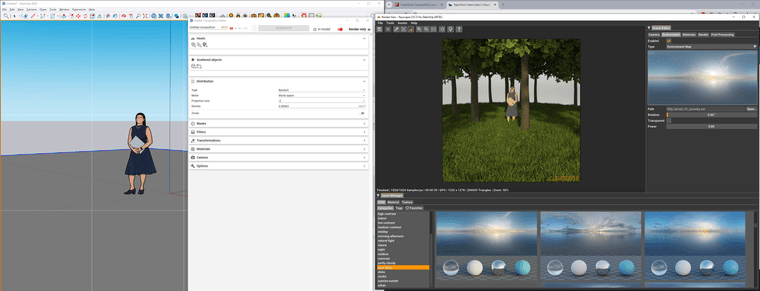
- Rayscaper now supports direct integration with the Skatter plugin. Render-only Skatter data can now be ingested directly from Skatter, bypassing the
SketchUp viewport. This offloads complex instancing and geometry handling to Rayscaper, keeping SketchUp responsive and lightweight during rendering.
Perfect for large vegetation or scattering setups — just hit render and let Rayscaper handle the heavy lifting. (@ntxdave Thanks for connecting me with the Skatter people). - Bugfix: push/pull geometry would not properly propagate to Rayscaper.
- Fix Rayscaper for SketchUp 2024, caused by a breaking change in the SketchUp SDK. Note: Going forward, Rayscaper will only support the latest three
SketchUp releases because now that it's for sure that the SDK is not backwards compatible, it's too much overhead for me to maintain more versions. The
current version supports: SketchUp 2026, SketchUp 2025 & SketchUp 2024. - Make materials assigned to a SketchUp group or component instance work again. cc: @sashapepperspray
Here's a screenshot of a simple forest I created using Skatter:
Help Me Build the Community

If you like Rayscaper, please share your renders (final or work-in-progress, it doesn't matter)! This is motivating and helps me showcase its capabilities
to new users.Follow me on https://x.com/rayscaper3d.
Happy Rendering!
Thomas -
RE: Rayscaper New Releases
@majid said in Rayscaper New Releases:
I have a question regarding material libraries. I have prepared a Carpaint collection and am also going to prepare a water material pack. The question is that if the same name materials will be replaced? i.e. a car paint in my library is called 001red. Imagine there is another material in the Sketchup model by user and called 001red, I am wondering if RS will replace the same name with my material? To be more precise: How do material libraries in RS work?
Nice, users will love those material packs!
No — naming your materials isn’t essential for Rayscaper. Names only matter for finding them in the material library. They are necessary for the user, not for the software.
Behind the scenes, Rayscaper stores each material as a material pack, which is simply a ZIP file. This pack includes a human-readable configuration file and all the texture images used by the material. I will add this format to my documentation. I hope that, in the age of AI vibe-coding, people can build tools to convert materials from other renderers into Rayscaper, and vice versa.
When you apply a material in Rayscaper to any material in your SketchUp model, Rayscaper doesn’t replace the SketchUp material. Instead, it configures the existing SketchUp material using the parameters it reads from the material pack.
You can view the material packs that Rayscaper saves in the
%%AppData%%/AssetCachefolder (the exact path escapes me, I'm not at my PC right now).Cheers,
Thomas -
RE: Rayscaper New Releases
I think I figured something out about the blue material bug, I can make it happen in any file if I use the "edit texture in external editor" in the sketchup material editor, It shows up as blue.
That's a good clue. I think it also has to do with SketchUp's colorized textures only. But I haven't looked at that part in depth.
(Another thing I noticed, is that If i edit a material in sketchup, it does not automatically update the material in rayscaper.)
This is by design; You should press the reload button in the Rayscaper material editor. I could add an "auto-sync" option to do this automatically. Rayscaper has a richer set of material capabilities than SketchUp. I assumed you want to edit the materials in Rayscaper, and that it would be counterproductive to override them from SketchUp repeatedly. Maybe that's not a reasonable workflow assumption.