sketchucation logo sketchucation
    • Login
    1. Home
    2. pixelcruncher
    3. Best
    Oops, your profile's looking a bit empty! To help us tailor your experience, please fill in key details like your SketchUp version, skill level, operating system, and more. Update and save your info on your profile page today!
    ⚠️ Important | Libfredo 15.6b introduces important bugfixes for Fredo's Extensions Update
    P
    Offline
    • Profile
    • Following 0
    • Followers 2
    • Topics 21
    • Posts 465
    • Groups 3

    Posts

    Recent Best Controversial
    • RE: RayScaper tryout

      When I used VRay when opening Vray Asset Editor tool you have buttons to start/stop rendering with the ability to run real-time or non-real-time rendering (push and wait to see result).
      And since I have used it for a long time I am accustomed to that UI, your is quite good, and like I said it is just a matter of spending some time with UI to get accustomed to it.

      The start/stop buttons are a must, but I just haven't gotten around to it yet. I will make sure that happens soon.

      It's not as feature-rich as Vray, but I hope the UI makes sense for users new to rendering and users with prior rendering experience like yourself.

      For me, it doesn't save scene settings when I am done with the rendering and after reopening skp it goes to CPU rendering and pic size of my Sketchup window.

      Another user (@Mike-Amos) reported the same bug. I can reproduce it and plan to have a fix for the next release.

      Please, use my picture to promote Rayscaper, this, and any I post later.

      Thanks!

      Regards,
      Thomas

      posted in Rendering & Subdivision
      P
      pixelcruncher
    • RE: RayScaper

      @majid Just one side of the plane is enough. Do you have an example render or example scene so I can take a look?

      Cheers,
      Thomas

      posted in WIP
      P
      pixelcruncher
    • RE: Twilghtrender alternatives?

      @jo-ke

      That is totally fair! No dig, and not seeking to make a sale.

      And I admit I might have pulled the trigger too soon on the pricing. If you have the time, I am just curious to know what issues you are seeing.

      Cheers,
      Thomas

      posted in Extensions & Applications Discussions
      P
      pixelcruncher
    • RE: Folding Step Animation

      That is a very cool idea!

      posted in Gallery
      P
      pixelcruncher
    • RE: RayScaper

      @Rich-O-Brien Yes, it would be optional. IIRC, we discussed this a while ago, i.e., having the artistic freedom to do whatever you want with directional lights, so I definitely don't want to take away that freedom.

      Maybe a 4th light that represent SketchUp sun or if I right click a Di-Light I can set it to SketchUp position.

      This was my thinking: have a context menu on the directional light that says sync with SketchUp sun position or have a tick box in the directional light config sync from Sketchup. Then, it would track it in real-time. Option two would be the logical path to quickly support sun animations for shadow studies.

      posted in WIP
      P
      pixelcruncher
    • RE: Twilghtrender alternatives?

      @jo-ke said in Twilghtrender alternatives?:

      -Rayscaper is still in development, but I didn't get warm with it. Now it isn't free anymore to test, many things are not working right now. to early for me to change and pay mony

      Hey @jo-ke,

      As the developer of Rayscaper, it's dear to my heart to try to understand what isn't working and what we can improve. I hope to get Rayscaper up there as the best affordable render engine for SketchUp.

      Cheers,
      Thomas

      posted in Extensions & Applications Discussions
      P
      pixelcruncher
    • RE: Kitchen

      Very nice results, keep those renders coming @Mike-Amos

      posted in Gallery
      P
      pixelcruncher
    • RE: RayScaper

      @majid

      Superb render, Majid! I like the result as well.

      This scene is a classic in computer graphics. It's the atrium of the Sponza Palace, which exists in Dubrovnik, Croatia (wiki). If you are a Game of Thrones fan, Dubrovnik is also where they filmed all the scenes in King's Landing.

      posted in WIP
      P
      pixelcruncher
    • RE: Rayscaper New Releases

      @ntxdave

      I was thinking about having SketchUp camera animation support and support for Fredo6 animator. But I need to reach out to @fredo6 to discuss how to achieve that.

      Cheers,
      Thomas

      posted in Extensions & Applications Discussions
      P
      pixelcruncher
    • RE: Living Room by FYM.

      @ntxdave I reworked the UI to use a new framework. Before this change, I used a proprietary framework with a yearly license cost. I was running into its limits, so I moved to another one. For end users, the new UI is not that big of a change, but internally, it allows me to develop at a faster pace.

      I can make it available in the coming days for those users who want to test-drive it, but it might still have some quirks and bugs. But there's no crazy big update coming πŸ™‚ Managing expectations.

      posted in Gallery
      P
      pixelcruncher
    • RE: Rayscaper, My trip down the road to adjumacation.

      @majid said in Rayscaper, My trip down the road to adjumacation.:

      @pixelcruncher it seems that the HDRI image is also pixly, so maybe adding an "upscaling" option to make low-res images, smooth, would be nicen

      That's a good idea; I will put it in my backlog. edit: It would not necessarily be upscaling because that might result in quality loss. I would add texture filtering to blur away those offensive pixelation artifacts, similar to what is done in games.

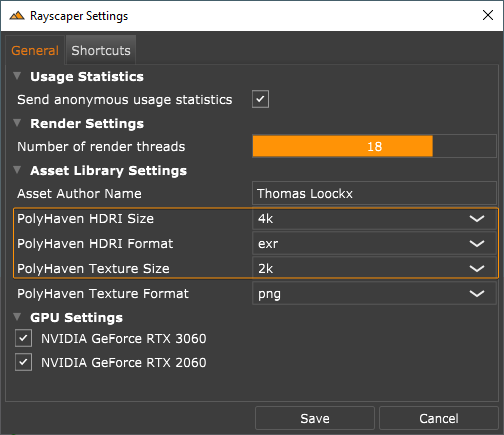
      Note that if you are using the HDRI from the asset library (which is sourced from PolyHaven), you can choose to increase the default resolution:

      59948c41-8d60-4790-b12c-6b673a9ed8b9-image.png

      You need to restart SketchUp for the change to take effect. Increasing the resolution will also increase the download time for the asset.

      Cheers,
      Thomas

      posted in WIP
      P
      pixelcruncher
    • Rayscaper New Releases

      Hey folks,

      I'm creating this thread to group all Rayscaper releases. When a new release of Rayscaper is available, we will append it to this thread. This way, all the information about Rayscaper releases stays together.

      The latest build is always available on SketchUcation: here.

      You can use Rayscaper without a license, with limitations. You can buy a license here on SketchUcation ($74.99 for SU premium users, $99 for non-premium users).


      Quick Tips

      • If this is your first time installing Rayscaper, have a look at our installation instructions.
      • If you installed Rayscaper before, have a look at our upgrade guide.
      • We also have a quick start guide with a free demo scene.
      • The documentation is here. Documentation is a work in progress.

      Reach Out

      When you get stuck, have questions, give some feedback or just want to say hi. Don't hesitate to create a post in this forum (Extensions & Applications Discussions) or send me a private message. We have a documentation section on finding help.

      Happy Rendering!
      Thomas

      posted in Extensions & Applications Discussions rayscaper render
      P
      pixelcruncher
    • RE: Old radio

      Very nice, love the renders!

      posted in Gallery
      P
      pixelcruncher
    • RE: RayScaper

      @majid Thanks for sharing the model! Super useful for others wanting to try Rayscaper.

      posted in WIP
      P
      pixelcruncher
    • RE: Rayscaper New Releases

      Hey folks,

      Rayscaper 0.9.7 is available in the SketchUcation store. It has more improvements, so we recommend upgrading to the latest version.

      What Changed?

      Support units for sliders and text boxes (not all sliders have it yet). For length units, Rayscaper will display values in units configured for the model (cm, mm, yd, etc).

      SketchUp_qX7plIkhxx.png

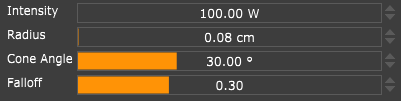
      Fix a bug in the sphere light. The sphere light would become black when the radius increased, so the lights started
      intersecting geometry.

      Fix wonky behavior with the spotlight. The spotlight would become very bright when configuring a radius of zero.

      Happy Rendering!

      posted in Extensions & Applications Discussions
      P
      pixelcruncher
    • RE: Piano with Rayscaper

      @Gus-R don’t know about your mood but the renders are yummy indeed!

      posted in Gallery
      P
      pixelcruncher
    • RE: Rayscaper, My trip down the road to adjumacation.

      I like this view, well done πŸ‘

      posted in WIP
      P
      pixelcruncher
    • RE: Rayscaper New Releases

      @ntxdave Definitely! Animation support will be part of the 1.0 version.

      posted in Extensions & Applications Discussions
      P
      pixelcruncher
    • RE: Interior render.

      @Mike-Amos Great result! How was the transition, Twilight <> Rayscaper? Things I can improve?

      Cheers,
      Thomas

      posted in Gallery
      P
      pixelcruncher
    • RE: RayScaper

      @majid I'm Looking forward to seeing this finished! This is going to be a beautiful architectural render.

      Cheers,
      Thomas

      posted in WIP
      P
      pixelcruncher
    • 1 / 1