sketchucation logo sketchucation
    • Login
    1. Home
    2. kaas
    3. Posts
    Oops, your profile's looking a bit empty! To help us tailor your experience, please fill in key details like your SketchUp version, skill level, operating system, and more. Update and save your info on your profile page today!
    šŸ”Œ Smart Spline | Fluid way to handle splines for furniture design and complex structures. Download
    K
    Offline
    • Profile
    • Following 0
    • Followers 0
    • Topics 47
    • Posts 864
    • Groups 1

    Posts

    Recent Best Controversial
    • RE: What can a Sketchup user do with CAD-drawings?

      @larv said:

      It seems to me that CAD and Sketchup are somewhat closely related(?). I“ve never worked with CAD, and was wondering what the use could be for a CAD-file such as this one that I imported into Sketchup? I“m at a loss when there doesn“t seem to be any closed surfaces to operate.

      I only use those cad-lines as a backdrop to create a new 3d model in Sketchup. I group every element of the cad lines (floorplan, facade, section etc) and set them at the right positions. Then I start to create a new 3d model snapping to those lines.
      By doing so, you don't inherit all the extra lines, cuts, divisions in lines etc that are the result of the export of the cad file and/or the conversion of the cad file into sketchup.
      posted in SketchUp Discussions
      K
      kaas
    • RE: Portable Workstations for Sketchup

      Also interesting is the gfx card list - it gives an idea how the card performs in comparison to other cards. The AMD FirePro M4100 there is currently at place 145 (1 is the best), which is worse than the gt740M so maybe that's why heavy models didn't work for you.

      See http://www.notebookcheck.net/Mobile-Graphics-Cards-Benchmark-List.844.0.html

      posted in SketchUp Discussions
      K
      kaas
    • RE: Really annoying, help please

      dynamic components? just guessing...

      posted in SketchUp Discussions
      K
      kaas
    • RE: [proto] 2d stencil - real line hatches

      @jclements said:

      Would it be an improvement to save the hatching element as a component rather than a group so that the file size is smaller?

      I didn't go that route with this version because the plugin was initially made from a hatching-sections point of view. That involves lots of cutting of the hatches after the copy process so a lot of the components would have to be exploded.

      I do see the benefits using components for 2d elements that wouldn't have to be cut. Stuff like: cars, trees, furniture, plants etc etc. Someone also suggested if it could be done with glue/cut-components. I will have a look if this can be implemented.

      posted in Plugins
      K
      kaas
    • RE: LO2015: no scale indication @ right-click anymore

      @marcdurant said:

      ...If you select "1:500" in that context menu, does a check mark appear?

      If I change the scale in the context menu, it does appear. But, after a short while, it's gone again. I haven't been able to detect any logic or pattern in it.

      To test again, I made a simple house and added some scenes. Send it to layout:
      1 changed scene from context menu,
      2 changed scale from context menu,
      3 copied the scene to another position on the paper
      4 go to step 1 + repeat

      5 after all the scenes were placed on the paper, I checked if the check marks were still there. They were gone.
      6 re-did the scaling so the checkmarks were there. saved + closed Layout. Opened layout again, the checkmarks were gone again.

      ...?


      scaleCheckMarks.layout


      scaleCheckMarks.jpg

      posted in LayOut Bug Reporting
      K
      kaas
    • RE: [proto] 2d stencil - real line hatches

      @JuJu:

      1. the hatches are just grouped lines / edges. They have no special properties so you can do with them whatever you like.
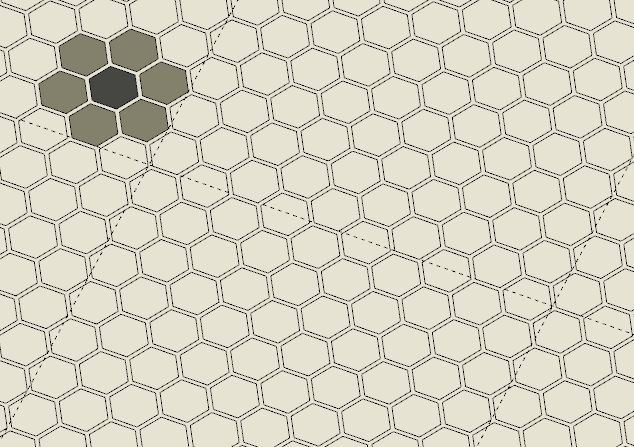
      2. yes, you can explode them and use them as a cookie-cutter to cut a face. Although, if the pattern is very complex, it doesn't always go right and Sketchup needs some re-tracing some of the edges but I did use it to cut and color a mosaic floor for instance (see image).

      2dstencil_shapeCutter.jpg

      posted in Plugins
      K
      kaas
    • RE: [proto] 2d stencil - real line hatches

      update: added some features. See new video in first post.

      posted in Plugins
      K
      kaas
    • RE: [proto] 2d stencil - real line hatches

      @julyyen said:

      ...and the most important thing is that I want the texture to automatically fit on a surface, when applied...

      the thing is: this is a plugin that doesn't use textures but uses real edges(lines) instead. If you want a solution that uses textures you have to look elsewhere (Skalp for instance)

      posted in Plugins
      K
      kaas
    • RE: [proto] 2d stencil - real line hatches

      @julyyen said:

      ..It is possible to offer your plugin as a free download because I look for centuries to find a good insulation hatch...

      If you're just looking for the hatch, I attached the skp file.


      isolatie2.skp

      posted in Plugins
      K
      kaas
    • RE: [proto] 2d stencil - real line hatches

      Hi Jolran,

      In earlier versions of the plugin I did manually use your 2dBoolean afterwards because the plugin only did the hatching. In the newer versions, I added code to do the intersections immediately after the copy-ing process so 2dBoolean isn't needed anymore. The workflow got more streamlined by doing so.

      It's quite fast until you copy/array more than 50k to 100k edges in one go. At that moment Ruby slows down fast.

      edit: you can see how many copies & edges are generated at each pattern-fill by reading the messages on the status bar (bottom left)

      edit2: but your 2dBoolean code was better. This one needs extra code to handle 'surfaces with islands' (a wall with a window + brick pattern = bad results at the moment).

      posted in Plugins
      K
      kaas
    • RE: [proto] 2d stencil - real line hatches

      @unknownuser said:

      Do you think this could turn out to become a database for 2D details? That would be something I'd love to have. Would it be easy to have those 2D details created/inserted from and into any model?

      I wonder but for these kind of detail 'blocks' you could also use the native component library functionality or am I mistaken?

      The libraries for the plugin can be filled with whatever 2d patterns you like so it should be possible. Although, after they are inserted from the plugin they loose any internal hierarchy they had (all edges will be put on layer 0, all non-edges will be removed).

      At the moment, adding a new pattern works like this: Just start Sketchup, draw some 2d lines, start the plugin, choose or create a sub-library, pick the '+' sign and add a name for the pattern. Also, add what kind of pattern it should be in default(single stencil, line, 2d array). All the edges in that file will be added to the new pattern file. You have to re-start Sketchup or open a new file to be able to use the new pattern.

      @unknownuser said:

      I can send you a model with my sectionCutFaces showing this kind of details though they're not shareable.

      PM me if you like me to have a look at it. Of course I won't share anything that should remain non-sharable.

      posted in Plugins
      K
      kaas
    • RE: [proto] 2d stencil - real line hatches

      Hi JQL, thanks for your nice reply!

      I changed the original video and added some footage about all the features of the current prototype.

      Concerning your doubts:
      The hatches are grouped per 'material' and again grouped altogether. Normally I have one main group per section. By doing so you can control the visibility in Sketchup and Layout by putting the hatches on a separate layer and separate page.

      You still have to use some common sense of course regarding the amount of detail you want to put into the patterns. Sketchup's Ruby gets slow if you try to create too many entities at one time. Going above 50k to 100k edges to be created at one click tends to take a minute or more. Going even higher could freeze Sketchup so I try to avoid that.

      I'm using it for all my remodeling projects and haven't run into any problems. Thise aren't really big projects but 'BIG' can mean different things. If you can post / pm me a SU file with a sectioncutface and some suggestions about the hatches you would like to see, I could give it a go and post / pm you the result back. That way you can find out yourself if it's something that could make you happy.

      posted in Plugins
      K
      kaas
    • [proto] 2d stencil - real line hatches

      Real line hatches was a feature that I was really missing in Sketchup. In between assignments I started working on a plugin. The video is showing the current prototype. It still needs bug fixes, additional features, mac support etc etc.

      edit 2 feb: plugin development stopped for the time being.

      edit 2015-01-05: features added

      • stencil plane detection at every pick
      • custom scaling of patterns
      • custom rotation of patterns
      • inner island detection (for instance: windows in facades)

      posted in Plugins
      K
      kaas
    • RE: Alpha texture problem

      Displaying layered transparencies is a bit harder (more calculations) for render engines. Have you tried changing the style settings to transparency - nicer ?

      posted in SketchUp Discussions
      K
      kaas
    • RE: Importing PDF floor plans...

      Use Inkscape to convert the pdf to dxf and import the dxf into Sketchup

      ps. Questions like these are quite common. If you use the search function on the top-right of the page, you will get many answers instantly.

      posted in Newbie Forum
      K
      kaas
    • RE: LO 2016 feature request / wish list

      It would be great if when copying several elements from one page to another, Layout would leave the assigned layers for those elements as they were. Up till now, layout will change all the layers for those copied elements to the current layer on the page you're copying to. Would be great it the assigned layers like 'Sketchup pages', 'images', 'text' etc would be preserved. Only work around now is copying those elements layer by layer OR re-assigning them after copying.

      posted in LayOut Feature Requests
      K
      kaas
    • LO2015: no scale indication @ right-click anymore

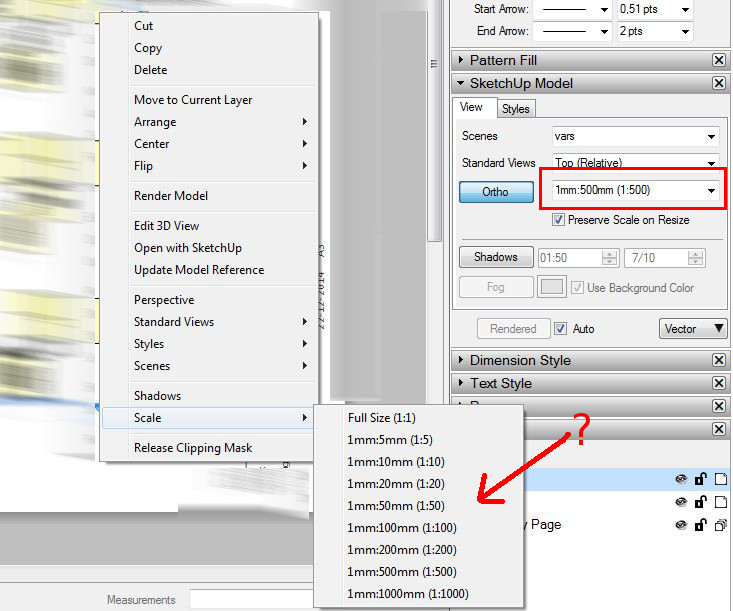
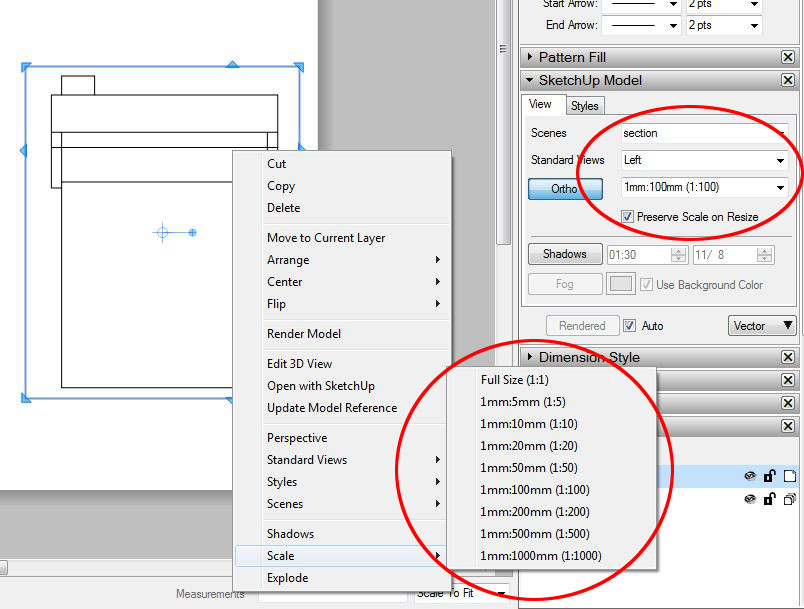
      In previous versions of LayOut, after right-clicking any SketchUp-page, you would get the current scale indicated for that element. In the right-click 'rollout' it's gone in 2015 so now you have to open the sketchup-model-tab to see the current scale. Would be nice if that old feature could be implemented again.


      loScale.jpg

      posted in LayOut Bug Reporting layout
      K
      kaas
    • RE: 13" Macbook Air or Retina Pro for SketchUp?

      @db11 said:

      ...I bought a latest revision 13" Retina MacBook Pro (2.GHz Core i5 w/ 16GB RAM) a couple of months ago and I love it...

      I'm thinking about going for the same machine for giving presentations and doing more light out-of-office work. You're still happy with it? Also, could you post a full screen screen dump of a project in Sketchup? I'm curious to see the quality of the linework (anti-aliased or not) etc.

      posted in Hardware
      K
      kaas
    • RE: Shadows on ground

      @samyell77 said:

      ..I have set some scenes up with shadows on but not on the ground...

      Strange problem, I haven't noticed any problems like this in LO2015. Could you share a simple layout file demonstrating the problem? Can be as simple as a box on a plane.

      posted in LayOut Bug Reporting
      K
      kaas
    • RE: Exporting big images from LayOut

      @abdulmuneim said:

      ... what is the biggest PDF or JPEG size i can export of LayOut. I need to print it on a 3m x 7m poster! ..

      What will be the dpi settings you want to print? -> 7m x 300dpi = around 8400 pixels? I dont think that will be a problem. Any test file you would want to share so someone with layout can do a test run for you?

      edit: after reading Yorik's calculation I came back to mine and turns out I missed 1 digit. So 7x3m with 300dpi will be around 83k x 35k pixels. You better have a killer machine to work on and lots of disk space because Photoshop will require a lot of resources as well.

      posted in LayOut Discussions
      K
      kaas
    • 1
    • 2
    • 25
    • 26
    • 27
    • 28
    • 29
    • 43
    • 44
    • 27 / 44