sketchucation logo sketchucation
    • Login
    1. Home
    2. kaas
    3. Posts
    Oops, your profile's looking a bit empty! To help us tailor your experience, please fill in key details like your SketchUp version, skill level, operating system, and more. Update and save your info on your profile page today!
    🔌 Smart Spline | Fluid way to handle splines for furniture design and complex structures. Download
    K
    Offline
    • Profile
    • Following 0
    • Followers 0
    • Topics 47
    • Posts 864
    • Groups 1

    Posts

    Recent Best Controversial
    • RE: Unreal 4 Engine

      @miikka1978 said:

      .. My understanding has been that Sketchup files don’t work that well with game Engines because the models need to be UV mapped properly....

      You're right. I've been playing with the Unreal engine for a bit. It's a game engine and it expects the uvmaps to be properly and uniquely layed out (do a google search for uvmaps in google-images to get an idea).

      When textures are used in Sketchup they are stored and Unreal reads them as UV channel 0. Unreal can create lightmaps and stores them in UV channel 1. So when doing a lighting calculation Unreal looks for a UV channel 1. If there is no mapping info in UV channel 1 (in Sketchup you can't create it), Unreal duplicates the UV channel 0 data into channel 1 and tries to store the lightmap data in there.
      And that's where you also run into problems with Sketchup. The UV coords for anything that's slightly more complex than a box, a floor or some walls aren't uniquely layed out by Sketchup but overlapping (see image: uvmaps in Roadkill for stairs). So the lighting data gets stored overlapping also and it results in errors and a visual mess.

      If you somehow can uniquely lay out the mapping in Sketchup for objects you should be fine.

      Still investigating...
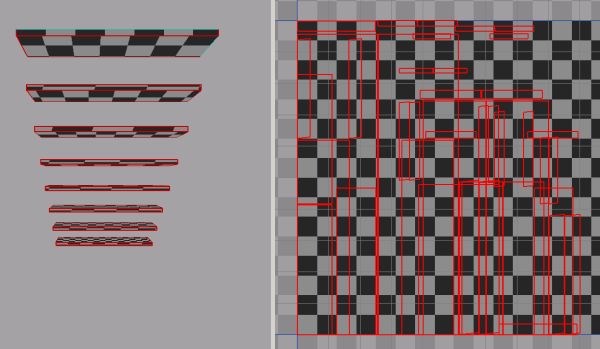

      uvmaps.jpg

      posted in Extensions & Applications Discussions
      K
      kaas
    • RE: Unreal 4 Engine

      @solo said:

      ... so how will the workflow go?... the challenge goes out as to how SKP and Unreal can work together or if if can.

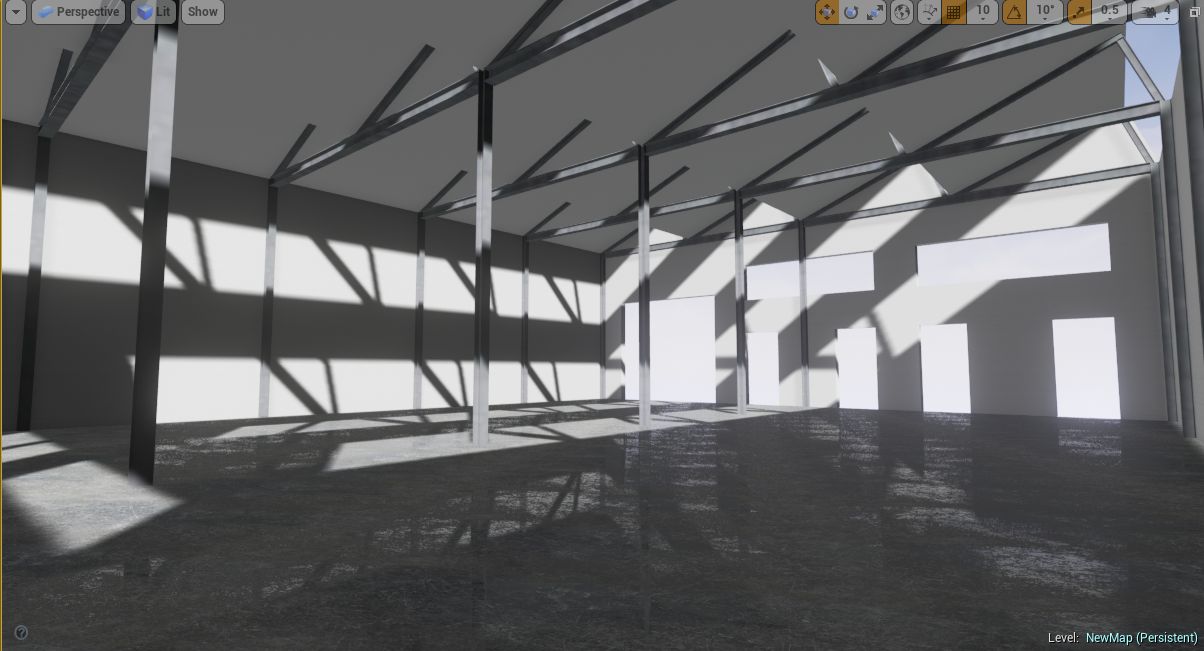
      I just tried Unreal using this workflow:

      • meters as unit in Sketchup
      • fbx output from Sketchup.
      • textures used were in size n2 (512x512 for instance)

      Import the fbx in Unreal:

      • place the mesh in the scene, rescale if needed
      • refine / add more objects and save selected overwrite the fbx file in Sketchup and re-import in Unreal. no need to re-scale and material settings (bump / reflection in Unreal)are preserved.

      Works nicely for a simple scene. What kind of problems / challenges are you expecting?


      test.jpg

      posted in Extensions & Applications Discussions
      K
      kaas
    • RE: Directory Structure and Layout

      My guess is: layout uses absolute paths. If you open Layout and look at 'document setup' and 'references' you will see the absolute path for each reference under 'file name'.

      Best way to avoid this is to use exactly the same directory structure on each computer. If that isn't possible, try solving it by using Junctions.
      For instance: if you have the data in
      C:\temp\clientX\sketchup on one computer and
      F:\temp\clientX\sketchup on another you could make a Junction on that computer in C:\temp and refer to F:temp\ That way your data will be on F:\temp but when opening a layout file thats looking for data in C:\temp will find the data on F.

      posted in LayOut Discussions
      K
      kaas
    • RE: Unreal Engine is now FREE

      Seems like Valve might be doing the same with their Source Engine. Interesting...

      @unknownuser said:

      We will be making Source 2 available for free to content developers

      SteamDB

      favicon

      (steamdb.info)

      posted in Extensions & Applications Discussions
      K
      kaas
    • RE: PlusSpec

      In general (I never used PlusSpec) I also very much dislike subscription based software. It just feels like an easy way to generate money without having to put much extra effort into it. I would rather prefer I'm encouraged to buy a renewal by putting new features / improvements into the software (like Sketchup to me did with their last releases).

      I do very much acknowledge the efforts of the programmers though. It takes a lot time to create and bugfix software. Maybe even much more time than is covered by the one-time sale of the software?! Also, the subscription most likely will pay for developing new features and bugfixes. Or are they using it to play golf all day? Most likely not.
      Maybe some of the forum members who create payed (and subscription based) plugins can shed some light into this that would make us less hostile to subscriptions.

      posted in Extensions & Applications Discussions
      K
      kaas
    • RE: Ruby Plugin - Inserted Component Wrong Scale

      Not sure if its the same problem but I also ran into problems when using very small units. My workaround was: draw the original element much larger (say 1000 units) and when inserting, divide its size by its bounds (in your case would be its depth). That way, you would end up with a 1 unit element again which you can scale to your liking.

      See more here: http://www.sketchup.com/intl/en/developer/docs/ourdoc/boundingbox

      posted in Developers' Forum
      K
      kaas
    • RE: Sushi

      nice! jum!

      One small comment: I would have another look at the glossiness (self-illuminating maybe a bit?) of the rice and the fish. They look a bit dull/pale to me and thus not so appetizing (looks a bit like old food). If I google 'sushi' I see vibrant, glossy ingredients.

      posted in Gallery
      K
      kaas
    • RE: Why make groups?

      I don't have a link for you but in short:
      I use a component for stuff that will be in the model multiple times like doors, furniture etc,
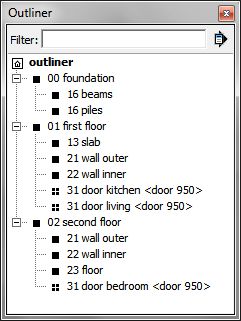
      Groups are used for unique elements like: all the walls, the roof etc. The group is also just a container used to make a nested hierarchy using the outliner.

      edit: added a screenshot of the Outliner from a dummy project. Maybe it illustrates the above more clearly. The icons looking like black boxes are groups, the icons looking like 'divided boxes' are components.


      outliner.jpg

      posted in SketchUp Discussions
      K
      kaas
    • RE: Finding groups in large models

      No need to make it a component. You can also name the group and find it using the Outliner.

      Another approach could be color-coding the layer of the group. Using a color-by-layer style you could visually find the 'special' group. Only useful if you use a limited amount of 'special' groups and or use a logical system for the colors.

      posted in SketchUp Discussions
      K
      kaas
    • RE: Slow Save Sketchup 2015 Mac

      on windows, disabling saving thumbnail files speeds up the process. Maybe on Mac as well? See model-info -> file

      posted in SketchUp Discussions
      K
      kaas
    • RE: Huge LayOut pdf output

      don't use the native pdf output but use a pdf printer (bullzip / pdf redirect / etc etc) instead.

      posted in LayOut Discussions
      K
      kaas
    • RE: PC hardware - which processor and grahics cards?

      Your budget will be a big deciding factor. Also, have a look at several pages in the hardware sub-section http://sketchucation.com/forums/viewforum.php?f=72
      In there you will find many related questions and discussions that might be of interest to you.

      posted in SketchUp Discussions
      K
      kaas
    • RE: Hidden edges still visible in parallel projection.

      and whats your setting in the main menu bar: <view> - <hidden geometry>? That one should be disabled as well to really hide the edges.

      posted in SketchUp Discussions
      K
      kaas
    • RE: [REQ] plugin overlay for low width aspect ratio export

      I haven't used it myself but it sounds like a feature of https://extensions.sketchup.com/en/content/advanced-camera-tools

      posted in Plugins
      K
      kaas
    • Good drivers for Intel HDxxxx ?

      My temporary laptop uses 3rd Gen Intel HD Graphics 4000(I know - that's trouble). It claims it supports OpenGl 4.0. I'm using the latest Intel drivers dated 1/8/2015.

      Problem is:

      • If I turn on AA, it's a nice looking image but when I drag a selection window it leaves a trail of the window.
      • If I turn off AA it works as intended but the image doesn't look as nice.

      Tried all kind of combinations of AA2x, AA4x, FF on/off, 16bit etc etc.

      So: anyone on windows 7 64bit with a HDxxxx that doesn't have this problem? If so, which drivers do you use?

      posted in Hardware
      K
      kaas
    • RE: [proto] Quick Scene Dial

      @jql said:

      @jclements said:

      Would there be a way for a scene to execute the extents of a model so as the geometry increases or decreases, its extents are viewed for that scene when it is first opened?

      That would be great if it wouldn't pervert Layout viewports. I.E. if a scene for a floor plan has a different setting than it was created it will shift inside Layout.

      Technically I think it is possible to do both. It would need another tickbox in the settings/edit screen for each line. Good suggestion. Will add it to the list.

      posted in Plugins
      K
      kaas
    • RE: [Plugin] 3 point Window

      Nice Pixero. Quite useful. You also incorporated the materials. Is this the final version or do you have more plans with this plugin?

      posted in Plugins
      K
      kaas
    • RE: [proto] Quick Scene Dial

      @jql said:

      ... Do you want a beta tester?
      Would be nice. Have a look at your pm.

      posted in Plugins
      K
      kaas
    • [proto] Quick Scene Dial

      Here's a preview of a small plugin for managing scenes. It allows you to:

      1. create named sets of scenes. Scenes can be in several sets
      2. switch to a scene
      3. hide the Sketchup Scene Tabs - create more working screen space
      4. hide (just don't include in a set) scene names that you don't want to visually share (during a presentation for instance)

      The set info is saved as an attribute to your Sketchup file. Works in Sketchup 2015 in Win.

      edit 2 feb: plugin development stopped for the time being.

      posted in Plugins
      K
      kaas
    • RE: [Banned]

      @OP, I don't agree. JQL already made a nice list of reasons why I also don't agree. Apparently you don't use plugins that benefit from 64 bits, Ruby 2.0 etc. I do agree the materials & mapping should benefit from some Trimble-love.

      posted in SketchUp Discussions
      K
      kaas
    • 1
    • 2
    • 24
    • 25
    • 26
    • 27
    • 28
    • 43
    • 44
    • 26 / 44