@bryan k said:
Mirrors.
maybe put info like mirrors (camera at the back) and all those indicators in a hud in the helmet? Those mirrors look a bit old skool motorbike to me.
@bryan k said:
Mirrors.
maybe put info like mirrors (camera at the back) and all those indicators in a hud in the helmet? Those mirrors look a bit old skool motorbike to me.
First impression: pro site, easy on the eye. BUT... I would definitely choose another photo for yourself. This one doesn't say 'pro' or 'fresh ideas' or 'someone you immediately trust your next big important visual assignment to'.
@dale said:
.. The retina makes the lines extremely fine, and sometimes very hard to select. ...
Would changing the style and setting the profile to a higher value 'fix' this?
@jeff hammond said:
the problem with the air is that it's clock speed is so slow.. ~1.5GHz cad applications rely heavily on cpu and only one core at that...
Question: the 1.7-GHz dual-core Intel Core i7 has a Turbo Boost up to 3,3 GHz. If Sketchup could trigger it automatically it would be great. Question is though: what triggers that turbo boost? Has anyone tried an MBAir with Sketchup?
Great plugin. Thanks for the update. I use it quite often. Quite strange this function has never been added to the native SU tools.
@blastfurnace said:
everything I draw in SU2015 looks jagged to me...I have changed the openGL settings but no luck...
The timing of your post is funny. I noticed today something similar while rotating a scene, I see some jaggies (like edges that are fragmented in several large parts).
I already had a look at my opengl settings (gtx560ti) and was already google-ing if some of the gfx card settings could be better but haven't found anything useful yet.
any suggestions anyone??
@whaat said:
What about having the Z axis aligned to the world Z axis and the Y axis aligned to the vector from 0,0,0 to 100,0,0?
Can you explain in more detail how it is an inconvenience?
Hi Whaat, I will try to explain:
When making a 3d model of a building, I have a 'fixed' idea what I see as the length (x) , width(y) and height(z). I use your plugin to build all kinds of building parts(see pic). Some of them are on multiple axes (the wall for instance, partly aligned with x and partly with y axis).
Sometimes the result of profile builder needs a little extra moving of edges / faces afterwards (see foundations). Because of the 'fixed' idea about x/y/z during modelling, the 'mis-alignment' of the axes in the profile builder groups, causes a problem when 'automatically' pressing the arrow keys to force movement in one axes.
So, in short: it causes a few seconds hick-up in my modelling flow. I build a profile, go into the group, select a face and 'automatically' press an arrow key and start trying to move the face... turns out its a different axes.. few seconds hick-up.
Only changing the z axes to the world axes doesn't help me. Totally aligning to the world axes does. Just a small 'problem' to me though - at the moment I immediately explode and recreate the group after creation of a profile but for me, it would be nice if it could be fixed.
regards, Max
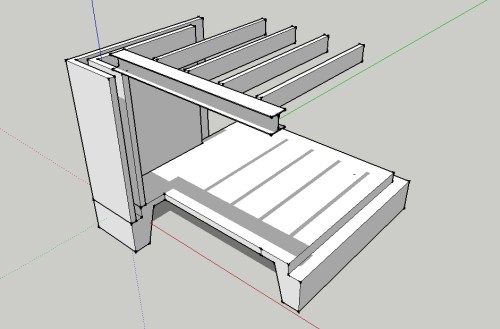
Another one by me (I use your plugin almost on a daily basis): use the world xyz axis in the resulting profile group as well.
In the current version, if you build a beam from 0,0,0 to 100,0,0 and you go into the group to edit the result, the Z axis is aligned to the vector from 0,0,0 to 100,0,0. From a user (my) pov its a small inconvenience.
@tig said:
...However some other 'attributes' do add usefulness - like DCs... - which should endure - how do we decide what to keep ?
Good point. Maybe make a combo box with several options for cleaning the attributes: remove all, preserve @ components, ...
Suggestion: to really purge a file to its bare minimum, maybe add an option to remove attributes (set by some plugins), ifc info etc?
I'm curious - how long does it take your SKetchUp reseller to send you the authorization codes for the new V15?
Last time, when we went from v13 to v14 it took mine 7 days. This time it's 8 days and counting. I would imagine it should take a minute - even batch process it but maybe there's more to it.
@tt_su said:
I still don't see any difference. Do you have a sample model to share?
I just did some tests with all kinds of code and you might be right it's my component files that are causing the problem. This one (see attachment) for instance takes 0.93 seconds to load in V15 while in V14 it takes 0.36
I'm puzzled...
edit:
@tt_su said:
I'm not seeing any performance regression - looks rather consistent on this end.. I'm not sure why you are seeing a difference on your system.
Hi Thom, thanks for taking time to look at my code-problem.
I don't see big differences as well if I load components from the SketchUp Components sub-folder (see my post, two posts above your post).
Have you tried my original code (loading from root of C OR loading from the Sketchup plugins folder) and looked at the differences?
I tested your code and here are the results:
SketchUp Version: 15.0.9350
0.06: 0.06
0.04: 0.04
0.05: 0.05
0.04: 0.04
0.040001: 0.040001
0.04: 0.04
0.05: 0.05
0.04: 0.04
0.04: 0.04
0.04: 0.04
Average: 0.0440001
SketchUp Version: 14.1.1282
0.02: 0.02
0.02: 0.02
0.02: 0.02
0.02: 0.02
0.02: 0.02
0.02: 0.02
0.02: 0.02
0.02: 0.02
0.02: 0.02
0.02: 0.02
Average: 0.019999999999999997
@driven said:
I ran a variation of your script in v13 and v15 on my mac...
t = Time.now
> f = Sketchup.find_support_file('candle.skp', 'Components')
> d = Sketchup.active_model.definitions.load f
> puts (Time.now - t)
> #  all in different sessions of SU
> # v13 => 0.146086 , 0.037117, 0.022029
> # v15 => 0.033036, 0.046043,  0.013811
john
Thanks for looking into it. I tried your code on win32 and it loads the skp instantly. Great...but, plugins aren't installed in a sub-directory of the SketchUp installation directory anymore. Isn't it bad practice to put resources for a plugin in SketchUps installation directory instead of together with the code in the plugin directory?
@tt_su said:
Well, the simplicity of the model is one thing - but if out thumbnail generating code has become slower writing pixels then the model content doesn't matter...
This is still on our todo list to investigate.
just to be sure...My concern is not about writing skp files but about loading them. I don't see why it should be thumbnail issue.
The tool is called 'Radial Bend', its part of FredoScale - look more here:
http://sketchucation.com/forums/viewtopic.php?f=323%26amp;t=17948
@mike amos said:
I am getting a repeated bugsplat when, having made a circle I change the number of facets. Has anyone else come across this?
Crash Report #1949
Changing the number of segments of a circle works fine for me (tested on win x32 and win x64)
@dan rathbun said:
@kaas said:
I just noticed in one of my plugins that loading a single small skp file (to use as a component definition) seems to take almost 1 second whereas the same code in SU 2014 loads the skp instantly.
Bigger thumbnail = more loading time? (guessing)
I can't imagine. The box.skp testfile I created was just a rectangle with an extrusion.
Still looking for a solution. I tested all kinds of files and the result is always the same: loading a skp file as a component definition takes 2 to 3 times as much in SU2015 compared to SU2014 with the code above.
I tested disabling all plugins. I also tested loading SU2015 skp files (I wanted to rule out it took additional conversion time from SU2014 to SU2015).
Any suggestions / workarounds ?
Funny thing is: while everybody is mostly happy about the 64bit part (including me - LightUp has gained quite some speed), I'm very surprised about the 32bit version as well.
I have an outdated laptop (Intel GMA965 gfx) that I use for SketchUp for presentations only. SketchUp 2014 didn't do well on it - screen freezes etc. Always had to use v8 to show projects. Now, the new v2015 is quite fast and responsive. Its a nice surprise. Many thanks SketchUp team!
