@ladcwei said:
now I translate LO to PDF,then,translate all PDF to DWG with AI in one step,then I an see the lines...
do you lose anything in the process? do all the elements that you see in the pdf appear in the dwg?
regards.
 Offline
@ladcwei said:
now I translate LO to PDF,then,translate all PDF to DWG with AI in one step,then I an see the lines...
do you lose anything in the process? do all the elements that you see in the pdf appear in the dwg?
regards.
@krisidious said:
Did you try my process Edison?
yes, kris. i did. but when i open autocad there seems to be nothing there. perhaps it is a problem of changing the color of the layer for them to appear. this i have to learn how to do. my aversion to autocad is so great that i know almost nothing about it. i obviuously must learn to do that.
by the way i abandoned autocad more than 20years ago when i discovered minicad, the former name of vectorworks.
@tig said:
Have you seen the several of Nick Sonder's videos on how to use SketchUp and Layout for CDs ?
Start here: https://www.youtube.com/watch?v=Z3xUOAicq-YAnd "The SketchUp Workflow for Architecture": https://www.youtube.com/watch?v=uiZ8OYqLv8w
yes, tig. i have seen those and all available videos. the problem is that i try to export from my layout files and when i open the dwg file there is nothing there. i am told there has to be some work in autocad for the to show but i wish this was more direct. i do not work with autocad and thus this next step becomes hard to do. i wish LO would export something immediately recognizable.
best regards
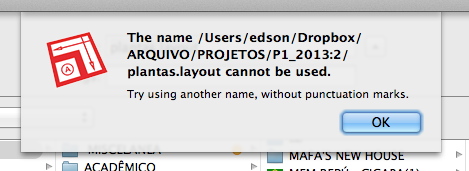
two strange things are happening to me. I am not sure it is relevant to the problem, but I have my files in a dropbox folder. what happens is that in sketchup Send to Layout is greyed out and in Layout I cannot save the file as I get a weird message (see attached).
has anyone encountered this problem? any ideas as to how to solve it?
thanks.
I have tried many times to export files from Layout to dwg/dxf. it always fails: not a single line gets exported.
I followed some advice given in another thread but it did not help me. I am not AutoCad savvy. all I want is to export the line work for the people doing structures, etc. they will be accompanied by nice pdf files with the real stuff in them.
any advice?
hi juju,
below I post a list of "must have" plugins; they happen to be the ones I use most. yes, 1001bit Tools is immensely useful. two other plugins I strongly recommend are Skalp and Layers Panel.
Sketchucation Plugin Store from Sketchucation
Selection Toys from EW
Rotate Rectangle from EW
Path Copy from Smustard
Weld from EW/Smustard
Profile Builder from EW/Smustard
Artisan from EW
Selection Memory from EW
Instant Site Grader Nui from Vali Architects
Instant Roof Nui from Vali Architects
Instant Road Nui from Vali Architects
Instant Grade Nui from Vali Architects
CFL Repeat Copy from EW
Layers Panel from Sketchucation
Extrude Tools from Sketchucation
Round Corner from Sketchucation
Repaint Face from EW
Fredo6 Tools from Sketchucation
CLF Tools from EW/Sketchucation
Tig Tools from Sketchucation
1001bit Tools from EW
Skalp
@skalp said:
What to do if you have problems with installing Skalp 1.0 Beta 8:
Due to the changing of the name and the path to meet the Sketchup Extension Warehouse guidelines we see on some computers trouble with the installation. You can do the following to fix this. Look at your plugin directory*. You wil see two directories one Skalp and the other Skalp_Skalp, there is also one file Skalp_Skalp.rb. If the file Skalp.rb is still there you may delete this file.
[attachment=0:kiqvykc6]<!-- ia0 -->Schermafbeelding 2014-09-03 om 08.40.42.jpg<!-- ia0 -->[/attachment:kiqvykc6]
You can now try to startup SketchUp and Skalp again. If this doesn't fix the problem feel free to contact us.*SketchUp plugin directory:
Windows: C:\Users\YOUR USERNAME\AppData\Roaming\SketchUp\SketchUp 2014\SketchUp\Plugins
Mac OS X: Open a new Finder window, press and hold the Option key on your keyboard, the click Go in the menu bar > Library > Application Support > SketchUp 2014 > SketchUp > PluginsThe Skalp Team.
the Skalp and the Skalp_Skalp folder contain absolutely the same stuff. can I delete the Skalp folder safely?
@skalp said:
@jclements said:
New updates:
Should the previous installation be deleted before installing the new or will the update write over the existing installation?It depends. If the previous beta version wasn't expired and you clicked on the auto update feature. This previous version is uninstalled without removing your license file and you pattern files, sketchup is closed and you automatically go to the download page. Startup Sketchup again, install Skalp and you're up and running again.
When the beta version is expired you can install the new version right on top of the previous. You only need the restart SketchUp after installation. And you are also up and running again.
The Skalp Team.
what do you mean by "auto update feature" ? what am I missing here? I see no auto update feature anywhere in my mac version!
another thing: I have installed updates in all sorts of ways and it always goes well. right now I downloaded the latest in the form of an .rbz file. just updated with sketchup on and it started working right away.
@jiminy-billy-bob said:
@skalp said:
On special request a Video Tutorial about Skalp Pattern Layers (color by layer).
Skalp Pattern Layers uses an undocumented feature of Color by Layer in combination with the hidden line render mode to create an architectural section with everything white in the model except the section.
I see in your video that you add a bunch of layers. I guess you can get to high numbers of layers if you have a lot of different section patterns?
Maybe you could make your plugin work with Layers Panel, to automatically put all those layers in a layer group, and automatically collapse it so that they don't take much space in the dialog.
You can use LP's API for that : http://sketchucation.com/forums/viewtopic.php?f=180%26amp;t=57777
after realising how this method works I immediately thought of creating a group for the Skalp layers in LP. if this can be made automatically so much the better.
@skalp said:
@edson said:
very good! I know this was explained in the user guide but seeing you do it completes the information.
if I may suggest another topic for a video, how about one on how to save skalp settings to a sketchup template?
regards.
Edson,
After you setup a full Skalp model you can delete all entities, except the section planes and save it in a standard sketchup template.
The Skalp Team.
so the template will have a couple of section planes that section nothing? like ghost section planes? how does one deal with those section planes in a new model?
very good! I know this was explained in the user guide but seeing you do it completes the information.
if I may suggest another topic for a video, how about one on how to save skalp settings to a sketchup template?
regards.
you are welcome and deserving of this praise.
a lengthy tutorial on the advanced use you describe from page 25 of the user guide would be very appreciated. everyone using Skalp professionally would thank you for that.
best regards.
as an early buyer who complained about the lack of tutorials and guides it is only fair that I come here to say that the Skalp people have been posting very instructive short videos and in large number, covering many aspects of the plugin. at this rate, they will surely cover all of it.
besides, the latest user guide is superb in that it covers in detail all the features and tells us things that are not (yet?) in the videos.
skalp is a hugely useful plugin and is worth every cent you pay for it.
@whitelock said:
Hi All, I am not very computer savvy in terms of how to download and install things on a mac, how do you get this new build for the bug fixes, do you uninstall old version first. please help.
the podium site has all the instructions on how to uninstall and install the new build.
@bigstick said:
Yes, we recently released a new build which fixes this behaviour.
I had been affected by this glitch for a long time. the new build has really fixed it. now I can just quit Sketchup.
dave and jim, thanks for fixing this irrelevant but annoying problem.
best regards.
what if you just created a pdf explaining each item in the dialog that opens when one creates a new RS? for people who do not have English as their first language the dialog is not self-explanatory.
to give you feedback: I installed RS in my mac smoothly but I cannot get it to fill the sections it produces. I am not sure if it is a problem or my lack of knowledge of how to use RS.
cheers.
@pgarmyn said:
Thanks for the kind words
About documentation:
I planned to make very short 'how-to' videos. In my opinion, that is the best way to explain the basic steps of the workflow. And traduction is almost superfluous.
About Mac:
I got help from the mac community, but it is almost impossible to make regular updates without testing the new code parts in mac and windows. I dont have a mac. Maybee i should buy a cheap (paradox?) or a second-hand mac.
About charging:
I don't have much time outside my every-day job (architect, 98% execution, conception is only an exception), family, etc.
Charging wouldn't give me more free time to spent on ruby & SU.
....
So, be patient
thanks for your kind reply. believe it or not there is a cheap mac: the mac mini. it comes without screen, keyboard or mouse. you can just connect the ones you have.
I am patient. it is just that RichSection is so promising one wants to get it working right away. keep up the great work.
pgarmyn,
this is a plugin with enormous potential. so much so that it deserves better documentation. your videos go a long way to show us how RichSection works but they go too fast. I know it is too much to ask but would you consider releasing a pdf describing all the features and a reasonable workflow?
I, and am sure many others, would be willing to pay for a plugin like this if it can boost one's productivity. charging for it would perhaps encourage you to produce that documentation.
I do hope you can get the mac version of it working. why do you not ask for help from other authors who have faced the same problem? the author of Layers Panel had similar problems and managed to fix them so that his excellent plugin is now running smoothly on mac.
best regards.
I bought Skalp with the same feeling vented by most of you guys: it seems to be a very promising plugin.
however, its release seems to have been premature at least in what regards documentation. so far there has not appeared one single tutorial dealing with complex sections like the ones one does in real life. to apply textures to a simple cube is easy enough but what about doing it to a complex section made up of nested groups and components.
not to mention the fact that many of features on the toolbars do not work yet on Mac OS.
I still think Skalp can be of great help but so far it has not lived up to one's expectations. sometimes it is better to wait a little longer and come up with more finished product than to rush to release it and have to face a lot of complaints.
