sketchucation logo sketchucation
    • Login
    1. Home
    2. Edson
    3. Posts
    Oops, your profile's looking a bit empty! To help us tailor your experience, please fill in key details like your SketchUp version, skill level, operating system, and more. Update and save your info on your profile page today!
    ⚠️ Important | Libfredo 15.6b introduces important bugfixes for Fredo's Extensions Update
    Offline
    • Profile
    • Following 0
    • Followers 0
    • Topics 235
    • Posts 2,415
    • Groups 1

    Posts

    Recent Best Controversial
    • RE: [Plugin] Layers Panel 1.2.1

      hi jbb,

      it is working on mac os 10.8.5 now.

      almost all the features work, except the render one. I understand the kettle icons are for one to disable scenes as far as rendering goes. however, nothing happens when I hover the cursor over the kettle icons: there is no indication that I can click on them, as all the others do.

      when clicking on the podium icon I got a message that it was not installed but the rendering process started anyway although id did not go through to the end.

      I am sure you will fix those little glitches soon. Layers Panel is already an important part of my workflow. thanks.

      best regards.

      posted in Plugins
      EdsonE
      Edson
    • RE: [Plugin] Layers Panel 1.2.1

      first of all, thanks for porting this plugin to Mac OS.

      I am running mac os 10.8.5 and am facing some problems that I will report as they happen.

      the first is the fact that when I open your layers panel it does not recognize the current layers but loads the ones the file opened with.

      the second is the fact that I highlight a layer, select a group and try to move it to that layer but nothing happens.

      posted in Plugins
      EdsonE
      Edson
    • RE: I'm now a proud Grandad!

      congratulations to you all, mike! now you are going to enjoy having a kid around. being a granddad is much easier than being a dad...

      posted in Corner Bar
      EdsonE
      Edson
    • RE: Dynamic Components Training

      it is a pity the videos are not in english. they could at least be subtitled the way fredo6 does his videos.

      posted in Dynamic Components
      EdsonE
      Edson
    • RE: [Plugin] Canvas v1.1.3

      I am a mac user who is also having problems with canvas, it just does not work for me. I tried with groups and components. I am only able to select the options on the input box after hitting the space key but that does have any consequence: I just cannot place a single instance of the selected group/component.

      mac os 10.8.5 and sketchup 13.0.4811.

      posted in Plugins
      EdsonE
      Edson
    • RE: Useful MAC Apps and Hardware [Ongoing Updates]

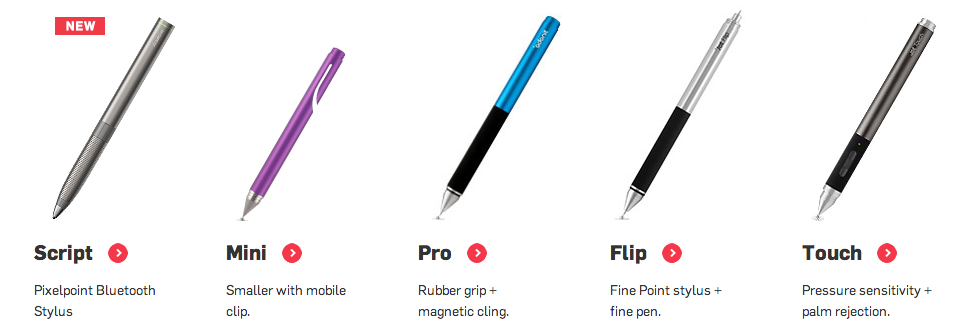
      speaking of pens, have a look this set of pens. the one that caught my attention is the jot script, as it works with Penultimate/Evernote, two apps I use with my iPad.


      Screen Shot 2013-11-08 at 5.38.13 PM.png

      posted in Hardware
      EdsonE
      Edson
    • RE: MAC pointing devices with SU?

      the Magic Mouse is great for almost everything but SU. I use the wireless Apple Mouse for the same reasons. I do not mind its heaviness; I find it less of a problem than the USB cable.

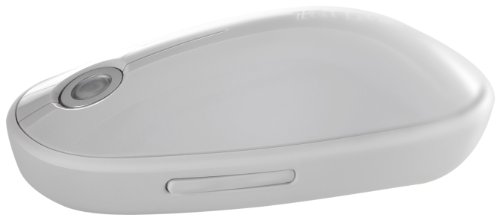
      as the wireless Apple Mouse has been discontinued I bought a Targus Mouse for when it ceases working (which should not happen soon as I only use the Apple Mouse for modeling). instead of a scroll wheel it has a small touch surface. its effectiveness remains to be tested.

      21NNEwefhKL.jpg

      posted in Hardware
      EdsonE
      Edson
    • RE: Sketchup 2013 won't close

      this is a possibility as I use two screens. I am attaching the latest crash log, in case someone knows how to interpret it.


      SketchUp_2013-09-17-145239_MafasBook-2.crash.zip

      posted in SketchUp Bug Reporting
      EdsonE
      Edson
    • RE: Sketchup 2013 won't close

      I have the same problem as you have. I am told there must be some plugin conflict but the hard thing is to find out what is going on.

      posted in SketchUp Bug Reporting
      EdsonE
      Edson
    • RE: How PAOK FC stole my design from 3D warehouse [IMO]

      this is indeed a difficult subject because historically architecture has been created having other architectures as point of departure. just think of how many "miesian" office towers there are out there obviously modelled on Mies van der Rohe Seagram Building or lesser known towers.

      thus the discussion of plagiarism in architecture is a very difficult one. most of the time designing after someone's example is a sort of homage and it always involves some kind of adaptation to different circumstances pertaining to place, program and construction possibilities. this determines that in general any project is unique no matter how much it may have been inspired by another.

      however, what we see in the images does not seem to be the same case. it seems as if the initial design has been taken forward by someone else without bothering to alter it in any significant way.

      to discuss the matter in court is one possibility but it will certainly cost a lot and will probability drag on for a long time. the question for you is: is it worth the cost and the stress? are there precedents for this kind of lawsuit in your country? could you not approach the promoters and explain the case to them? perhaps you could reach some kind of settlement by which you get paid for your ideas.

      just a couple of thoughts. good luck.

      posted in SketchUp Discussions
      EdsonE
      Edson
    • RE: Problems with BezierSpline

      @fredo6 said:

      Edson,

      When you get a crash, could you send the bug report to Trimble, specifying this is about BezierSpline.

      So far, I don't have enough elements to figure out in which area it can be. Since SU8 and SU13 use the same version of Ruby, it must be something more subtle.

      Thanks

      Fredo

      I have already done it.

      posted in SketchUp Discussions
      EdsonE
      Edson
    • RE: Problems with BezierSpline

      no, converting does not cause crashes.

      one thing I noticed is the fact that sometimes I am able to get away with generating a piece of geometry if I use just one tool. but as soon as I try to create something using a second tool SU crashes, as if it was somehow overloaded.

      posted in SketchUp Discussions
      EdsonE
      Edson
    • RE: Problems with BezierSpline

      Do you get the crash:

      • when you start a tool
      • when you just move the mouse
      • when you start entering points
      • when you finish and the geometry is generated
        Also, do you get a crash when you 'convert' a curve.

      If you have SU8 installed on your latest OSX Mac, do you get a crash too?

      Sorry, I have all these questions because I don't have a Mac at hand and need to figure out where to start with.

      Fredo[/quote]

      it happens sometimes when I finish and the geometry is generated, some other times when I am still generating it.

      I never got any crashes on SU 8.

      what do you mean by converting a curve?

      posted in SketchUp Discussions
      EdsonE
      Edson
    • RE: [Plugin] UCS Manager

      I am puzzled too. the UCSs you created are listed on my mac. however, I created UCS 04 and it did not register again.

      posted in Plugins
      EdsonE
      Edson
    • RE: [Plugin] UCS Manager

      here you have a skp file with 5 UCSs registered, from 01 to 05. if you still want me to run the attributes thing, let me know.

      you forgot to attach it.


      UCS_Manager_test.skp

      posted in Plugins
      EdsonE
      Edson
    • RE: [Plugin] UCS Manager

      didier,

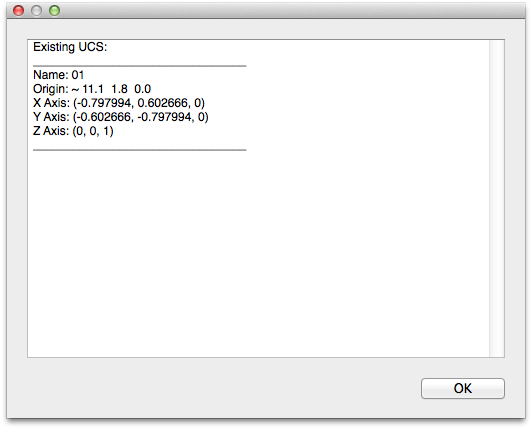
      I created three UCSs: 01, 02 and 03. then I clicked on List UCS and it shows only the first one (see below).

      please. forgive my thickness but I do not know where is the Attributes Manager you mentioned. is there such a thing on mac?

      Screen Shot 2013-09-15 at 9.12.40 AM.png

      posted in Plugins
      EdsonE
      Edson
    • RE: [Plugin] UCS Manager

      hi didier,

      as simple to operatte as this plugin may seem to be, I am having trouble with it.

      I have no problem saving the first custom axes position. but after the first it will not save any other. I am stuck with just one custom axes system.

      I am probably doing something wrong. but what?

      I use mac os x.

      regards.

      posted in Plugins
      EdsonE
      Edson
    • Problems with BezierSpline

      I am having problems in one of my macs with BezierSpline (by Fredo6). as soon as I try to draw anything with one of its tools SU crashes.

      I am running the latest OS X, as well as the latest LibFredo.. could it be because BZ has not been updated for 2013 (the latest posted version is dated 2011)?

      thanks.

      posted in SketchUp Discussions sketchup
      EdsonE
      Edson
    • RE: 2013 crashes everytime i use fredo6's bz tools?

      I have the same problem in one of my 3 machines. they all run Mountain Lion, the latest SU and the latest Fredo plugins, but the crashes occur in only one of them.

      posted in SketchUp Discussions
      EdsonE
      Edson
    • RE: [Plugin] Layers Panel 1.2.1

      I hope you do it. why not ask for help from the other authors on this forum? they have been able to port their plugins to mac os.

      posted in Plugins
      EdsonE
      Edson
    • 1 / 1