sketchucation logo sketchucation
    • Login
    1. Home
    2. Dave R
    3. Posts
    Oops, your profile's looking a bit empty! To help us tailor your experience, please fill in key details like your SketchUp version, skill level, operating system, and more. Update and save your info on your profile page today!
    โš ๏ธ Important | Libfredo 15.6b introduces important bugfixes for Fredo's Extensions Update
    Offline
    • Profile
    • Following 1
    • Followers 5
    • Topics 672
    • Posts 19,189
    • Groups 4

    Posts

    Recent Best Controversial
    • RE: A Bench and a Stool

      @Rich-O-Brien indeed it is. So quick and simple too.

      posted in Gallery
      Dave RD
      Dave R
    • A Bench and a Stool

      Edmundson Bench.png
      Playing in SketchUp 2025. The bench and stool were modeled a long time ago. Cloth added with Clothworks. The cloth and floor have textures from the curated collection in the 3D Warehouse. Nothing but SketchUp and PaintdotNet.

      posted in Gallery
      Dave RD
      Dave R
    • RE: Mid Mod Chest

      Very cool!

      posted in Woodworking
      Dave RD
      Dave R
    • RE: [Plugin] CopyAlongCurve 1.0.4 (28 February 2017)

      @Requisher You could learn to do the Ruby coding and add a toolbar. Might be easier to just create a keyboard shortcut for it.

      posted in Plugins
      Dave RD
      Dave R
    • RE: Roof.rbz

      The lack of a signature will not prevent the extension from running unless you set the loading policy to prevent it. Set the policy to Unrestricted or Approve ... and the extension will load.

      Screenshot - 2_15_2025 , 11_13_23 AM.png

      posted in Extensions & Applications Discussions
      Dave RD
      Dave R
    • RE: Posted image recovery

      I looked up your first post. It appears that you linked to images hosted on ImageShack. Maybe you can contact them to see if they still have them somewhere. Perhaps they are still there if you log in to your ImageShack account.

      Screenshot - 2_13_2025 , 8_43_43 AM.png

      posted in Corner Bar
      Dave RD
      Dave R
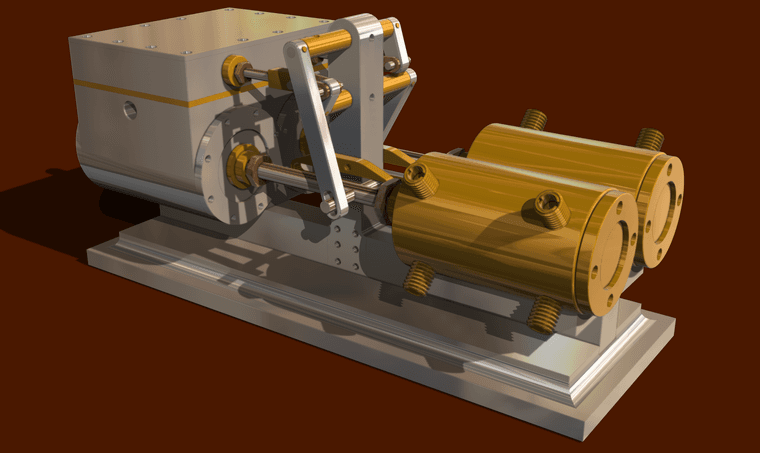
    • RE: Another Machinist's Model of a Steam Engine.

      @tuna1957 thank you sir!

      posted in Gallery
      Dave RD
      Dave R
    • RE: Another Machinist's Model of a Steam Engine.

      Thankee gentlemen.

      posted in Gallery
      Dave RD
      Dave R
    • RE: Another Machinist's Model of a Steam Engine.

      Kacio LS-1_14 Engine layers.png

      posted in Gallery
      Dave RD
      Dave R
    • RE: [Plugin] Helix along curve

      @Aurora2017SRL what do you mean by "floating shortcut"? Are you referring to the panel where you enter the values?

      Screenshot - 2_10_2025 , 9_39_16 AM.png

      posted in Plugins
      Dave RD
      Dave R
    • RE: Another Machinist's Model of a Steam Engine.

      @Bryan-K thank you very much, sir.

      posted in Gallery
      Dave RD
      Dave R
    • RE: [Plugin] Lines to tubes

      @Mahasamaritan said in [Plugin] Lines to tubes:

      How can you make Lines to Tubes work in Sketchup 2014?

      Just install it using the Sketchucation ExtensionStore tool, select the edges and then run it. It works just fine in older SketchUps.

      UFmw_what_can_isay.jpg

      posted in Plugins
      Dave RD
      Dave R
    • RE: Unwanted lines showing in hybrid mode

      The issue is a graphical thing caused by your model being placed at a huge distance from the origin.

      Screenshot - 2_6_2025 , 9_51_51 AM.png

      It's more than a kilometer away. Reset the axes and then move your model to the origin and update the camera position for the scenes. for a detail thing like this I would copy the objects of interest into a separate model file so you can keep them close to the origin. An alternative would be to leave the viewport rendered as Raster and remember to disable the Output Override in Document Setup>Rendering.

      Here I copied that frame object to a new SketchUp file and placed it at the origin. Then I relinked the viewport to that new file. It now renders correctly and it actually updates almost instantaneously when changes are made in the SU model.
      Screenshot - 2_6_2025 , 10_42_08 AM.png

      In your model I see you have Length Snapping enabled. This can get in the way of creating accurate models. I would also suggest setting Display Precison higher than the precision you require in your LO file. That'll help you avoid dimensional issues.
      Screenshot - 2_6_2025 , 9_48_36 AM.png

      In LayOut I see you are modifying the Camera position for the viewport. It would be better to set up the camera position correctly for the scene in the SketchUp model and avoid modifying it in LayOut. That will avoid potential problems that would make your work more difficult.

      posted in LayOut Discussions
      Dave RD
      Dave R
    • RE: Discussion - object is not a manifold solid !?

      @alexpacio2013 said in Discussion - object is not a manifold solid !?:

      I guarantee you that Bool tools 2 works and works better than the standard tools even among solids

      You're preaching to the choir on that point. I don't use nor even recommend the native Solid Tools.

      I guess I have no problem, even for complex objects, with making them solids so I get predictable results when using Bool Tools 2 or Eneroth Solid Tools.

      posted in SketchUp Discussions
      Dave RD
      Dave R
    • RE: Discussion - object is not a manifold solid !?

      @alexpacio2013 said in Discussion - object is not a manifold solid !?:

      Bool tools 2 also works on non-solid objects.

      However it doesn't always yield the desired results when one of the objects isn't solid. Best to make sure the objects are clean and solid before running Bool Tools 2.

      posted in SketchUp Discussions
      Dave RD
      Dave R
    • RE: Offset with curves instead of sharp corners

      By definition that's not a true offset.

      posted in Extensions & Applications Discussions
      Dave RD
      Dave R
    • RE: Offset with curves instead of sharp corners

      I don't know of an extension that would do what you ask. If the radius of the arcs on the outside is larger than the offset distance you will get a radius on the offset corners, too. In your example, you could radius the corners of the inside loop of edges and offset outward.

      Question for you: Suppose an extension existed to do what you want. What radius would you expect on the corners of the offset edges?

      posted in Extensions & Applications Discussions
      Dave RD
      Dave R
    • RE: A Recent 3D Printing Project

      @Rich-O-Brien thanks Rich. You're right. The bag adapter thing wouldn't be available off the shelf anywhere.

      There are alternatives for the footplate thing but as you say, they are much more expensive. A friend had ones made of HDPE installed on her chair.
      39bea2e0-3623-4105-a184-4216624824b4.jpg

      I think the price was about $250 or $300. My version has less than $3 worth of filament in it and I can't charge for the development time. ๐Ÿ˜‰ My version weighs about a third of the one she has.

      @Mike-Amos thank you.

      posted in SketchUp for 3D Printing
      Dave RD
      Dave R
    • RE: A Recent 3D Printing Project

      A few more 3D printed things.

      The H-shaped thing fits into the back pocket of a waist pack style camera bag and the C-shaped clips attach to it through the fabric with M6 screws. I printed some temporary ones while waiting for proper metal ones to show up. The 3D printed screws worked fine as long as they weren't torqued too tight.
      54049772835_c7c9ed1387_k.jpg

      This is a sort of adaptor for attaching the bag on a new chair. The new chair's cross tube is farther back and larger diameter than on the old chair.
      54046789246_94cc91414e_k.jpg

      And here's the bag in place on the adapter on the new chair.
      54049819564_5e82a6f8fd_k.jpg

      This is an auxilliary footplate with side guards to keep feet from falling off the sides. Temporarily installed for the picture. Waiting for screws and lock nuts to come.

      IMG_20250201_100354625.jpg

      posted in SketchUp for 3D Printing
      Dave RD
      Dave R
    • RE: problem using V-RAY 5 with SU 2019

      Contact Customer Support at Chaos Group so they can help you sort out your license.

      posted in SketchUp Discussions
      Dave RD
      Dave R
    • 1 / 1