🔌 Smart Spline | Fluid way to handle splines for furniture design and complex structures. Download

  • [REQ] PDF Importer

    Plugins
    20
    0 評價
    20 貼文
    1k 瀏覽
    Dave RD
    @FlorinAp that's exactly the same as it's been on Mac forever. The developers have indicated that vector import is on their roadmap.
  • 0 評價
    5 貼文
    133 瀏覽
    S
    @Rich-O-Brien thanks
  • [Plugin] Zero Tilt Camera

    Plugins
    18
    0 評價
    18 貼文
    15k 瀏覽
    F
    Finally, i think i figured it out - the best description for this one is "perspective perpendicular center view", i used it a lot through the first button of Curic Align View, and now through Dezmo Dice "center (front, left, right, back) view". Somebody please tell me if I'm wrong.! It is very useful, and in SketchUp, there is no way that you can manually and precisely achieve this.
  • Help with plugin

    Extensions & Applications Discussions
    9
    0 評價
    9 貼文
    321 瀏覽
    Dave RD
    @panixia said in Help with plugin: is definitely not the best for textured models tho. I know that. I was only responding to the OP's comment that SketchUp 2017 won't import .stl files. I agree that other formats would likely be better.
  • 2d tools

    Newbie Forum sketchup
    8
    0 評價
    8 貼文
    421 瀏覽
    TIGT
    V8.0 is released https://sketchucation.com/pluginstore?pln=2Dtools Or via the ExtensionStore dialog. It fixes a glitch with v2026 whereby some MAC users could not get the TAB key press/up to work to open dialogs in some tools, and some PC users had to press/up 4 times to make TAB work. But <=2025 users had no issues. I've now improved the onKeyUp methods to optimize TAB use in v2026, but it can still be flaky for some users. including me needing 4x press/up! So as an additional option I've added one press/up on the Shift key which will also open the dialogs, in certain tools like LineStyle and Hatching. The Help pages explain this dialog opening more fully. Please try and report back issues...
  • Undo history list

    Plugins
    10
    0 評價
    10 貼文
    4k 瀏覽
    F
    Yes, there is one with a visual history - Samuel Tallet visual_history But, in my experience, it requires some solid CPU...
  • [Plugin] Quick selection

    Plugins
    3
    2
    1 評價
    3 貼文
    218 瀏覽
    F
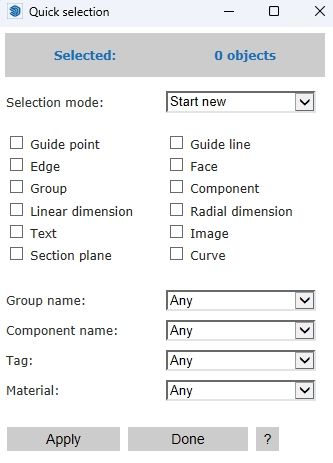
    This extension is very useful, with an exception - by default, it selects hidden objects and tags, and there is no way to change that behaviour.
  • TIG 2D Tools Line Style and Hatch Dialog Box Not Opening

    SketchUp Bug Reporting
    7
    0 評價
    7 貼文
    277 瀏覽
    TIGT
    A new signed Version 8.0 of the toolset is available as an RBZ in the PluginStore https://sketchucation.com/pluginstore?pln=2Dtools or for AutoInstall/Update through the ExtensionStore dialog. It addresses the TAB keycode weirdness recently reported when trying to open a dialog for certain tools, like LineStyle and Hatching etc. The TAB press/up was itself introduced for >=v2020 when the right-click in empty-space context-menu option was removed from the Ruby API. It had to be a TAB press/up because MAC has always ignore a simple TAB press. Recently it's been found that in v2026 on a MAC a TAB press/up sometimes fails to work at all, and other times on PCs x4 press/up were needed to get TAB to call the dialog - whilst weirdly some users experienced no issues with it at all, on either OS ! I have now error trapped the keycode capture for TAB as best I can, note that on <=v2025 there's no problems with TABx1 press/up [sadly my own PC still needs TABx4 press/up with v2026], and TABx1 may work with v2026 for some users and OSs, BUT as a fallback I've now introduce an alternative additional key press/up - Shift - which [I hope] works with one press/up on any OS and SketchUp version. So if you have any v2026 TAB annoyance you can now just press/up the Shift key instead to open the dialogs. Please try it and report any issues. I've updated the More-Info>Release-Notes and the toolset's Help HTML files to reflect these changes.
  • Drink driving?

    Corner Bar
    6
    0 評價
    6 貼文
    184 瀏覽
    L
    Looks like a case of poor engineering to me
  • Playing arround with Sketchup diffusion

    Gallery
    99
    0 評價
    99 貼文
    7k 瀏覽
    jo-keJ
    @Rich-O-Brien a friend of mine (working at the tramwaycompany) is doing the prints for me. [image: 1767956369041-2025-12-02-11.07.48-resized.jpg] another person is doing the paintings [image: 1767956656600-a841e357-bd1c-456b-b2a2-5be5b996cf13.jpg] [image: 1767956673368-720c0ebb-7db0-4098-912b-77e021ba416c-resized.jpg]
  • [Plugin] MaterialConsolidator

    Plugins
    59
    0 評價
    59 貼文
    42k 瀏覽
    Didier BurD
    @ramiduscz Hi, Which texture replacer are you using ? ThomThom's 'material replacer' (works like a charm, although you need to replace materials one by one. It respects UV's if tou hit the Ctrl key. [https://extensions.sketchup.com/extension/4137f7fc-a81f-4ef9-9ec8-b6dd8a0d9086/material-replacer](link url)
  • 3D Truss Models

    Plugins
    2k
    0 評價
    2k 貼文
    976k 瀏覽
    medeekM
    Version 3.7.6 - 01.07.2026 Added an offset parameter for coffer trusses (non-raised heel only). [image: 1767827418771-truss_su914_800-resized.jpg] [image: 1767827418832-truss_su915_800-resized.jpg]
  • Having a bad day?

    Corner Bar
    4
    1 評價
    4 貼文
    139 瀏覽
    ntxdaveN
    @L-i-am said in Having a bad day?: Hi Guys have not been very active of late as I am temporally on a med that completely stifles creativity, hence no sketchup. However this appeared on facebook. It made me smile from ear to ear. Careful though it can be I know how you feel. I had some surgery a few months ago and am trying to get back too SketchUp. As @rich-o-brien and a couple of others can tell you, I have been having some problems getting back into it. Trying to use some features that I either have not used before (or at least for a long time) and have asked some pretty silly/dumb questions. However, I am determined to learn/get back with it. Hope all is well with you and you can get back with it. I know you have posted some great work in the past and you will get there again.
  • [Plugin]Unique colors for layers

    Plugins
    3
    0 評價
    3 貼文
    693 瀏覽
    TIGT
    My old https://sketchucation.com/pluginstore?pln=TIG_LayersFromList and https://sketchucation.com/pluginstore?pln=TIG_LayersToList Let you import / export layers from / to a text file in the form NAME:R,G,B per line. So you could edit [or make] the file with customized RGB values and names as desired...
  • 0 評價
    4 貼文
    175 瀏覽
    TIGT
    Does your set up meet the requirements listed here ? https://help.sketchup.com/en/sketchup/system-requirements The fact that it runs OK on a similar machine suggests that something is 'missing' in the set up with the problems - hardware or software ?
  • Merry Christmas

    Gallery
    10
    2
    5 評價
    10 貼文
    347 瀏覽
    majidM
    it is fierce mate. Thanks . lets hope for positive changes.. and a lasting peace in world.
  • AI Render Enchancer Extensions or tools

    Extensions & Applications Discussions
    3
    0 評價
    3 貼文
    214 瀏覽
    M
    I have been testing MyArchtectureAI quite some. I also purchased the Pro version with unlimited credits. In my case the results are not that great even when doing editing. There are just too many random AI stuff happening. I just tested Archfine.com and it gave excellent results. There was editing needed because AI didn't get creative. Unfortunately it was not possible to do more test because it was possible to do only 1 test render with the free version. It seems that the solutions (Visoid, Archfine, Viz Maker) that use NanoBananaPro are giving the best results. https://vizmaker.vizacademy.co.uk/ has also somekind of integration with Sketchup but it seems to just export the image, no material info or anything. Viz Maker has also quite good edit possibilities.
  • [Plugin] Eclate_Deplace (fragmentation-exploded view)

    Plugins
    161
    0 評價
    161 貼文
    226k 瀏覽
    TIGT
    It might work. Just try it... İşe yarayabilir. Bir deneyin...
  • Prêts à tâter des Nurbs ?

    Français
    446
    0 評價
    446 貼文
    189k 瀏覽
    pilouP
    2026Moi3D Naca Airfoil Profil Generator French Version Beta V 5 https://moiscript.weebly.com/aile-naca.html https://www.ntop.com/ [image: 1767481023108-naca_2026.jpg]
  • SketchUp WebView2 HTML Dialog Patch

    Extensions & Applications Discussions
    2
    0 評價
    2 貼文
    96 瀏覽
    Rich O BrienR
    https://developer.microsoft.com/en-us/microsoft-edge/webview2 AI is not good source for a solution. You could be going down a rabbithole to nowhere. A better option would be to upgrade SketchUp if that's in your budget.