🔌 Easy Offset | Offset selected faces in SketchUp in positive and negative offsets. Download
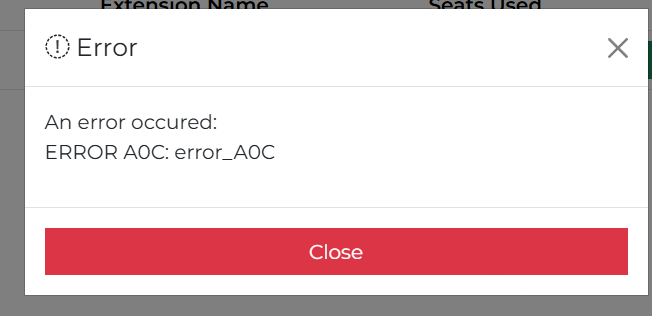
  • Unability to activate my license

    3
    1
    0 Votes
    3 Posts
    38 Views
    TIGT
    While you are preparing the info for Rich can I also ask: the A0C error means the computer name and what's in the license file don't match., so have you changed your computer name ? Or copied license files between different computers ? Or perhaps your computer-name [or even user-name?] contain non-standard characters [like accented letters or other non-standard characters] - the Microsoft requirement is for computer names to have only ASCII alphanumeric characters [A-Za-Z0-9] and a few common punctuation characters, and not following this can result in weird issues when comparing licenses and computers etc - I am guessing you are perhaps french so accents could be the issue...
  • TIG 2D Tools Line Style and Hatch Dialog Box Not Opening

    7
    0 Votes
    7 Posts
    163 Views
    TIGT
    A new signed Version 8.0 of the toolset is available as an RBZ in the PluginStore https://sketchucation.com/pluginstore?pln=2Dtools or for AutoInstall/Update through the ExtensionStore dialog. It addresses the TAB keycode weirdness recently reported when trying to open a dialog for certain tools, like LineStyle and Hatching etc. The TAB press/up was itself introduced for >=v2020 when the right-click in empty-space context-menu option was removed from the Ruby API. It had to be a TAB press/up because MAC has always ignore a simple TAB press. Recently it's been found that in v2026 on a MAC a TAB press/up sometimes fails to work at all, and other times on PCs x4 press/up were needed to get TAB to call the dialog - whilst weirdly some users experienced no issues with it at all, on either OS ! I have now error trapped the keycode capture for TAB as best I can, note that on <=v2025 there's no problems with TABx1 press/up [sadly my own PC still needs TABx4 press/up with v2026], and TABx1 may work with v2026 for some users and OSs, BUT as a fallback I've now introduce an alternative additional key press/up - Shift - which [I hope] works with one press/up on any OS and SketchUp version. So if you have any v2026 TAB annoyance you can now just press/up the Shift key instead to open the dialogs. Please try it and report any issues. I've updated the More-Info>Release-Notes and the toolset's Help HTML files to reflect these changes.
  • Export to .3ds takes forever

    Unsolved
    2
    1
    0 Votes
    2 Posts
    61 Views
    Dave RD
    The developers haven't have made any changes to SketchUp 2021 since late in 2021. The .3ds exporter in SketchUp 2021 wouldn't have been changed, either. You can be certain that the developers won't be looking at the exporter in old, unsupported versions of SketchUp. Maybe there's something in your model that is resulting in the slow down. You could share the .skp file. We could try the export in the current version and see what happens. @onzki said in Export to .3ds takes forever: I’m using 2021 Pro Your profile says you are using SketchUp 2024. Do you get a different export result with that version?
  • 2026 Materials Dropdown showing ALL folders and subfolders

    6
    3
    0 Votes
    6 Posts
    388 Views
    Dave RD
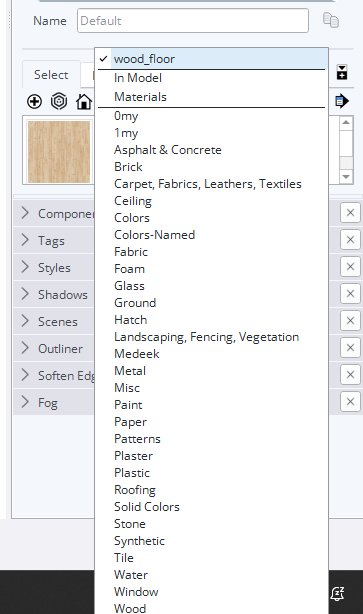
    I see the same long list of material collections. I have nearly twice as many subfolders as can be displayed on screen at one time. This has been relayed to the developers and hopefully they will revert back to the folder-subfolder thing.
  • Unique Tag

    9
    0 Votes
    9 Posts
    213 Views
    D
    This is helpful: [image: 1762771353282-screenshot-2025-11-10-124039.jpg] [image: 1762771353292-screenshot-2025-11-10-124005.jpg]
  • Copies of Cut Opening Component, Not Cutting the Opening

    13
    0 Votes
    13 Posts
    2k Views
    gullfoG
    yeah, not a fan of live components. as a "component factory" it has value, but for many of us doing complex work where dynamic components can be rapidly adjusted, scaled, etc. the DC need a lot of love which it's not getting. what would also be nice - letting non-pro users use DC but no option to peek inside or adjust anything other than exposed parameters. but i'm thinking somewhere someone got the idea of the potential for charging people to generate a "live component" and download it - voila! instant money maker... eeerrghh.
  • SU Render Engine

    2
    0 Votes
    2 Posts
    161 Views
    SektaS
    Update on this post, I went out and upgraded my desktop to the unit mentioned above and I am still have the same issue with LO crashing. I had someone from tech support remote into my computer for an hour but he couldn't find the issue. I am working on projects that have been 4-5 years in the making so the model has gone through a number of SU upgrades. I did an experiment and created a new SU 2025 file and copied the base model over from the old file and created a new LO file and the problem seems to be solved (touch wood). I can now use the new graphics engine without LO or SU crashing. Along with this I changed my file location from OneDrive, which was slow and laggy, back to Dropbox. I know not ideal to have these files in the cloud but DB seems to work way better than OneDrive. So, SU2025 cant like older SU files, or at least that is what I am finding.
  • Sketchup Files Preferences is not working

    7
    0 Votes
    7 Posts
    294 Views
    gullfoG
    it's less the risk of updates and more that it's forcing the program data folders to be rebuilt EVERY F'ING TIME i double click on an skp file. and it's ignoring both the preference settings AND the manual edits on the private preferences json file (and as a note, the private file does not have any thing other than my appdata folders for the materials and material browser, styles and style browser, and component and component browser) so there is some special magic happening to "helpfully fix" my install every time. this is not the behaviour in the 2024 version nor the earlier 2025. so someone changed the behaviour, adding things like "would you like to purge your model before saving? it can help improve performance" -- i get it. there are people who will f-up their basic installation so "self-healing" can be useful. but simply ignoring or overriding my settings (used for years mind you) is problematic. please fix this.
  • Line Scale Multiplier error

    2
    1
    0 Votes
    2 Posts
    134 Views
    Dave RD
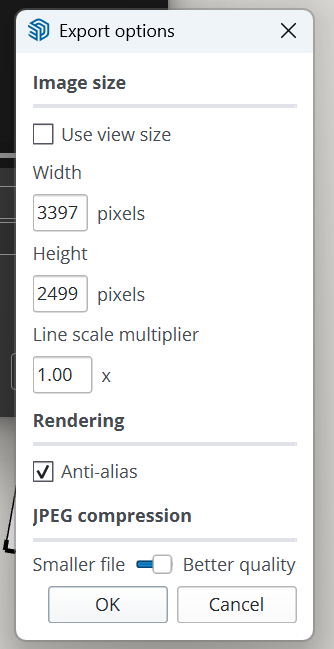
    Export Options aren't part of the template settings, though.
  • Shortcut command does not work with multiple selected texts.

    2
    1
    0 Votes
    2 Posts
    93 Views
    Dave RD
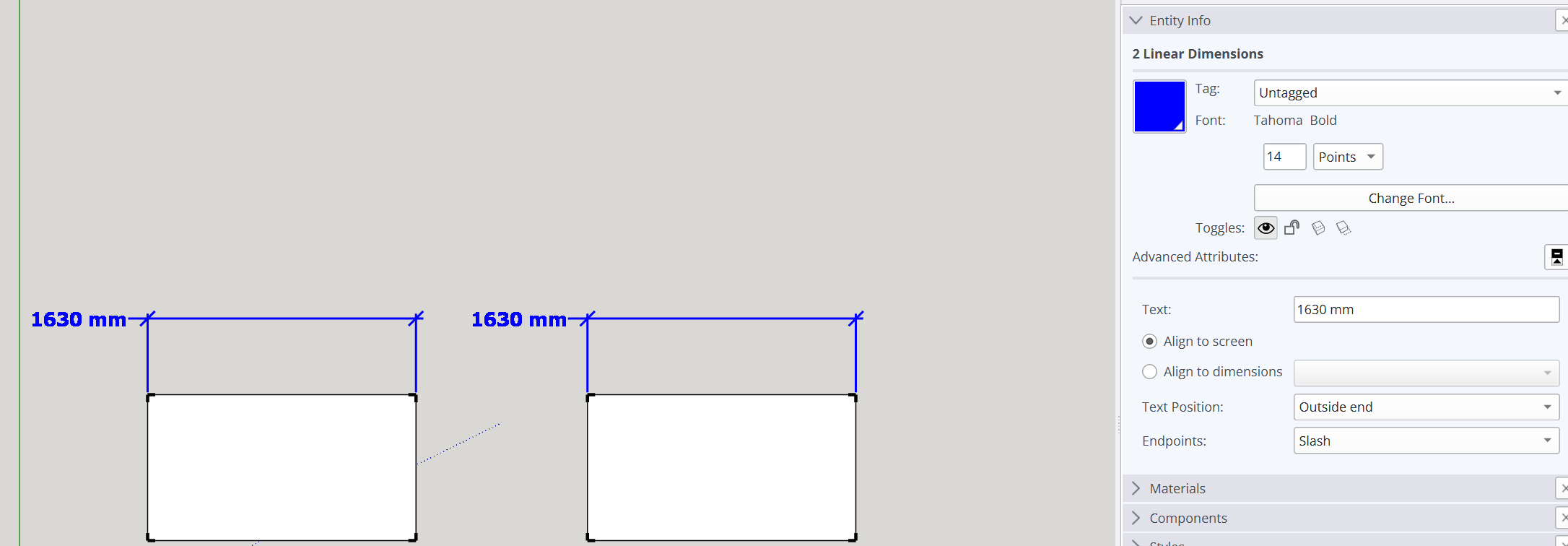
    The Text Position command also shows in the Context menu for a single selected dimension, too. There's no need for a keyboard shortcut if you're going to change the text position in Entity Info, anyway.
  • Anyone else getting constantly logged out of SketchUp/Trimble?

    2
    0 Votes
    2 Posts
    171 Views
    Rich O BrienR
    Not as frequent as that. But because I test extensions between SketchUp 2023 and 2025 I encounter the Trimble login a few times a week. I don't think its tied to a browser. I always thought SketchUp was pinging Trimble when you start it and because I'm switching versions it eventually goes 'let's just check if this is suspicious usage'. I don't know though. I've kinda gotten used to it. But I'm using the from the perspective of a single user so I can't say what happens in a corporate type environment when it comes to validation. A few times a day seems excessive.
  • Scale Tool Axis is incorrect on DC and Groups

    6
    4
    0 Votes
    6 Posts
    182 Views
    Rich O BrienR
    Exactly, I don't know how that impacts DC creation. But I figure they didn't really consider simple planes as 'dynamic'. I prefer ProfileBuilder for these trimsheet type of assemblies.
  • Vector pushpull throwing up error "argument not valid"

    2
    0 Votes
    2 Posts
    107 Views
    Rich O BrienR
    many factors could be the cause. From outdated extensions to troublesome geometry. If you shared the file and versions of JPP and Libfredo you are running it would be helpful.
  • Please reduce extraneous spacing in the trays

    1
    0 Votes
    1 Posts
    97 Views
    No one has replied
  • Help! My SketchUp Model Won’t Open Anymore

    Solved
    5
    0 Votes
    5 Posts
    871 Views
    Dave RD
    @PeterLustiger good deal and I'm glad it helped. It's good that you found an older version that is viable so you don't have to start from the beginning.
  • Sketchup 2024 taking hours to open/load

    Solved
    3
    0 Votes
    3 Posts
    240 Views
    N
    @Dave-R I managed to finally get it to work a couple days ago. I thought I'd been installing the latest version, but checking the update thru the Help drop down it was saying there was still newer. I ran that and it hit the COM surrogate issue again. I ended all those instances and tried again and it installed perfectly and has worked just fine the last few days.
  • Unable to use Fredo6 tools after purchase and update

    11
    0 Votes
    11 Posts
    665 Views
    TIGT
    @jhanphillipco Why not email support at sketchucation.com - they can advise on acceptable payment methods...
  • Texture handling

    6
    0 Votes
    6 Posts
    184 Views
    Mike AmosM
    @Rich-O-Brien I import the texture and "Use as material, paint it onto the face you want and then richt click "Texture", "Place texture". Four handles. No, NOT fork handles. Scale from there. In the instances mentioned, there is no way to use as texture or place texture. Having placed the import onto the face (Within a group) the scale goes whack when closing the group. Explodiing the group soves the problem. Random, not consistent and there is no rhyme or reason I can see for the aberrant behaviour.[image: 1723047453440-bug-2.jpg] Why did I not guess the handles would not appear in the 2d export.......?
  • SketchUp 2024 Thumbnails Don’t Display - Only Icons

    1
    1
    0 Votes
    1 Posts
    58 Views
    No one has replied
  • SU crashes when exporting as .dxf file

    1
    0 Votes
    1 Posts
    81 Views
    No one has replied

Advertisement