sketchucation logo sketchucation
    • Login
    1. Home
    2. Whaat
    3. Posts
    Oops, your profile's looking a bit empty! To help us tailor your experience, please fill in key details like your SketchUp version, skill level, operating system, and more. Update and save your info on your profile page today!
    ๐Ÿ”Œ Easy Offset | Offset selected faces in SketchUp in positive and negative offsets. Download
    W
    Offline
    • Profile
    • Following 0
    • Followers 0
    • Topics 86
    • Posts 821
    • Groups 2

    Posts

    Recent Best Controversial
    • RE: [Plugin] [$] Artisan (1.2.3) - Feb 28, 2014

      @guanjin said:

      Why do I install the free 15-day version of the display icon gray, can not be used.
      If I buy genuine worry about will not be displayed? ?

      Unless Artisan was installed previously on your computer, the icons should not be gray until 15 days have expired.

      Once you purchase and register, the icons will no longer be grayed.

      If you have problems with the plugin after purchase, I can provide you a refund.

      Thanks
      Dale

      posted in Plugins
      W
      Whaat
    • RE: [Plugin] [$] Artisan (1.2.3) - Feb 28, 2014

      @pbacot said:

      Sometimes I get no results from the sculpt tool at all. However this can change when I close the model or SU and reopen. What might be the things that make this tool work better, or worse?

      Hi Peter,

      Maybe you have a mask active? If you have any edge or face selected, the sculpt tool will only affect those selected entities. I am not sure why else you would experience this.

      Dale

      posted in Plugins
      W
      Whaat
    • RE: [Plugin] Profile Builder Free Edition

      @zook247 said:

      Can I use profile builder to make negative profiles, that is, reveals cut into a wall?

      Sorry, you can't do this directly.

      If you have SU8 Pro, you can use the solid tools to cut into the wall after extruding the shape with Profile Builder (assuming your wall is a solid).

      Or you could use the good old-fashioned intersect function in SketchUp to cut out the negative profile.

      posted in Plugins
      W
      Whaat
    • RE: Simple Artisan examples collection

      Awesome, oli!

      Great stuff everyone!

      posted in Organic Modelling
      W
      Whaat
    • RE: [Plugin] [$] Artisan (1.2.3) - Feb 28, 2014

      @pbacot said:

      Thank you Dale. I have this DL'd already. I should remember, but how can you find out what version is currently installed?

      Go to Windows->Preferences->Extensions->Artisan

      posted in Plugins
      W
      Whaat
    • RE: Artisan 2 Wishlist

      @pbacot said:

      @jclements said:

      In the context of terrain meshes and site grading, these are my requests.

      1- Allow the tools other than just the Smooth Selection function (such as the sculpt tool) not to move edges and vertices which have the crease attribute.

      2- Have an option for the strength value to correspond to an absolute value relative to the origin. This would allow the user to sculpt berms or scuplt a series of contours to specific elevations.

      I'm going to ask a question here in terms of a request. Maybe this is already possible.

      In the sculpt tool: flatten-- I can work a terrain down pretty well to "flat", and I imagine I'll get better at it-- but it takes some trial and error. I would like to be able to reference a face in the model and have artisan do subsequent sculpt flattening exactly at that plane. I'd like it to work the way Artisan seems to do already, where the edges transition smoothly out of the flattened area...

      Hi,
      Currently, in version 1.2, the first face that is clicked on will be the reference face for the flattening. By holding the SHIFT key and flattening, it will constrain all flattening to a horizontal plane. So, I think this request is already fulfilled in version 1.2 unless I am misunderstanding you.

      @unknownuser said:

      I think that for terrain and other applications, it helps where Artisan sculpt tools can directly reflect or take advantage of guides in the model such as contours or laid-out slope framework, and form smooth transitions in the mesh to these forms.

      The Vertex move tool can utilize inferencing to guides and other geometry in your model so I suggest making use of it for this purposes. For example, to create a berm at a specific height:

      1. Select the area using the Select Brush
      2. Create a soft selection with the Vertex Select tool
      3. Use the Make Planar tool to flatten to the XY plane
      4. Use the Vertex Move tool to move the berm to the proper height (while doing so, you can snap to guides or contours)
      posted in Plugins
      W
      Whaat
    • RE: [Plugin] [$] Artisan (1.2.3) - Feb 28, 2014

      Info about version 1.2 has been added to the first post.

      Get it here:
      http://artisan4sketchup.com/category/downloads/

      posted in Plugins
      W
      Whaat
    • RE: [Plugin] [$] Artisan (1.2.3) - Feb 28, 2014

      @hellnbak said:

      Don't know what I could be doing wrong, you select all the faces, and then subdivide and smooth four times, right? Just like in the video. If I can't get beyond the first basic step, I don't hold out much hope for getting very far with this. Any help will be much appreciated.

      You might be missing this step:

      After you press the subdivide and smooth button, then type in '4 <enter>'. This is how to properly achieve 4 iterations. (press <enter> again to commit)

      The alternative is to apply the SDS tool 4 times, each with one iteration. If you do this, you will probably not get the desired result.

      posted in Plugins
      W
      Whaat
    • RE: Artisan 2 Wishlist

      @carrozza said:

      Hi guys, I was wondering whether the next Artisan could get real-time feedback, like the good old subdivide-and-smooth plugin.
      Actually, I never understood why this useful feature was removed in the first place.

      Hi Carrozza,
      Actually the feature was never removed ๐Ÿ˜•

      Make sure you have 'Create Proxy From Group' turned on in the 'Settings' dialog. Then, just create a group and apply the SDS tool to it.

      posted in Plugins
      W
      Whaat
    • RE: Artisan 2 Wishlist

      @panixia said:

      will ever artisan support quad faces?
      or at least preserve it in case the proxy was properly created with thomthom quadface/vertex tools or fredo curviloft or tig extrusion tools or any other tools wich eventually generates quads? โ“

      it would be very useful for cleaner topology, faster selections, better texture mapping etc. ๐Ÿ‘

      I hope to add support for quad faces in a future version.

      posted in Plugins
      W
      Whaat
    • RE: Indigo Exteriors

      Hi,

      There is some more info here: http://www.indigorenderer.com/forum/viewtopic.php?f=19&t=11521

      The technique is somewhat specific to Indigo Renderer

      posted in Gallery
      W
      Whaat
    • RE: [Plugin] UVTools 0.2 Pro (Beta) (Updated for SU6)

      @paolo said:

      ๐Ÿ˜ฎ Whaat thanks for your quick reply, it works manually dividing face into quads although is a bit of a pain... I wonder if your SketchUV plugin will do the job 'automatically'.
      Sorry, although SketchUV has a nice triangulation feature that will split all faces into triangles, it has a bit of trouble with faces that have 'holes'

      posted in Plugins
      W
      Whaat
    • RE: [Plugin] UVTools 0.2 Pro (Beta) (Updated for SU6)

      @paolo said:

      Hi everyone, sorry for the silly question but I'm learning using UV tools by Whaat (thanks a lot to him) with Headus UVlayout although is for Architectural purpose (simple geometry) I wonder if using this method will reduce the file size comparing to editing textures to Photoshop in Sketchup? any way I have a problem when loading the geometry in UVlayout cause some openings do not appear, please see the pictures.
      Thanks a lot for any help.

      [attachment=0:3moajcy4]<!-- ia0 -->SU to UVlayout.jpg<!-- ia0 -->[/attachment:3moajcy4]

      I think there might be a bug with the OBJ export for faces with more than four vertices. Try manually dividing faces into quads before exporting and see what happens?

      posted in Plugins
      W
      Whaat
    • RE: [Plugin] Profile Builder Free Edition

      @etong said:

      I've downloaded the plugin, saw the icon, have a dialog box but when I click on the drop down it's empty, click the buttons in the Profile Builder dialog box with no response.
      Unload I think possible plug-ins that might create some conflicts like the housebuilder and building structure tool but to no avail.
      Any idea would be welcome.
      Thanks!

      Hello,

      I don't believe there are any conflicts with those plugins. I have heard of the issue you are having before. It might be due to your Internet and Javascript settings. Profile Builder uses web dialogs which use javascript.

      If you are using Windows, open Internet Explorer and try going to Tools->Internet Options->Advanced->Reset Internet Explorer Settings.

      posted in Plugins
      W
      Whaat
    • RE: Photoshop tutorials

      I found these useful when I just starting out with Photoshop. You can find them on a podcast too.

      http://blog.lynda.com/tag/photoshop-top-40/

      posted in Extensions & Applications Discussions
      W
      Whaat
    • RE: Extrude problem with Artisan or not?

      Hello, I am not familiar with the tutorial you are referring to, but one thing that might be confusing you is that the Artisan extrude tool only works in the direction of the front-face. You might want to reverse your faces (right-click on a face) if you are getting unexpected results. I tried extruding the face in your attached file and it worked fine for me.

      Sorry if I'm misunderstanding the issue.

      posted in Organic Modelling
      W
      Whaat
    • RE: Some Doors and Windows for you all (Update)

      Much appreciated!

      posted in SketchUp Components
      W
      Whaat
    • RE: Last Lions Update

      So is there a solution for this? I have had issues with the black input fields as well. Is it something that can be easily fixed?

      posted in Developers' Forum
      W
      Whaat
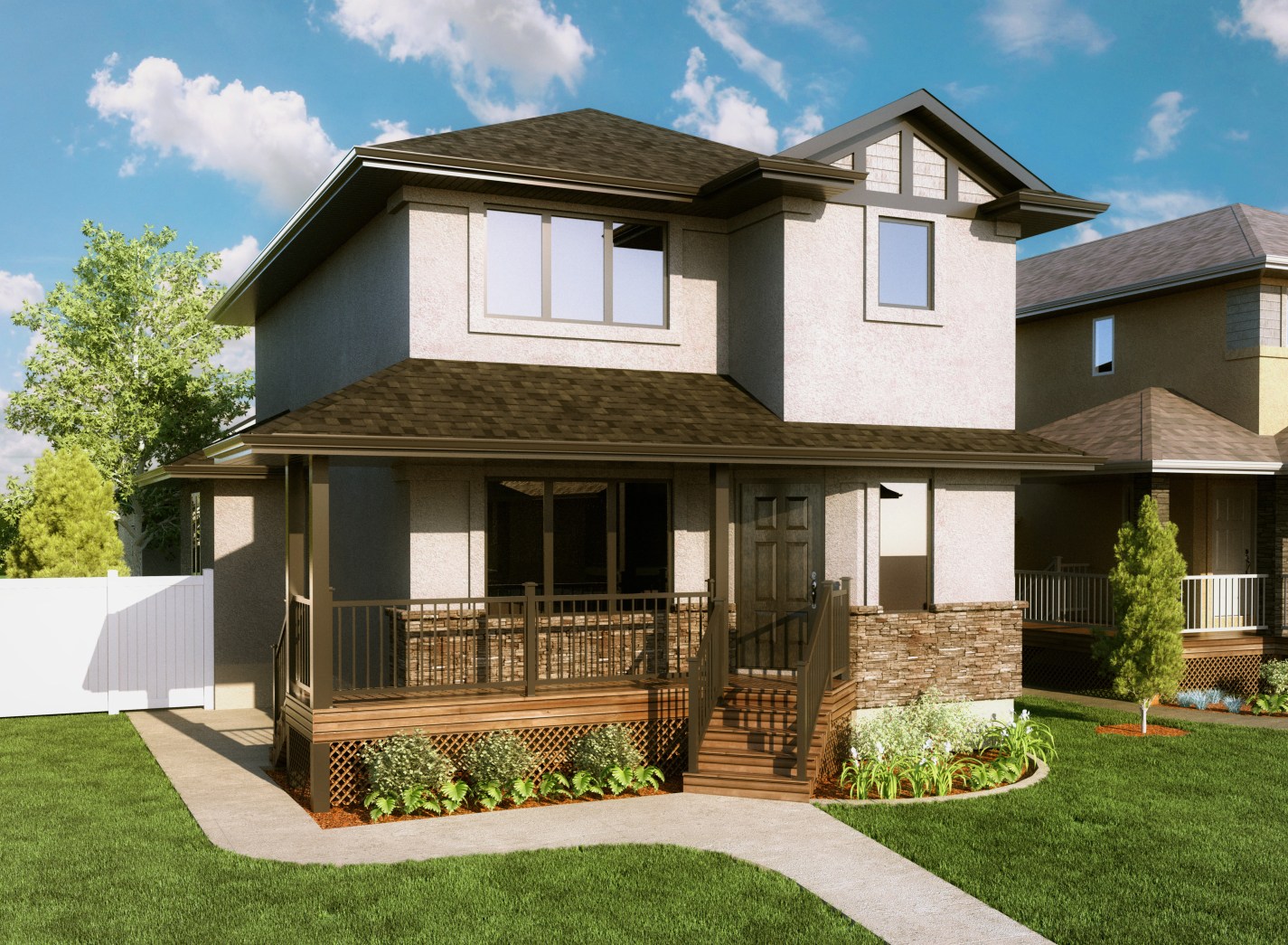
    • RE: Indigo Exteriors

      @pibuz said:

      Your 3D grass is excellent Dale! Mind to share how you did that/the base component?

      Thanks Pibuz, it took a lot of trial and error.

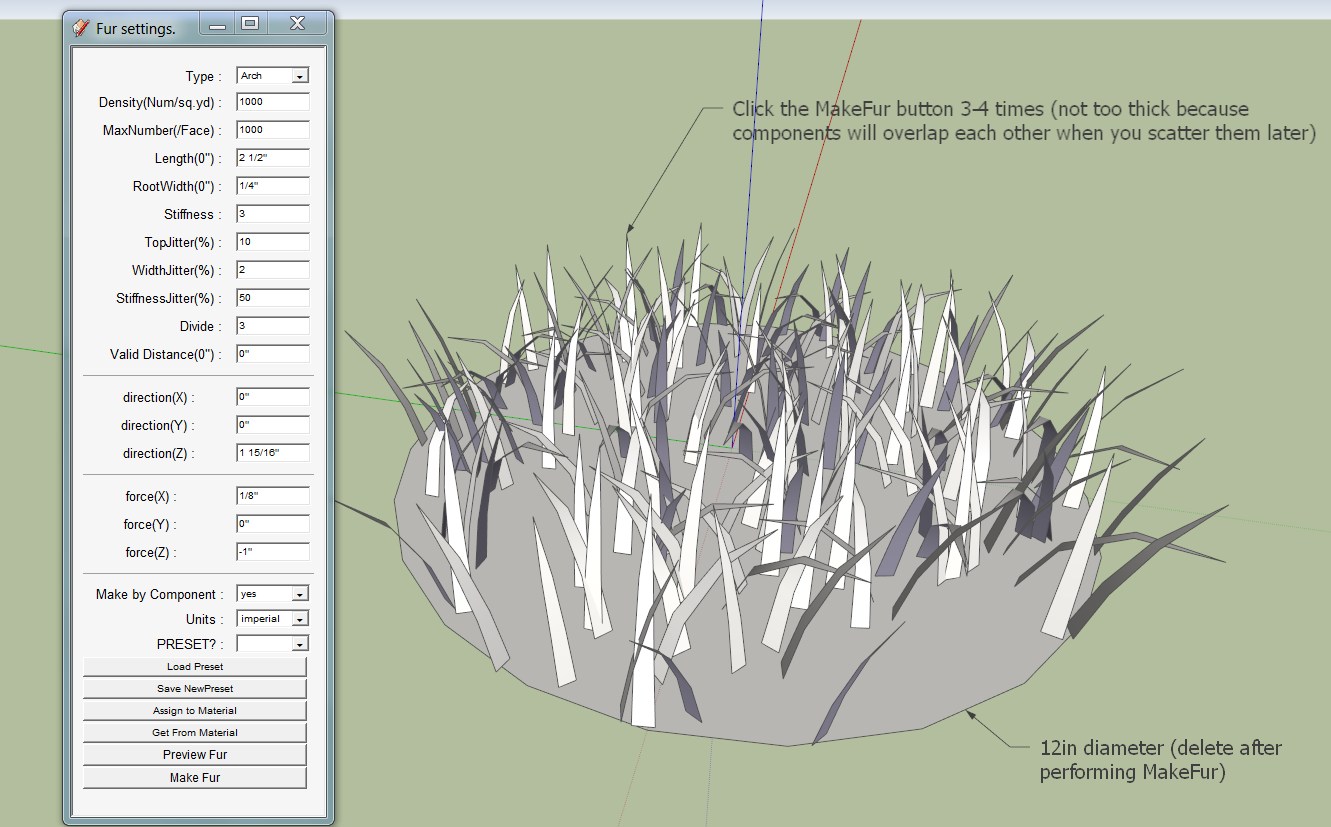
      See image for my Grass fur preset settings. I make two color variations of this component (three might even be better). I also create a very small (1"x1") clump that gets scattered along the borders with greater density.

      I use the MakeCrowd feature of MakeFur to scatter the proxies over the base mesh and I use Fredo's Offset Surface tool (from Tools on Surface) to create the border surface.


      grass settings.jpg

      posted in Gallery
      W
      Whaat
    • RE: Indigo Exteriors

      @bolkop said:

      Very nice renders... do you use Photoshop for adding the grass? How can I make the transparent space between the stems of grass at the edge of lawn. Can you recommend any good tutorial?

      Thank you!

      Up until now, I have used Photoshop for the grass. There is a grass brush in Photoshop that I use to paint along the edges of the lawn. This gives the space between the stems. The brush is applied to the grass layer mask. The grass itself is just a photograph.

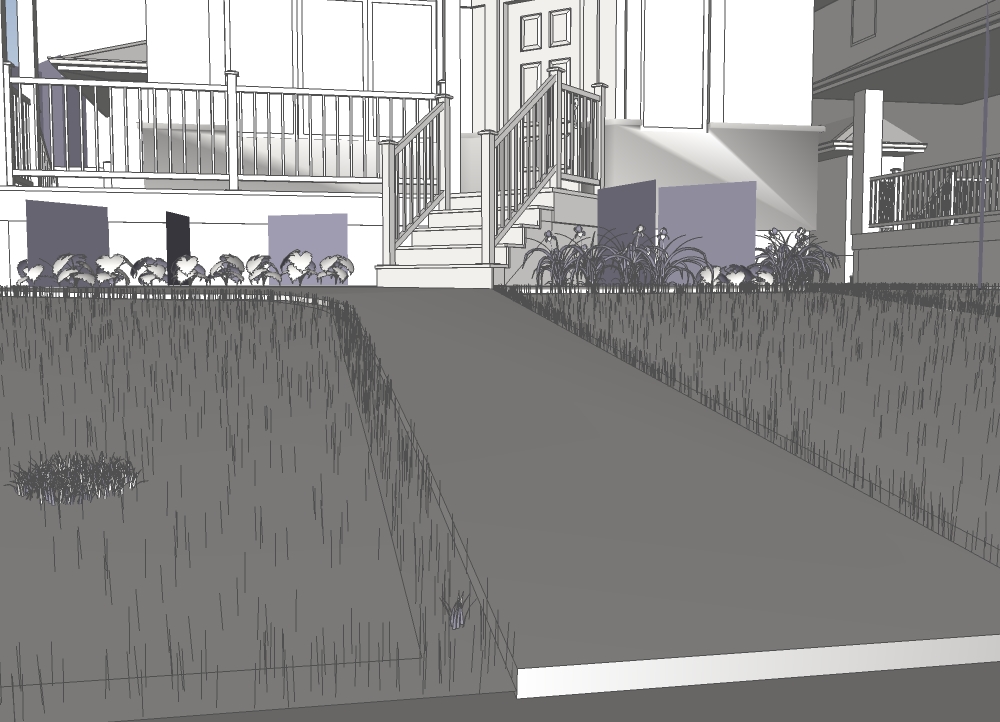
      I have just started using 3D grass because I was finally able to get the results I wanted. I use the excellent MakeFur plugin to scatter the grass 'proxies' across the lawn. Smaller but denser grass clumps are used along the borders of the lawn. I use at least two different colors of grass clumps to add color variation.


      3D grass


      grass proxies (lines) and sample grass clumps

      posted in Gallery
      W
      Whaat
    • 1
    • 2
    • 8
    • 9
    • 10
    • 11
    • 12
    • 41
    • 42
    • 10 / 42