sketchucation logo sketchucation
    • Login
    1. Home
    2. Whaat
    3. Posts
    Oops, your profile's looking a bit empty! To help us tailor your experience, please fill in key details like your SketchUp version, skill level, operating system, and more. Update and save your info on your profile page today!
    πŸ”Œ Easy Offset | Offset selected faces in SketchUp in positive and negative offsets. Download
    W
    Offline
    • Profile
    • Following 0
    • Followers 0
    • Topics 86
    • Posts 821
    • Groups 2

    Posts

    Recent Best Controversial
    • RE: Plugin to make a hole in a group?

      Looking awesome, Fredo! Very exciting stuff! You know, a lot of other plugins might want to take advantage of the core features of your plugin.

      Is there any chance you could develop a library and API for the hole drilling functions?

      Very excited about the possibilities of this new tool... πŸ‘

      posted in Plugins
      W
      Whaat
    • RE: Does Zorro2 crash with SU2014?

      @jql said:

      It's stable now but still dangerous... Fortunately it's at the end of the context menu list. For new users it can easily be confusing to see a "create group from slice" and a "slice model at section"

      I will add some clarity to the context menu or maybe a toolbar button instead. Thanks!

      posted in Plugins
      W
      Whaat
    • RE: Does Zorro2 crash with SU2014?

      Thanks JQL,

      Anyone else?

      posted in Plugins
      W
      Whaat
    • Does Zorro2 crash with SU2014?

      I would like to release Zorro2 on the Extension Warehouse but I am concerned about the stability.

      Have you ever experienced a crash using Zorro2 with SketchUp 2014? If so, please share the SKP file for testing. Do you find that Zorro2 is more stable with SU2014 than with older versions of SketchUp?

      Thanks!
      Dale

      Link to Zorro2
      http://sketchucation.com/forums/viewtopic.php?f=323%26amp;t=16038

      posted in Plugins
      W
      Whaat
    • RE: [Plugin] [$] Artisan (1.2.3) - Feb 28, 2014

      @plot-paris said:

      Hey Whaat,

      it seems that since SU2014 the undo-capability after a Subdivide and Smooth operation is broken.
      Ctrl + Z doesn't work any more. And if it does, its only on individual smoothing steps, rendering it useless.

      Has anyone else had these problems?

      PS: Once again: Thanks for this superb plugin. Every time I modify a terrain, it gives me great joy!

      Thanks for the report! I will have to do some testing. I also noticed some strange undo behavior on another plugin I am working on. Do you know if this only occurs when you have 'Subsurface Materials' enabled?

      posted in Plugins
      W
      Whaat
    • RE: [Plugin] SketchUV - now free

      @cotty said:

      As Extractor wrote a solution seems to be on the way...

      Updated version available on Extension Warehouse.

      Link Preview Image
      SketchUp Extension Warehouse

      Your library of custom third-party extensions created to optimize your SketchUp workflow.

      favicon

      (extensions.sketchup.com)

      posted in Plugins
      W
      Whaat
    • RE: [Plugin] SketchUV - now free

      @swissmountain said:

      Hello and thank you for this much needed plugin.

      I am rendering in Modo and need to export my models.

      I notice that each polygon gets assigned its own material, creating hundreds of materials and making the export near impossible.

      Is this how the plugin is intended to work?

      Sorry for the late reply.
      You need to use the Triangulate feature in SketchUV prior to exporting in order to reduce the number of exported materials. This is explained in the SketchUV tutorials.

      Dale

      posted in Plugins
      W
      Whaat
    • RE: Fix for Profile Builder Previews in SU2013

      @cjryan said:

      OK, I'm still having issues with Profile builder in SU8 Pro, not being able to see thumbnails.

      This first happened when I loaded SU 13. As none of the above fixes seemed to work, I removed SU 13 from my computer. That restored the thumbnails in PB.

      I have now upgraded to SU 14 Pro and am having the same issues with my 8 Pro.

      I dropped the new JS file into the plug-ins folder and got nothing but a bug-splat.

      Any help for me out there?

      Chris

      Upgrade to the latest version from Smustard. Use the MySmustardToolbar or find your original email with the download link in order to get access the upgrade.

      Cheers,
      Dale

      posted in Plugins
      W
      Whaat
    • RE: [Plugin] [$] Artisan (1.2.3) - Feb 28, 2014

      I appreciate everyone's patience as the plugins authors work to fix any remaining kinks with their plugins for SU2014. Although we have done our best to prepare for SU2014, some bugs only become apparent when it gets released to the masses πŸ˜„

      Artisan 1.2.4 was released yesterday on
      http://artisan4sketchup.com/download/

      This version resolves a loading bug that was apparent if you have non-english characters in your user name.

      The version on the Extension Warehouse will be updated as soon as the QA team reviews it.

      Thanks!
      Dale

      posted in Plugins
      W
      Whaat
    • RE: [Plugin] SketchUV - now free

      @ely862me said:

      Hi, Dale
      I am using SketchUV mostly for it's selecting features, and I was wondering if you could add a new function to the Path Select Tool. What I need and I think it would be welcome is to be able to select more than one path by pressing the CTRL key as in the native Select tool.
      For example I have two exploded circles(or two random contours) and I want to connect those, I use the Path select on one contour, then I press CTRL key and select the next one, then I use Curviloft and "Voila!".
      In the actual case we are not able to select more than one path.Or there is a way that I am not aware of ?

      Thanks !

      Maybe if you weld the paths with the Weld plugin, you might be able to do this. I have not used Curviloft so I am not sure...

      Someday, I would like to release the Path Select Tool as a standalone plugin. Maybe then, I could add that feature, too.

      Thanks.

      posted in Plugins
      W
      Whaat
    • RE: [Tutorial] SketchUp Ruby C Extension

      @tt_su said:

      Good news is that I got the SLAPI example compiling under OSX. I need to test on Windows and clean up the extconf.rb file a little.

      Cool! πŸ‘

      posted in Developers' Forum
      W
      Whaat
    • RE: [Tutorial] SketchUp Ruby C Extension

      @tt_su said:

      Hi Dale

      I looked into this and found that you cannot use Visual Studio's nmake for this as it's C89 - and the SLAPI is written in C99.

      It would work if you install the DevKit at Ruby Windows Installer - though I'm still working out some minor quirks. We're preparing some Hello World examples to get started with Ruby C Extensions. Can you hang in there a little bit more?

      No problem. Thanks for looking into this. I am excited to see the new examples... πŸŽ‰

      posted in Developers' Forum
      W
      Whaat
    • RE: [Tutorial] SketchUp Ruby C Extension

      @tt_su said:

      We're actually working on a Hello World example for Visual Studio and Xcode for compiling Ruby C/C++ Extensions for SketchUp. We can expand that (create a work or extra branch) with SLAPI configured as well.

      By the way can you post a Gist of your code? You got some syntax errors there that appear to not be related to linking to the correct headers.

      Interesting, I was just now doing some research into 'extconf.rb' and I'm starting to think my problem is related to not configuring the location of the .lib and .h files inside of 'extconf.rb' using the 'dir_config' and 'have_library' commands.

      BTW, the only difference between my code and your 'hello world' code on bitbucket is that I #included one the SLAPI .h files at the top.

      I had assumed (or hoped) that it would be properly linked since I put the files in the same location as the .c file that I was trying to compile. πŸ‘Š

      It goes without saying that I am a complete noob at this.

      posted in Developers' Forum
      W
      Whaat
    • RE: [Tutorial] SketchUp Ruby C Extension

      Problems already...
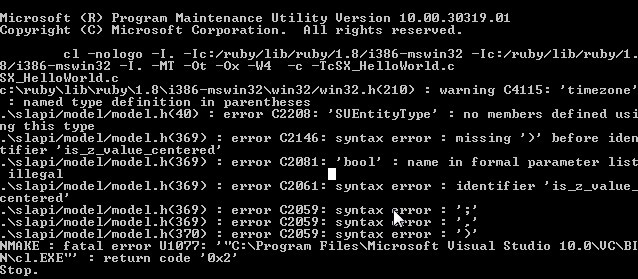
      I have the SDK .h files installed in the same folder as 'SX_HelloWorld.c'. I'm not sure what to do with the binary files provided with the SDK.

      I tried to include just one header <slapi/model/model.h> file from the SDK and this was the result.

      Feeling clueless...


      test1.jpg

      posted in Developers' Forum
      W
      Whaat
    • RE: [Tutorial] SketchUp Ruby C Extension

      Just wanted to thank Thomas and everyone else for the contributions in this thread. I tried to get Thomas' Hello World extension working and had no problems at all, thanks to his clear documentation.

      My next experiment will be to incorporate SketchUp SDK calls into the Ruby Extension. Has anyone done this? Is it relatively straightforward? Any 'gotchas' that you could warn me about? Thanks

      posted in Developers' Forum
      W
      Whaat
    • RE: Looking for tool to cut non-solids along a plane

      You could give Zorro2 a try. Save your work first.

      http://sketchucation.com/forums/viewtopic.php?f=323&t=16038

      posted in SketchUp Discussions
      W
      Whaat
    • RE: Simple Artisan examples collection

      @cotty said:

      I often wonder why Artisan shows a nice (more quad-like) mesh in the preview and it is not possible to choose this mesh instead of the triangulated...

      Well, the preview mesh uses openGL to render (which supports non-planar quads) and we all know that SketchUp itself does not allow them.

      Nice work as usual, cotty! πŸ‘

      posted in Organic Modelling
      W
      Whaat
    • RE: I quit

      Congrats Thomas!

      Great move by both you and Trimble! No doubt SketchUp will keep getting better with guys like you and Chris on board! πŸ‘

      posted in Corner Bar
      W
      Whaat
    • RE: [Plugin] SketchUV - now free

      @stpauljason said:

      I just bought the plugin, and am very happy with it. I read the user manual as well, and have a question using the path select tool. Is it possible to weld a piece back after it has been cut, like in most UV mapping software. I sometimes accidentally double click on the wrong line, and I hate to have to start the whole line cut again on a large model.

      I tried holding the Alt, Shift, and Ctrl Keys separately hoping they would activate the opposite of cut, but they did not.

      Thanks
      Jason

      Hi Jason,
      If I understand you correctly, all you have to do is select the edges you want to 'weld' and then right-click on them and select 'soften'. You can also use the soften edges dialog in SketchUp by going to Window->Soften Edges

      When you 'cut' all you are doing is unsoftening the edge.

      Hope this helps.

      posted in Plugins
      W
      Whaat
    • RE: [Plugin] SketchUV - now free

      @smicha said:

      @whaat said:

      Price drop - now just $5. Get it here:
      http://www.smustard.com/script/SketchUV

      Do you plan to add the function to normalize different sizes of textures - I asked about it in previous posts?

      Yes, but I can't give you any accurate estimate of when that would be. It could be anywhere from two months to several years away.

      posted in Plugins
      W
      Whaat
    • 1
    • 2
    • 6
    • 7
    • 8
    • 9
    • 10
    • 41
    • 42
    • 8 / 42