Thank you for the comments. Here is a dusk shot just finished.

Thank you for the comments. Here is a dusk shot just finished.
@unknownuser said:
Great job Whaat. I've only used it a bit but the Loop tool alone is worth the cost of admission. I've tried some alternatives with no success.
And the Tube mapping works brilliantly. Absolutely on my 'must have' list. As far as I can tell this pretty much solves SU's lack of UV functionality. And what's more, it seems to work in a very SU like way, very intuitive, just a couple buttons and pretty easy to figure out after skimming through the youtube tutorials.
I can't recommend it highly enough. Let me know if you ever need a kidney.
-Brodie
Thanks Brodie, that made my day! 
Weird, now the user says the problem is not occurring anymore without any explanation. Lovely! 
Sorry for wasting your time Dan,TiG. Thanks for the help!
@tig said:
Is it inside a compiled rbs file or a rb file.
If it's used inside a rbs it might refer to the wrong 'variable', as its not then specific to that loading file.
What is the exact context ?
It's in an RB file (I believe you have it ) that is located in the plugins/sketchuv folder:
The code inside the file is:
Sketchup.load(File.join(File.dirname(__FILE__),"sketchuv.rbs"))
and the user is getting this error when SketchUp loads:
Error Loading File sketchuv_load.rb
(eval):3076:in `join': can't convert nil into String
I have since found out that the user is using SU8.1 and OSX 10 (not too helpful info)
Thread title says the problem. I received a support email and it seems as though this code is returning nil on his system. Has anyone experienced this and figured out why?
Thanks.
@nektares said:
You have no idea how happy i was when i saw this on my tablet. Rushed to my office and bought it right away.
I wated for this for ages, no joke. I have no words to describe how happy i am with this. Thanks!
in 3 mins i was already getting what i expected, between this and the two venti´s i drank today i´m sure i will not be able to sleep tonight. This is fantastic
Great to read your enthusiasm! Nice render! (Hope you got some sleep  )
)
Absolutely no bother! We've all had those moments. RBZ is a still a very new thing.
@unknownuser said:
Hi there, sorry to a bother...
I just purchased and installed SketchUV and I can not find it anywhere in SU... No toolbar, no listing in the plugins menu.
It has been placed correctly in the plugins folder as far as I can tell... Macintosh HD/Library/Application Support/Google Sketchup 6 /SketchUp/Plugins.
I tried it in SU 6 and 8 and it does not show up.
The downloaded file was SketchUV.rbz
I have never installed a RBZ file so far, could this be a problem? Does this require a password or some other method of activation?
Is this a PC only plugin?In case you need to know: 2 GHz Intel Core 2 Duo running OS 10.5.8
Thank you for any assistance in this matter.
Hello! I think you will find all of your answers in the manual:
http://dl.dropbox.com/u/22333105/SketchUV%20Tutorials/SketchUV%20Manual.pdf
Let me know if you need further assistance.
Thanks for purchasing!
@unknownuser said:
@whaat said:
Thanks! Unfortunately, you can't override the shortcuts (AFAIK). Maybe I can come up with a solution in a future update...
Whaat,
For info, I have logged a bug to Google on that, asking them to let all alpha characters be captured by the VCB after a valid character (digit, (, +, -, ...) is entered. They do it for some charcaters like 's', 'm', 'x', etc...
Let's see if they listen or hear!Fredo
Thanks Fredo!
@rv1974 said:
Whaat, this is amazing tool. Thank you!
The only thing I could complain about are the shortcuts. My U,V and arrows keys set for other tools.
Was it hard to make a temporary shortcuts override?
Thanks! Unfortunately, you can't override the shortcuts (AFAIK). Maybe I can come up with a solution in a future update...
@boostabeats said:
Hi All,
Just hoping someone may help.
I've purchased and downloaded BoolTools and copied booltools.rbs and the BoolTools Folder to my plugins folder.
Upon starting sketchup I get this load error...
Error Loading File /Library/Application Support/Google SketchUp 8/SketchUp/Plugins/booltools
no such file to load -- /Library/Application Support/Google SketchUp 8/SketchUp/Plugins/booltoolsI've attached a pic of the plugin path.
Thank you kindly!
Hello,
Your installation looks good. Do you have the toolbar icons located within the BoolTools folder?
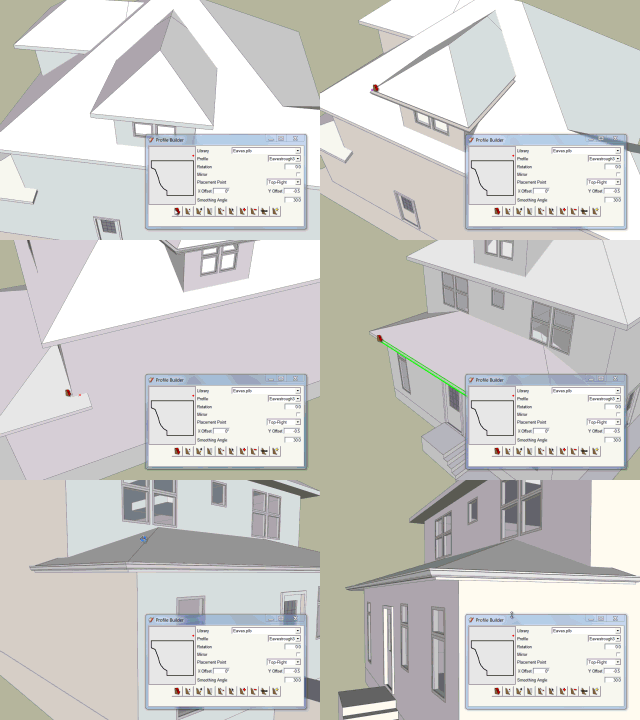
Profile Builder will save you lots of time.
There is a free evaluation version available here:
http://www.smustard.com/script/ProfileBuilderFree
I had a support question about how to map a curving deformed tube-like shape composed of triangles so I created a quick video showing how I would do it. (I could have saved some time by not exporting the cap faces but you get the idea)
[flash=560,315:9c6bzvk2]http://www.youtube.com/v/U-Gb1_Ibi0k[/flash:9c6bzvk2]
@unknownuser said:
Super impressive!!
I have a question in regards to exporting a finished model (to OBJ or DAE)...
With some plugins that allow you to modify, or reposition a texture, when the finished model is exported, multiple copies of the texture image are generated (or in some cases, copies of parts of the image)... does this occur with SketchUV?
Thank you in advance for any info.
Hi. Your question is answered in this tutorial:
[flash=560,315:2f18ixq5]http://www.youtube.com/v/baQwxL6mgMQ[/flash:2f18ixq5]
@krisidious said:
will this work for mapping cars? and will the maps transfer over to other programs well like Max?
can you optimize UVW maps with it? using all the area on a map for more than one piece of geometry?
Hi Kris,
You can map cars by dividing the surfaces into separate panels and applying planar projections to it. I expect it would work very well. Any surfaces that were especially tricky could be easily unwrapped using Roadkill (a free UV unwrapping app) that you can export and import UVs with using SketchUV.
You can not optimize maps with it directly. However, by exporting to another app, that can be done. Again, using Roadkill, the maps are automatically optimized by default as you unwrap the mesh. See this tutorial:
[flash=560,315:mq6wro7c]http://www.youtube.com/v/NXS6_WdXZ3s[/flash:mq6wro7c]
The maps should transfer perfectly to Max as long as you first use the triangulation function prior to 3DS export. This is explained in this tutorial:
[flash=560,315:mq6wro7c]http://www.youtube.com/v/baQwxL6mgMQ[/flash:mq6wro7c]
@moghamdi said:
I tried to use it on my sofa, but I could not get the result that I am looking for.
I used Box map and planner map, but it did not work.
Can you please help me with this?
I attached SKP file.Thank you.
Hello,
Box mapping will show seams at curving surfaces so it is not ideal for that part of the couch. I recommend using the exact same technique that I used in the tutorial video attached to the first post of this thread (first part of the video):
In the attached video, I actually began with box mapping, and then used the seams as a guide to separate the surfaces. I didn't have to switch the material to the UV Texture but I thought it would help with the alignment.
[flash=560,315:34f1096s]http://www.youtube.com/v/MKH7AkTq-f0[/flash:34f1096s]
Hi,
Just wanted to let you know that I have released an update to UV Tools called SketchUV.
It adds some notable features including:
Also it improves on all of the previous features of UV Tools which included:
Thankyou very much to my testers and especially to Rich for the very nice review in CatchUp #9.
Update: Plugin can now be downloaded for free on the Extension Warehouse!
Below is one of several video tutorials that I made for the plugin. You can see all of the tutorials and manual at at the EW page.
Your library of custom third-party extensions created to optimize your SketchUp workflow.
(extensions.sketchup.com)
Thanks!
Dale
[flash=560,315:2qjgzfyp]http://www.youtube.com/v/0V6NN3hqG8w[/flash:2qjgzfyp]
I'm sure Maxwell has a decent camera simulation system but I haven't tried it lately so I can't say how it compares for sure.
However, I can't imagine a render engine having a more physically accurate camera system than Indigo. It's got all the typical camera settings you'd expect plus less common ones such as lens shift, aperture shape, physically correct aperture diffraction, aperture obstacle map, and the choice of tonemapping using over 50 measured camera response functions.
@utiler said:
Dale sounds like a hardcore user.....
Seriously, it is one of my most used plugins. maybe the most.
I'm still discovering new uses for it. Just recently, I started using it for roofing (ridge caps and hip caps)