sketchucation logo sketchucation
    • Login
    1. Home
    2. Whaat
    3. Posts
    Oops, your profile's looking a bit empty! To help us tailor your experience, please fill in key details like your SketchUp version, skill level, operating system, and more. Update and save your info on your profile page today!
    ๐Ÿ”Œ Easy Offset | Offset selected faces in SketchUp in positive and negative offsets. Download
    W
    Offline
    • Profile
    • Following 0
    • Followers 0
    • Topics 86
    • Posts 821
    • Groups 2

    Posts

    Recent Best Controversial
    • [Plugin] Profile Builder Free Edition

      I'm happy to announce a free edition of my Profile Builder plugin. The original plugin was released about three years ago on Smustard. The free edition allows all of the features of the original pro version except for the ability to define your own profiles. However, users of the free edition are welcome to install any profile libraries (PLB files) that pro users have created.

      In fact, the free edition comes packed with 26 profile libraries including:

      • AISC steel shapes (C,HSS, L, S, and W)
      • AITC Glulam profiles
      • Hundreds of moulding profiles (bases, casings, chair rails, crowns, etc.)
      • Lumber profiles
      • Metric and Imperial circular and square profiles
      • Concrete curbs

      In addition, the Pro version of Profile Builder has just dropped in price to the amount of $20 US.

      Here is what users are saying:
      "I use it every day. What a time saver!" - Dale Martens
      "I haven't used the follow-me tool in the three years since Profile Builder came along" - Dale Martens
      "The toolbar could be nicer..." - Dale Martens

      If you have never heard of Profile Builder, the videos below will provide you an introduction. Thank you, Eric Schimel for the tutorial.

      Grab the plugin here: http://www.smustard.com/script/ProfileBuilderFree

      [flash=425,344:3mbj6zss]http://www.youtube.com/v/FcpGwlfu3vU&hl=en&fs=1[/flash:3mbj6zss]

      [flash=425,344:3mbj6zss]http://www.youtube.com/v/yT6oi30GILA[/flash:3mbj6zss]

      posted in Plugins
      W
      Whaat
    • RE: [REQ] Transform UV's

      Very nice Fredo! Looking forward to it. ๐Ÿ‘ ๐Ÿ‘

      posted in Plugins
      W
      Whaat
    • RE: Edge path finding script - Does it exist?

      @jorge2011 said:

      excellent idea.
      when will be available? Free will?

      I am thinking of releasing a free standalone version but also including it in an upcoming commercial plugin (more as a convenient bonus tool kind of like the knife tool in Artisan which resembles the free Zorro2)

      posted in Plugins
      W
      Whaat
    • RE: Edge path finding script - Does it exist?

      @thomthom said:

      With what kind of geometry? Arbitrary? Or a regular quad based mesh?

      Arbitrary.

      [flash=420,315:5brm36v7]http://www.youtube.com/v/ivONz7LukYU[/flash:5brm36v7]

      sdmitch, it looks like your script is very similar.

      posted in Plugins
      W
      Whaat
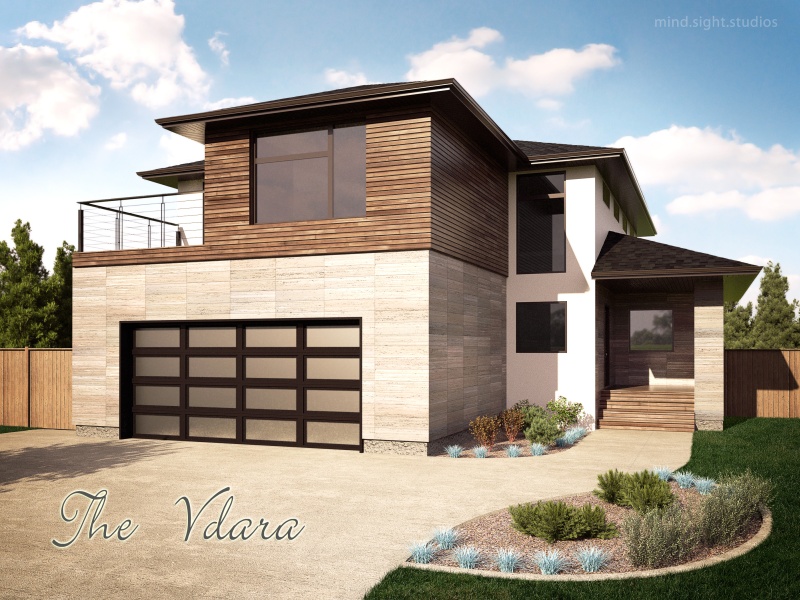
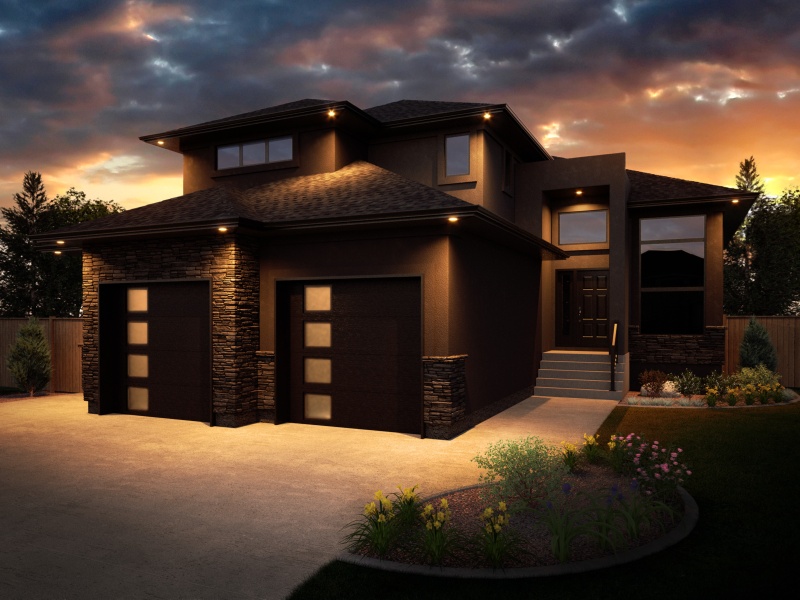
    • Indigo Exteriors

      Hey all,

      Here are a couple of recent projects. Grass is added in post. All other plants are 3D, mostly external OBJ references that are substituted for a proxy at render time.

      Hi-res version here:
      http://dl.dropbox.com/u/22333105/DecoraHomes/Final/Vdara_r1.jpg


      Vdara_r1_small.jpg


      Sauer Cres_night_small.jpg

      posted in Gallery
      W
      Whaat
    • RE: Landscape modeling Tools/Software?

      @pugz1983 said:

      Hi Everybody,

      Don't know if this is the right place for this but I need some help with environment/landscape modeling. I was wondering what the best 3d software is for modeling/sculpting landscapes. I know it can be done in SU with sandbox tools, but that doesn't work for me. The basic landscape can be done but adding more detail is very cumbersome. I know Vue has landscaping tools so that might be a good option. My current workflow is SU->C4D->vray. Cinema 4D lacks good landscaping tools in my opinion. I'm looking for landscaping tools like in Unity3d where you can use brushes to raise and lower landscape and paint on textures. Where I can import my SU model and then sculpt the landscape around it. Hope this makes sense.
      Some hints or pointers would be great.

      Greets Twan

      Have you tried Artisan? It includes sculpting tools (along with many others) that are very useful for landscape and terrain modeling. I do a lot of landscape modeling myself (golf courses for example) and I use it all the time. Even if I hadn't created it, I'd still be recommending it to you... ๐Ÿ˜„

      posted in Extensions & Applications Discussions
      W
      Whaat
    • RE: Edge path finding script - Does it exist?

      @sdmitch said:

      whaat, In case you haven't finished your script, would you post your test model. I have a script that I would like to test on your model. It seems to work on my rather simple model.

      Sorry sdmitch, I'm confused. Are you also writing a similar script? Are you asking for test geometry for it? Why not create it yourself? As the author of the script, you are probably the best suited to create geometry for testing. Besides, I don't have a single test model anyway, I test on many different models. I often get test models from the 3D warehouse because you can find some nasty script-breaking stuff in there!

      @unknownuser said:

      there's also the 'recurve' script which will select joining edges (then weld them if you want)..
      different than what you're asking but along the same idea

      thom also has a select edges (forgot what it's called) that has this type of functionality.

      Thanks Jeff! I had forgotten about the recurve script (which I have actually downloaded awhile ago ๐Ÿ˜ณ )

      posted in Plugins
      W
      Whaat
    • Edge path finding script - Does it exist?

      Hey all,

      I am working on a script that finds the path of connected edges between two selected edges. Does such a script already exist? It would seem surprising if it doesn't because this will be very useful for my work and probably for many others.

      Thanks!

      posted in Plugins
      W
      Whaat
    • RE: What do you think is the best UV mapping software ?

      UU3D is a good app and is a pretty good price. It has tons of features and works well with the UVTools plugin. Take the time to learn it and you won't regret it.

      posted in SketchUp Discussions
      W
      Whaat
    • RE: Maxwell Render may soon break SU's poly limit

      @jason_maranto said:

      :enlight:

      Yeah, external linking is definitely the way to go for complex organic geometry -- I've always been a fan of Whaat's work and the Indigo plugin is no exception. Thanks for showing this feature off for us ๐Ÿ‘

      Best,
      Jason.

      Thanks Jason, and thanks Jeff for showing this feature. I am hoping to finally get around to doing some video tutorials for this sometime. It's been on my TODO list far too long.

      posted in Extensions & Applications Discussions
      W
      Whaat
    • RE: [Plugin] UVTools 0.2 Pro (Beta) (Updated for SU6)

      @martinvz said:

      I Guess Whaat does not update this plugin anymore.
      So here is a fixed version, this will solve the problem with Blender.

      Tested with blender 8, LithUnwrap and Blender.

      [attachment=0:12f2k8sk]<!-- ia0 -->UVtools.rb<!-- ia0 -->[/attachment:12f2k8sk]

      I apologize for not updated this plugin. You should be asking permission before you redistribute any plugins. However, I have decided to include your version in the top post of this thread (hmmmm...I guess I'm now redistributing your plugin... ๐Ÿ˜› ๐Ÿ˜† ) if you don't mind.

      Thanks for providing a fix. I had tested the plugin with Blender before and I thought it worked fine but I guess I was wrong.

      posted in Plugins
      W
      Whaat
    • RE: [Plugin] Texture Resizer (1.5.6) โ€” updated 15.05.2013

      Thanks! I've been wanting a plugin like this. Nice work!

      posted in Plugins
      W
      Whaat
    • RE: [Plugin] UVTools 0.2 Pro (Beta) (Updated for SU6)

      @snowdogg said:

      Maybe be the wrong question, but would this work on Sketchup7? I keep getting bugsplat when I use it. โ“

      Thanks!

      Do you have a material with texture applied to the selected faces before you activate the tool?

      posted in Plugins
      W
      Whaat
    • RE: Indigo render issues

      @mrmikeesq said:

      Hello
      I've just got the latest indigo render trial
      I followed a tutorial which worked (although didn't look great because it was obviously very basic). This involved using displacement on a carpet and applying a few materials and a light.

      Since then I can't get it to work. I add lights in sketchup using a preset material and when I bring it into indigo there's no artificial light, only natural. I also now notice in the material editor in sketchup, when you hit preview render (to see the material applied to a cube or something) it doesn't generate any light there either..

      Also, my render times are terrible, even for Indigo IMO. I brought in a scene from sketchup with some materials applied (no bump or displacement though), and even though I knew the lights wouldn't work I thought I'd leave it on.
      16 hours later and it's still very noisy, and that's with GPU acceleration on!?

      Hope someone can help because I'm dying to use an ultra photorealistic software for my renders (atm I'm using podium). Some of the examples on the Indigo site are crazy ๐Ÿ˜ฎ

      Oh my specs are i7 2600k, 16gb ram, 3GB gtx 580. Do you really need a CAD workstation / render farm to use Indigo?

      Cheers
      Mike

      Hi Mike,

      I have a couple of suggestions for you that may help:

      • Put your artificial lights on a different light layer than the natural sun light. That way you can balance them easier during the render.
      • It can help to really turn up the power of the artificial lights. It may result in faster renders. You can always turn the power down later by adjusting the light layer power inside Indigo during the render.
      • I assume you are trying to render an interior because an exterior render would never take that long. Sun-lit interior renders can be drastically sped up by using 'exit portals'. However, they will always be a lot slower than exterior ones.
      • You don't need a render farm to use Indigo. I use a Core i7 'laptop' with a GTX 460M card and I use Indigo all the time for my production rendering work. The Indigo community is full of great advice for reducing noise and render times. I suggest poking around the Indigo forums and asking any further questions over there.
      • If you have an emitting material and you are trying to preview it, it should show appear to emit light in the preview. If it doesn't show with the sphere preview, try the cube preview (There might be a bug with emitting materials for the sphere preview)

      I think you have made a good choice to try Indigo. There's a bit of a learning curve (like in all software) but you will be happy if you stick with it.

      posted in Extensions & Applications Discussions
      W
      Whaat
    • RE: Artisan 2 Wishlist

      @baldaman said:

      Dear Mr MASTER WHAAT,
      a little question.
      There is an option for smoothed edges or not for the subsurf in the settings.
      We only have the choice between all smoothed or none smoothed, it would be fantastic to have the choice of the "angle between normals" like in the soften edges native SU dialog!

      Hi baldaman,

      The problem with this is that it is VERY slow to do this using Ruby. It is much faster to just use the SketchUp soften edges dialog after you are finished modeling (even though it's an extra step)

      posted in Plugins
      W
      Whaat
    • RE: Artisan 2 Wishlist

      Thanks for starting this, solo, and thanks for the great suggestions so far from everyone.

      I use Artisan all the time for terrain modeling and I can definitely appreciate some of these requests.

      posted in Plugins
      W
      Whaat
    • RE: [Plugin] [$] Artisan (1.2.3) - Feb 28, 2014

      @jclements said:

      I must be doing something wrong. I don't the see how the Perpendicular and Camera Plane modes differ. Can someone demonstrate this?

      With 'Perpindicular' move mode, the movement is constrained to the average normal (face direction) of the all of the selected faces. You can only move in one direction.

      With 'camera plane' mode, you can move in all directions that are on a plane perpindicular to the camera direction but you can not move in the direction that the camera is pointing.

      Hope that helps!

      posted in Plugins
      W
      Whaat
    • RE: [Plugin] [$] Artisan (1.2.3) - Feb 28, 2014

      @jclements said:

      Is there somewhere that demonstrates (or illustrates), how the Best, XY, YZ, and XZ options work?

      I kind of have an idea, but how do they choose where the plane is placed relative to the coordinates of vertices selected? Especially with the Best option?

      Hi,

      The position of the plane is always at the average position of the selected points (the centroid).

      With the 'best' option, the vertices are projected to the best-fit plane. In other words, the plane that results in the least amount of movement of the vertices from their original position.

      posted in Plugins
      W
      Whaat
    • RE: [Plugin] [$] Artisan (1.2.3) - Feb 28, 2014

      @unknownuser said:

      Is it Artisan Forum still supported? I posted a question several days ago and no reply yet.
      Also, I want to ask a question about how to use it. If I want the classic SDS behaviour, with Proxy and Subsurface, I need to run subdivide on a group first, then go inside that group, right? But when I run dubdivide on group, I can't choose how many iterations and as an example, in this moment, my SketchUp is not responding... and is doing this for more than 10 minutes yet... a little too much. If it tries to iterate 2 or 3 steps for starting, is a bullshit, because I don't want this. All I need is to have that two elements and continue editing the proxy.

      Hello,

      I am not sure why SketchUp became unresponsive in your case. That is very unusual. If this is something that you are able to duplicate, I would like to see the SKP file for testing.

      @unknownuser said:

      The plugin is not intuitive at all ๐Ÿ˜ž I can use it, because I learned how to use it in the first place, and I used SDS before. But, for a newcomer is hard. It doesn't communicate with the user, one have to be sure to KNOW and remember everything from tutorials, because the plugin doesn't tell much. I'm sure that most time was spent on good functionality and I appreciate that a lot, but the interface and interaction with the user is equally important.

      I am sorry you feel this way. I worked hard on making the plugin intuitive and improving the workflow over SDS. If you have ideas on how to make things more intitive, please let me know.

      Please note that the Artisan forum has now been discontinued. The quickest way to get support on Artisan is to use the contact form on the Artisan website:
      http://artisan4sketchup.com/category/contact-us/

      I will typically respond within 24 hours.

      Thanks,
      Dale

      posted in Plugins
      W
      Whaat
    • RE: Error 183 on image render export

      @mbeauvais said:

      I am trying to render a scene from SketchUp and continue to get error 183 no matter how small I set the exported image to be.
      I have 157GB free on my hard drive. Windows 7.

      The file is large 205MB, and there are many components and materials in it, but it has been purged many times to try and minimize it's impact.
      The rendering software is Indigo, and the skIndigo plug-in. But I can't even get Indigo started because SketchUp gives me the 183 error on export.

      We are running SketchUp 8 pro.

      I have seen many forums on animations, but not on single image renders. If you can point me to a thread that covers this type of problem or if you have any suggestions, please help.

      Thanks,
      M

      I'm not exactly sure what error 183 means but for a scene this large, I recommend trying out the new SkIndigo 3.0 beta which is greatly improved for exporting huge scenes:
      http://www.indigorenderer.com/forum/viewtopic.php?f=17&t=11055

      SkIndigo does not yet support Image export. You should explode any image components if you want them to show up in the render.

      posted in SketchUp Discussions
      W
      Whaat
    • 1 / 1