Hi guys, any news about this? Some feedback from the developers?
I was kinda hoping to see this fixed in the recent update but no luck......
Oops, your profile's looking a bit empty! To help us tailor your experience, please fill in key details like your SketchUp version, skill level, operating system, and more. Update and save your info on your profile page today!
Check out Febhouse | New extensions for Shadow Analysis in SketchUp Download
P
Offline
Latest posts made by pibuz
-
RE: 2026 Materials Dropdown showing ALL folders and subfolders
-
RE: 2026 Materials Dropdown showing ALL folders and subfolders
Hi!
...I have to agree with Gullfo on this (I get the exact same behaviour here): inside our firm, we organized the folders and subfolders maniacally to get an intelligible list. Now seems to be all messed up, and the users could be dazzled. Is there any chance the SketchUp team would consider a fix for this, or maybe a plugin to add some additional control functionalities? -
RE: New to DC: topic for my simple questions to the pros
Hi again!
another silly question: is there any way a plugin could select all the dynamic components which share the exact same attribute selections as the selected one?Could be very useful.
A searched a lot but could not find any in the internet..
Thanks in advance!
-
RE: [Plugin][$] FredoGhost - v2.1a - 01 Apr 24
Hi DaveR! Thanks for your support!
I updated everything and tried a clean install of the plugin but I get the error message i attach... What could it be?
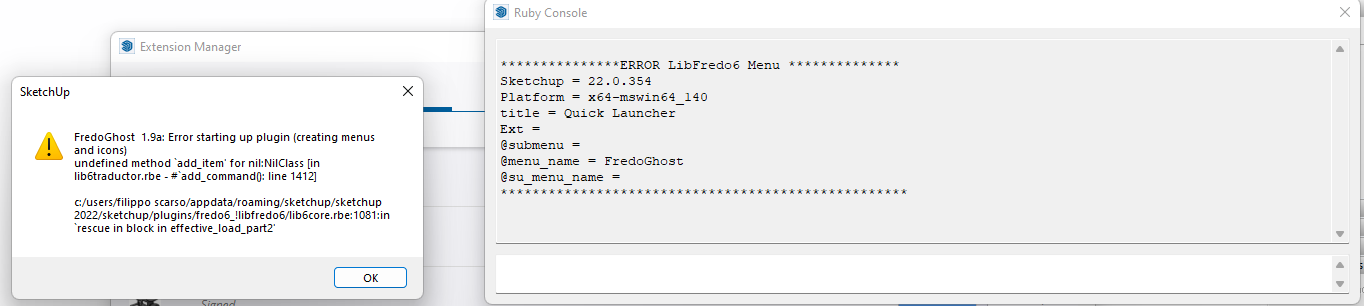
-
RE: [Plugin][$] FredoGhost - v2.1a - 01 Apr 24
Hi! I have to report a strange behaviour: fredoghost plugin doesn't work properly, but this seem to be a random behaviour (sometimes it does, sometimes it doesn't) and it doesn't seem to be related to "run as administrator's" permissions.
At launch, in the consolle I get the following error:
Error: #<NoMethodError: undefined method
advanced_features?' for nil:NilClass> c:/users/filippo scarso/appdata/roaming/sketchup/sketchup 2022/sketchup/plugins/fredo6_fredoghost/fredoghosttool.rbe:2622:intop_process'
c:/users/filippo scarso/appdata/roaming/sketchup/sketchup 2022/sketchup/plugins/fredo6_fredoghost/fredoghosttool.rbe:264:instartup' c:/users/filippo scarso/appdata/roaming/sketchup/sketchup 2022/sketchup/plugins/fredo6_fredoghost/fredoghosttool.rbe:115:inlaunch_after'
c:/users/filippo scarso/appdata/roaming/sketchup/sketchup 2022/sketchup/plugins/fredo6_fredoghost/fredoghosttool.rbe:96:inblock in launch' c:/users/filippo scarso/appdata/roaming/sketchup/sketchup 2022/sketchup/plugins/fredo6_!libfredo6/lib6plugin.rbe:1807:inblock in tem_context'
c:/users/filippo scarso/appdata/roaming/sketchup/sketchup 2022/sketchup/plugins/fredo6_!libfredo6/lib6plugin.rbe:1891:intem_context' c:/users/filippo scarso/appdata/roaming/sketchup/sketchup 2022/sketchup/plugins/fredo6_fredoghost/fredoghosttool.rbe:96:inlaunch'
c:/users/filippo scarso/appdata/roaming/sketchup/sketchup 2022/sketchup/plugins/fredo6_fredoghost/fredoghosttool.rbe:84:inaction__mapping' C:/Users/Filippo Scarso/AppData/Local/Temp/Fredo6_LibFredo6_TemporaryFiles/data6.rb:65:incall'
C:/Users/Filippo Scarso/AppData/Local/Temp/Fredo6_LibFredo6_TemporaryFiles/data6.rb:65:inlaunch_action' c:/users/filippo scarso/appdata/roaming/sketchup/sketchup 2022/sketchup/plugins/fredo6_!libfredo6/lib6plugin.rbe:240:inlaunch_action'
c:/users/filippo scarso/appdata/roaming/sketchup/sketchup 2022/sketchup/plugins/fredo6_fredoghost/bootstrap_fredoghost.rbe:97:inlaunch_action' c:/users/filippo scarso/appdata/roaming/sketchup/sketchup 2022/sketchup/plugins/fredo6_fredoghost/bootstrap_fredoghost.rbe:233:inblock in declare_command'
c:/users/filippo scarso/appdata/roaming/sketchup/sketchup 2022/sketchup/plugins/fredo6_!libfredo6/lib6plugin.rbe:1464:incommand_invoke' c:/users/filippo scarso/appdata/roaming/sketchup/sketchup 2022/sketchup/plugins/fredo6_!libfredo6/lib6plugin.rbe:1444:inblock (2 levels) in build_config_commands'
c:/users/filippo scarso/appdata/roaming/sketchup/sketchup 2022/sketchup/plugins/fredo6_!libfredo6/lib6traductor.rbe:1385:in `block in add_command'I'm running the trial version (installed yesterday) on SU2022. Thanks in advance!
-
RE: Plugin SJ Add DC Attribut
Hi Simon! I recently discovered you plugin and it's brilliant!!! Thanks a lot!
Although I'd like to suggest you a couple upgrades, to improve usability even more.-
First thing, the possibility to save a set of favourite attributes to be used in other skp models. This is very convenient when you have a set of fixed attributes you always want to load for any of your components. Could be useful to name the set so the plugin can load the relative attributes
-
Second thing: the possibility to add to the selection a set of attributes (the thing we saved at step 1) so that the plugin can import a number of attributes without having to manually select them one by one.
Tell me what you think! Thanks again a lot!
-
-
RE: Add new component to the selected components' origin
That's fantastic!!!!! THANKS A LOT!
-
RE: Add new component to the selected components' origin
Hi Ludo!
I tried the plugin you so kindly shared. Turns out that in many cases I don't want the new components to be automatically aligned to the original components' axes: all equal orientations could be enough!I tried opening your rb and fiddling around with the code lines not to bother you again...but really.....I'm no programmer and I can't figure out what to do.. Could you be so kind to tell me what I can remove from the main.rb file to achieve no transformation on the copied components?
Also, is there a way to insert a specific folder to start searching from? or to remember the last path searched?
Thank you a lot again!
-
RE: Add new component to the selected components' origin
THANKS A LOT!!!!! THIS IS WONDERFUL!
-
RE: Add new component to the selected components' origin
I forgot to mention that my company is obviously willing to pay for such a plugin, if a development is needed!