Jeff --
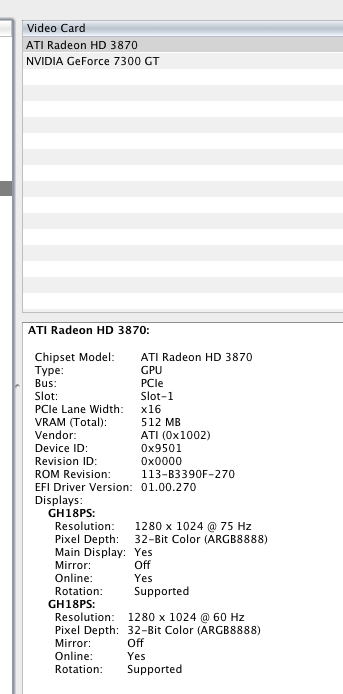
Here's the System Profiler output. AFAIK, the 3870 has always been supported...

Jeff --
Here's the System Profiler output. AFAIK, the 3870 has always been supported...

TIG --
Macs don't have 'ini' files. The plist that Jeff is talking about is simply SU's preferences file on the mac. Will PM a copy over to you.
Jeff, if it's that simple... but I wonder is the licence info in there too?
Driven, Jeff --
Apparently, AMD stopped development when they bought ATi. Obviously because Apple's in bed with intel.
I will never buy an ATi card again. Fuck 'em.
Driven -- thanks for reminding me. I remember something about using that with nVidia cards...
Thanks, john, but this isn't a driver issue...
I'm talking about the control panel that lets you set antialiasing and texture filtering for SketchUp and the like.
ATi's site is shit. They only list drivers for up to 10.4.x..
I just installed a Radeon 3870 to replace the GeForce 7300 that I was using after my X1900 died.
Now, the ATi Displays control panel reports 'Unknown ATi Graphics', and I can't access all the nice antialiasing features. And I can't see anything on the ATi website about an update...does anyone know if it's still available?
My SketchUp models look like crap. 
Ah. They're for Windows only. KISD is a Mac shop.
Thanks, TIG
I'll check those threads out. Which Jim is that? Blaenavon Jim?
Can this be done, like you can do in Photoshop??
I'm going to be teaching SketchUp (yay!) at the Cologne International School of Design next semester, so I need a way to make sure that each student has exactly the same screen layout for toolbars, palettes, etc. (the default layout is pants).
TIA,
Cheers, TIG --
I d/l'ed your file and put it in the plugins folder, and I'm happy to report it does exactly what it says on the tin!!!
Mike --
Will do... (if this file ever gets exploded).
Seriously, though, what an arseache.
Before I ran bomb.rb, I Unhid All, so there would be NO hidden geometry, but I'm stll getting these 'Your recent operation has caused geometry to become merged with hidden geometry'. How, if there's no hidden geometry?
And what's more, I'm also getting 'Your recent operation has caused geometry to become merged with geometry on a hidden layer'.
Now, here's a clue: I DON'T USE LAYERS. The only layer that there can be in my model is Layer 0, which is visible by default. I don't think the problem is with bomb.rb, it's some change made to the app itself.
Oh, and I only got TIG's script after I started the current Explode All operation (at 2 o'clock yesterday arvo).
Right. It's just finished.
This is what I got from the Ruby console:
erase_if_hidden
Error: #<NameError: undefined local variable or method `erase_if_hidden' for main:Object>
(eval)
edit: Oh, and this from the Load Error window:
^Error Loading File erase_if_hidden.rb
/Library/Application Support/Google SketchUp 7/SketchUp/Plugins/erase_if_hidden.rb:1: parse error, unexpected tCONSTANT, expecting kEND
def erase_if_hidden()
Sketchup.active_model.entities.to_a.each{|e|e.erase! if e.valid? and e.hidden?}
Sketchup.active_model.definitions.each{|d|d.entities.to_a.each{|e|e.erase! if e.valid? and e.hidden?}}
end#def

TIG --
You da man!
Cheers, Matey...
Chris --
So, would that work for hidden objects that are inside other groups and components?
Chris --
Hidden objects, yes.
Why wouldn't I want to delete them? I often forget that hidden objects are there. I've just waited nearly a day and a half for this model to explode, and the hidden objects have, naturally,become unhidden. What's more, due to the nature and size of this model, simply deleting them isn't an option. The exploded model is unmanageable in SketchUp.
So, you see, I do want to delete hidden objects before preparing a model for export.
Is there one?
The reason I ask, is because I've got a model that I'm trying to apply bomb.rb to, but every so often SU throws up the dialog 'Your recent operation has caused geometry to become merged with hidden geometry'. yesterday I set the script going when I left the house (it takes its time on complex models), and when I got back at 22:00, there was the dialog waiting for me --- the script may have been doing nothing all that time.
As far as I know, there's no hidden geometry in my model, but there must be some tucked away in sub-groups somewhere...that's why a script like this would be so useful.
Thanks, both --
They both look really interesting...will check them out.
I'm trying to use bomb.rb on a fairly complex model, but SU keeps crashing. This means that getting the model into my renderer in any usable form is not happening.
Are there any alternatives? I remember one that exploded and grouped surfaces by material, but I can't remember what it's called...
TIA,
Is there one?
I'm tired of FM rotating sections as it sweeps them along rails. Or not smoothing the resulting sweep properly. It makes the interior handrails of spiral staircases murder to get right. A plug-in that keeps the orientation of the original face would be useful, too.
TIA,
Hah! Pilou,
I'm actually translating a book about the CAAD department at the ETH, Zürich and their use of a Processing-based program in developing urban design strategies... fascinating stuff.
Oh, and by the way...
Anyone used Bonzai's 'Keyboard Shortcuts...' feature? (Under the Edit menu). All shortcuts are completely configurable, and you can load in a set that duplicates most of SU's... (Go to 'Keyboard Shortcuts' > 'Load Defaults' and choose Preset 2). It's much easier to use Bonzai when all your familiar navigation kit is in place.
Back on track:
Bonzai3D: Components. Cut. Walls. With. Thickness.
That's all I wanted to say...