Back on track:
Bonzai3D: Components. Cut. Walls. With. Thickness.
That's all I wanted to say...
 T
Offline
T
Offline
Back on track:
Bonzai3D: Components. Cut. Walls. With. Thickness.
That's all I wanted to say...
Cheers Moris...
And thanks for the link, Pilou -- that's some crazy sh1t!
Fabbo...
Blimey, I'll be able to get a whole othter article out of this...  !
!
Yes, that's what I figured...
Is there, I wonder, a Ruby that allows you to vary the time transition between scenes? In combination with Proper Animation, that would be really cool.
OK, right, once the component is exploded, it works... but the lift car moves in one scene, then stops while the scene changes, then moves again, then stops...
Any way to get continuous movement across changing scenes?
p.s. "I have just exploded" = "Je viens de faire exploser", "I just exploded" = "j'ai simplement fait exploser", d'oú, peut-être ma confusion...
Like I say... I set the four positions for the lift car (all in the same scene), save, quit, re-open SU, turn on Animation Observer, play the scene animation... The lift car doesn't move.
I can make it move within the same scene by choosing 'Get Position - X', it's just when I play the scene animations, there's no movement.
I still must not be understanding something.
@unknownuser said:
You have not save, quit reload!
Yes, I have. Just didn't state it.
@unknownuser said:
and why 1 (start), move car ? Start is only when all is adressed!
Because, in my experience with other packages, I want to set a keyframe for the starting position.
@unknownuser said:
Can you post your car or a simple objects with same nature group
OK. 'Lift Car' is the name of the group that I want to animate.
@unknownuser said:
Before launch the Animation observer (positions adressed), better is save, quit and restart!
@Tim
Start Animation Observer only when all positions Objects are adressed!!!
That is that your error !
Objects (must be grouped) are independent of the scene! But will be animated inside the moving of the scenes!Just go in the scene 1 and take 4 positions of your objects (or less) if you have 4 scenes
Pilou --
Thanks, but...
in Scene 1: Set Position - 1 (start), move car, Set Position - 2, move car, Set Position -3, move car, Set Position -4.
Start Animation observer.
Play scene animation.
Car does not move. The car is a self-contained group.
?
Phew, am I thick or what? I just cannot get this to work. I've had a look at Moris' & Pilou's explanations and the video... but it just don't werk for me...
This is what I'm doing:
I want to animate a lift / elevator car moving vertically within the elevator structure. I have four scenes in my file.
I select the lift car, RMB > Transformation > Set position 1
Start Animation Observer.
Switch to scene 2, Then move lift car, Set Position 2.
Switch to Scene 3, move lift car, Set Position 3
Switch Scene 4, move lift car, Set position 4
Stop Animation observer.
Start animation / Slideshow in SU -- nothing happens. The views change between scenes, but the lift car stays in the last position I set it to.
I can use 'Get Position X', and the car will move within the same scene, but not when playing back an animation / Slideshow.
WTF am I doing wrong?
TIA,
Lugs. Meh.
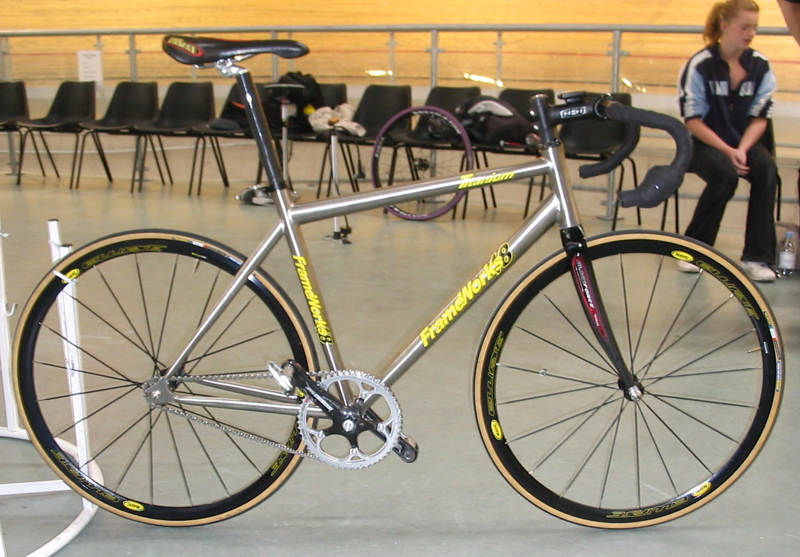
Here's my track frame, which I designed myself (part of the designing was done using SU):
Titanium is not the best material for a track frame, but it's individual, to say the least. I should have specced some gussetting / webbing around the bottom bracket / chainstay area.
@remus said:
Ecuadorian, have you tried it with an SU6 file? As SU7 wasnt released very long ago they might not have support for the new file format yet.
Indeed, Remus. I does import SU6 files.
@bonzai3d support said:
- bonzai3d should work fine when not connected to the net -- although the net is required to view the introductory videos.
bonzai3d support
As I stated previously, please make these available as a separate download so we can peruse them at our leisure. the waiting times for them to load are just not viable at the moment.
Oh, and another thing: some way to navigate with the mouse. The disconnect between bonzai's way and the other programs I use is just too great. And that Cone of Vision thing -- it's pants.
SU has it nearly right: MMB -- Orbit/Tumble, MMB + LMB -- Pan, Scroll wheel -- Zoom. (I know you have scroll-wheel zoom in Banzai). My suggestion would be MMB + RMB -- Scroll. On some mice (like mine) the scroll-wheel action makes zooming unpredictable and erratic.
Bonzai3DSupport --
Thanks for your presence here -- very much appreciated.
Will be back tomorrer with more observations -- or as and when time permits.
@xrok1 said:
the thing i don't understand is that there are ump-teen 3d packages out there but somehow the elegant simplicity of SK seems to evade every other developer in the industry? nobody wants to make "another SK". i say please do, but finish the job, do it right.
There's 3DVia -- as to whether they're doing it 'right'...
As xrok1 said --
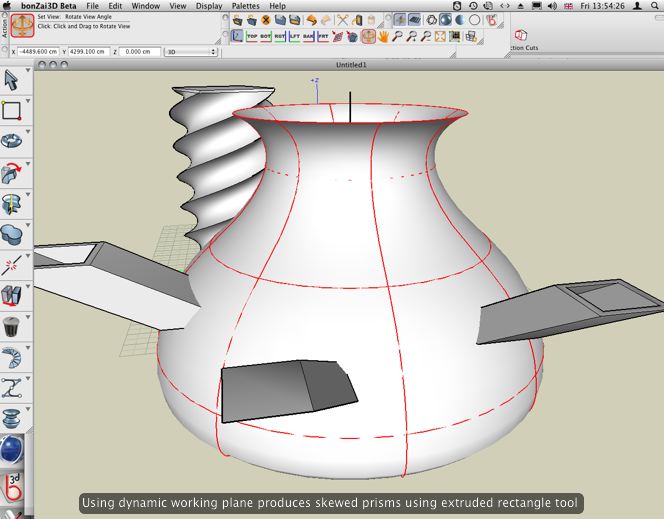
This appears to be an attempt to get form•Z users in athe ground floor -- get them used to the form•Z way of doing things and then get them to buy what is the most overpriced modeller on the market these days.
It is, to all intents and purposes, form•Z. It's still based on the ACIS modelling libraries. I thought that it would be more along the lines of 3DVia -- a SketchUp clone.
Wow, I'm really missing the ability to pan & orbit with the mouse.
Has anyone found a way to edit derived surfaces after creation? I thought the generating spline was supposed to stay active? Maybe in the 'full' version.
Anyone found any shadow-casting capabilities yet?
And why can't we just download the videos and peruse them at our leisure?
Has no-one mentioned DragThing yet?

The new official DragThing home page. You can get the most up-to-date DragThing news and information here, and download the latest version.
(www.dragthing.com)
Couldn't do without it. Fock the Dock.
It appears to be form•Z in new knickers.
Seriously, it looks like the same app... a million different ways to draw a spline... working planes, all the floating palettes re the same.
I thought it was meant to be something new... 
Gaaah...
D/L time has swollen to 3hrs, 47 min.
I vote we start a new thread to post observations.
^^^^^^^
Agreed. Maybe their server is getting hammered?
