sketchucation logo sketchucation
    • Login
    1. Home
    2. Tim Danaher
    3. Posts
    Oops, your profile's looking a bit empty! To help us tailor your experience, please fill in key details like your SketchUp version, skill level, operating system, and more. Update and save your info on your profile page today!
    🚹 Skimp | 25% Off until March 30 Buy Now
    Offline
    • Profile
    • Following 0
    • Followers 0
    • Topics 46
    • Posts 208
    • Groups 1

    Posts

    Recent Best Controversial
    • RE: So, How Do I Close This Face?

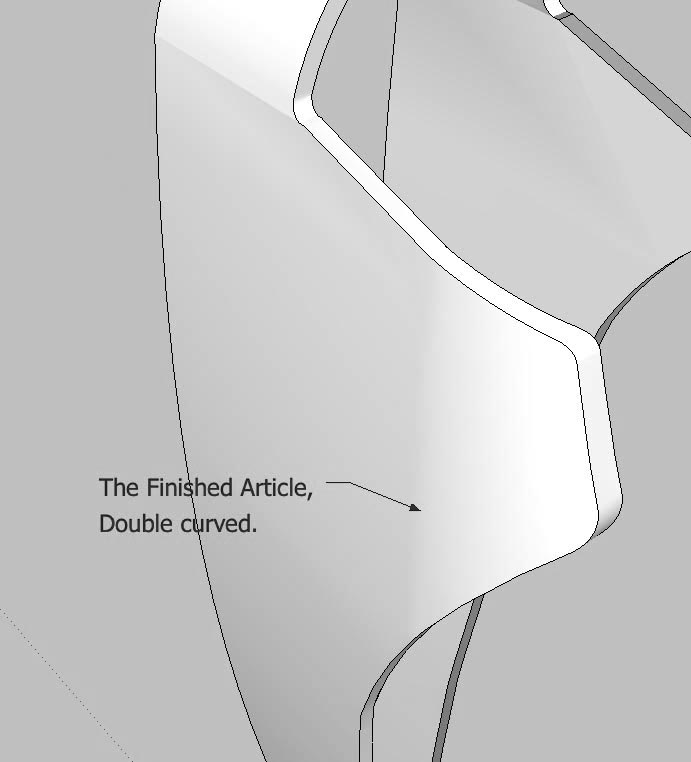
      Cheers, Frenchy --- that's basically the method I used in the end, the one that Gaieus proposed. However, my intersections would fail constantly and I had to fill in lots of line segments by hand. Of course, I should have scaled up before doing the intersecting. I was also Constantly getting that horrible situation where you get reversed faces that don't have edges, and where you have to draw in the edge to be able to reverse them. in the end, I don't think that joining up the endpoints would have been much slower!

      Anyway, attached is the final result:

      DerivedSurface-6.jpg

      Edit: removed spurious attachment.

      posted in SketchUp Discussions
      Tim DanaherT
      Tim Danaher
    • RE: So, How Do I Close This Face?

      Damn, can't get the Follow Me approach to work at all: I selected the entire path, then welded it, but Weld.rb failed. Trying out a section of pre-selected line, I got 'This does not appear to be a valid path'. And trying to drag the selection along the path produced geometry in the wrong place, even with the model scaled up 100x.

      Gonna try Gaieus's method...

      posted in SketchUp Discussions
      Tim DanaherT
      Tim Danaher
    • RE: So, How Do I Close This Face?

      Hey, thanks for all the replies, guys.. nagyon köszönöm szépen! I'll have a closer look tommorrow...

      The 'Follow Me' approach sounds intriguing, I have to say...

      Fuzzion---nothing wrong with curiosity: where would we be without it? It's a course on 'SketchUp' for Product Design' that I'm giving at Cologne International School of Design. Trouble is, I'm an architect... 😉

      posted in SketchUp Discussions
      Tim DanaherT
      Tim Danaher
    • So, How Do I Close This Face?

      This a model of a mannequin by a student of mine. We used Intersect Faces to carve out the shape from an original, push-pulled profile, but the outside edge is open... is there any quicker way of closing this face other than joining all the points? The Student doesnÂŽt have access to the Solid Tools.model from scratch.skp

      TIA

      posted in SketchUp Discussions sketchup
      Tim DanaherT
      Tim Danaher
    • RE: Au Secours! Need a Screengrab of the SU Windows Print Dialog

      Box -- thank you so much! You're a star!!!

      posted in SketchUp Discussions
      Tim DanaherT
      Tim Danaher
    • Au Secours! Need a Screengrab of the SU Windows Print Dialog

      ... for this French-English book translation...

      Google image search only turns up lo-q ones, and I thought I had Boot Camp on my mam's machine... but no.

      If you could just post it here as an attachment (screen-res, jpeg, hi-quality, using one of the standard XP / Vista / Win 7 themes, you will earn my undying gratitude (but no royalties, unfortunately 😼)).

      Oh, and print quality in the drop-down set to 'High'.

      Ta!

      Tim

      posted in SketchUp Discussions sketchup
      Tim DanaherT
      Tim Danaher
    • RE: Matching a SketchUp View to one in External Render

      Thanks, Baz --

      Looks like the same procedure that I was trying to use above, but will study it in more depth later.

      posted in SketchUp Discussions
      Tim DanaherT
      Tim Danaher
    • Matching a SketchUp View to one in External Render

      For the cover of this book, they want a SketchUp model to fade into a photo-real rendered version... I've followed Google's instructions here:

      http://download.sketchup.com/OnlineDoc/gsu6_win/Content/E-Camera_Tools/Camera-PhotoMatch.htm

      But it just doesn't work... I can't even place the origin -- the model's always in the way of the photo.

      Is there any way to get the coords, focal length, etc., of SU's camera. so I can set it up in Cheetah?

      TIA,

      posted in SketchUp Discussions sketchup
      Tim DanaherT
      Tim Danaher
    • RE: Any Artlantis users out there?

      @mitcorb said:

      @ Tim:
      Is the description text extracted directly from your manuscript? If so, please note that the first occurrence of "Artlantis" after "Here's the Description:" needs an "r".
      Otherwise, just ignore this reply. And good luck on your work.
      (Don't mind me. I just have this affliction that causes me to notice stuff like that.) 😉

      Don't worry, mitcorb! I use dictation software and unrecognised words are substituted like that. This was copy-pasted before my final cleaning up...

      dictation software: saves RSI, does NOT save time.

      posted in SketchUp Discussions
      Tim DanaherT
      Tim Danaher
    • RE: Any Artlantis users out there?

      Cheers, Jim!

      Glad you appreciated my deathless prose... 😉 😉 😉 😉 😉

      posted in SketchUp Discussions
      Tim DanaherT
      Tim Danaher
    • RE: Any Artlantis users out there?

      D'oh... should have included the original French, shouldn't I for M. Pilou et la bande francophone...

      Dans Artlantis, nous allons placer la photo initiale en image de fond de notre fenĂȘtre de prĂ©visualisation. Dans le module d'insertion, nous avons Ă©galement la fenĂȘtre de contrĂŽle 2D, dans laquelle apparaĂźt le volume 3D. Des repĂšres d'axes X, Y et Z apparaissent dans les deux fenĂȘtres.

      1.	Trouvez un angle du bùtiment dans la vue 2D qui serait pertinente dans la photo et placez l'origine des axes.
      
      2.	Alignez dans la photo les axes X, Y et Z sur des lignes de perspectives pertinentes, par exemple des trottoirs, la chaussée, les alignements de bùtiments voisins.
      
      3.	Lancez le calcul d'insertion. Le bùtiment se place. Vous pouvez corriger en temps réel l'orientation des axes pour affiner la position. Enfin, il est possible de jouer sur la valeur de focale pour là aussi améliorer la position supposée du bùtiment.
      
      4.	Il ne reste plus qu'à placer au premier plan l'image ajourée et préparée dans Photoshop qui viendra masquer les zones de bùtiment qui doivent se trouver à l'arriÚre-plan.
      

      Une fois l'image créée, quelques retouches sont souvent nécessaires pour parfaire l'image finale. Photoshop est souvent le meilleur ami de l'infographiste.

      posted in SketchUp Discussions
      Tim DanaherT
      Tim Danaher
    • Any Artlantis users out there?

      I'm translating this from French, and since I've never really used Artlantis, could someone tell me if i've got this right?

      first thing, what is the function I'm using called in English? (googling didn't help)...it's the perspective-photo-matching tool (module d'insertion sur site in French).

      Here's the description:

      In Atlantis, the site photo is placed as a background image in the preview window. In the Site Insertion module, the 3-D and 2-D control windows appear. The X, Y and Z axis guides are also shown in both of these windows.

      1. In the 2-D view, find an edge of the building that is prominent in the site photo and use it to place the axis origin.

      2. In the site photo, line up the X, Y and Z axes with relevant edges such as pavements, roadways and horizontals and verticals of neighboring buildings.

      3. Start the insertion calculation. The building will be placed. The position of the three axes can now be tweaked in real time to fine tune how the building sits in the site photograph. The focal length can also be adjusted to refine the positioning of the building.

      4. Now it is just a matter of placing the image prepared in Photoshop in the foreground. This will mask out any parts of the building that should be in the background.

      Once the base image is created, it will more often than not need to be retouched in an image editor to obtain the final image. Photoshop is often a 3-D specialist’s best friend.

      Does that sound OK?

      TIA,

      posted in SketchUp Discussions sketchup
      Tim DanaherT
      Tim Danaher
    • RE: American Architects --- Do You Say that Concrete Has...

      Excellent, thanks mitcorb.

      Sorry about all these weird questions lately, because I'm having to translate a book on sketch up from French into American English!!!

      posted in SketchUp Discussions
      Tim DanaherT
      Tim Danaher
    • American Architects --- Do You Say that Concrete Has...

      ... 'gone off' when it sets?

      That's the standard term in British English [always sounded a bit odd to me...].

      TIA,

      posted in SketchUp Discussions sketchup
      Tim DanaherT
      Tim Danaher
    • RE: Do Any English-Speaking Architects Here Use the Word...

      Cheers, TIG --

      Yeah, I know it as well, but I'm thinking more from the 3-D/special effects side of things... I think we should officially adopt it in the English-speaking world. It's really useful!

      By the way, there are several shout-outsfor your plug-ins in the book!

      posted in SketchUp Discussions
      Tim DanaherT
      Tim Danaher
    • Do Any English-Speaking Architects Here Use the Word...

      ... 'maquette' when describing initial, exploratory models for a project [massing models, etc.]. This is the word used in French for this type of model, and is also used in the English-speaking 3D special effects industry, but I'm not familiar with it in architecture.

      Is there a specific term for models made at this stage of the design process? I can't think of one myself.

      TIA

      posted in SketchUp Discussions sketchup
      Tim DanaherT
      Tim Danaher
    • RE: US Architects: Do You Use the Word 'Plant'...

      Okay, thanks both, that's what I thought.

      As an aside, we even use the term 'plant' to refer to vehicles like diggers and bulldozers. A 'plant hire firm' is where you go to rent these out.

      posted in SketchUp Discussions
      Tim DanaherT
      Tim Danaher
    • US Architects: Do You Use the Word 'Plant'...

      ... to describe building machinery such as generators, HVAC systems, water tanks etc.? In British English these are normally housed in a 'plant room', and 'plant' is the generic name for these types of devices.

      I'm asking because I have to translate a book on SketchUp from French into US English.

      posted in SketchUp Discussions sketchup
      Tim DanaherT
      Tim Danaher
    • RE: How Is This Even Possible?---WTF?

      Hah! thanks everyone!

      posted in SketchUp Discussions
      Tim DanaherT
      Tim Danaher
    • How Is This Even Possible?---WTF?

      OK, so a student sent me this file: she was having problems push-pulling the hole on the front face through the face and getting a clean result—the hole would not appear on the back face. I tried everything to get a result: I managed in the end, but it was a real arseache.

      Can anyone else see what the problem is here? Is this a known bug? Or am I just not seeing something?

      Edit; BTW, is anyone else having problems orbiting & panning this file? I keep constantly getting lockups & the spinning beachball.


      Inges_Problem_Orig.skp

      posted in SketchUp Discussions sketchup
      Tim DanaherT
      Tim Danaher
    • 1
    • 2
    • 3
    • 4
    • 5
    • 10
    • 11
    • 3 / 11