sketchucation logo sketchucation
    • Login
    1. Home
    2. john2
    3. Posts
    Oops, your profile's looking a bit empty! To help us tailor your experience, please fill in key details like your SketchUp version, skill level, operating system, and more. Update and save your info on your profile page today!
    โš ๏ธ Important | Libfredo 15.6b introduces important bugfixes for Fredo's Extensions Update
    Offline
    • Profile
    • Following 0
    • Followers 0
    • Topics 186
    • Posts 590
    • Groups 1

    Posts

    Recent Best Controversial
    • RE: Making SketchUp use More RAM ?

      Thanks everyone for replying ๐Ÿ˜„

      @jql said:

      @jtri said:

      My IT guy is telling me that a solid state drive will improve the performance of my computer. Will I notice an improvement in SketchUp?

      Definetelly. Saving is a blink and autosave too.

      However if you go to "model info > file > redefine thumbnail on save" and turn it off, you'll see better improvement than a SSD.

      Before, autosaves were the main reason for breaking my concentration.

      That's one hell of a trick I didn't know. Thanks a lot for compensating my feelings of absence of SSD ๐Ÿ‘ ๐Ÿ‘

      posted in SketchUp Discussions
      john2J
      john2
    • RE: Making SketchUp use More RAM ?

      @dave r said:

      Is your model larger than the available RAM? If not, SketchUp will use what it needs. Did you miss the part about improving your CPU and GPU. More important than having 8 Gb of RAM is the graphics card. Did you update that while you were increasing the RAM? If your GPU isn't up to the task, it doesn't matter how much RAM you have.

      No my model is not larger than the available RAM. I am using 2GB graphics card as listed in my signature. I did not update my graphics card while upgrading my RAM. It is the same.

      posted in SketchUp Discussions
      john2J
      john2
    • RE: Making SketchUp use More RAM ?

      @jql said:

      It's already using the full available RAM as you're using the 64bit version. So if you want to use more RAM the only way would be to upgrade to even more RAM.

      However, there is something that you should be aware of... if you want to boost performance you don't need more RAM but better CPU and GPU.

      RAM is just there so you can open the model and work with it. If you have enough RAM for your model it will work. If you don't have RAM enough it will freeze.

      It's the GPU and CPU that determine your performance Boost...

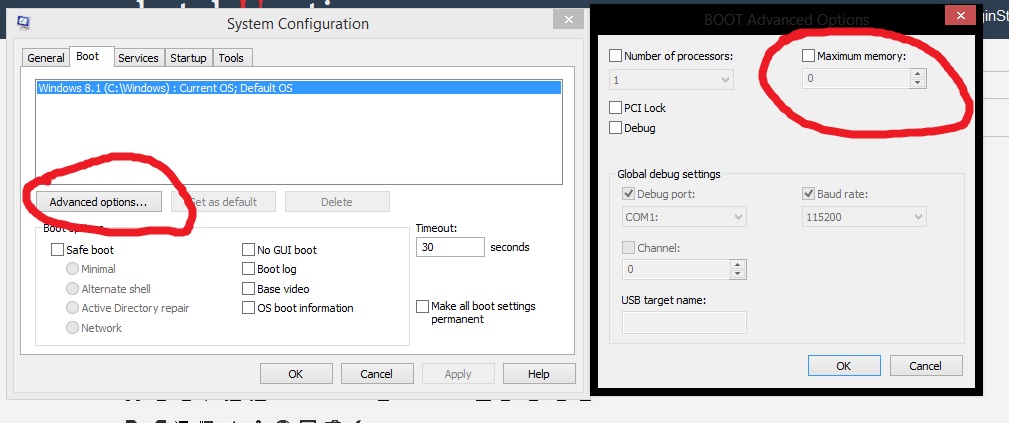
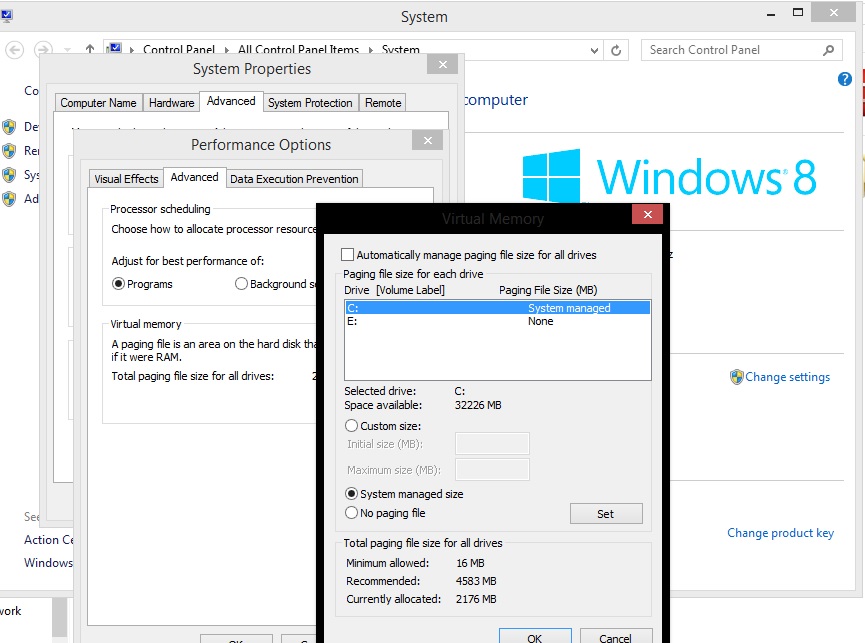
      I read on internet about increasing the maximum memory capacity by going to msconfig and advanced options. Another one was increasing the page file size. The page file trick is also mentioned in the book Autocad Professional tips and techniques by Lynn Allen, Scott Onstott but it's for autocad only.

      See the screenshots.

      Does/will it help?


      msconfig one.jpg


      pagefile.jpg

      posted in SketchUp Discussions
      john2J
      john2
    • Making V-Ray use More RAM ?

      I recently upgraded my laptop ram to 8 GB . How can I make V-ray use more RAM, so as to boost the performance? I am using Windows 8.1 (64 bit) and Sketchup 2015 (64bit)

      posted in V-Ray render plugins extensions
      john2J
      john2
    • Making SketchUp use More RAM ?

      I recently upgraded my laptop ram to 8 GB . How can I make sketchup use more RAM, so as to boost the performance? I am using Windows 8.1 (64 bit) and Sketchup 2015 (64bit)

      posted in SketchUp Discussions sketchup
      john2J
      john2
    • RE: [Plugin] SketchUcation Tools 2.6.1

      @dave r said:

      Try clearing the IE caches/temporary internet files.

      Tried it. I cleaned using CCleaner. I am still getting that screen.

      posted in Plugins
      john2J
      john2
    • RE: [Plugin] SketchUcation Tools 2.6.1

      I recently updated to Windows 10 Pro. I am running sketchup 2015 64 bit. Whenever I click the red butotn of this plugin I get a blank white screen. I tried 4-5 times, removed this extension, reinstalled it but still getting a blank white screen. What should I do? My drivers are up to date.

      posted in Plugins
      john2J
      john2
    • RE: [Plugin] Align tool 3D (bug fix)

      @tig said:

      It works fine in v2014 and v2015.
      It appears near the end of the Context menu as 'Align' - you must have something Selected...

      What happens if you copy+paste this command into the Ruby Console + <enter> ?
      load 'align_tool.rb'

      The older versions <=v1.1 are NOT compatible beyond v2013, because of the Ruby upgrade.
      So, are you using the very latest version [v1.1x] available from the PluginStore which was made compatible with all SketchUp versions [sorry but it's in ENglish only]...
      http://sketchucation.com/forums/viewtopic.php?p=76774#p76774
      http://sketchucation.com/pluginstore?pln=align_tool
      If NOT then please get the latest version's RBZ installed...
      Report back if there are continuing issues...

      I get this

      load 'align_tool.rb'
      true

      That's really weird. I am getting this option align in my right click menu. Restarted sketchup and wow! my option is coming.

      This problem was occuring in both my PC and laptop. I am sitting on my laptop currently and the problem is gone. Didn't know what created it. Moreover on both my machines, I installed the latest version straightaway by accessing the plugin store inside sketchup via SCF plugin. Thanks for replying. ๐Ÿ˜„ ๐Ÿ‘ Maybe this ruby console has healed my problem, dont know. ๐Ÿ˜„

      posted in Plugins
      john2J
      john2
    • RE: [Plugin] Align tool 3D (bug fix)

      this tool is not showing up in context menu. I am using version 2014 make

      posted in Plugins
      john2J
      john2
    • RE: Required tutorial for aligning objects

      align tool plugin not showing up in sketchup 2014 make. what's wrong?

      posted in SketchUp Discussions
      john2J
      john2
    • Required tutorial for aligning objects

      I'm having difficulty in aligning a hexagonal pyramid. Simply put, I don't know how to rotate it perfectly any way I want. I searched on youtube but for aligning objects, I'm getting tutorials for cuboidal forms.

      Can anyone suggest me a video tutorial for aligning other geometrical forms easily?

      posted in SketchUp Discussions sketchup
      john2J
      john2
    • RE: Export selection as jpg?

      Plugin ruby file.. How can I make from this?

      Sent from my IQ 446 using Tapatalk

      posted in Plugins
      john2J
      john2
    • Export selection as jpg?

      Is there a plugin that enables me to export a selection as jpg image?

      posted in Plugins
      john2J
      john2
    • Plugin bundle installation

      I'm trying to install my plugin bundle from scf plugin store. I had this plugin bundle installed for Sketchup 2015 64 bit. I have sketchup 2014 make and I want to install bundle for 2014. When I try to install, nothing happens. I press the button and keep looking at screen for 5 minutes and then close the screen. Is it gonna take longer or some fault is there?

      posted in SketchUp Discussions sketchup
      john2J
      john2
    • RE: SP Waves

      Wow! How did you make this thing ๐Ÿ˜ฎ ๐Ÿ˜ฎ

      posted in SketchyPhysics
      john2J
      john2
    • Multiple copies tips

      I am making four buses of same model but with different speeds. However if I make copies then the wheels begin to move in a wrong way. I have to manually create new wheel for each bus.

      Is there a smart way to deal with lot of copies so as to save time?

      posted in SketchyPhysics
      john2J
      john2
    • Why make groups?

      I guess this discussion must have been here for a lot of times. Can anyone post a link for discussion showing importance of groups?

      I mean, we don't know when the need will arise for something when we need dynamic change/cloning change possibilities later, so it is always good to make components initially. So what is the need for groups?

      posted in SketchUp Discussions sketchup
      john2J
      john2
    • Can't push pull a box

      Iโ€™ve faced this problem for the first time. I have a simple box and I canโ€™t seem to pull/push it from below. What is preventing me exactly to do my job? Deleting circle does that but I want to know the precise reason.


      BOX PROBLEM.skp

      posted in SketchUp Discussions sketchup
      john2J
      john2
    • Finding groups in large models

      While handling large models, lot of times I make something as a group, then due to huge scale of model, I forget where I placed that group. Is there any good way to avoid this situation besides making a component initially and naming it, to avoid getting into such situation? I feel this is a stupid question to ask but still I wanted to ask. ๐Ÿ˜ณ

      posted in SketchUp Discussions sketchup
      john2J
      john2
    • Disable control panel popup

      Every time I hit the play button, the SP control panel pops up. Is there anyway to temporarily disable this feature? Sometimes I don't need this panel.

      posted in SketchyPhysics
      john2J
      john2
    • 1 / 1