Is there any plugin manager that let me uninstall unnecessary plugins? I have sketchup plugin store.
Oops, your profile's looking a bit empty! To help us tailor your experience, please fill in key details like your SketchUp version, skill level, operating system, and more. Update and save your info on your profile page today!
Sketchucation Tools 5.0.7 | Licensing improvements and bug fixes Learn More
 Offline
Posts
-
Plugin uninstaller
-
Group vs. components for axes management
I've got all the plugins to manage the axes of groups and components. Just to be on the safe side, do components have an advantage when it comes to avoiding the zoom cutting view problem or do both are equally vulnerable to this bug in sketchup. Moreover is this bug solveable? I'm asking because it's a really annoying problem which Sketchup team has so far been unable to solve.
-
RE: All vismats black
Well, I found a way out of this. I have to reload the diffuse layer for every vismat to make it work. It is indeed a problem solver but very tedious. There must be some smart solution for the problem. I download vismats from internet.
-
RE: Increasing priority of SU in task manager
@jim said:
This shouldn't be happening. Are you working on models on a network drive? I have heard this can hang SketchUp during an auto-save.
I have tried increasing priority when playing some games. I've never really been able to tell a difference.
I'm using sketchup on my laptop with 2gb graphics card and an i5 processor, no network drive, just simple usage.
-
RE: RAM consumption with multitasking
Plugin that uses observers means? What is IMHO?
Sent from my IQ 446 using Tapatalk
-
All vismats black
I am using the most recent version of vray for SketchUp 2015-64 bit. I have a vismat collection. The problem I’m getting is, while the vismats import correctly, however when I apply them, they get applied as a pitch black colour in SketchUp. Interestingly they render perfectly as they should be in the render but in the live SketchUp workflow, they show up as pitch black. This is happening with all vismats.

-
Increasing priority of SU in task manager
Often it happens that SketchUp hangs midway of some crucial stage in modeling. I often increase the priority in the windows task manger from normal to realtime, so that SketchUp doesn’t hang and speeds up the process in which it has got hanged. Does this method work actually? I don’t know whether SketchUp recovers from the hang because of the fiddling that I do in task manager or due to the time elapsed. One more thing, how much should one wait when SketchUp hangs during 3d modeling process? 10 minutes, 20 minutes? And is it safe or risky to open another window of SketchUp and start doing something else related to the work you’re currently engaged in?
-
RAM consumption with multitasking
I have 4GB RAM and an i5 processor in my laptop. I want to ask while running SU 2015x64, would my laptop perform better if AutoCAD 2012 with a 1 mb drawing is open or with Adobe Reader XI window of the same drawing opened as a pdf?
I'm asking this because I keep on looking at my 2D drawing while modelling in SketchUp so want to ensure that I get the best performance from my hardware with respect to the multiple software windows open at the same time. -
High-res/vector sketchup toolbar buttons?
I am making sketchup tutorials[in powerpoint as well as printed notes] for my students. I'm making text and images based tutorials. For toolbars, I need high resolution vector graphics. Is there any place I can find such vector graphics for sketchup toolbars?
-
[req] level management plugin
I"m making a huge model with lots of levels. The problem I"m getting is with step levels of 300mm driving me crazy in 3d. The model is getting hard to manage. Is there a plugin which does dimensioning of the various levels [i.e. the lowest levels] of huge sized groups in a model?
and we can define the size of the groups/components. Color by Z by Chris sir is for raw geometry only.
-
RE: [req] Exterior lighting advice
and what about the Studio-Roosegaarde-Solar-Bike-Path-Van-Gog image? How is that made in vray? too many lights?
-
[req] Exterior lighting advice
I want to show bollards in exterior lighting for a park I am designing. Which is the best suited vray light for showing such lightings?
Also correct me if I am wrong
Strip lights = vray rectangular lights
For lamp posts = vray spot lights/IES lights
Accent lights = IES lights

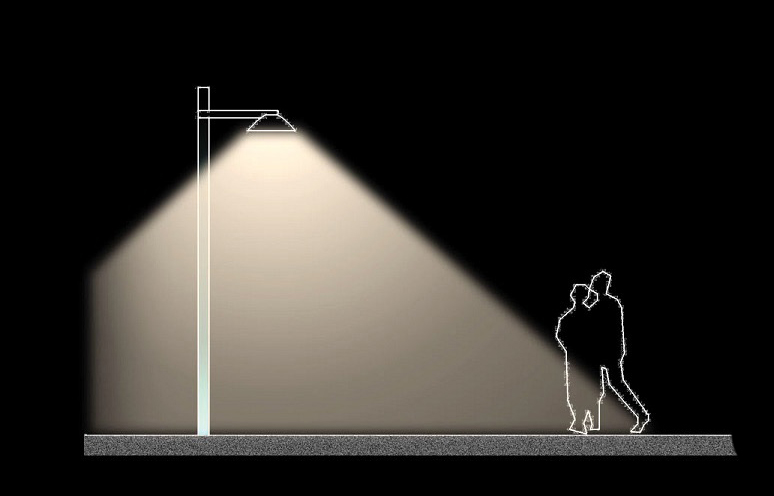

all the rectangular lights here.
How should I make such lights? Make a 2d dotted pattern in autocad and then apply emissive layers yeah?
Here in this image all the IES lights near the wooden steps -
RE: Parallel or Perpendicular axes as default
@wo3dan said:
@john2 said:
How can I do a tweak in sketchup so that any new group or component has its axes created in a way that it is perpendicular to its one of the edges and not randomly created?
I see no problem in putting the axes where I want them to be, overruling where SketchUp puts them (which btw isn't random at all).
But to answer your question: right click the face (if not too complex shaped) with that edge you wish to coincide axis with > select 'Align Axes' > (maybe adjust the drawing axis to coincide with another bounding edge) > select all that needs to be grouped and group the selection > right click on an axis in empty space and select reset.:heart_eyes: Bullseye sir, bullseye!! That's what I wanted. I should perhaps explore more of the right click menus of sketchup. :smile:Thanks a gigaton

-
Parallel or Perpendicular axes as default
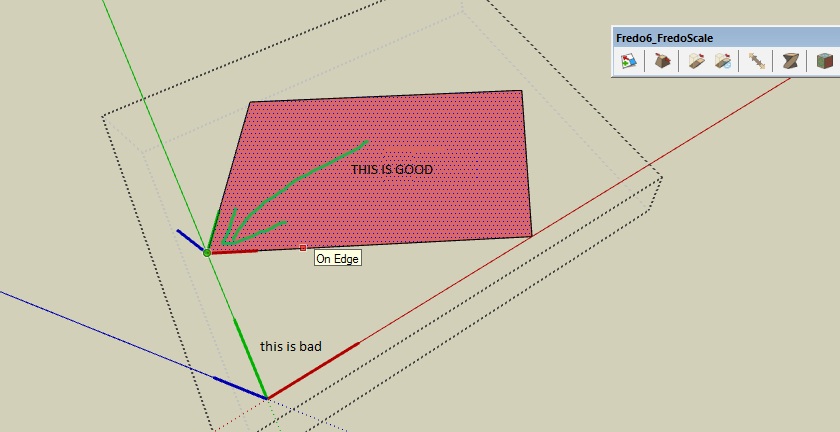
How can I do a tweak in sketchup so that any new group or component has its axes created in a way that it is perpendicular to its one of the edges and not randomly created?
-
Generating custom numbered lists
In microsoft word or any other word processor I want to generate list which goes like
http://sampleanythingwebsitexyzabc/e349338fc5c67fdsfdee34353/jpg/page_6.jpg
http://sampleanythingwebsitexyzabc/e349338fc5c67fdsfdee34353/jpg/page_98.jpg
http://sampleanythingwebsitexyzabc/e349338fc5c67fdsfdee34353/jpg/page_101.jpg
.............................http://sampleanythingwebsitexyzabc/e349338fc5c67fdsfdee34353/jpg/page_500.jpg
..........
so on and so forth.
How can I make? There must a macro or something.
-
RE: Getting in a component by axis click
@dave r said:
So the issue is that the component's axes and origin are not within or close to the geometry contained in the wrapper. There isn't any way to click on component axes and get the component open for editing. Perhaps, instead, maybe you could select the component from the Outliner. You'd at least be able to sort out which component axes belong to which component.
As you already recognize, the problems you're trying to sort out are due to sloppy work on the front end. Maybe you should consider that there comes a time when you need to cut your losses and start over. You've been chasing this axis thing since last week, I think. Perhaps it would be faster, easier, and less frustrating to start over from the beginning with clean modeling. Or maybe at least you can go back and fix the original CAD file instead. Just a thought.
Absolutely true Dave sir. That's what I'm doing now, thanks to thomthom axes tools. I am now building the entire model from almost scratch and manually choosing the axes tools plugin to centrally place the axis.
I've been using sketchup since 2006 and never faced this problem because, my architecture site never exceeded the 11 acre mark. Now, I have made serious mistake for the first time and learnt a lot from it.
P.S. You're speaking like my 60 year old dad.

-
RE: Getting in a component by axis click
I know all this already
Sent from my IQ 446 using Tapatalk
-
Getting in a component by axis click
I"ve got into serious mess by doing disorganized axis modeling. By viewing the axis of each and everything, it gets clear about the mess I'm into. However, is there a way if I click on the axis, I get inside the component/group for a better insight into my stupidity?
-
RE: SketchUcation Plugin Video Tutorials
Thanks a lot Rich Sir for these tremendously helpful videos. I'm speechless about the feeling of my gratitude towards this awesome effort of yours.

-
RE: Don't want notification for makefaces
Thanks for advising me a great plugin by TIG sir.
Thanks for the trumpet  . That plugin of TIG sir is way much better and doesn't blow the trumpet of notification about how many faces were made, lines, stats and all the useless stuff for ordinary user like me.