@dave r said:
As I understand it, you can't import those 3D buildings from GE to SU. google doesn't offer that functionality.
Any third party software that allows us to do so?
 Offline
@dave r said:
As I understand it, you can't import those 3D buildings from GE to SU. google doesn't offer that functionality.
Any third party software that allows us to do so?
Okay, now the situation is that I found an old setup of sketchup 2016 (version 16.0.19912 - 64 bit). I installed it and it ran fine. My plugins folder was renamed as "plugins_latest". Okay so far so good. I renamed the folder back to plugins, and sketchup still started. I closed it and restarted it again. Then it crashed with the same "amd driver has crashed and recovered error"
Now I renamed my plugins folder back to "plugins_latest". Now sketchup as usual created a new default plugins folder and now its running fine. I also did registry cleaning with CCleaner.
I think the culprit is some plugin that crashes sketchup.
What should I do now?
I found old posts on this topic and couldn't find my solution.
So, how can I import existing models on google earth into sketchup? Those models aren't found on 3d warehouse.
@dave r said:
Yes. It does sound like some extension is causing the problem. I guess I would install a couple of extensions at a time until you get the crash. Make sure you are installing fresh copies from their source. Do not copy extensions from the old Plugins folder.
That's precisely what I was thinking. Here on the forums I was expecting an opinion that would allow me to do "all my plugins in bulk" sorta thing. 
But one thing I don't understand. I was earlier running an updated sketchup 2016 and did the same default plugins folder thing. I allowed sketchup to create a new default plugins folder and the crash was still happening unlike the present scenario. 
@dave r said:
@john2 said:
@dave r said:
Would it be okay that I download "plays.tv" application, install it and then uninstall it to remove any of its previous invisible traces that have been causing trouble?
I don't know. That seems like an odd way to go about it. Maybe find a registry cleaner instead.
Try going back to 32-bit SketchUp and see what happens.
Sketchup 2015 - 64 bit is running fine. I'm downloading 32 bit version of 2016. I'll post the results soon.
I have piriform CCleaner for cleaning registry and temp files. Should I perform cleaning up of registry with this software?
@dave r said:
You might try rolling back the video drivers to and earlier version.
Or you might uninstall 64-bit SU and install 32-bit instead. Some users have found that Radeon's motoriously poor OpenGL support creates fewer problems with 32-bit applications.
Rolling back the video drivers to previous version won't solve this trouble as I started facing this when I was on previous version only. That's why I updated my driver.
Would it be okay that I download "plays.tv" application, install it and then uninstall it to remove any of its previous invisible traces that have been causing trouble?
@dave r said:
Very likely you do have Plays.tv installed since it was packed with a recent Radeon driver update and installed automatically. Many users have reported this same sudden crashing and every one of them have found plays.tv was the culprit. You might have a closer look for it.
No, I couldn't find any plays tv in my installed programs list. Neither it was found in program files and program Files(x86) folders.
I uninstalled raptr application also but I'm still facing this trouble. What's should I do now?
There was just one windows update file that was related to some journal that got installed last. Sketchup trouble was already there before installation of that update too.
I don't have any play tv installed.
I have rebooted a lot. I installed Radeon updates too (after this problem) which requires rebooting the laptop. I removed previous installation of Intel graphics and amd Radeon using DDU.
http://www.guru3d.com/files-details/display-driver-uninstaller-download.html
Then installed the latest graphics drivers but the problem persists. This graphics trouble is coming with Sketchup only.
If graphics driver was troubled (as seen in my past experiences) then my Adobe Illustrator CC graphics acceleration also got disabled earlier (the jet button). But it's running absolutely fine now.
I also tried repairing my Sketchup installation but still I can't fix this problem.
I'm running Windows 8.1 (64 bit) on my Lenovo G500 laptop. It has AMD Radeon HD 8570 (2GB) graphics card, Intel integrated HD graphics, i5 processor, 500 GB SATA Hard disk and 8GB DDR3 RAM. My windows are up to date and sketchup too.
Today, when I started sketchup-2016 (x64). I got the error "display driver has stopped responding and has recovered" in the system tray. This error occurs for AMD Radeon. After that SketchUp crashed.
Then I updated my Radeon crimson driver. Still I was getting the error and SketchUp was crashing.
I renamed my plugins folder to “pluginslat”. Then SketchUp started flawlessly.
For the past few months, I have not installed neither updated a single SketchUp plugin.
What should I do to fix this trouble? It seems as if the plugin folder is the culprit but how do I find the culprit?
I don’t have any plugins that are written in this post.
http://sketchucation.com/forums/viewtopic.php?f=323%26amp;t=59657
Here's the list of files and folders present in my sketchup plugins folder
Folders
1001bit_pro/
1001shadows/
2DTools/
artisan/
bezierspline/
BoolTools/
BTW_Textures/
BZ_Dir_14/
BZ_Dir_16/
BZ_Dir_17/
CD_ICONS/
clf_center_on_origin/
clf_color_by_slope/
clf_color_by_z/
clf_component_stringer/
clf_perpendicular_face_tools/
clf_select_same_length_edges/
clf_shape_bender/
cmd_mover/
CompoSpray/
css/
deBabelizer/
dj_plugins/
DM_artisan/
dm_curve_maker/
DM_ProfileBuilder/
DM_SketchUV/
ene_camMemory/
ene_texturepositioning/
ene_viewport_resizer/
Examples/
FG_Icons/
Fredo6_!LibFredo6/
Fredo6_Curviloft/
Fredo6_Curvizard/
Fredo6_FredoScale/
Fredo6_FredoTools/
Fredo6_JointPushPull/
Fredo6_RoundCorner/
Fredo6_ToolsOnSurface/
Fredo6_TopoShaper/
fur_en/
Icons/
iscarnet_dibac/
jf-moveit/
JPP_Dir_18/
JPP_Dir_20/
js/
jwm_polyhedra/
ky_simple scale handles/
LiveIvy/
medeek_truss_ext_trial/
Modelur/
mover2/
nurnies/
Ocean/
OpenStudio/
pfile blder/
Projection/
protrude/
RND_iSelect/
s4u_selectool/
SectionCutFace/
SketchUcation/
smustard_PathCopy/
smustard_Weld/
SoapSkinBubble/
su_advancedcameratools/
su_dynamiccomponents/
su_sandbox/
su_solarnorth/
su_trimble_connect/
su_webtextures/
Terrain - 3D Warehouse_files/
TIG-Smart_offset/
TIGtools/
tilelook_tilesearch/
tmp/
TOS_Dir_18/
tt_architect_tools/
tt_autosmooth/
tt_axes/
tt_bezier_surface/
tt_bitmap2mesh/
tt_cleanup/
TT_EdgeTools/
TT_Lib2/
tt_material_replacer/
tt_material_tools/
TT_MatRep/
TT_QuadFaceTools/
tt_replacer/
tt_select_curve/
TT_Select_Toys/
tt_selection_memory/
tt_selection_toys/
tt_solid_inspector/
tt_solid_inspector2/
TT_Superglue/
tt_text_tools/
tt_uv_toolkit2/
tt_vertex/
tt_vray_tools/
Utilities/
VRayToys/
windowizer4languages/
List of files
.gitignore
#extrusionToolbar.rb
0.skb
1.skb
1001bit_path_win_su7.rb!
1001bit_pro.rb!
1001bit_pro(v2.2).rbz
1001shadows.rb!
2.skb
2DTools.rb
addfaces.rb
align_tool.rb
AndersenWindows_extension.ini
AndersenWindows_extension.rb!
Another_Sketchup.rb!
bezierspline.rb!
booltools.rbs
cd_power_extension_m.rb
cd_power_m.rb
cd_power_n.rb
centerpoint.rb
centroid.rb
centroid.rbs
cgauth.dll
clf_center_on_origin.rb!
clf_color_by_slope_1-5-7.rbz
clf_color_by_slope.rb!
clf_color_by_z.rb!
clf_component_stringer.rb!
clf_perpendicular_face_tools_loader.rb!
clf_select_outer_edges.rb
clf_select_same_length_edges.rb!
clf_shape_bender_loader.rb!
cmd_mover.rb
compoSpray_142.pdf
config-thumb.jpg
corner_vertices.rb
corner_vertices.rbs
create_section_drawings.rb
deBabelizer.rb
delauney2.rb
delauney3.rb
divide_faces.rb
divide_faces.rbs
DM_artisan.rb!
dm_curve_maker.rb!
DM_ProfileBuilder.rb!
DM_SketchUV.rb!
drop.rb
Elev45shadows.rb
ene_camMemory.rb
ene_texturepositioning.rb
ene_viewport_resizer.rb
EntsGetAtt.rb
examples.rb
examplesen.strings
extensions.rb
ExtrudeAlongPath.rb!
extrudeEdgesByEdges.rb!
extrudeEdgesByFace.rb!
extrudeEdgesByFaces.rb!
extrudeEdgesByLathe.rb!
extrudeEdgesByLoft.rb!
extrudeEdgesByOffset.rb!
extrudeEdgesByRails.rb!
extrudeEdgesByRailsByFace.rb!
extrudeEdgesByRailsToLattice.rb!
extrudeEdgesByVector.rb!
extrudeEdgesByVectorToObject.rb!
FacePusher.rb
fixSolid.rb
Fredo6_!LibFredo6.rb
Fredo6_Curviloft.rb
Fredo6_Curvizard.rb
Fredo6_FredoScale.rb
Fredo6_FredoTools.rb
Fredo6_JointPushPull.rb
Fredo6_RoundCorner.rb
Fredo6_ToolsOnSurface.rb
Fredo6_TopoShaper.rb
Fredo6Trace.txt
fur_en.rb!
getMaterials.rb
GoldenGauge.rb
gradienttools_v1.3.rbz
Grow.rb
iscarnet_dibac.rb
jf-moveit.rb
jwm_polyhedra.rb
ky_simple scale handles.rb
latticeMaker.rb
LibTraductor.def
LibTraductor.rb
LICENSE
lines2tubes.rb
LiveIvy.rb
medeek_truss_ext_trial.rb
MI.png
Mirror.rb
MirrorTool.png
MirrorTool.rb
Modelur.rb!
ocean_extension.rb
offset_mod.rb
offset_mod.rbs
offset.rb
OpenStudio.rb!
parametric.rb
progressbar.rb
projection_extension.rb
protrude.rb
protrude.rbs
quarr_jsalign.rb
RamTools_StepEx.rb
RandomPushPull.rb
randomSelect.rb
randomselect.rbs
Rational.rb
README.markdown
README.mdown
rectangle_hole.rb
rectangle.rb
RND_iSelect.rb
Rotated Box.rb
Rotateplanview.rb
s4u_selectool.rb
scramble.bat
SDM_FloorGenerator_WD.rb!
SectionCutFace.rb
select.rb
selection_manager.rb
selection_manager.rbs
selecto.rb
shade_analysis_tool.rb
SketchUcation.rb
SketchUcationTools.rbz
sketchup.rb
SketchyFFD.rb
SliceModeler.rb!
smustard_PathCopy.rb
smustard_Weld.rb
smustard-app-observer.rb
SoapSkinBubble.rb!
startup.rb
Stepping Stones.rb!
stray_lines.rb
su_advancedcameratools.rb
su_dynamiccomponents.rb
su_sandbox.rb
su_solarnorth.rb
su_trimble_connect.rb
su_webtextures.rb
Terrain - 3D Warehouse.htm
TIG_points_cloud_triangulation.rb
TIG-originatecomponnetsaxes.rb
TIG-shadowProjector.rb
TIG-Smart_offset.rb
TIG-solidsolver.rb
TIG-weld.rb
tilelook_tilesearch.rb
toggleWindows.rb
tt_0000_menu.rb
tt_architect_tools.rb
tt_autosmooth.rb
tt_axes.rb
tt_bezier_surface.rb
tt_bitmap2mesh.rb
tt_cleanup.rb
tt_comp_prop.rb
tt_component_dropper.rb
tt_edgetools.rb
tt_export.rb
tt_flatten.rb
TT_Lib2.rb
tt_mat_replace.rb
tt_material_replacer.rb
tt_material_tools.rb
tt_plan_tools.rb
tt_quadfacetools.rb
tt_replacer.rb
tt_select_curve.rb
tt_selection_memory.rb
tt_selection_toys.rb
tt_simple_installer.rb
tt_simple_installer.rbz
tt_solid_inspector.rb
tt_solid_inspector2.rb
tt_superglue.rb
tt_text_tools.rb
tt_uv_toolkit2.rb!
tt_vertex.rb
tt_vray_tools.rb
ui.css
ui.html
ui.js
utilities.rb
UVprojection.rb!
UVtools1.rb!
vector.flat_angle.rb
vfs.rb
VoronoiConic_loader.rb!
vray.dll
weld.rb
windowizer.rb!
windowizer4-zh-CN.html
windowizer4.rb!
windowizer4stylemanager.rb!
xformclone.rb
xLine.rb
zoom_selection.rb
@dave r said:
Leave Hardware Acceleration turned off and hope that ATI/Radeon improves their support for OpenGL.
Turning Hardware acceleration off makes things work even slower. 
I can't replace my laptop amd graphics card for now. Is there a better option for me? I'm sure there will be one as it was giving a good performance over the last few years.
I'm running Windows 8.1 (64 bit) on my Lenovo G500 laptop. It has AMD Radeon HD 8570 (2GB) graphics card, Intel integrated HD graphics, i5 processor, 500 GB SATA Hard disk and 8GB DDR3 RAM.
I am using sketchup 2016 make - 64 bit.
Recently sketchup started behaving jaggedly (zooming, panning, moving objects) in models as light as 5 mb. I tried other files also just in case to confirm whethere there was a problem in file. But, it was not the case. I also updated my AMD radeon crimson software from 16.2.1 to 16.6.1 today but the problem is not solved.
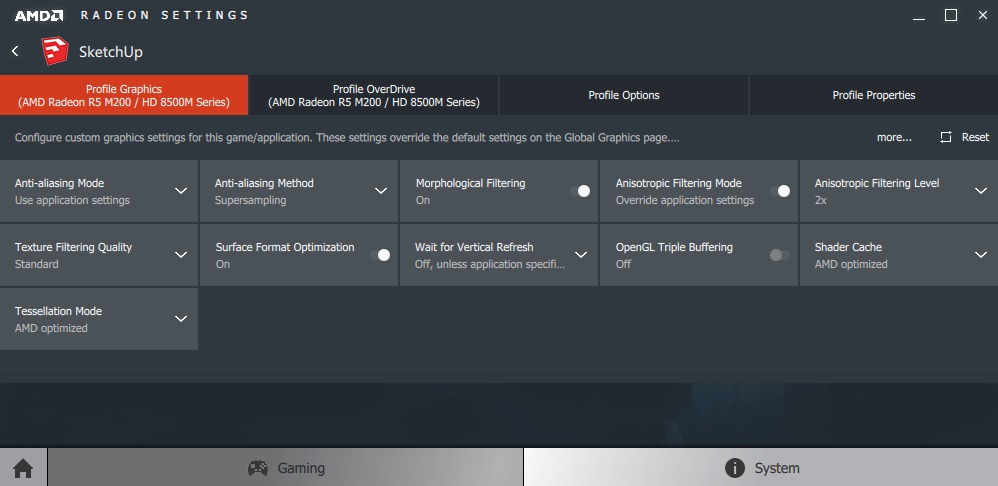
Can anyone please share their custom graphics and overdrive settings which are done in AMD crimson software?
I am using the following settings. I have also checked that my hardware acceleration in sketchup OpenGL preference is enabled
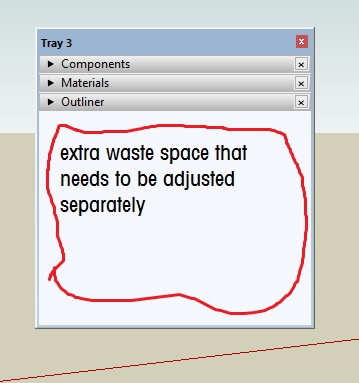
Is it just me or trays in sketchup aren't fully developed unlike photoshop and indesign which have smart collapsible trays which don't waste space like this?
I have to shorten the size of the trays when in a minimized mode to save space.
Normally in sketchup, if I change the opacity of a material to make it transparent. It remains transparent from one side if applied to a face. I have to apply it from second side also so that the face is transparent from boths sides. Is there a quick way to make a two sided material so that our work can become faster instead of applying material on both faces? I know that I can achieve in vray, but how in default sketchup?
@box said:
Make sure internet explorer is up to date, has a clean cache and isn't too restricted security wise.
Thanks for the tip! It worked. I am using Internet explorer 11. I reset my settings to defaults for privacy and security.
Now my extension store is working. I can see the lists, etc. However, this version of store works slow. That is the search and the opening of pages is slower than the previous versions. It seems as if I am using this store on a very slow internet connection which is not the case. Moreover, I have not changed anything as far as interference with my internet is concerned, i.e. my antivirus brand, firewall settings, etc.

My extension store is showing up as a white box. I downloaded and installed the latest rbz file from the official link. My graphics drivers and windows are up to date. I tried opening sketchup with my antivirus disabled (Avira), but it did not help.
Thanks for this tip! I'll surely try it 
I am facing a similar problem. However, my object is has much simpler geometry than the ones discussed above
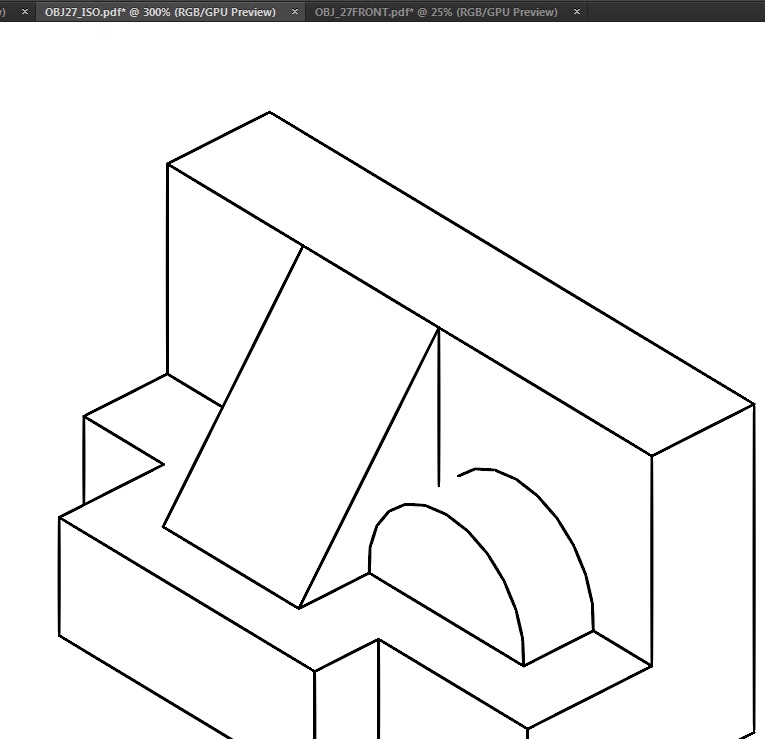
Is there a plugin that allows me to space objects at a even distance horizontally and vertically?
For example I have 4 spheres (diameter 50 mm) and 3 cubes of (40 mm side). I want them aligned centrally and spaced with a gap of 10 mm between them. How is it quickly possible?
I was stuck in a similar problem yesterday. Does anyone know how to control the dpi resolution by entering numbers (e.g. 270 dpi, 250 dpi, 200 dpi) when exporting jpegs and hybrids from layout?