sketchucation logo sketchucation
    • Login
    1. Home
    2. AdamB
    3. Topics
    Oops, your profile's looking a bit empty! To help us tailor your experience, please fill in key details like your SketchUp version, skill level, operating system, and more. Update and save your info on your profile page today!
    Sketchucation Tools 5.0.7 | Licensing improvements and bug fixes Learn More
    A Offline
    • Profile
    • Following 0
    • Followers 0
    • Topics 130
    • Posts 935
    • Groups 2

    Topics

    • A

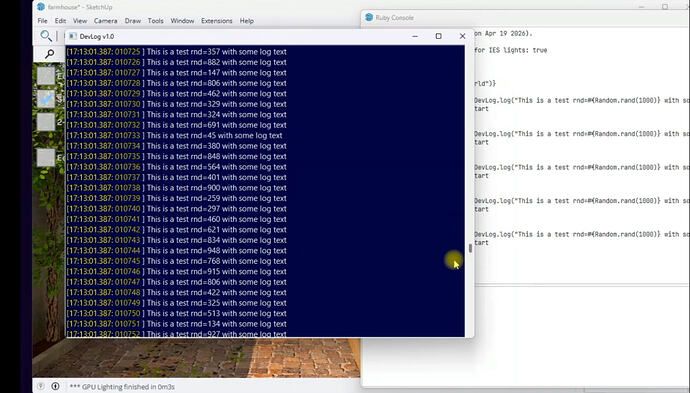
      Bonkers faster logging. New extension for developers

      Watching Ignoring Scheduled Pinned Locked Moved Developers' Forum
      3
      1
      1 Votes
      3 Posts
      142 Views
      A
      Sure TIG. As shown in the video, its just an extension that opens a window so that when you execute Ruby: DevLog.info("Hello world") It shows in the log window. You can filter on log level and there are: DevLog.warn("oo, something might be bad") DevLog.error("oo, this is an error") DevLog.fatal("oo, I cannot continue") When you close SketchUp, the entire log file is saved to %Temp% USP: Its around 4000x faster than puts
    • A

      LightUp v4 now uses SketchUp .rbz Installer

      Watching Ignoring Scheduled Pinned Locked Moved Extensions & Applications Discussions extensions
      8
      0 Votes
      8 Posts
      4k Views
      P
      [image: olddschool.jpg]
    • A

      New step-by-step tutorials

      Watching Ignoring Scheduled Pinned Locked Moved Extensions & Applications Discussions extensions
      3
      0 Votes
      3 Posts
      1k Views
      P
      Does it possible to rotate the scene from a fixed axe without see the Tripod XYZ ? [image: M2VE_test.gif]
    • A

      Android player

      Watching Ignoring Scheduled Pinned Locked Moved Extensions & Applications Discussions extensions
      1
      0 Votes
      1 Posts
      754 Views
      No one has replied
    • A

      New releases of LightUp

      Watching Ignoring Scheduled Pinned Locked Moved Extensions & Applications Discussions extensions
      3
      0 Votes
      3 Posts
      1k Views
      A
      +1 on the Perpetual License option, the subscription licensing kept me from evening trying LightUp, I hope other developers whose software is subscription based follow your lead and give us a choice. Mike
    • A

      Bar renders

      Watching Ignoring Scheduled Pinned Locked Moved Gallery
      6
      0 Votes
      6 Posts
      779 Views
      B
      They look good to me!
    • A

      Experiments with rendering ceramic surfaces

      Watching Ignoring Scheduled Pinned Locked Moved Gallery
      2
      0 Votes
      2 Posts
      365 Views
      B
      Looks spot on to me.
    • A

      Little touches in SU2015

      Watching Ignoring Scheduled Pinned Locked Moved SketchUp Discussions sketchup
      16
      0 Votes
      16 Posts
      2k Views
      V
      I took SU2015 as an opportunity to house clean as I have always ctrl+c copied plugins from one version to the next and the same with my shortcuts. I manually reinstalled all of my favorite plugins and tossed the old ones that never really used. Then I ran this script in the ruby console and went through all of my shortcuts. Some I knew, some I had no idea. UI.messagebox(Sketchup.get_shortcuts.join("\n"), MB_MULTILINE)
    • A

      LightUp 64-bit released

      Watching Ignoring Scheduled Pinned Locked Moved Extensions & Applications Discussions extensions
      3
      0 Votes
      3 Posts
      2k Views
      A
      In case it wasn't clear, LightUp has full 64-bit support for Windows and Macintosh. On Windows, you need to run the LightUp-x64.msi installer because Windows 64-bit applications live in a different Program Files folder, on Mac its automatic when you run SU2015. Realtime render [image: f1176d50-744e-4a11-a37b-e6ef95d39740_zps7bb87907.jpg]
    • A

      Avoid SketchUpBIM?

      Watching Ignoring Scheduled Pinned Locked Moved Developers' Forum
      3
      0 Votes
      3 Posts
      482 Views
      K
      It's in my architecture list. I'll put in a warning.
    • A

      Loft Bedroom WIP

      Watching Ignoring Scheduled Pinned Locked Moved Gallery
      13
      0 Votes
      13 Posts
      941 Views
      A
      @pbacot said: Adam, Thanks for the demos. I am not sure what the answer would be as to whether I'd like the results in Lightup. I have to try it again. It looks to me like the AO is too pronounced. Peter Peter, the amount of AO is controllable by a Multiplier, so you can tone it down, change the blend colors, change the blending with direct lights. Lots of control to get the look you want. I turned it up to full whack just so you could see the difference of AO cutoff.
    • A

      LightUp v4.1 released

      Watching Ignoring Scheduled Pinned Locked Moved Extensions & Applications Discussions extensions
      19
      0 Votes
      19 Posts
      3k Views
      K
      @adamb said: Hi Kris, On Windows, the installer checks what version of SketchUp you have and sets up the initial Installation Folder. So if you have SU2014, then it will be set to *C:\Program Files (x86)\SketchUp\SketchUp 2014* If you have SU2013, then it will be set to *C:\Program Files (x86)\SketchUp\SketchUp 2013* and so on. You can of course edit this install location to wherever you like, but the default is based off where you installed SketchUp. Adam You might think of adding this as a text description or a tip on the installer. When I install 64bit My system is defaulting to program files 86 base folder. C:\Program Files (x86)\ and no sketchup folder. I have 8, 13, and 14 installed.
    • A

      Realtime archviz in Sketchup

      Watching Ignoring Scheduled Pinned Locked Moved Gallery
      7
      0 Votes
      7 Posts
      1k Views
      R
      TOTALLY IMPRESSED!!!!!!!!! Woe mate, that's really cool!
    • A

      Setting up an exterior render in 10 mins

      Watching Ignoring Scheduled Pinned Locked Moved Extensions & Applications Discussions extensions
      1
      0 Votes
      1 Posts
      551 Views
      No one has replied
    • A

      Studio lighting

      Watching Ignoring Scheduled Pinned Locked Moved Gallery
      3
      0 Votes
      3 Posts
      394 Views
      A
      @rich o brien said: Any chance of posting the SU setup as an image. I'd like to see how many irrcaches you have injected. Sure, here it is. Should be a case of loading and starting TourTool. studiolighting.skp.zip
    • A

      Koooolalala archiviz tribute

      Watching Ignoring Scheduled Pinned Locked Moved Gallery
      7
      0 Votes
      7 Posts
      1k Views
      Rich O BrienR
      @cadmunkey said: Depth of field a Lightup feature? Yes, DOF, Vignette and Bloom are all handled interactively after processing the scene.
    • A

      Mad behaviour of String#hash

      Watching Ignoring Scheduled Pinned Locked Moved Developers' Forum
      6
      0 Votes
      6 Posts
      724 Views
      D
      @tt_su said: This .hash change affects only String, yes? The above Ruby bugs thread mentions Object#hash being overhauled (which is inherited by every object, unless overriden.) So a test under SketchUp 2014 & Ruby 2.0: (1) Open a SketchUp session, and in the console: Sketchup.hash %(#004000)[>> -112701995] This is the method that the Module class inherits from Object. (2) Close this SketchUp session, reopen SketchUp, and in the console: Sketchup.hash %(#004000)[>> -226388390]
    • A

      LightUp Explainer

      Watching Ignoring Scheduled Pinned Locked Moved Extensions & Applications Discussions extensions
      1
      0 Votes
      1 Posts
      523 Views
      No one has replied
    • A

      Basketball court

      Watching Ignoring Scheduled Pinned Locked Moved Gallery
      8
      0 Votes
      8 Posts
      2k Views
      B
      Well done.
    • A

      LightUp v4.0c released

      Watching Ignoring Scheduled Pinned Locked Moved Extensions & Applications Discussions extensions
      1
      0 Votes
      1 Posts
      565 Views
      No one has replied
    • 1
    • 2
    • 3
    • 4
    • 5
    • 6
    • 7
    • 1 / 7
