sketchucation logo sketchucation
    • Login
    Oops, your profile's looking a bit empty! To help us tailor your experience, please fill in key details like your SketchUp version, skill level, operating system, and more. Update and save your info on your profile page today!
    Urasik Extensions | Lots of new extensions to check out Learn More

    Bonkers faster logging. New extension for developers

    Scheduled Pinned Locked Moved Developers' Forum
    3 Posts 2 Posters 27 Views 2 Watching
    Loading More Posts
    • Oldest to Newest
    • Newest to Oldest
    • Most Votes
    Reply
    • Reply as topic
    Log in to reply
    This topic has been deleted. Only users with topic management privileges can see it.
    • AdamBA Offline
      AdamB
      last edited by AdamB

      Hi,

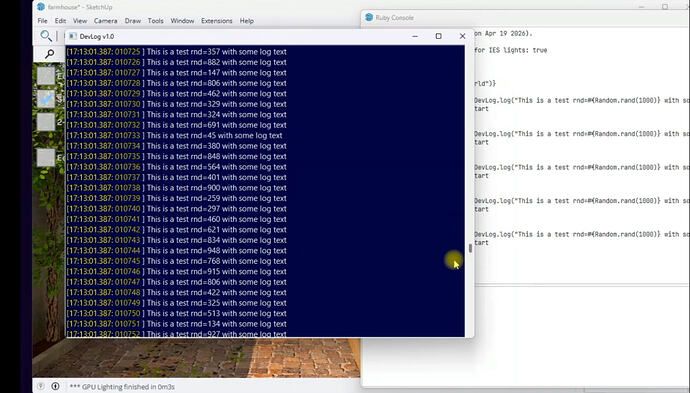
      DevLog v1.0 is a high performance logging extension for SketchUp. Its built from the ground up to be very fast - currently can handle around 2,000,000 log lines per second. I built it because puts really isn't made to handle lots of logging that you often need when debugging during development.

      RBZ attached below. Let me know your thoughts!

      Here is a short vid explaining a bit more::
      DevLog explainer
      922014eded6669e5b775325d9b2c91a7b7407afa_2_690x393.jpeg

      RBZ installer attached

      dlog.rbz

      Developer of LightUp Click for website

      1 Reply Last reply Reply Quote 1
      • TIGT Offline
        TIG Moderator
        last edited by

        Can you please explain more about its function and use...

        TIG

        1 Reply Last reply Reply Quote 0
        • AdamBA Offline
          AdamB
          last edited by AdamB

          Sure TIG. As shown in the video, its just an extension that opens a window so that when you execute Ruby:

          DevLog.info("Hello world")
          

          It shows in the log window. You can filter on log level and there are:

          DevLog.warn("oo, something might be bad")
          DevLog.error("oo, this is an error")
          DevLog.fatal("oo, I cannot continue")
          

          When you close SketchUp, the entire log file is saved to %Temp%

          USP: Its around 4000x faster than puts

          Developer of LightUp Click for website

          1 Reply Last reply Reply Quote 0

          Hello! It looks like you're interested in this conversation, but you don't have an account yet.

          Getting fed up of having to scroll through the same posts each visit? When you register for an account, you'll always come back to exactly where you were before, and choose to be notified of new replies (either via email, or push notification). You'll also be able to save bookmarks and upvote posts to show your appreciation to other community members.

          With your input, this post could be even better đź’—

          Register Login
          • 1 / 1
          • First post
            Last post
          Buy SketchPlus
          Buy SUbD
          Buy WrapR
          Buy eBook
          Buy Modelur
          Buy Vertex Tools
          Buy SketchCuisine
          Buy FormFonts

          Advertisement
