🔌 Easy Offset | Offset selected faces in SketchUp in positive and negative offsets. Download
  • Divide curve - Anyone interested ?

    15
    0 Votes
    15 Posts
    2k Views
    Didier BurD
    Please go here for downloading the plugin: https://sketchucation.com/forums/viewtopic.php?f=323&t=70027
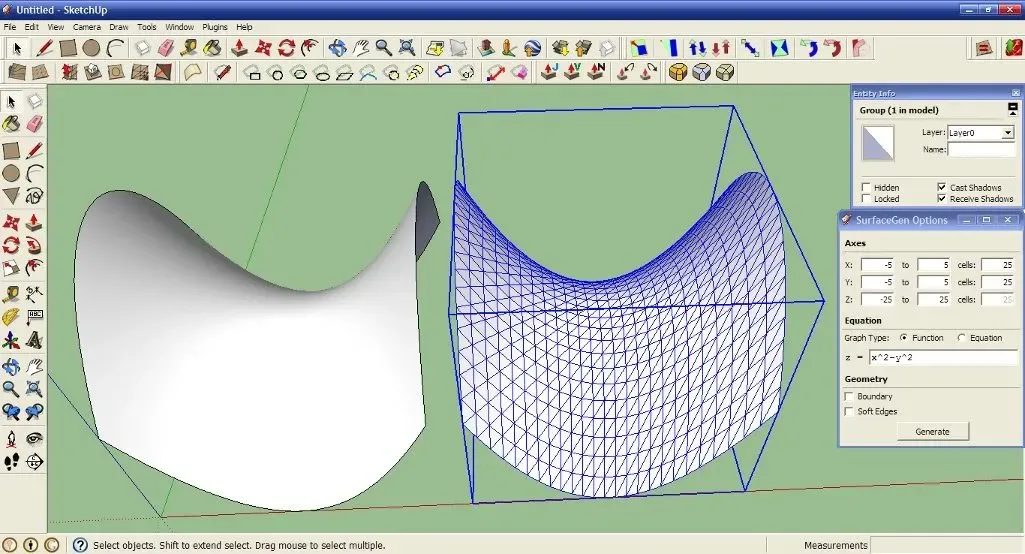
  • [Plugin] SurfaceGen (0.9.0b) — 28 April 2012

    69
    3
    0 Votes
    69 Posts
    62k Views
    TIGT
    It's in the PluginStore, made into an RBZ format download. https://sketchucation.com/pluginstore?pln=surfacegen It's not Thomthom's, it's Diggsey's plugin... It'll probably still work in v2018 - however, because it's old and unsigned, you'll need to set the SketchUp Extension Manager's Loading Policy to "Unrestricted"...
  • [Plugin] Sections Manager released

    3
    0 Votes
    3 Posts
    883 Views
    pbacotP
    This looks interesting!
  • [Plugin] SB Trilateration

    4
    0 Votes
    4 Posts
    994 Views
    BepB
    You will find the download here: https://sketchucation.com/plugin/2106-sb_trilateration
  • [Plugin] Editing: Hide Context - v1.1 20101019

    14
    0 Votes
    14 Posts
    10k Views
    T
    Hello TIG, Thought this plugin would serve for 2D exports but it's actually not. I might be wrong but I don't believe there is a plugin that hides the rest of the model from the 2D export. For instance, sometimes, I'd like to just make a 2D export of a furniture inside a whole project in order to show how it looks on its own. Even though the "Hide rest of the model" function is enabled, it's ignored in the export file (png or jpeg). No matter how much of the model was visible in the viewport, the whole model will be seen in any cases. The only workaround for me right now is just to select all, unselect the only element that I want to make visible and delete rest of the model, do the export, and undo the objects removal. But it can get tricky when there are groups of groups and you need to manage inside them which you want to keep or not... Do you think you could create a feature that would somehow allow this ? Thank you
  • [Plugin] Toolbars Manager

    7
    0 Votes
    7 Posts
    1k Views
    pilouP
    Last version of PBR has a Toolbar! [image: sketch11.png] [image: GIF_samu93.gif]
  • [Plugin] Add comments to your file

    104
    0 Votes
    104 Posts
    21k Views
    S
    @bmoffa said: I would really like to use this plug-in, but it seems to not save or not load comments that I add. At first it lost comments from one of the two tabs I set up, then it lost everything. I'm using version 2.3.5 in SketchUp 2015 Pro 64 bit (current build). I really hope you can fix this as I really like it. Hi, I'm having the same problem as BMoffa. The data in Tab1 is always deleted after I close and reopen a file. Tab2 seems to be fine... Using version 2.3.10 on a 64Bit Win7 machine
  • [Plugin] North Angle Animator

    17
    0 Votes
    17 Posts
    4k Views
    atelierpaarA
    Hello Sketchers, I am still struggling with the 45° shadows on elevations. I tried to use north angel animator or north angel tool - the results are not stable and Layout has a hard time to update the shadows as created in SU Jim Foltz once work out the north angel animator. I ask him for an update but unfortunately he doesn't work on plugins any more. But he aloud to work and improve on the tool. Anybody out there who would like to work on an Tool update ?
  • Unhide/unsoften edges?

    7
    0 Votes
    7 Posts
    2k Views
    TIGT
    To make a short script to do this... Use Notepad++ [or TextWrangler on MAC] to make a plain-text file that must be UFT8 encoded. Name it say myUN.rb It goes in your user's Plugins folder. Find that using this snippet in the Ruby Console: UI.openURL("file;///#{Sketchup.find_support_file('Plugins')}") Then add one line of text as follows + return, substituting the desired code you wish to run, where I have put CODE [copy paste from the previous examples as desired]; you can also name the menu item as you wish - I've named it "myUN..." UI.menu("Plugins").add_item("myUN..."){CODE} After SketchUp restarts the new menu item should be seen in the Plugins menu - which is now called the 'Extensions' menu in newer SketchUp versions... Select that menu item to run the code... Also remember that you will need the Extension Manager Loading Policy set to Unrestricted to run your own 'unsigned' scripts...
  • KT2OBJ in OS X?

    2
    0 Votes
    2 Posts
    930 Views
    romboutR
    I was always trying to do this as well. Not sure you still need it. Couple months i got it to work. If you have the unix version you open Terminal and drop that file in there. Best thing to do is to make a folder on you desktop. It doesnt like space in file names therefor its best to do it there. Then drop you xml model file also on there, now you see 2 file paths next to each other. Then simply hit enter/return, you could get a warning if you dont have proper java lib installed, click more info and download the java for OSX. Then try again. The OBJ will be put in the folder where you dropped the xml model file from. It doesnt get a MLT file, so you would need to recreate the material though
  • [REQ] Scale Definition

    6
    0 Votes
    6 Posts
    2k Views
    D
    I would appreciate an option to scale all components definition to their current scale. Is there some plugin for that or any other way of doing it component by component ? I have problems with large dwg imports after I scale the to desired size. Formal dwg block imported to sketchup as components are all scaled and I need to manually scale their definitions witch can by labor-some.
  • [Plugin][$] Profile Builder 2

    219
    0 Votes
    219 Posts
    54k Views
    pep75P
    ) Thanks again!
  • [Plugin] TIG.splitdonut

    11
    0 Votes
    11 Posts
    14k Views
    TIGT
    This tool was combined into SplitTools with other similar ones... https://sketchucation.com/pluginstore?pln=TIG_splitTOOLS
  • [Plugin] 3 point Window

    37
    0 Votes
    37 Posts
    9k Views
    Bob JamesB
    @pixero said: Thanks. I have no plans for new features right now and sliding windows would probably be low on the list as they are not common here in Sweden. That's too bad since here in central California their use is nearly 100%
  • [Plugin] Click-Kitchen 2 and Click-Change 2

    4
    0 Votes
    4 Posts
    7k Views
    TNTDAVIDT
    Hello,   Thank you for your encouragement Joewood. Glro you're right! This is a mistake on my part and I will take advantage to demonstrate some solutions. 1 - Reduce the height of the legs. (These options are available in LT + Pro only.) [image: V15qMB2.gif] 2- Choose a smaller faucet. (It is also possible to choose a folding faucet.) [image: trhKlna.gif] Announcement regarding the development of Click-Change 2. If some of you have beautiful 3D models for kitchens, I can integrate them in the next update of Click-Change 2. As Click-Change 2 will always be distributed free of charge, I can not offer any financial counterparty. The only thing possible is advertising about your work or your products.
  • [Plugin] VirtualStore Check

    6
    0 Votes
    6 Posts
    16k Views
    A
    Marc, you need to first pick the forum you would like the topic to be in. Then click the "post a new topic" button
  • Append to Multiple Layers

    3
    0 Votes
    3 Posts
    617 Views
    jujuJ
    +1 for TIG's Layers From List, it has a companion script called Layers To List (or something like that). I've used them both and it's quite useful and simple to use. Also take a look at EasyGroups if you intend to rename groups / components.
  • [Plugin] Goldilocks v2.0

    16
    0 Votes
    16 Posts
    39k Views
    pbacotP
    I'm trying to fix a big file. Can someone explain what the Goldilocks output means. In the screenshot, does this mean the very component last in each list muntin v#2 is the big component or the whole window or door? The muntins should only be 6 sides If I open this up and select all it is 18 entities Also there is a number in each column. On the left "24" on the right and "1287070" on the right. I guess the one on the right is actual edges? (where are they?) I am comparing to some similar projects made in similar fashion. This file is 79 MB--10 times larger than some of the others and a pain to work with. [image: LYy4_ScreenShot2018-05-05at6.16.04PM.png]
  • New Plugin: Extrapolate selected edge

    14
    0 Votes
    14 Posts
    6k Views
    E
    Hi, Very nice tool I'm thinking if it's possible to add a feature of extrapolation several selected edges in one go.
  • [Plugin] Extrude Edges by Rails by Face

    82
    0 Votes
    82 Posts
    230k Views
    S
    @box said: Just divide the straight lines into a few segments and weld them back together, then they will be seen as a 'curve'. @Box Ah. that method worked. I didn't think of that method where I can weld the straight line after being divided. that was the last method I missed when I was having trouble with how to use the tool. Thank you for helping me out and that solved my problem. EDIT 1: https://imgur.com/a/Tlcww4z what Black arrows are pointing at is the rails (the straight lines) not being at the correct angle (referring to red line) Is there a way I can fix this?

Advertisement