🔌 Easy Offset | Offset selected faces in SketchUp in positive and negative offsets. Download

  • Cannot License FredoCorner – Any Help or Suggestions?

    3
    1 Votes
    3 Posts
    139 Views
    1
    The issue has been resolved. Thank you for your help and response !
  • [Plugin][$] FredoCorner - v2.7a - 31 Mar 24

    439
    3
    0 Votes
    439 Posts
    547k Views
    Dave RD
    @talegend said in [Plugin][$] FredoCorner - v2.7a - 31 Mar 24: license for round corner doesn't have FredoCorner word and that's why I can't see it Round Corner and FredoCorner are two different extensions and each requires a different license. Which one did you actually purchase the license for? Install that one.
  • [Plugin] SPGears

    93
    0 Votes
    93 Posts
    184k Views
    Dave RD
    You could probably edit the code but it's simpler to rotate the object after it's created.
  • Box Stretching - New Dimensions

    13
    1 Votes
    13 Posts
    836 Views
    F
    This is an old focus issue in Sketchup, from 2023, and now it seems it has gotten worse... It is not related to Fredo.!
  • [Plugin][$] FredoScale - v3.6a - 01 Apr 24

    1k
    4
    0 Votes
    1k Posts
    2m Views
    pilgerP
    @Rich-O-Brien @Mattshiggins I'm having the same issue here. I've tried uninstalling all other extensions and plugins and running Sketchup without any other apps in the background and I still get the same thing. Is there a way to check what is getting focused when I press tab, maybe? To try and find what's stealing the focus? EDIT: or maybe change that tab key to something else that doesn't cause the issue? EDIT 2: updates here: https://community.sketchucation.com/post/1617927
  • Plugin to quickly open nested Component or Group?

    Solved
    16
    1 Votes
    16 Posts
    829 Views
    F
    Anyway, Curic 2 Level + Curic Copies (or S4U PickUp) does the same thing as this one. I use S4U PickUp cause is better than Curic Copies. And Curic Select++ does the same thing as Curic To Level, but still i find Curic To Level better.
  • [Plugin] Memory Copy (xformclone.rb)

    44
    0 Votes
    44 Posts
    56k Views
    F
    There is another one from Eneroth, and i think maybe two more (one may be Tax Engineering, plus another one)
  • [Plugin] Material Browser - v1.1.1 - 15 Nov 2025

    51
    2
    0 Votes
    51 Posts
    33k Views
    samuel_tS
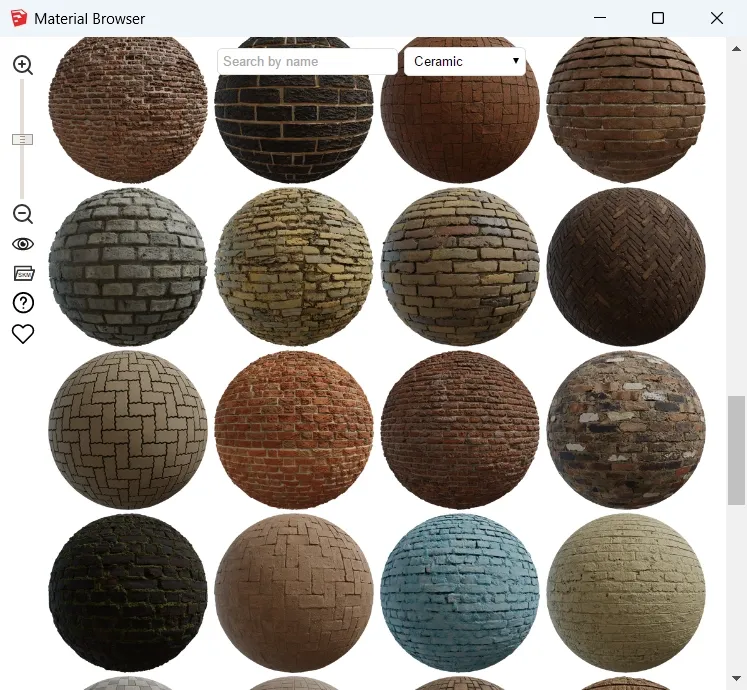
    Hello, Material Browser v1.1.1 is out Here what's new: You can precisely choose which sources to display: [image: 1763247282734-sketchup-2026-material-browser-plugin-v1.1.1-settings.webp] Interface is more reactive and more predictable (status bar). Source logos and material names are proportional to thumbnails. Plugin window can be resized to a smaller width and height. Poly Haven catalog has been extended to 713 textures. Texture downloading is more robust (3 attempts before giving up). On SketchUp open, toolbar position and visibility are restored. It shouldn't emit warnings when SketchUcation Tools is installed. Thanks to @judedouch and @ateliernab for their suggestions. Download latest Material Browser plugin from SketchUcation PluginStore.
  • 2 Votes
    4 Posts
    238 Views
    P
    @Brighter3D said in [Plugin][$] Brighter3D rendering plugin (ready for SketchUp 2026) version 4.7.0 released: Thanks, man! Appreciate the props—yeah, I've been wrestling with this for 12 years now. Good to see a fellow pro! Jeez, now I feel very green! Congrats on sticking with it for 12 years. Rayscaper was first launched in February of 2024, so it's been around for almost two years. I should really get a beer with you; I might learn a lot.
  • Fredo6 plugins and SU2024

    14
    3 Votes
    14 Posts
    1k Views
    Rich O BrienR
    Hello. Licenses will periodically call home to validate. Not sure what you mean by reset? If you can share more info like error messages or alerts that would be great. Can you also run the Window > Libfredo Settings > Fredo6 Plugins Information for Sketchucation Support menu command in SketchUp and copy/paste the output into your reply.
  • [Plugin] TrueTangents v3.0

    95
    0 Votes
    95 Posts
    109k Views
    Dave RD
    @Gili It works perfectly in SketchUp 2025 and 2026. I've been using it a great deal. I used it repeatedly the other day to set up the linkages on this paddle wheel. [image: 1762525212449-54898381982_f970ddd225_k-resized.jpg]
  • [Plugin][$] JointPushPull Interactive - v4.9a - 02 Apr 25

    619
    4
    0 Votes
    619 Posts
    629k Views
    F
    I just bought the plugin and am testing it. I thought I could replace the classic push-pull with some of its functions, but I have a problem: when I "push" inside an object, the surface often disappears. I made a short video about it: https://www.youtube.com/watch?v=YSaSjpmAJzQ The only icons that don't do this are "R" and "F." Is this a bug?
  • [Plugin] Edge Tools

    211
    0 Votes
    211 Posts
    276k Views
    TIGT
    This is explained under its 'More Info' link... https://community.sketchucation.com/topic/117065/plugin-edge-tools Its entry appears under the Tools menu. It also has its own Toolbar, that can be activated. It also needs TT_Lib2 installing. After the installations of these restart Sketchup to sync everything... Run it with the Ruby Console open to see if there are any errors...
  • [Plugin][$] FredoGhost - v2.1a - 01 Apr 24

    56
    4
    0 Votes
    56 Posts
    59k Views
    E
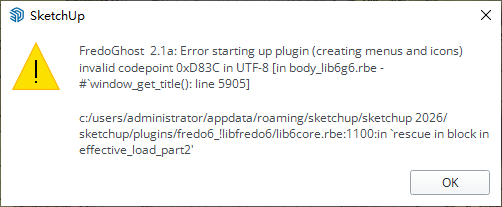
    [image: 1761912291323-e3ceb7bd-1f3e-4b62-a688-edca78ba4304-image.png] After using fredoghost in the model, there will be a warning as shown in the figure when the model is opened again. In addition, lord of toolbar cannot be used normally in version 2026, and it will disappear after adding a custom toolbar and restarting.
  • [Plugin][$] Curviloft 2.0a - 31 Mar 24 (Loft & Skinning)

    1k
    2
    0 Votes
    1k Posts
    2m Views
    Rich O BrienR
    @RASKL Please run the Window > Libfredo Settings > Fredo6 Plugins Information for Sketchucation Support menu command in SketchUp and copy/paste the output into your reply.
  • OBJexporter v3

    3
    0 Votes
    3 Posts
    203 Views
    J
    @panixia thanks
  • Warning and Toolbar Issues After Using Fredoghost

    1
    1
    0 Votes
    1 Posts
    77 Views
    No one has replied
  • [Plugin] Projections version 2a UPDATED

    145
    0 Votes
    145 Posts
    214k Views
    C
    Thank you @Glenn-at-home
  • [Plugin] SectionCutFace

    565
    0 Votes
    565 Posts
    361k Views
    Dave RD
    @alskaro do you mean something like this? As TIG says, apply whatever materials you want to the various faces in the SectionCut Face. [image: 1761569581070-uniflow-steam-engine-cut-away-small-resized.png]
  • 2016 compatible Curvizard?

    1
    0 Votes
    1 Posts
    89 Views
    No one has replied

Advertisement