sketchucation logo sketchucation
    • Login
    1. Home
    2. onzki
    3. Posts
    Oops, your profile's looking a bit empty! To help us tailor your experience, please fill in key details like your SketchUp version, skill level, operating system, and more. Update and save your info on your profile page today!
    ⚠️ Important | Libfredo 15.6b introduces important bugfixes for Fredo's Extensions Update
    Offline
    • Profile
    • Following 0
    • Followers 0
    • Topics 67
    • Posts 174
    • Groups 1

    Posts

    Recent Best Controversial
    • Inquiry: Alternative method for helicoid type of ramp?

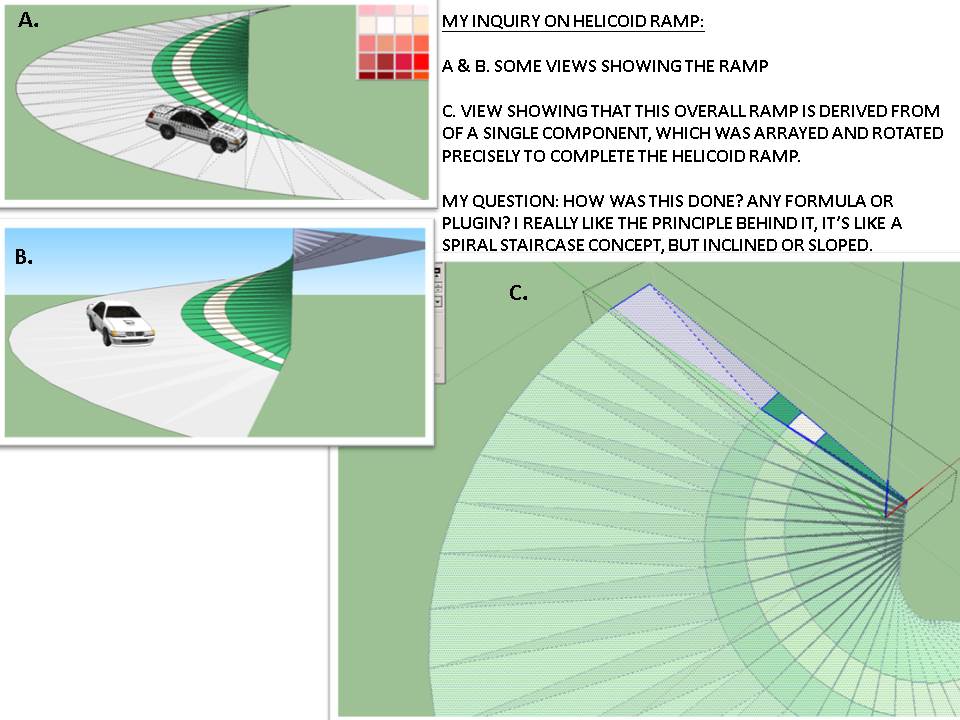
      Hi everyone, firstly, I'm not sure if I should post it in plugins forum or the tutorials section. I am aware of other techniques in making helix ramp, such as using a shape bender plugin and follow me and keep..something like that.

      But for this type, I am really interested to know the technique or plugin used if any- if you will notice on the file or attached screenshot, the entire ramp is composed of series or array or components-a feature that attracted me most because it's so easy to modify later on (and looks so professional, IMHO). I find it very similar to a spiral staircase idea.

      I haven't figured it all out yet. I appreciate if anyone could help me understand the formula or plugin used for this type of ramp.

      Thanks a lot in advance for checking and for your time. πŸ˜„ see attached file and image.


      My helicoid ramp inquiry


      helicoid ramp sample sketchup file

      posted in Plugins
      onzkiO
      onzki
    • RE: Sketchup 13 undo bug

      @onzki said:

      @eddie said:

      looks like uninstalling the component manager did it for me...so far. Took a while to find though since it was called BGScomposants...

      Thanks for all your help everyone!

      I just had this problem today.. can't find this "BGScomposants".. where is it located?

      After a day of struggle of trying to work precisely knowing there's no undo available πŸ˜„.. I finally found the culprit (in my situation)- It's the luxrender plugin that I installed few days ago.

      IMHO, I think the cause will vary (I use Sketchup 8), so as a tip, I suggest to always log or remember the plugins that you install so it's easier to spot the troublemaker πŸ˜„.

      posted in SketchUp Discussions
      onzkiO
      onzki
    • RE: Sketchup 13 undo bug

      @eddie said:

      looks like uninstalling the component manager did it for me...so far. Took a while to find though since it was called BGScomposants...

      Thanks for all your help everyone!

      I just had this problem today.. can't find this "BGScomposants".. where is it located?

      posted in SketchUp Discussions
      onzkiO
      onzki
    • RE: [Plugin] Scale and Rotate Multiple (UPDATED Dec 22, 09)

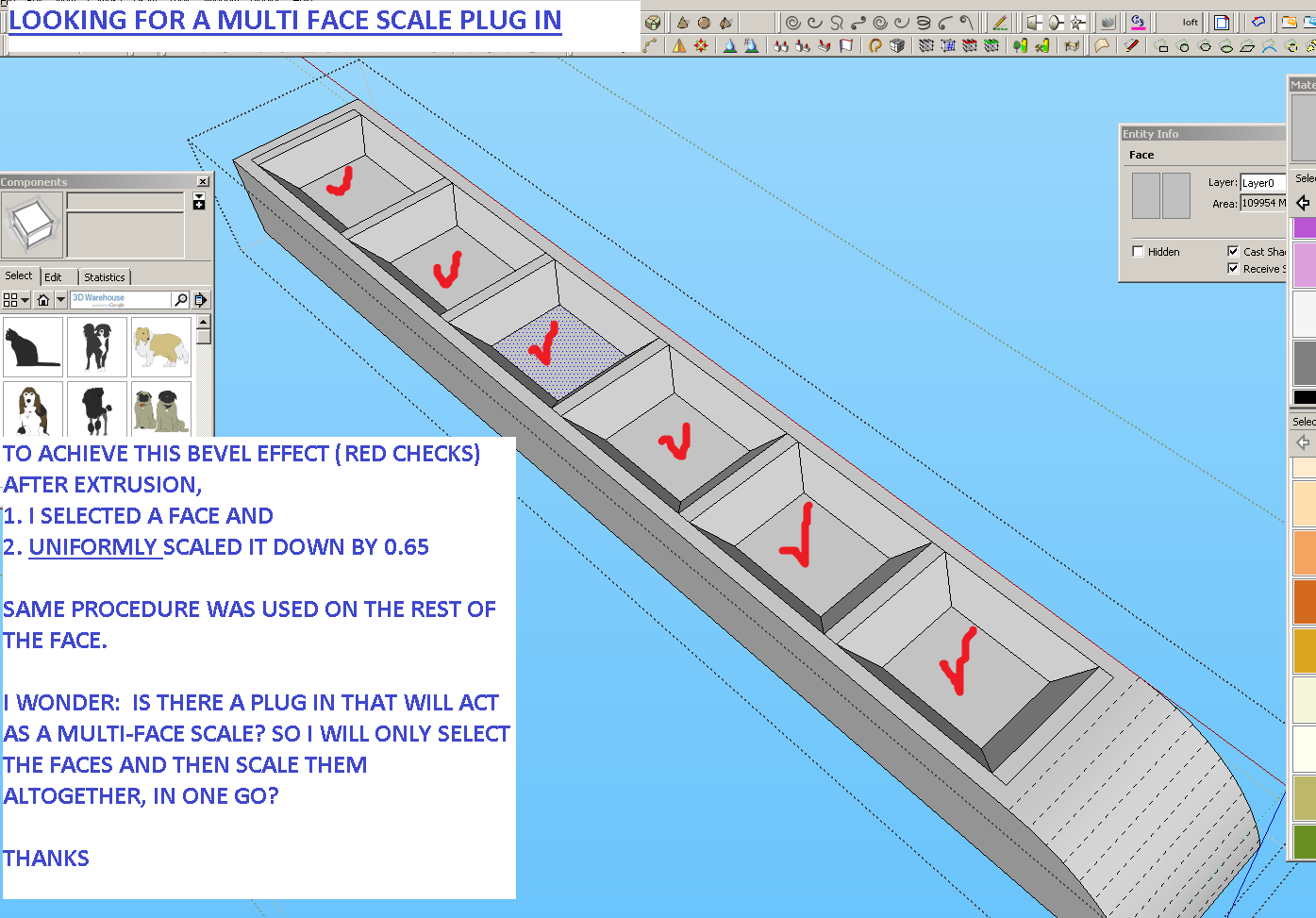
      Thanks for sharing this.. it will be very useful in my work. By the way, I have a similar need, this time multi-face scale plugin, to scale a multiple polygon/faces in one go. Is this possible? My screenshot:
      Thanks a lot!


      inquire on Multiface scale plugin.png

      posted in Plugins
      onzkiO
      onzki
    • RE: Molding Profiles

      Oh no..am I too late? Can't download.. server is not working 😞 Can anyone share again? Thanks!

      posted in SketchUp Components
      onzkiO
      onzki
    • Count / selection count

      Hi guys, is there a way to count selected objects? For example: I have parking slots, (each slot is a component). When I select a part or the area containing these objects, an info feedback will return, something like "100 objects selected". For those familiar with CAD interface, it's the same found on command box.

      Thanks!

      posted in Plugins
      onzkiO
      onzki
    • RE: Multiple segment editor plugin

      @tig said:

      http://sketchucation.com/resources/pluginstore?pln=ArcCurve_set_segments

      I tried it.. wow, this is amazing. I can set it endlessly, from high to low and vice versa πŸ˜„ Thanks a lot!

      posted in Plugins
      onzkiO
      onzki
    • RE: Multiple segment editor plugin

      @tig said:

      I've now incorporated this updated ArcCurveTests.rb in the 'segemnt-setting' tool's PluginStore RBZ for the tool, as it works 'backwards' down to v7...

      Thanks a lot for looking at this post and sharing your time generously for another good plugin, what's the specific plug in name again? Thanks, cheers! πŸ‘

      posted in Plugins
      onzkiO
      onzki
    • RE: Multiple segment editor plugin

      @mitcorb said:

      I am sure you are familiar with Fredo6's Bezier Spline suite.

      Thanks for the reply. Yes I have that one and it's very useful. However, like what you mentioned, it doesn't have the option that I'm currently looking for. Thanks again for the suggestion.

      posted in Plugins
      onzkiO
      onzki
    • Multiple segment editor plugin

      Hi, I'm curious if we have a plug in where the user can select multiple arc or circles and specify its segments at once?
      The native sketchup only allows one edit per selection via entity info (segments). The problem with this is the time factor, say if there's 20 circles or arcs- it would be better (IMHO) if the user can select them all and then specify the segments he wanted instead of selecting and editing one by one.
      Thanks! πŸ˜„

      http://img199.imageshack.us/img199/995/ymtb.png

      posted in Plugins
      onzkiO
      onzki
    • RE: Method for circular or radial railing- help please.

      @cotty said:

      The plugin follow me and keep should help in this case...

      Thanks, I'll give it a try. πŸ‘

      --update:

      It works great.. amazing plugin. Thanks for pointing me to it. Cheers!

      posted in SketchUp Discussions
      onzkiO
      onzki
    • Method for circular or radial railing- help please.

      Hi, i'm having a hard time in making circular or radial railing as shown on screenshot below. After I created the path and used follow me, the object appears to be twisted instead of aligning it self parallel to ground. Any workflow suggestions? I appreciate your help, Thanks!

      http://img90.imageshack.us/img90/9383/25o.png

      posted in SketchUp Discussions sketchup
      onzkiO
      onzki
    • RE: Align texture to axis plugin

      Thanks for the reply, looks interesting. I'll give them a try.
      By the way, I updated my post with added option 2 alternative- the tick box, though I'm not sure if that's easy to add because it's Sketchup's interface already.

      posted in Plugins
      onzkiO
      onzki
    • Align texture to axis plugin

      Hi everyone, is there a plugin that will:

      [Concept 1]:
      Enable me to quickly align texture to my new specified axis? I work with landscape design plans with so much paving textures involved.. The texture rotate / re-size is helping me a lot. (for orientation purposes and correct paving dimension.)

      To skip the texture rotate part- what I'm thinking is- I will specify my axis on correct orientation and then use the "align texture to axis" plugin that will then quickly position itself according to the active axis... is that possible?
      After rotating, I'll just use a texture scale plugin separately. But at this moment, the rotating part is what I want to deal with.

      [Concept 2]:
      And if the above won't work, I'm thinking of the second option, a more simple one- the tick box during import.

      Thanks! πŸ˜„

      Concept 1:

      http://img822.imageshack.us/img822/1419/vxm.png

      Concept 2:

      http://img197.imageshack.us/img197/8228/h28k.png

      posted in Plugins
      onzkiO
      onzki
    • RE: Plug in Kill Switch

      @tig said:

      It's a simple change from the UI.messagebox() type from MB_YESNO to MB_YESNOCANCEL and then adjust the checks for the three cases of Yes[6], No[7] and Cancel [i.e. anything else]... ...; else; return nil;
      If the script's file is editable it's any easy tweak...

      Hi TIG, I'l try this, what program can you use to edit a ruby script?

      posted in Plugins
      onzkiO
      onzki
    • RE: Plug in Kill Switch

      @thomthom said:

      No such plugin possible. But you could just press the N key - which triggers the No button. Keep it pressed until all dialogs are done.
      And contact the author of the plugin.

      Thanks, unfortunately the problem with this dialogue is this: "yes" means it will prompt you this box per scene export, and "no" will not prompt any (background saving). Accessing this plugin box by mistake will surely put one in a stalemate πŸ˜„
      Thanks for the reply, I hope they can add a cancel button. I also use Smustard scene exporter Pro alongside with this, but only for selected scenes.

      posted in Plugins
      onzkiO
      onzki
    • Plug in Kill Switch

      Hi, is there a plugin that act like a "kill switch" (Can't think of any word) that can cancel or stop a certain process? I always use the plugin called "export scene to JPG". It's amazing and so useful, but the downside: it lacks "cancel" button (See screen shot below). One time, I selected by mistake the "export scene to JPG" from view drop down menu and I wasn't able to stop it. I have 400 scenes already so I ended up to traditional Ctrl+Alt+Del, end task. Loosing to save my work. I know this is a human error. My bad. I just wonder a kill switch might be useful-OR if the plug in developer can add a "cancel" button (please) that's even better πŸ˜„.
      Thanks!

      http://img824.imageshack.us/img824/9026/inquireonpluginkillswit.png

      posted in Plugins
      onzkiO
      onzki
    • RE: Menu Options Keeps Graying Out!

      @dukejazz said:

      These 8 rules may help

      I noticed that this thread is year old (Feb 2012).. I got the same problems right now. Do we have a more updated solution? Otherwise, I'll just try these suggestions above. Thanks! πŸ˜„

      posted in SketchUp Bug Reporting
      onzkiO
      onzki
    • RE: Get SketchUp 8 to automatically save as SU-7 ?

      @jim said:

      I could make a little plugin that uses VisualBasic Script to open the Save As dialog and select version 7. It would at least take some of the tedium out of it.

      (I'm already testing it. Windows-only, I'm afraid.)

      Is this possible with 2013? I'm getting a 2013 version, but my co workers use v.8.0 pro. I'm afraid they won't be able to open it. I hope the developers will consider this option.. like in AutoCAD, you can set what default version to save as.

      posted in SketchUp Discussions
      onzkiO
      onzki
    • RE: Scene manager plugin?

      @renderiza said:

      Hi,

      You might want to have a look at [Re]Scene ... http://sketchucation.com/forums/viewtopic.php?f=323&t=52203

      Cheers!

      Looks amazing, thanks!

      posted in Plugins
      onzkiO
      onzki
    • 1 / 1