Thanks, that's an older model so maybe I will check eBay or amazon for the price.
Oops, your profile's looking a bit empty! To help us tailor your experience, please fill in key details like your SketchUp version, skill level, operating system, and more. Update and save your info on your profile page today!
Urasik Extensions | Lots of new extensions to check out Learn More
 Offline
Posts
-
RE: Graphics card: GTX 6xx and GTX 7xx- any benchmark?
-
Graphics card: GTX 6xx and GTX 7xx- any benchmark?
Hi, anyone has experience using GTX 680 or 770 (or similar specs) for Sketchup (viewport performance and GPU render)? I plan to use it for general Sketchup modeling, Vray RT and other realtime GPU renderer. My models usually have 5million faces. I already got a Quadro 4000 in my office workstation, which is fine. I just want to try consumer gaming card as comparison for my personal home PC.
Thanks!
-
RE: Looking for Scene Manager for Layers
Hi, this looks amazing, how can I get it?
-
Looking for Scene Manager for Layers
Hi, i got a problem with layer and scene management. Usually, after adding and updating about 100++ scenes, my boss will add new elements (new layers) that he wants to appear only on selected views.
Now, the problem with that is, such new layers will appear by default in all the 100++ scenes that I previously made- consequently making me go to each scene, and turn off the unwanted layer and update the scene- well, that's a lot.
And the worst case scenario is, after doing that, I got to do it all over again when my boss added another new stuff.
Do we have a plugin to address this issue? Thanks!

PS: I usually generate all the jpeg images in one go (through export\animation\image sets) That's why I set all the scenes right first. Any suggestion with better workflow, I highly appreciate it. Thanks again
Update:
I've found a plugin called "Layer Manager by D.Bur", it's very helpful especially the layer state part. If only there's a way to apply such layer state to all the scenes, and viola, that's what I'm looking for. -
RE: Quadro FX4800 for sketchup?
Thanks a lot for the advice, I will check out those link. Cheers

-
Quadro FX4800 for sketchup?
Hi, I plan to get a graphic card mainly for Sketchup 2015, Vray and photoshop and a little bit for 3ds Max+Vray use as well. I found a used /bargain Quadro FX4800 in my area, I'm aware that it's an old card already but If it can still get the job done, I don't mind getting one.
The usual Sketchup projects I do has 13M edges and 5M faces (from sketchup\model info\statistics).
Anyone still using this type of graphic card? How's the performance?Thanks!
-
Dell Mobile Precision M6800 crashes
Hi everyone! my Boss' PC have this specs-
CPU: i7-4810MQ
Video: AMD Firepro M6100 2GB
OS: Windows 7 64-bit
and it crashes every time he moves from one scene to another even though the scene transition disabled already. Model is a big mixed-use complex, about 280 MB.
Could it be the graphics card? Anyone having similar issues with AMD Firepro?Thanks!
-
RE: Assign new layer name quickly?
@tig said:
@onzki said:
By the way TIG, I noticed that the list of existing layers won't allow me to scroll down to see more layers- is there a new version that can scroll along the list?
This is a known limitation of theUI.inputboxdrop-down list.
However, it is not insurmountable...
To pick a layer-name that is off the end of the list...
Select the drop-down box so it highlights, immediately type in the start of the layer name [DO NOT press <enter>] - e.g.X
The listing now jumps to show perhaps "Xref-1"
If you want "Xref-3" press the down arrow key to page to it.
If you want "Wins" and are currently at "Xref-1" then use up arrow key presses to get to it...Works like a charm! Thanks a lot!
-
RE: Assign new layer name quickly?
@tig said:
I have something similar, running from the context-menu, although it allows you to specify a layer that is 'off', entering a new layer creates it OR you can choose from a drop-down list of all Layer-names.
I'll post it in the PluginStore and add a link...
EDIT:
Here's the link to its thread...
http://sketchucation.com/forums/viewtopic.php?p=563979#p563979By the way TIG, I noticed that the list of existing layers won't allow me to scroll down to see more layers- is there a new version that can scroll along the list?
-
RE: Assign new layer name quickly?
-
RE: Assign new layer name quickly?
@tig said:
I have something similar, running from the context-menu, although it allows you to specify a layer that is 'off', entering a new layer creates it OR you can choose from a drop-down list of all Layer-names.
I'll post it in the PluginStore and add a link...
EDIT:
Here's the link to its thread...
http://sketchucation.com/forums/viewtopic.php?p=563979#p563979Oh, I never found this on search. It's perfectly what I'm looking for, the existing layer list is also a bonus for me. Thanks for sharing!
-
RE: Assign new layer name quickly?
Thanks everyone for all your replies, I appreciate the help. I will check them out. Cheers!
-
Assign new layer name quickly?
Hi everyone, is there a way to assign new layer name quickly, like in two basic steps or mouse clicks?
Usage example:
Step 1: right click an object, sub menu appears,
Step 2: then choose "send to new layer"- and then you type in the new layer name, press enter.
This plugin as usual, will consequently have a one click icon/button or assignable with keyboard shortcut.As comparison, presently, what I usually do is:
Step 1. open the native layers tab (I have shortcut key)
Step 2. click +
Step 3. Type the name
Step 4. Select object
Step 5. activate entity info (I have shortcut key)
Step 6. Choose the new layer name created from step 3So that's it.. 2 steps vs. 6 steps.
Thanks a lot for looking at this. Cheers!
-
Flatten and Rename/renumber scenes Plugin for Sketchup 2015
Hi everyone,
Back in version 8, I have 2 plugins that successfully worked well.
- Flatten- Just one command and it flattens the newly imported CAD plan.
- Rename/Renumber scene- (scene_rename.rb) Very useful in keeping scenes in order, it sorts the numbering of scenes.
Unfortunately, I didn't find one that works with Sketchup 2015, Any suggestions?
Thanks! -
RE: Follow me tool on multiple surfaces
@box said:
There is a simple workaround for this that people often miss.
Just draw a circle around your group of faces and extrude that.
Tiny bit of clean up and reversing of faces and away you go.Haha.. I like this trick. I'll give it a try, I never thought about this technique before. Thanks for sharing
-
RE: Follow me tool on multiple surfaces
@tig said:
However, here is a code snippet that does it for you !
Tips:
Ensure that the faces to extrude have their 'backs' to the start of the path.
Ensure the path is NOT going to be 'consumed' by the extruded geometry, by placing it below the lowest face.
Pre-Select the path AND the faces, do NOT include any faces' edges.
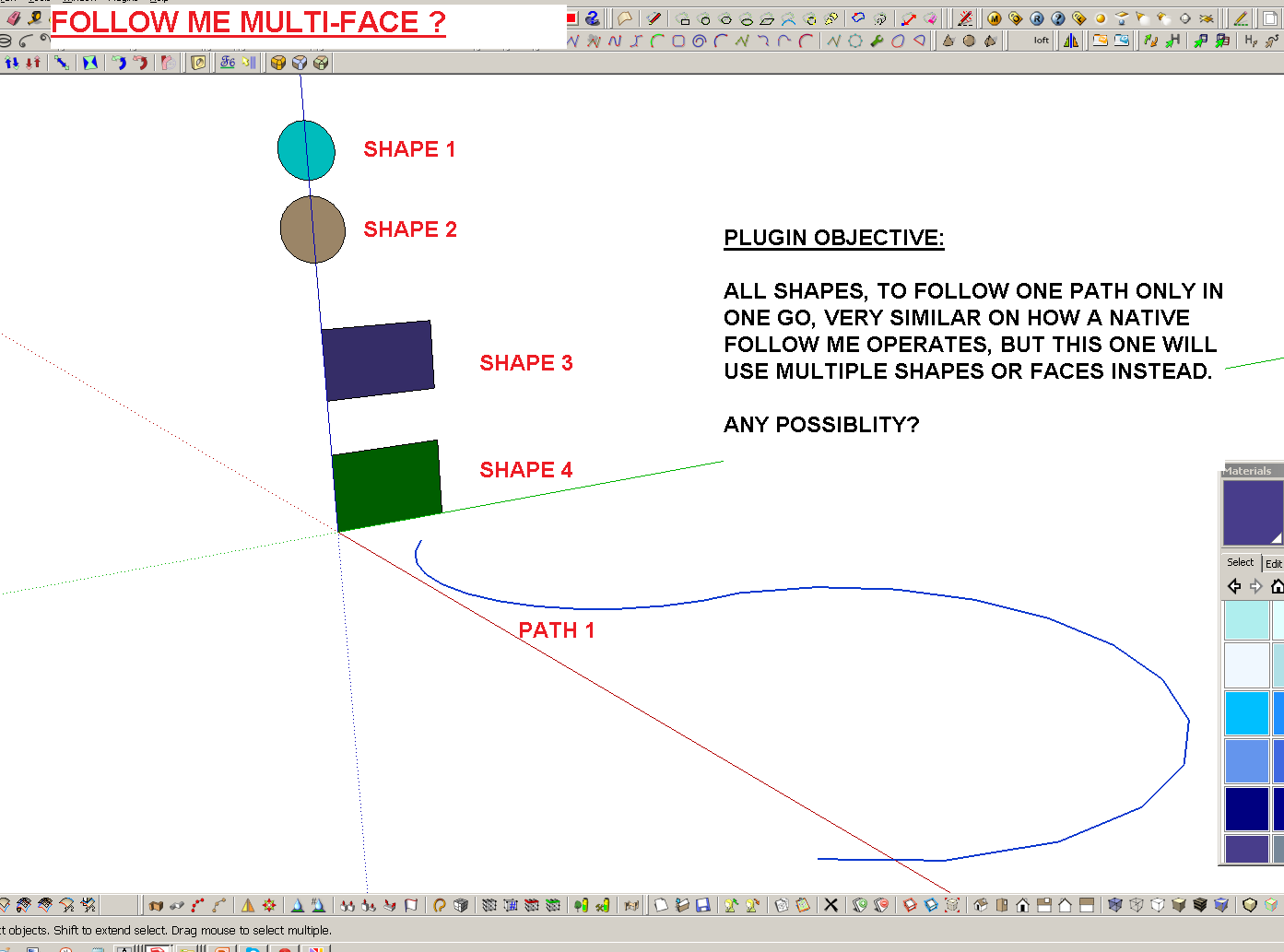
Then copy/paste the code into the Ruby Console +<enter>m=Sketchup.active_model; s=m.selection; m.start_operation('xf'); s.grep(Sketchup;;Face).each{|f| f.followme(s.grep(Sketchup;;Edge))}; m.commit_operation; >All of the face FollowMe along the selected path in one go.
It is one step undo-able.
Thanks a lot, I'll give this a try.
-
RE: Follow me tool on multiple surfaces
Hi there, I saw that this thread was first started back in 2010.. any solutions to date? Just want to resurrect an old query. I appreciate your help, I find my self in need of such plugin because I'm doing a steel railing that has multiple shapes and if only a multi-face follow me exist, it'll be easier for my current task
Thanks!
-
RE: SSD, SATA HDD and Raid configuration
@kaas said:
@onzki said:
... How I tested: 1. I opened it (timer start), 2. Save as to a new file afterwards (timer starts).
To my Surprise, the results are almost identical, ...
I noticed that if I disable 'redefine thumbnail on save' in 'Model info - File' saving a file is a matter of (milli-)seconds on my SSD. If I don't disable it, saving a file takes up to 20 to 30 seconds.
wow, you're very observant to notice that small box
I will give it a try, Thanks! -
RE: SSD, SATA HDD and Raid configuration
@numerobis said:
"Interesting test, i have to try this myself. "
"looking at your test and the numbers it seems that the problem or the slow part is not the storage hardware but the way sketchup is handling the data. "
"I will try it myself with SSD and network and post the result.Thanks for the reply. I look forward seeing your results. I agree on your assessment about Sketchup's handling of data, maybe textures and polygons varies from one file to another, and probably Sketchup has a certain file size threshold we don't know how much, that slows it down when such peak is reached-I'm just throwing some wild speculation here
Maybe time for Trimble to consider making 64bit as well, if it might help.For the raid setup, most of forums I've read discourages my current setup of raid. Another way to find more is to try it myself- for my personal home PC that I am building, I will just plug the SSD and HDD directly to MOBO, no more raid setup. I will update this post with new results once I tested it in my home.
Cheers!
