sketchucation logo sketchucation
    • Login
    1. Home
    2. Mistro11
    3. Posts
    Oops, your profile's looking a bit empty! To help us tailor your experience, please fill in key details like your SketchUp version, skill level, operating system, and more. Update and save your info on your profile page today!
    ⚠️ Important | Libfredo 15.6b introduces important bugfixes for Fredo's Extensions Update
    Offline
    • Profile
    • Following 0
    • Followers 0
    • Topics 78
    • Posts 315
    • Groups 1

    Posts

    Recent Best Controversial
    • Cannot get Default Material Back on Faces

      Using SU 2014 Pro:
      By mistake I colored a model from the group level and all faces that had default material was colored with dark grey. When I try to put the faces back to default color, nothing is happening. Even when I go in and select a face directly, the dark grey will not change. Any help is appreciated.

      Edit: The reason I want to get back to default is to make sure I know where the back faces are before I export to render.

      posted in SketchUp Bug Reporting sketchup
      Mistro11M
      Mistro11
    • RE: Sketchup Pro 2014 and Widows XP

      Thanks. That makes sense. If it was anything significant it would be more obvious.

      posted in SketchUp Discussions
      Mistro11M
      Mistro11
    • Sketchup Pro 2014 and Widows XP

      I am about to order a license for SU2014 for my home XP SP3 machine. I know a lot of people are saying to upgrade but my XP is working just fine. I cant say the last time I ever had to download an update anyway. I read in the system requirements that SU2014 have limited support for XP. What are these limitations exactly?

      I installed the demo and everything seems to work fine. I also have some questions for a sales rep. I am having trouble contacting one. I would like to resolve this as soon as possible so I can buy it today if I can. Any help is appreciated.

      posted in SketchUp Discussions sketchup
      Mistro11M
      Mistro11
    • RE: Tunstall Court

      Very nice model! And I like the landscaping in the render foreground.

      posted in Gallery
      Mistro11M
      Mistro11
    • RE: New Monitor Old Graphics Card

      I ended up going back to the HP IPS monitor. The other choices just could not beat the color and picture quality. In fact the ASUS monitor actually made me miss the HP. I also did an upgrade just to cover some more bases. I got a NVIDIA GTX 760 and 2 sticks of fresh RAM (DDR2 2GB). I notice a big difference in performance. The picture quality is much better too than my first experience. It's not super perfect but I have no complaints and can say I have a better monitor than before. Probably when I get an HDMI cable it will be even better.

      posted in Hardware
      Mistro11M
      Mistro11
    • RE: New Monitor Old Graphics Card

      Well, today I exchanged for an ASUS 24" LED monitor.
      http://www.bestbuy.com/site/asus-23-6-led-hd-monitor/8767187.p?id=1218890757510%26amp;skuId=8767187

      It's 1ms. But now I am seeing the same issues from the HP monitor. I'm beginning to think I need a newer graphics card. Or is there a way to calibrate to get the best picture? The issues I'm seeing is pixelation on videos that were smoother on my older monitor and horizontal banding on my gradient colors.

      I'm running a NVIDIA 9800GT on XP BTW.

      posted in Hardware
      Mistro11M
      Mistro11
    • RE: New Monitor Old Graphics Card

      Thanks numerobis!
      My old monitor was a Sceptre DCL LCD http://www.amazon.com/DCLCD-Sceptre-DCL20A-Widescreen-Monitor/dp/B000VXR8RE/ref=cm_cr_pr_product_top

      I always connect to DVI. Since I made the post last night, I been playing around with the settings and software. I put it back to native resolution and went into my NVIDIA control panel to experiment. I played a good quality HD movie with good bitrate and the video is actually beautiful. The natural colors are far better than my older one. I just have to get used to it.

      What do you think about this monitor for gaming or the fact that it's 7ms response, with IPS? Someone told me IPS is not suitable for gaming and I would notice it once I upgrade the GPU.

      posted in Hardware
      Mistro11M
      Mistro11
    • New Monitor Old Graphics Card

      My 5 year old monitor died today and I went to buy a new one. I had to stay within the $150-$200 range. I got a 21.5" HP Pavilion IPS LED Backlit Monitor....model 22bw.

      I like the monitor but now I'm wondering if I need a newer graphics card to really experience the quality. I am on a 5 year old rig (Q6600 quad core @2.4GHz on a P5QL Pro mobo XP SP3). The current video card is a EVGA 9800GT. My videos and picture had more harmony on the old monitor than this new one but I don't know if it's because of the video card not performing to meet the capabilities of the new monitor or I am just ignorant on how to configure my monitor with the card to get the best display I can with what I got. Every monitor I ever had was just plug in and forget it save for adjusting brightness and wishing I had something higher than 60Hz. This thing is more sophisticated than I thought a monitor could be. I Feel like I been living under a rock when it comes to monitors.

      I have the resolution at the native 1920x1080. I can actually raise it to 2048x1536 but then I would have to pan to see the edges. The more I raise the resolution, the edges start to look weird (like too much sharpening) and the lower resolution videos tend to look better than the HD ones. But there are options in the software panel where I choose presets and the the "text" and "photos" options looked the best. The HD options were all the way to the left and when I went there, I saw the "over-sharp" edges. If I put the resolution back to 1680x1050 like I had on the old monitor the aspect ratio is off and everything is slightly stretched horizontally.

      Before I completely blame it on the video card, I want to make sure I'm on the right track before I go to purchase a new one. I never studied the relationship between monitors and graphics cards until now. I want to find balance in my display again. Any advice or lecture on this subject is appreciated. I do plan on getting a GTX 660 or 760 in the near future as I get ready to build a new PC.

      posted in Hardware
      Mistro11M
      Mistro11
    • RE: Intel Xeon E5 2407...Good Enough?

      Sorry for my long delayed response. I did not install the drivers yet because they are in exe format. I'm making sure they are the correct drivers before I go ahead and try them. The board looks different than the one shown in the picture though the model number is the same as the drivers I downloaded. So far I been having the "if it ain't broke don't fix it" attitude as everything seems to be working just fine. I am curious though about putting in those drivers.

      posted in Hardware
      Mistro11M
      Mistro11
    • RE: Sketchup 2014 Plugins Folder in Windows7 Professional

      To be fair, there are older plugins that do not have the "rbz" extension at the end or they are not located through the store and so will not install automatically. That means they have to be installed manually thus we have to find the plugins folder. I for one like to dig and know exactly where things are on my PC.

      posted in SketchUp Discussions
      Mistro11M
      Mistro11
    • RE: Trimble Sketchup Customer Service???

      I was able to locate the toll free number in the email and got someone who resolved our issue. Thanks.

      posted in SketchUp Discussions
      Mistro11M
      Mistro11
    • Trimble Sketchup Customer Service???

      We recently purchased SU2014 pro at my job and we been trying to reach customer service. We are having an issue with our license. Is there a phone number or any other way besides the form over at the SU site to contact Trimble to resolve our issue? Any help is appreciated.

      posted in SketchUp Discussions sketchup
      Mistro11M
      Mistro11
    • RE: Kerkythea and Sketchup2014

      Turns out my issue is similar to someone else who posted it over at KT forums
      http://www.kerkythea.net/forum/viewtopic.php?f=10%26amp;t=10502

      I even installed my free version 8 on the W7 machine and it's the same issue, so not a 2014 specific thing. The plugin works fine on my XP machine but not working in W7. It seems I have some kind of permissions configuration thing going on but at least I can create the xml file and open seperately in KT. Any ideas?

      posted in Extensions & Applications Discussions
      Mistro11M
      Mistro11
    • RE: Kerkythea and Sketchup2014

      JQL I will try that method when I get back to the studio tomorrow.

      posted in Extensions & Applications Discussions
      Mistro11M
      Mistro11
    • RE: Kerkythea and Sketchup2014

      I got this reply from Fletch over at Kerkythea forums:

      As far as I'm aware, no plugin will work for SU2014 without an update for proper path installation, SU2014 Ruby is also an update, so all plugins must be updated.
      So, until Tomasz releases an update, there is no SU2KT for SU2014

      If this is true, how are you guys getting it to work?

      posted in Extensions & Applications Discussions
      Mistro11M
      Mistro11
    • RE: Kerkythea and Sketchup2014

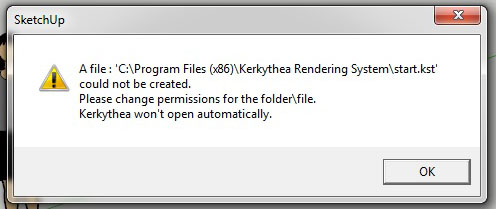
      I agree it must be the way I installed the plugin. I am new to windows 7. I figured when I run the export for the first time, all I had to do was point to Kerkythea application. But that's when I got the error and don't know what it means.

      The error message
      Error

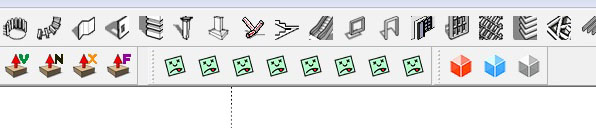
      The green faces
      the green faces

      I have the plugin in AppData/Roaming/Sketchup2014/Sketchup/Plugins

      posted in Extensions & Applications Discussions
      Mistro11M
      Mistro11
    • Kerkythea and Sketchup2014

      Does anyone use Kerkythea with SU2014? I'm getting a weird toolbar with green faces and the export will not complete. This is happening on my windows 7 Pro 64bit at work.

      posted in Extensions & Applications Discussions extensions
      Mistro11M
      Mistro11
    • RE: [Plugin] Find My Plugins Folder

      @box said:

      Have you installed the Plugin store itself?
      If not you can download it from the link at the top of the page.

      Ok, that worked. I didn't realize I needed that. Cool little tool BTW.

      posted in Plugins
      Mistro11M
      Mistro11
    • RE: Sketchup 2014 Plugins Folder in Windows7 Professional

      I found it! I had to show hidden files. For me it's Username/AppData/Roaming/Sketchup2014/Sketchup/Plugins. Now I have to figure out how to get Kerkythea to launch automatically from using the plugin...

      Thanks.

      posted in SketchUp Discussions
      Mistro11M
      Mistro11
    • RE: [Plugin] Find My Plugins Folder

      @rich o brien said:

      Look under the the SketchUcation menu.

      That's what I'm looking for but it is not listed in the plugins tab or anywhere else in the menus.

      posted in Plugins
      Mistro11M
      Mistro11
    • 1
    • 2
    • 5
    • 6
    • 7
    • 8
    • 9
    • 15
    • 16
    • 7 / 16