sketchucation logo sketchucation
    • Login
    1. Home
    2. Mistro11
    3. Posts
    Oops, your profile's looking a bit empty! To help us tailor your experience, please fill in key details like your SketchUp version, skill level, operating system, and more. Update and save your info on your profile page today!
    ⚠️ Important | Libfredo 15.6b introduces important bugfixes for Fredo's Extensions Update
    Offline
    • Profile
    • Following 0
    • Followers 0
    • Topics 78
    • Posts 315
    • Groups 1

    Posts

    Recent Best Controversial
    • RE: Updating Graphics Card Drivers

      Thanks for your replies. I updated my drivers to the latest and so far I'm not experiencing those jitters since. I just installed it over the old one without deleting anything.

      This is a quote from the Nvidia site-
      "Q: Do I need to uninstall my older driver first?
      A: No. It used to be the case that an uninstall was first required. Today the recommended method is to overinstall the newer driver on top of your older driver. This will allow you to maintain any current NVIDIA Control Panel settings or profiles."

      I did that and all seems well. So yeah, if I experience anything wrong, I can easily revert back.

      posted in SketchUp Bug Reporting
      Mistro11M
      Mistro11
    • Updating Graphics Card Drivers

      I'm still running the same driver that came with my card back in Nov. 2008. It's a Geforce 9800GT. I had no problems with it to date but today as my model gets more complex, I notice some choppiness particularly when I select the Line tool and attempt to draw something (not every time but occasionally and more frequent as my model grows). Today Sketchup crashed on me for the first time. I read through some threads where people experience similar issues and the common answer I hear is to update the drivers.

      The reason I stuck with my original driver is because 1 I believe in "if it aint broke don't fix it". I figure if I can run Microsoft Flight Simulator X very smoothly and all my other apps are fine then why update? 2 I see many people having terrible issues after downloading newer drivers and the process seems very complicated. On the Nvidia site, the instructions are uninstal this and that then reboot in safe mode and make sure these folders are deleted yada yada yada. I tried it a long time ago and failed so I ended up reverting to the original driver and stuck with it since.

      I would like to know how members here update their drivers (is there an easy way) and/or if it's even worth going through the trouble just for Sketchup? Overall what is your opinion on updating Graphics card drivers and what advantages does it have? I'm still on the fence about doing it but I think it's in part due to ignorance as I never really went down this road.

      posted in SketchUp Bug Reporting sketchup
      Mistro11M
      Mistro11
    • RE: 3D Warehouse Question

      Thanks Rich for the explanation. Now I know what I'm looking at.
      I rarely see a version 8 model when I'm searching. Mostly 5,6,and 7. I usually just get the highest version on the list and so far I have no problems with any downloads.

      posted in SketchUp Discussions
      Mistro11M
      Mistro11
    • 3D Warehouse Question

      I noticed that when downloading models from 3D Warehouse there are options for Sketchup versions 5,7 etc. and at the bottom a collada. Does it matter which one I choose for Sketchup 8 and what's the difference?

      posted in SketchUp Discussions sketchup
      Mistro11M
      Mistro11
    • RE: Cannot Find Imported Materials in Sketchup

      I have it sorted now. I found that while I have my scene open I first open the materials window and select the "in model" section. Then I click on the import KT materials button and choose the textures I want to play with. After selecting the textures as new, the texures are then loaded into the material browser.

      This video helped me understand the procedure http://www.youtube.com/watch?v=6LdkHHYrns4&feature=related

      If there's anything else I should know feel free to let me know. Thanks Rich.

      posted in Newbie Forum
      Mistro11M
      Mistro11
    • RE: Cannot Find Imported Materials in Sketchup

      @unknownuser said:

      The file you downloaded was it a Kerkythea material file or a .zip containing image files?

      In SU you can create materials from images via the materials windows or via File > Import.... And in this dialogue you can choose 'as texture'

      Your downloaded images will reside in your default download location as defined by your browser.

      You can extract images from KT material files but I forget how?

      You can also turn any imported images into .skm files by saving as collection.

      But first let's see what you've downloaded

      I downloaded Kerkythea material files (zip files/packages). The first thing I did with them is loaded them in Kerkythea to add to that library as instructed in their manual. I then opened up Sketchup and clicked the "import KT materials" button. I went through the dialog and selected "all" in each one of the material options. At the end I chose "create as new".

      posted in Newbie Forum
      Mistro11M
      Mistro11
    • Cannot Find Imported Materials in Sketchup

      I downloaded and imported materials from the Kerkythea site. At the end of importing I chose to "create new" assuming that the textures will be stored somewhere in the materials window. I searched and cannot find any of the materials I imported. I read in their forums that they would be in the "in model" color section. I looked there but still no imported materials, just the ones that came with Sketchup. I'm not sure if something went wrong with the import or I'm just not looking in the right place.

      posted in Newbie Forum sketchup
      Mistro11M
      Mistro11
    • RE: Multiple Story Building Issue.....

      Ok I fixed it! I remember now that I have to press the control button while using push/pull to get the two faces. I'm back in business.

      posted in Newbie Forum
      Mistro11M
      Mistro11
    • RE: Multiple Story Building Issue.....

      Thanks Dave!
      I remembered back when I started working on the second floor. I had every intention on making a double face for the floor and ceiling but when I did a push/pull on the face, it was still only one face and it was raised up from the crown molding. So I stuck with the one face. I was thinking push/pull automatically makes two faces for some reason. I remember reading about this issue but forgot where.

      posted in Newbie Forum
      Mistro11M
      Mistro11
    • Multiple Story Building Issue.....

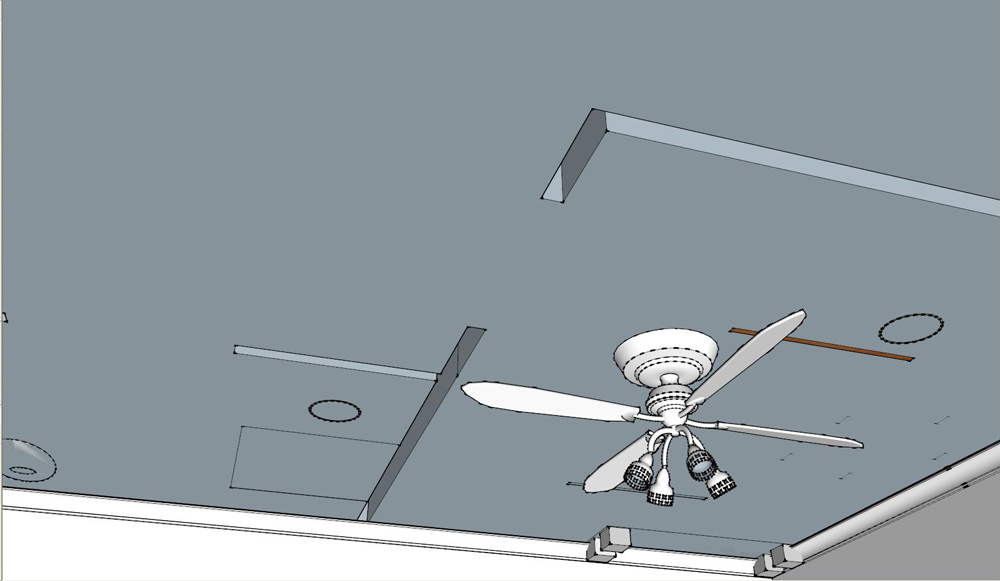
      I was finishing my layout of the second floor of my model when I discovered a nightmare in the first floor ceiling.
      See pick below. This is my first time making a two story building.

      This obviously happened after I did a push/pull operation for the rooms upstairs. I did not double the face separating the two floors. When I tried to heal the holes by making lines and then deleting them, the ceiling was clean again but my walls upstairs were gone. What did I do wrong and how do I fix it? Thanks in advance.


      Holy-ceiling.JPG

      posted in Newbie Forum sketchup
      Mistro11M
      Mistro11
    • RE: Hotel Design - Your thoughts

      I enjoyed the video! Congrats! The music kept me watching too. The sample used in that track is from one of my favorite old school songs.
      Nice job!

      posted in Gallery
      Mistro11M
      Mistro11
    • RE: Sketchup and Kerkythea

      @numbthumb said:

      @mistro11 said:

      I would like to put in a bump map as well as make the floor look like someone buffed the @#%@ out of it. I'm not clear on how to achieve this using Sketchup's material editor

      You cannot create or apply bump maps in SU. You´ll need an external app for that. I´d suggest searching Kerkythea forums. See here for example:
      http://www.kerkythea.net/phpBB2/viewtopic.php?t=8465&view=previous&sid=e268c81b9be81de414ec1f49cb391dfe

      Thank you for the link. I actually got through with a youtube search but I missed that thread over at their forums. I managed to figure out the material editor in Kerkythea and got the floors I wanted. I didn't know I could right click some things to get at more options. I think I have it sorted now.

      I found myself reading and watching more tutorials than getting any work done and got impatient. Was just one of those things I skipped. Patience is a vurtue.

      posted in Newbie Forum
      Mistro11M
      Mistro11
    • RE: Total Newbie just joined!

      @charly2008 said:

      Hi Mistro11,

      maybe this topic could helpfull for you.

      http://forums.sketchucation.com/viewtopic.php?f=323&t=28586

      Charly

      I missed that one thanks for posting it. This seemed to be meant for Lancer's sake but I'll take it too.

      posted in Newbie Forum
      Mistro11M
      Mistro11
    • Sketchup and Kerkythea

      Hello again. I am now at the rendering stage of my project and been playing around with different rendering parameters in Kerkythea. I'm still trying to get an understanding of the whole material/texture system with these 2 programs. I read that it's faster to import the model/scene into Kerkythea with all textures already applied. I would like to put in a bump map as well as make the floor look like someone buffed the @#%@ out of it. I'm not clear on how to achieve this using Sketchup's material editor. Can anyone point me to a comprehensive tutorial or documentation that specifically deals with Kerkythea and Sketchup? I already downloaded the getting started pdf but unless I missed something, I see very little info on Sketchup specific configurations.

      posted in Newbie Forum sketchup
      Mistro11M
      Mistro11
    • RE: Total Newbie just joined!

      Hi Lancer and welcome. I'm new here too and also a noob to Sketchup. Here's a link to a download that helped me getting started. http://www.tutorialspdf.com/sketch-up-5-0-tutorial/

      It's for Sketchup v5 but the same basic principles are for all versions (I believe). It helped me tremendously. Once you learn the basics of what you can achieve, you'll be modeling those rings in no time. My suggestion is learn the basics by following along with the guide and when you are comfortable, you can look into some plugins that will help make some tasks easier too.

      Hope this helps.

      posted in Newbie Forum
      Mistro11M
      Mistro11
    • RE: Zooming Sometimes Non Responsive

      @box said:

      You'll probably find it is due to the position of the cursor. If your cursor is on something close it will zoom very fast but if it is on a point in the distance it will seem to do nothing.

      Wow you're right! I tried zooming with the cursor on a line and then on empty space. Empty space=very slow to no zoom. Thank you for clearing that up.

      posted in Newbie Forum
      Mistro11M
      Mistro11
    • Zooming Sometimes Non Responsive

      Every now and then my zooming function seems to stop working. I use the middle mouse wheel to zoom in and out. I don't know if I'm pressing something accidentally or it's something else like RAM. Anyone know what would cause this?

      posted in Newbie Forum sketchup
      Mistro11M
      Mistro11
    • RE: The Move Tool

      @dave r said:

      I did the video here quite awhile ago. Perhaps it will be helpful in your coming to terms with the Move tool.

      Thank you Dave. I just watched your video and it cleared up some things for me. I'm bookmarking it as a reference in case I forget what to do again at any time.

      posted in Newbie Forum
      Mistro11M
      Mistro11
    • RE: The Move Tool

      Thanks for the tips Dave and TIG!
      How did I forget the tape measure??? That's one of my favorite tools. I actually used the top and side views to help as well as making it into a component. I have to practice inferencing more to get the hang of it. I got it where I want it but I know I could've done a better and faster job at getting it done. My scene is not finished yet so I know I'm in for another one of these move operations.

      BTW, I just made a copy of one of my windows. I got the top row to cut through the walls so I could delete where the glass will be. With my current window it is not cutting through, The wall around it and in the window remains one face. What will make the difference? I have no idea what I did the first time. I do see the new window has gone through to the other side though.

      posted in Newbie Forum
      Mistro11M
      Mistro11
    • RE: The Move Tool

      I been experimenting with the move tool. I made a 3D cross I would like to place on top of a small area over the entrance that's a rectangle. This rectangle is about 3" square. I managed to place the cross on top but it was not in the exact position I intended. When I tried to adjust it's position by moving it, it was attached to the rectangle and the top of the rectangle moved with it. I had to undo which placed the cross back at it's original place. How can I get a precise centered placement or what am I missing?

      posted in Newbie Forum
      Mistro11M
      Mistro11
    • 1 / 1