Cannot get Default Material Back on Faces
-
Using SU 2014 Pro:
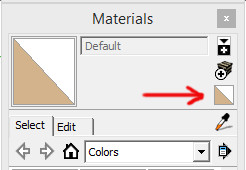
By mistake I colored a model from the group level and all faces that had default material was colored with dark grey. When I try to put the faces back to default color, nothing is happening. Even when I go in and select a face directly, the dark grey will not change. Any help is appreciated.Edit: The reason I want to get back to default is to make sure I know where the back faces are before I export to render.
-
-
Thanks Cotty. I did try changing the face styles. The style of the model did change but not for what was already colored. I made a model outside the group and the default colors applied. But I don't understand why I cannot paint the default color back to the colored surfaces. I did it before plenty of times. Sometimes it is necessary when working with the UV plugins.
I will try and remember about the monochrome view. Thanks again.


Hello! It looks like you're interested in this conversation, but you don't have an account yet.
Getting fed up of having to scroll through the same posts each visit? When you register for an account, you'll always come back to exactly where you were before, and choose to be notified of new replies (either via email, or push notification). You'll also be able to save bookmarks and upvote posts to show your appreciation to other community members.
With your input, this post could be even better 💗
Register Login


Advertisement