sketchucation logo sketchucation
    • Login
    1. Home
    2. kaas
    3. Posts
    Oops, your profile's looking a bit empty! To help us tailor your experience, please fill in key details like your SketchUp version, skill level, operating system, and more. Update and save your info on your profile page today!
    πŸ”Œ Smart Spline | Fluid way to handle splines for furniture design and complex structures. Download
    K
    Offline
    • Profile
    • Following 0
    • Followers 0
    • Topics 47
    • Posts 864
    • Groups 1

    Posts

    Recent Best Controversial
    • RE: Different Line Colors With Section On

      If I remember well, I ran into that bug a while ago as well. I had sort of grey colors for the section cuts in LayOut for some sections and there was no way to change them to black in LayOut whatever I did in SketchUp. I ended up exporting and inserting those sections again from scratch.
      Maybe post this question and the file on the official SketchUp forum?

      Edit: original post on this forum with same bug? http://sketchucation.com/forums/viewtopic.php?f=15%26amp;t=62746
      posted in LayOut Discussions
      K
      kaas
    • RE: Arrange Trays in 2016

      @ntxdave said:

      ...annoying as heck......Entity Info ... appears/disappears.... I have not found a way to get totally comfortable with it yet.

      Same here.
      Already several months since the new trays were released and I still prefer the V2015. In V2016 its playing whack-a-mole (auto-hide side panels) OR scrolling a lot (stacking the trays LO-style) OR hiding and un-hiding to get to the right tray because another tray is open already and they were stacked etc (trying to mimic the old ways). Wasted space(entity info, materials - no autosize), small annoying rename bug (entity info + outliner) etc...

      Crossing fingers in M1 they will fix some things in the UI.

      posted in SketchUp Discussions
      K
      kaas
    • RE: What if unwrapping sketchup models was kinda easy....

      Wrapster
      Wrap-a-lot
      WrapIt
      ...

      posted in Plugins
      K
      kaas
    • RE: What if unwrapping sketchup models was kinda easy....

      @thomthom said:

      ...How often do you have different UVs for the light channel - or other channel? Don't you normally have multiple channels matching their size and placement?

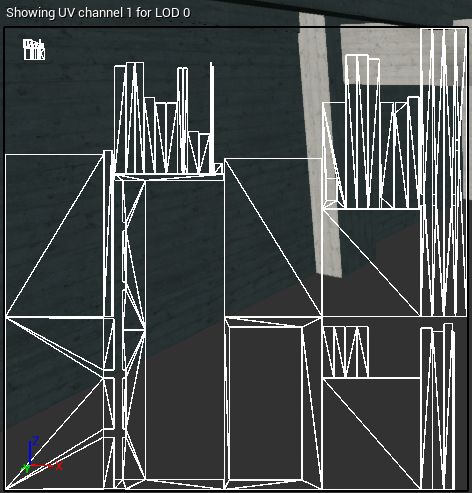
      For gaming elements in general they are the same. For architecture though, the lightmap usually is totally different. The mapping coordinates for a tileable texture (brick, concrete etc) can have any value. The lightmap channel must have all uv's in the 0-1 space.

      In the pic the lightmap uvs for a concrete structure: unwrapped in 0-1 space.


      uvLightmap.jpg

      posted in Plugins
      K
      kaas
    • RE: What if unwrapping sketchup models was kinda easy....

      @pixero said:

      Every time I see one of the community's great SU innovations I keep thinking: What DOES the Trimble team do each day as so little comes out in each yearly update?

      Surely the wrong place for this discussion but recently I had the same thought and wondered: when was the last time the community was happily posting pictures, models and ideas about a new SketchUp tool by the official developers?

      Are we just spoiled brats here and is it wrong to expect new fancy tools from the Trimble team? Like good uvTools, more shading options, native quads, native lofts, running dimensions, etc.
      Should they focus on making a stable framework (behind the scenes stuff) for other developers? Are we missing something very crucial here?

      Just asking.

      posted in Plugins
      K
      kaas
    • RE: What if unwrapping sketchup models was kinda easy....

      @rich o brien said:

      ..As a bonus it will be a standalone app with file export options so you won't be confined to skp format...

      If you're going to support fbx, maybe add the option for a 2nd UV channel as well? No use for it in SketchUp itself but for people who need a lightmap channel in Unreal that would be great.

      posted in Plugins
      K
      kaas
    • RE: [REQ]-[Solved]Batch save in given Version and /or fileformat

      you could alter the code in this topic a bit to fit your needs:
      http://sketchucation.com/forums/viewtopic.php?f=323%26amp;t=63569#p582211

      posted in Plugins
      K
      kaas
    • RE: [ruby] material colorize

      I use the tool to quickly switch two modes: textured / colored AND grey scale

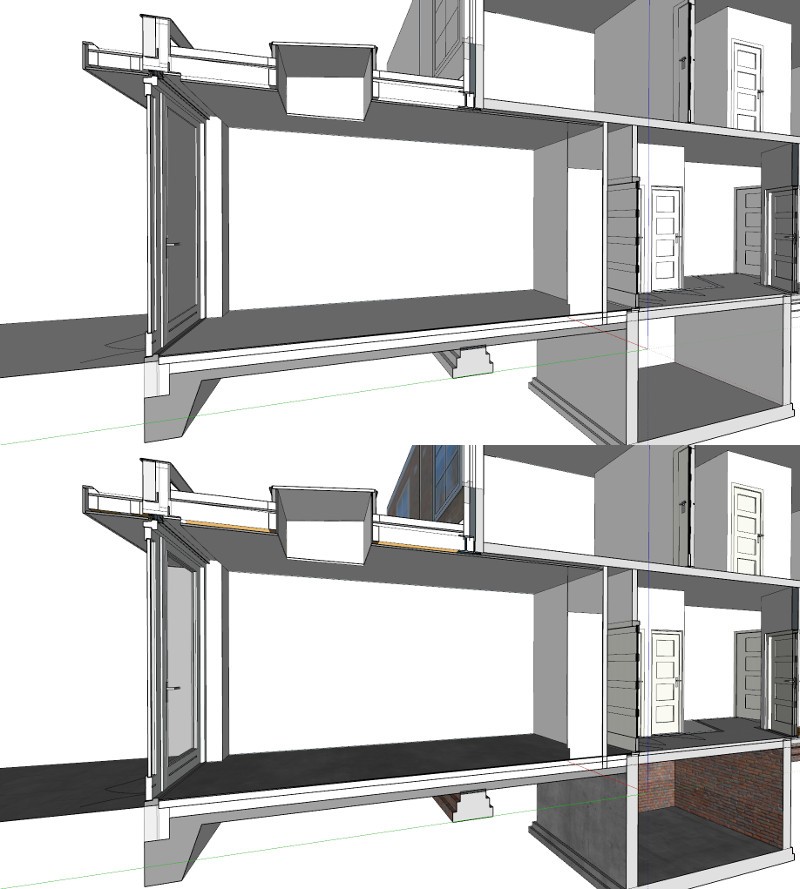
      I have a fully textured 3d model and a sectioncut with faces in several shades of grey. In layout I need a grey scale representation without textures. The grey scale colors of the section cut must be preserved.

      So the tool temporary converts the colors to grey scale, makes the material color for those materials with a texture to white and sets the style to shaded.

      Previously I needed two scenes in SU and one extra layer in LO to achieve the same result in LO.


      switch.jpg

      posted in Developers' Forum
      K
      kaas
    • RE: Code to eyedrop

      @djrique said:

      Hi guys, my name rique, i've started to learn .rb and i would like to use eyedrop in my plugin to select a material in sketchup workspace and the material open in window with some datas about it...but i don't know what code i can use. Plz, somebody can help me?

      That's quite a challenge to start learning ruby.

      Use google-search to find in the SketchUp Ruby API code about:

      • making a tool -> all the code you need for starting a plugin, moving the mouse, refreshing the view, stopping the tool etc
      • making a custom cursor -> for changing the cursor to a custom eyedropper icon
      • pick_helper -> for picking the material from a face
      • webdialog -> for opening a window to display your data
      posted in Developers' Forum
      K
      kaas
    • RE: [ruby] material colorize

      Thanks, I already used that method for reverting to the original settings.

      Had another look...turns out I just have to add 'm.colorize_type= 0' when setting everything to white to prevent SketchUp to automatically use the colorize option.

      posted in Developers' Forum
      K
      kaas
    • [ruby] material colorize

      I'm testing a small tool to temporary turn all colors, for any material containing a texture, to white. Together with a shaded style this results in a black and white representation of the model.

      model = Sketchup.active_model
      materials = model.materials	
      
      materials.each {|m|
      	m.color = [255,255,255,255]
      }
      

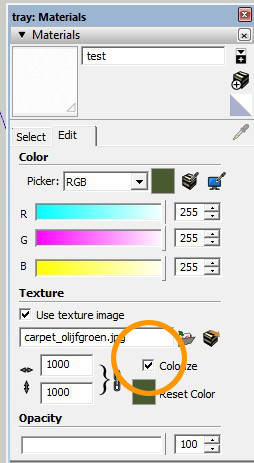
      Annoying thing is: if you run the code, SketchUp is checking the 'colorize' flag (see pic) for the materials which can't be unchecked with code when reverting back to the original settings.

      Already found some topics about this behavior:
      http://sketchucation.com/forums/viewtopic.php?f=180%26amp;t=49184%26amp;p=442077%26amp;hilit=colorize#p442077
      http://sketchucation.com/forums/viewtopic.php?f=180%26amp;t=22488%26amp;p=189349%26amp;hilit=colorize#p189349

      The topics are rather old - any new ways to prevent this OR to uncheck the colorize flag by code?


      colorize.jpg

      posted in Developers' Forum
      K
      kaas
    • RE: The art of Moebius +...

      Moebius...brilliant and unique style. If I'm not mistaken, he did the concept art for the 5th Element movie (Bruce Willes, Gary Oldman etc).

      posted in Corner Bar
      K
      kaas
    • RE: [Plugin] Canvas v1.1.3

      Just re-discovered this nice plugin.
      Maybe add perpendicular mode as well? That would be a nice addition to the placement options. Great for adding elements that should be perpendicular to the surface.

      posted in Plugins
      K
      kaas
    • RE: Modelling from a Topo footprint

      @icedkasz: My guess : its Toposhaper by Fredo6 http://sketchucation.com/forums/viewtopic.php?f=323%26amp;t=52039

      posted in SketchUp Discussions
      K
      kaas
    • RE: SketchUp to UnReal.... is it REAL?

      @juju said:

      you can also try playuptools, it looks like they're currently focusing on Unity, Valve, CryEngine compaitibility, but I'm almost sure they previously also exported to Unreal.

      My guess is Valerostudio's problem is more related to some Unreal settings. For instance: imported lightmap uv's must be entered at two location or it defaults to low settings. That could explain the dark faces. Or its the auto-exposure setting... or the lights...

      posted in SketchUp Discussions
      K
      kaas
    • RE: SketchUp to UnReal.... is it REAL?

      @juju said:

      ...If you're using Unreal for archviz, please see their T&C's, I believe they distanced themselves from Unreal being used for archviz.

      You remember where you read that? I would be very surprised if they did. They even have an archviz section on their forum and nothing is mentioned over there.

      posted in SketchUp Discussions
      K
      kaas
    • RE: SketchUp to UnReal.... is it REAL?

      The picture I posted here is a screenshot from Unreal http://sketchucation.com/forums/viewtopic.php?f=323%26amp;t=57270%26amp;start=30#p585955
      Granted, some of the lightmap UVs were applied in Blender but it sounds something is wrong with your settings.

      Can you post a screenshot from Unreal displaying your problem?
      And maybe a screenshot of the 'world settings' - 'lightmass' section?
      And a screenshot if you right-click on an object and choose 'edit'?

      posted in SketchUp Discussions
      K
      kaas
    • RE: Successful UV Unwrap inside Sketchup!

      @JQL You don't think its more fast and easy to just export the object to Blender, do an unwrap there and import the obj into SketchUp again?

      posted in SketchUp Discussions
      K
      kaas
    • RE: Successful UV Unwrap inside Sketchup!

      SketchUp really needs a better way of mapping and a good tool for unwrapping fast. The current toolset is... lacking...
      There are so many wonderful tools available for (realtime) rendering your 3d models generated in SketchUp but to do so you need proper UVcoords, sometimes multi-channel UVmaps(0-1 space) etc.

      Crossing fingers a talented programmer will have a go at this soon...

      posted in SketchUp Discussions
      K
      kaas
    • RE: Getting Component Size with Ruby

      @aibonewt said:

      ...That works brilliantly, thank you!...P.S. Sorry about the thumbs down, I hit it by mistake and it wouldn't let me change it πŸ˜•

      Glad to be of help. Np about the thumbs... πŸ‘
      Also, nice TIG for your clarification. Already wondered.

      posted in Dynamic Components
      K
      kaas
    • 1
    • 2
    • 15
    • 16
    • 17
    • 18
    • 19
    • 43
    • 44
    • 17 / 44