sketchucation logo sketchucation
    • Login
    1. Home
    2. kaas
    3. Posts
    Oops, your profile's looking a bit empty! To help us tailor your experience, please fill in key details like your SketchUp version, skill level, operating system, and more. Update and save your info on your profile page today!
    πŸ”Œ Smart Spline | Fluid way to handle splines for furniture design and complex structures. Download
    K
    Offline
    • Profile
    • Following 0
    • Followers 0
    • Topics 47
    • Posts 864
    • Groups 1

    Posts

    Recent Best Controversial
    • RE: Webdialog losing focus in V16?

      I think I have a fix for the textbox input losing focus. Just a few lines in the html/Javascript.

      In the body:

      <body onblur= go_focus();>
      

      And in the Javascript part:

      function go_focus(){
        document.getElementById("textbox").focus();
      }
      

      Doing a self.focus() or window.focus() doesn't seem to work.

      Edit: applying the same code to some more complex plugins doesn't seem to work...

      posted in Developers' Forum
      K
      kaas
    • RE: Webdialog losing focus in V16?

      SU V16 and me don't seem to get along... There must be a way to bypass this problem?!

      • I tried using a javascript onblur detection and re-focus again. That fails.
      • I tried using ruby to detect if the cursor 'wants' to change (sort of changing focus I thought) and do a wd.show again but that doesn't help either (or wrong idea on my part that it shouldn't ever have helped).
      • I did see though that ProfileBuilder2 doesn't seem to suffer from this problem. Entering a name for a new profile never seems to loose focus so there must be some way...
      posted in Developers' Forum
      K
      kaas
    • RE: Webdialog losing focus in V16?

      I only used .show in my plugins.

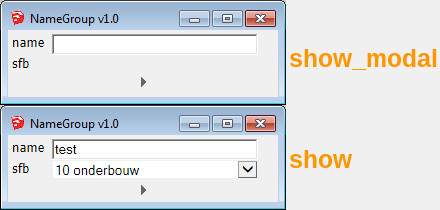
      Thanks for the suggestion. I tried show_modal next in a small name-plugin but show_modal seems to break the webdialog actions:

      • the combo box isn't visible anymore,
      • it doesn't respond to the javascript onClick button action,
      • <enter> doesn't close the webdialog.

      Will have to look into the documentation for show_modal.


      webdialog.jpg

      posted in Developers' Forum
      K
      kaas
    • Webdialog losing focus in V16?

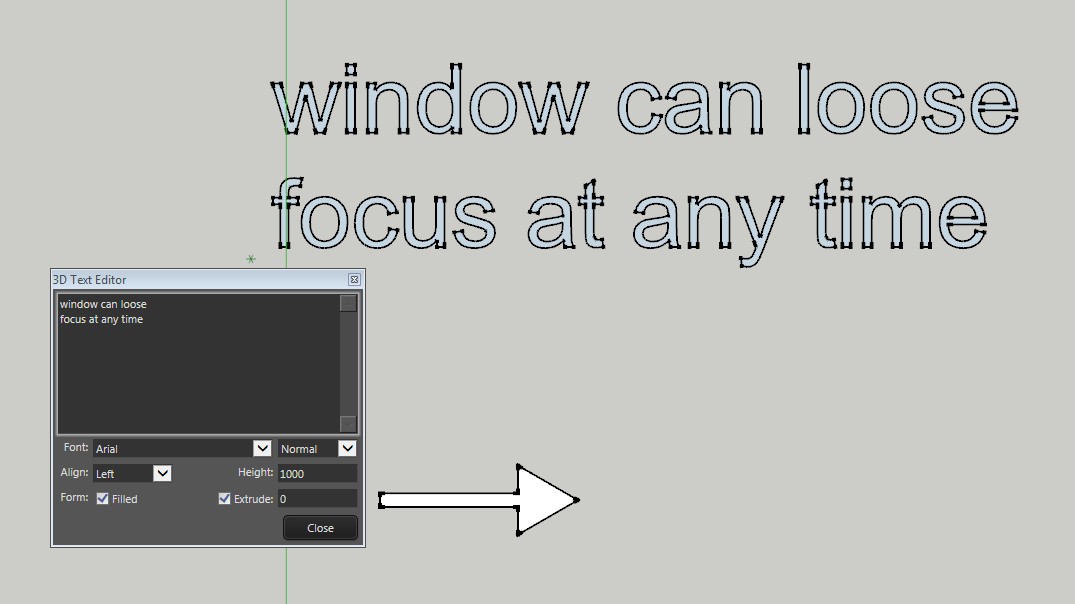
      Posted this issue a few days ago on the official forum but no response there. Just noticed the same issue in another plugin using a webdialog: ThomThom's Editable 3d Text. Posting here hoping somebody knows some javascript/ruby code to prevent this.

      If you have a plugin using a webdialog where you have to input some text, in V16 the webdialog can loose focus and then you're firing keyboard shortcuts instead.

      1. Move the mouse off the webdialog and the focus is gone and whatever you're typing is firing keypress shortcuts.
      2. Even without moving the mousecursor off the webdialog, the window can loose focus and you're firing shortcuts again.

      Nobody else noticed this? Any suggestions for javascript/ruby code could to prevent this?


      focus.jpg

      posted in Developers' Forum
      K
      kaas
    • RE: Inktspace--pdf---dwg---sketch up

      Looks like they used some mask in the pdf?

      You could double click on the brick lines in Inkscape and:

      1. delete them - I clean up my pdfs all the time (deleting text and not needed stuff) to shorten the import time in SketchUp.
      2. look for a way to apply the mask to the lines in Inkscape (not sure if this can be done)
      posted in Newbie Forum
      K
      kaas
    • RE: SketchUp 2016 is here....

      @pipingguy said:

      ...One thing I noticed with the materials tray - when you strike the B key, the tray does not automatically pop open.

      Did you bind the B key to the tray-toggle?

      posted in SketchUp Discussions
      K
      kaas
    • RE: Texture position bug

      On my laptop (with old Intel gfx) I see a small 'jump' in the texture as soon as I enter the component. So, just guessing here: could it be a limitation of the hardware? Do you use an embedded gfx solution or dedicated gfx card?

      posted in SketchUp Bug Reporting
      K
      kaas
    • RE: Random Corruption of LO 2016 File

      You know a layout file is actually a zip file with a different extension?
      Have you tried renaming it to zip and trying to unzip?
      If that works, just look at some of the assets. SU file still intact? etc
      Maybe by looking at these assets, you will get more clues what might be the problem..
      It still doesn't make sense though even the backup file went dead. Checked for a virus?

      posted in LayOut Bug Reporting
      K
      kaas
    • RE: Random Corruption of LO 2016 File

      If even your backup files are dead...nightmare for anyone who uses Layout professionally.
      The new version is just a few weeks out so if its just bad luck? Maybe send the file to Marc @ Trimble? Maybe they can debug it and find out whats happening?

      posted in LayOut Bug Reporting
      K
      kaas
    • RE: SketchUp 2016 is here....

      @pmolson said:

      ...When I opened a new drawing the new trays were not there. Are they really drawing file specific?is there a way to set them to be part of my standard template file?

      Strange, I just tested it and when I open a new session they are in the same position where I left them when I closed SketchUp.

      Not sure whats happening here. Maybe a rights-issue?

      posted in SketchUp Discussions
      K
      kaas
    • RE: Dwg to sketch up

      You could set up the layer colors in SketchUp the same as in Autocad and set the SketchUp color style to <color by layer> to have it resemble your autocad screen a bit more.

      posted in Newbie Forum
      K
      kaas
    • RE: SketchUp 2016 is here....

      @pmolson said:

      ..
      Is there a way to dislodge the layers dialog box from the default Tray. I like the tray, especially with autohide enabled, but I would like to get the layers dialog out of there and float it wherever I want...

      Create a new tray just for the layers and drag it off the docked position (double click).
      Window-manage trays-new etc

      posted in SketchUp Discussions
      K
      kaas
    • RE: [REQ] Save all .skps in folder to earlier version

      Maybe try this plugin and bind it to the save keypress?
      http://sketchucation.com/forums/viewtopic.php?t=33441

      posted in Plugins
      K
      kaas
    • RE: Dwg to sketch up

      I think you have to change your units in the import options to match the units in autocad

      posted in Newbie Forum
      K
      kaas
    • RE: [REQ] Save all .skps in folder to earlier version

      This works for me on Win7X64. Just copy-paste in your ruby console

      It first asks for the source directory, next it will ask for the target directory. And then it converts all sketchup files and saves a copy to the target location.

      USE AT YOUR OWN RISK - USE A COPY OF YOUR SOURCE DIRECTORY

      source_path = UI.select_directory(title; "Select Source V16 directory")
      target_path = UI.select_directory(title; "Select Target V8 directory")
      
      folder_list=Dir.entries(source_path)
      folder_list.to_a.each{|file|
        if file.include? ".skp"
          source = File.join(source_path, file)
          status = Sketchup.open_file source
          model = Sketchup.active_model
          target = File.join(target_path, file)
          status = model.save_copy(target, Sketchup;;Model;;VERSION_8)
        end
      }
      

      edit: no clue why indents aren't visible
      [mod=:221mh31f]use 'code' for formatting - use 'ruby' for single lines etc
      TIG[/mod:221mh31f]

      posted in Plugins
      K
      kaas
    • SU16 Outliner + Entity Info rename problems

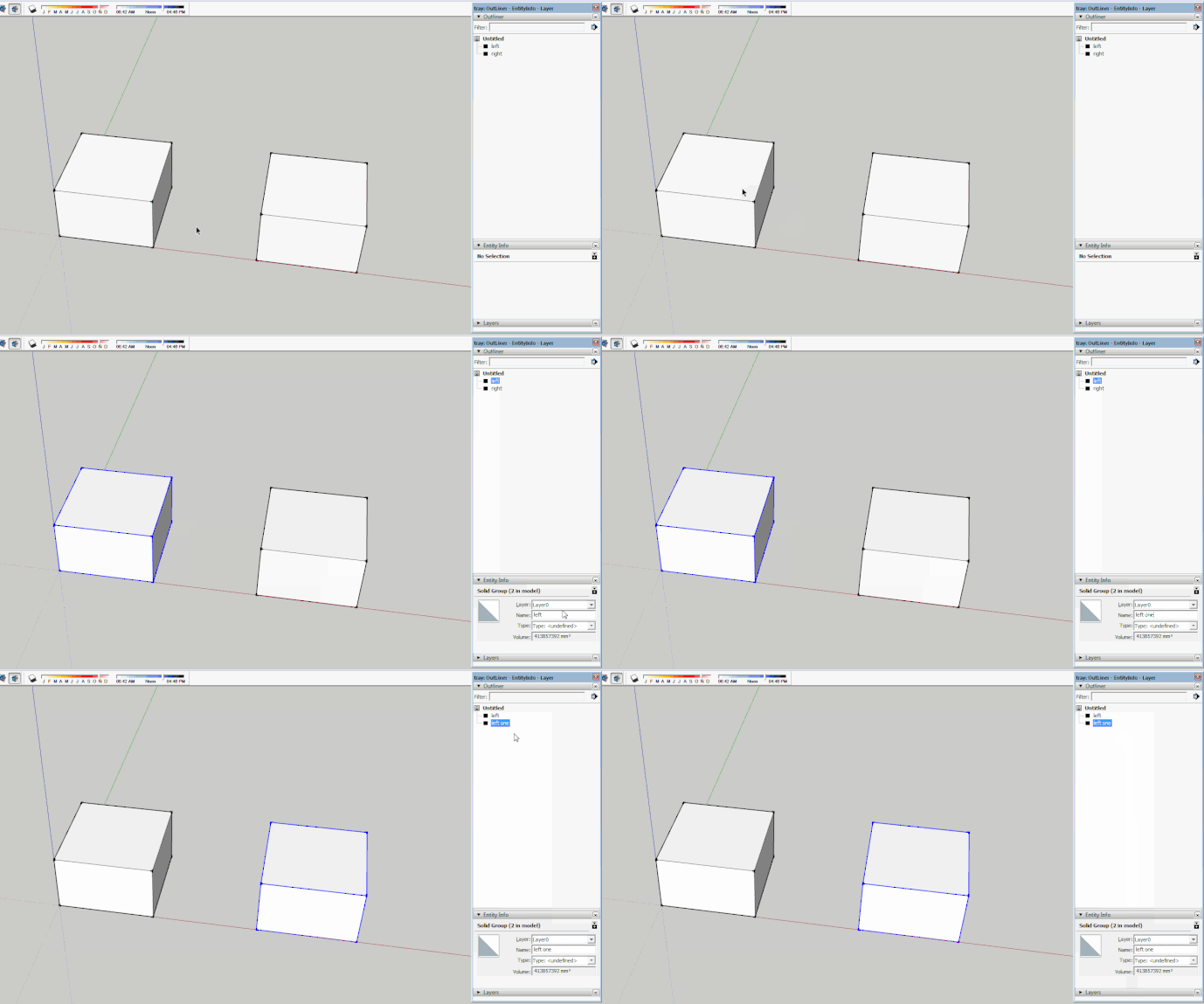
      V16 introduced a small yet annoying bug and a change in how it used to work:

      The small bug (see animated gif):

      1. select an object, rename in EntityInfo
      2. immediately select another object in the Outliner -> the last selected object gets renamed, not the one you were trying to rename.

      The change in how it used to work:

      1. select an object, rename in EntityInfo
      2. In V15 you could click in the white space of the Outliner to apply the new name of the object. Thats gone in V16. Clicking in the white space reverts the name of the object to the 'original' name.

      The 'fix' for both is you have to click in the viewport before you do something else... Its small yet annoying

      I wonder anyway: why does pressing <enter> when renaming anything in SketchUp not finalize the current rename action (+ updates view) and instead keeps your cursor blinking so you can continue to type? Does that make sense? Much better would be:

      1. type new name
      2. press <enter>, name is applied, view is refreshed. No blinking cursor
      3. next letter is shortcut to next tool. Instead you get 'wallZ' if you wanted to Zoom next.

      Already searched in Ruby docs to see if the <enter> could be picked up by a listener so <enter> activates the Select tool. Also seems you can't add <enter> in the keyboard shortcuts to link to the select tool or can we..?

      Posted it on official forums last week but posting here to double the chances it gets picked up and fixed soon(tm).


      rename and outliner.gif

      posted in SketchUp Bug Reporting sketchup
      K
      kaas
    • RE: Separate meshes from the same layer

      If I interpret your question correctly...I think it can be done if you export-selected your rooms from SketchUp.

      1. turn on all the layers you like.
      2. only select the objects you want to export as a 'group'
      3. use export selected in fbx (?) format. Result is a single file
      4. importing the fbx should only contain the selected objects BUT they could be 1 object in Unity as long as Unity doesn't split them by material
      posted in Newbie Forum
      K
      kaas
    • RE: SketchUp 2016 is here....

      @philw said:

      Clayton49

      Still like the old way better as it did not take up screen space and it just worked.
      its not just SKU, it other programs as well. They keep fixing whats not broken and not fixing what needs to be fixed.

      +1

      posted in SketchUp Discussions
      K
      kaas
    • RE: SketchUp 2017 Wishlist

      Now, a week after the V16 release, I have similar thoughts. LayOut was improved so that's really nice. In SketchUp I'm struggling to see improvements to me besides the added inference option.
      ... I'm actually considering using a LO16 & SU15 combo at the moment because of the new interface & a few bugs in them that break my workflow....

      I would be very very surprised to see a UV map/unwrap tool, quads, nested layers panel etc etc coming from Trimble in a next V17 release. If you, as a user, really need those tools - get started learning Ruby yourself or pay somebody to make the tools for you. My guess is: they are targeting the average user who just needs an interface to a pro-package (Revit, Maya, 3dStudio, Rhino etc) if they need the pro-tools.

      ...I hope I will be just as happy with a future update for SketchUp as I'm with this Layout update.
      In the mean time, many many thanks indeed to the plugin developers over here that have added so many invaluable tools that make SketchUp a joy to use!!!
      posted in SketchUp Feature Requests
      K
      kaas
    • RE: Sketchup Pro SLOW on large files...but Make isn't.

      I would be very surprised if Make would be faster than Pro. It could be a difference in the preferences (use large textures, anti aliasing, redefine thumbnail on save, etc) or a weak link in the hardware itself. Do u use the same preference settings? Maybe post the complete specs of both machines?

      posted in SketchUp Discussions
      K
      kaas
    • 1 / 1