Thanks John,
HEREDOC - exactly what I was looking for.
Max
Oops, your profile's looking a bit empty! To help us tailor your experience, please fill in key details like your SketchUp version, skill level, operating system, and more. Update and save your info on your profile page today!
🔌 Smart Spline | Fluid way to handle splines for furniture design and complex structures. Download
K
Offline
Posts
-
RE: Requesting idea for creating shapes with webdialog
-
RE: Requesting idea for creating shapes with webdialog
Interesting ruby code Sdmitch. I never knew how to embed the html code in Ruby. I expected all code would be in embedded into 1 string or something like that. Can you explain the syntax of the beginning and end capitalized HTML tags? Or maybe do you have a link to the relevant Ruby-doc.org page?
html = <<-HTML
...
HTML -
RE: EXPORTING 3D MODEL TO CAD
normally the only way to 'fix' this is: copy-paste parts of the model to another file and try to export that one until you have found the element that causes the export to fail.
More error details like 'failing at exporting object xyz' would help but we don't have that.
-
RE: Newbie Ruby Question
The code in itself doesn't create a component. Are you sure the SketchUp starter figure isn't in the scene as well?
Components and definitions in short (and this description is flawed):
A component definition is an 'object' that's stored in the internal library (example: the geometry and materials for 1 tree). You can have a definition in your file without it being visible in your model.A component instance is a visible 'copy' of the definition in your model. Using components is a good thing if you want to have several copies of the same element (like a forest). For every copy, SketchUp only uses a reference to the definition and only a few unique data entries for every copy (like position, scale, rotation etc). This keeps your sketchup file small and, if you want to refine every tree, you only have to change 1 to change them all.
For more information on components, read in the API about component definition and component instance:
http://www.sketchup.com/intl/en/developer/docs/ourdoc/componentdefinition
http://www.sketchup.com/intl/en/developer/docs/ourdoc/componentinstance -
RE: Another clipping plane topic
Thanks for the replies.
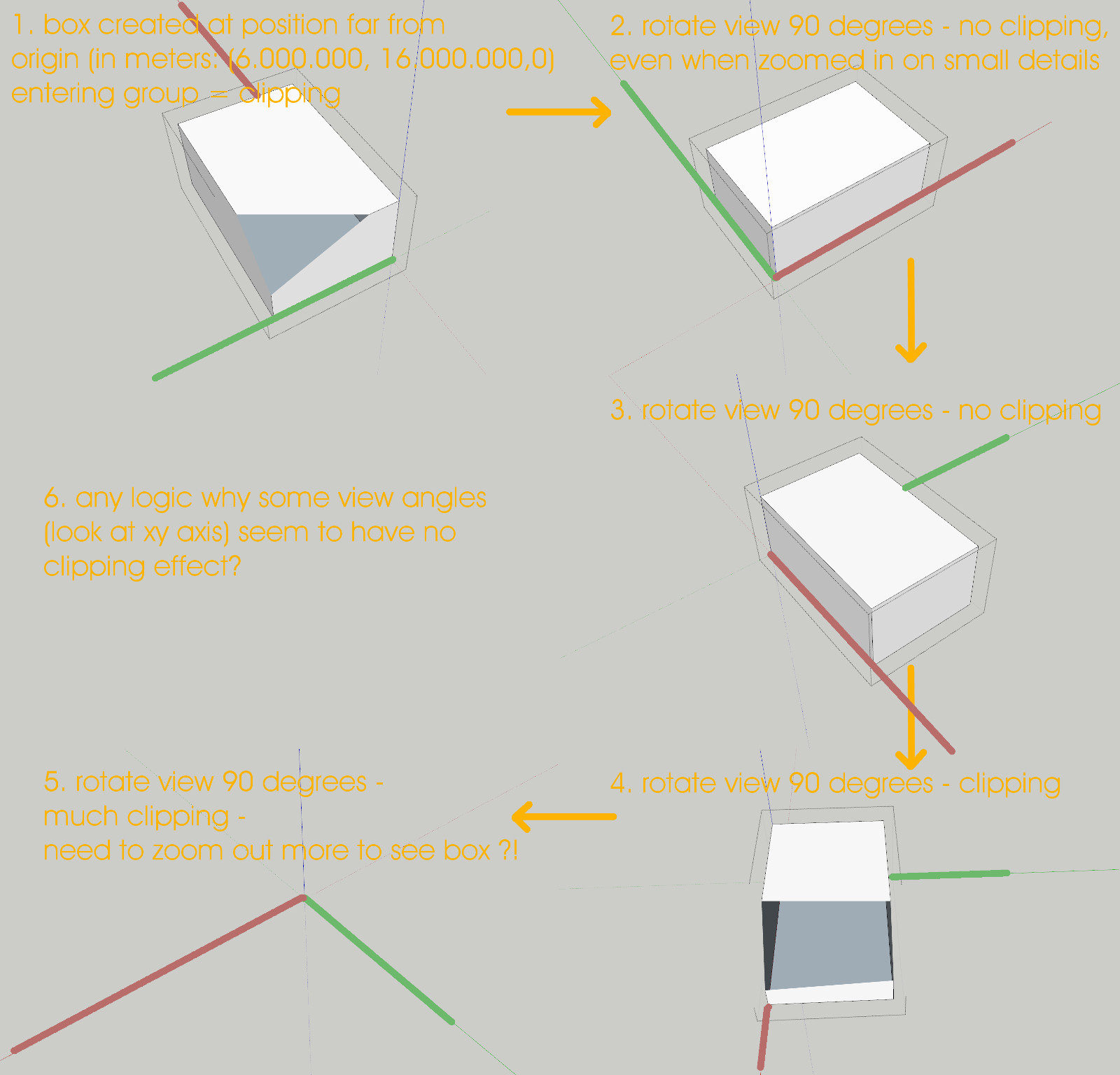
I still don't understand why at certain angles, even at absurd coordinates, the clipping effect doesn't occur. A bug? Normal behavior for openGL? -
RE: Texture from url?
@thomthom said:
When you say different type of URL, what do you mean? HTTPS?
Yes, something like
https://url/coordinates/?key=1234abc&index=0 -
Another clipping plane topic
I'm doing a project for a client that involves geometry with large coordinates.
My first idea was to move everything to the origin to prevent clipping issues. At the end of the project, the geometry will be added to their 3d database again so if moving and re-moving the data could be avoided that would be nice. Especially because they intend to do these kind of revisions to their 3d data very often.
I just noticed something 'strange' and I'm trying to understand it (see pic). Clipping issues seem to be related to the view / orientation of the axes? At some angles (look at the axes) there doesn't seem to be any clipping issue. Or is this just a coincidence?
Trying to make sense of it.
-
RE: Texture from url?
In case someone runs into the same question. It seems to work now.
require 'net/http' require 'tempfile' uri = URI('https://www.google.nl/images/branding/googlelogo/1x/googlelogo_color_272x92dp.png') model = Sketchup.active_model materials=model.materials m = materials.add "Test Color" loc = '' begin request = Net;;HTTP;;Get.new uri Net;;HTTP.start(uri.host, uri.port, ;use_ssl => uri.scheme == 'https') do |http| http.request(request) response = http.request request # Net;;HTTPResponse object file = Tempfile.new(['foo','.png'], Dir.tmpdir, 'wb+') begin file.binmode file.write(response.body) file.flush loc = file.path.gsub("/", '\\\\\\') ensure file.close end end rescue Exception => e puts e.message end m.texture = loc m.texture.size = [m.texture.image_width.to_m, m.texture.image_height.to_m] -
RE: Texture from url?
Thanks for the reply TIG. Your code does download a file but when trying to open it I get:
Decode Error! Invalid or unsupported PNG fileEdit:
I was also trying with net/http. It does work with simple files but the actual https request still fails. -
RE: Texture from url?
Digging up this old thread because I'm trying to do almost the same as the OP. Since the last post in this topic, Ruby has been updated so I'm hoping its more simple now.
I have been trying several methods. This code saves the image in the local documents folder so I could pick it up there etc.
require 'net/http'
Net;;HTTP.start("www.google.nl") do |http|
    resp = http.get("/images/branding/googlelogo/1x/googlelogo_color_272x92dp.png")
    open("googlelogo_color_272x92dp.png", "wb") do |file|
        file.write(resp.body)
    end
end
puts "Done"
Problem is, my images need a different type of url. Something like:
https://url/coordinates/?key=1234abc&index=0
This sort of link doesn't work in the code above.Another method I'm trying is loading the image in a webdialog and then grabbing it from Ruby.
The test html code (the url could easily replaced with the actual https code) is:
<!DOCTYPE html>
<html><head></head><body>
<img id ="webimage" src = "https://www.google.nl/images/branding/googlelogo/1x/googlelogo_color_272x92dp.png">
</body></html>
And to grab the image in ruby:
img = @wd.get_element_value('webimage')Of course this doesn't work because the image isn't a value. I'm stuck.
Anyone has a suggestion? That would be very welcome.
-
RE: Help! Sketchup automatically buggering my model!
Maybe something strange in your files going havoc with Preferences - General - Automatically fix problems when they are found (checked) ??
Just wildly guessing here.
-
Geo location attributes translation ?
Just noticed:
I start a new file.
I manually set the geo location for a project somewhere in the Netherlands.
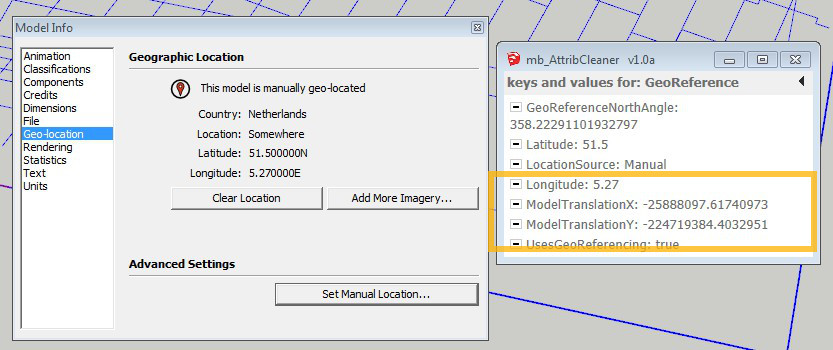
If I check the model attributes for the file (with a small plugin of mine), I see a large translation is added to the file (keys and values for GeoReference attribute).
Why? Whats the logic for the translation? Could it affect the accuracy of the units?
If I start a new file and check the attributes, there's no translation so it must be added by the geo location action. I noticed a similar translation in many other files that are geo located.
Just being curious here...
-
RE: [Preview] Wrap-R Video #2
@jql said:
Nice... It's not such a big deal with hard face modelling right?
Don't want to clutter Rich's topic. Send you a pm.
-
RE: [Preview] Wrap-R Video #2
@jql said:
I mean if we have something unwrapped the second UV channel to lightmap convertion works well?
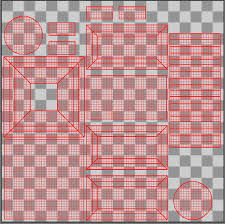
If you have nicely layout uvs (like in the image) AND the export to obj or fbx doesn't mess them up, I expect Unreal will most likely be able to re-use them easily.
-
RE: [Preview] Wrap-R Video #2
If you want to use lightmaps in Unreal, you need a second UV channel. If you want to use only dynamic lights, you don't.
Unreal can create a second UV channel from Sketchup's texture channel. It basically makes a copy of the texture UV's, and re-shuffles all the individual UV islands so they fit in a 0-1 space.
Most textures in SketchUp have UV coords outside that 0-1 space so Unreal takes a bit time for that.
Problem is though, this only works for simple geometry. For more complex or curved elements (furniture for instance) the UVs in SketchUp are not nicely stitched together but all loose islands and all over the place. This results in a large lightmap with all kinds of tiny little islands and lots of wasted space. These lightmaps take more time to calculate and never look really well - even at higher resolutions.For those elements, make your own lightmap UVs in Blender is your best option.
-
RE: XFrog tree - how to reduce size?
maybe you could post the SU file of the tree OR or small piece of a branch and a lot of leaves?
A small ruby script maybe could do the trick? Something like drilling down the meshes of all the leafs, see if they can be split up in connected parts by looking at connected elements, grouping them and see if those groups could be converted to components?
just an idea.. -
RE: SketchUp 2016 - Maintenance Release 1
Anyone tested it? Should I be tempted to renew my subscription?
I like the fixes for the focus-stealing and renaming-outliner issue. Fail to see more good reasons to renew and update. -
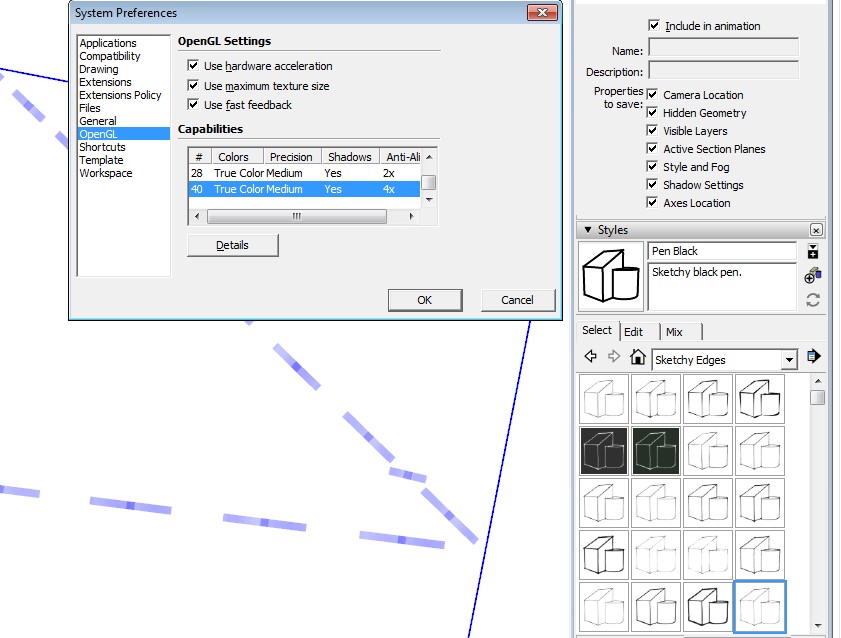
SU: styles bugged
For some reason, some of my SketchUp styles are bugged: sketchy edges, straight lines and the style builder competition winners.
I slightly recall I had the same problem before but can't remember what caused it and how to fix it.
Anyone have a clue?