Uhh, it seems that people around here are in lack of ideas too ... 
Oops, your profile's looking a bit empty! To help us tailor your experience, please fill in key details like your SketchUp version, skill level, operating system, and more. Update and save your info on your profile page today!
Urasik Extensions | Lots of new extensions to check out Learn More
 Offline
Posts
-
RE: Need scene suggestion (something "artistic")
-
RE: [Plugin] Edge Tools
@thomthom said:
Lately I've not had as much time as I used to. So I don't feel I can commit to anything right now. Sorry.
Well, this feature would be nice to be added to Artisan!
 As a free-update. Maybe somebody reads this!
-
Need scene suggestion (something "artistic")
Hello, I don't know how legitimate this request is, but I am in a lack of ideas.
I need a nice scene to render this model. Something expressive. I know... windows go on walls and blinds over the windows, but it's just not enough. This blinds must be expressive, because are for a website that sells such things.-The image needs to look good at small size(266px x 138px), but large too.
-The scene can have several of them with different grades of closing.
-The box (the magazine, where the blinds roll-up) need to get out from the wall about half.
-Also minor changes are allowed, of shape, color, or anything else as long as the idea remains the same (i mean don't make a car from it )
)In exchange for that ideas, I give the model !
This is how the window looks.
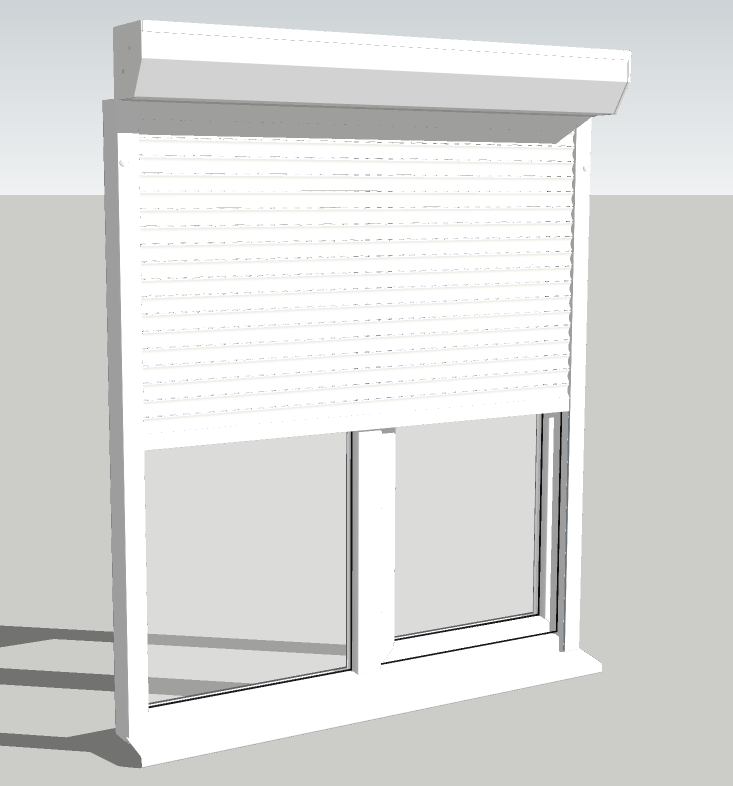
And here is the model:
Window with roller-blinds.skp -
RE: [Plugin] Curve Maker v1.2.2 - 7 March 2011
@max-cx said:
The most likely reason the dialog box keeps reappearing is that you have not entered a valid point for the curve origin. SU will not accept a ~ in any coordinate in a point - each value needs to be exact. The plugin could be friendlier in this regard.
Indeed I selected a guidepoint and its coordinate was with ~ . And the worse part was that if unselected it, hoping that the spiral to appear on origin, the previous value was retained in the inputbox, so I was triked again by the plugin. Maybe some fixes on that?
And yes, that is what I wanted to draw... after some trials and errors I got it (about one hour of playing). But I did it in a different manner, I don't know if that was the correct approach, or yours... I just changed the values until I noticed a pattern
.
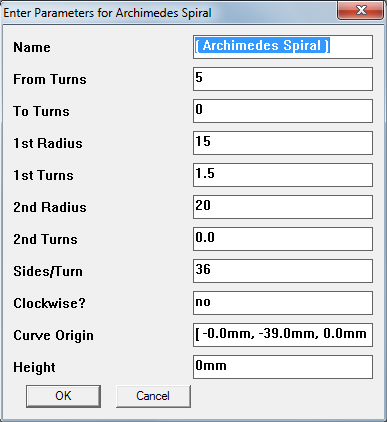
I still don't fully understand what are all that fields in inputbox. So many radii, turns, first turns, second turns... i'm dizzy . I tried to find the answer in the manual, but I couldn't.
 -
RE: [Plugin] Curve Maker v1.2.2 - 7 March 2011
ERROR !
After using the plugin several times, I can't use it anymore. Every time I click OK on Parameters input box, it reappears. No error message, no error in Ruby console. It's a loop. Dialog disappear then is back... and so on.EDIT: -it happened in the model I was working in. It didn't fixed after close and open. But in new model it worked. It seems that something that was saved inside the model while using the plugin, caused the bug.
-
RE: [Plugin] Curve Maker v1.2.2 - 7 March 2011
Please help!
I need to draw a Archimedes Spiral with this specs:inner radius: 15mm
turns: 5
distance between turns: 2mmI got the options panel attached here, but I get lost in it.
What should I input there to have the desired result?
-
RE: SolidWorks .exe file? How to import it in Sketchup?
It's a 3D model. I talked to the client and I will have the non-encrypted files.
Thanks for SW/skp plugin link. -
RE: SolidWorks .exe file? How to import it in Sketchup?
-
RE: SolidWorks .exe file? How to import it in Sketchup?
@gaieus said:
As an analogy (although may be a bit of), it is like asking someone to make a dxf export from an animation exported from SU.
Is there any data-like file that client could export from SW?
No, is not like that. Is the actual SW file, but somehow compressed and a viewer added. If you want analogy, think on a SKP file with Sketchup Viewer embedded. You have access to geometry, but can't edit. Just see sections, elements, perspective on/off, rotation, scenes.
-
RE: SolidWorks .exe file? How to import it in Sketchup?
@watkins said:
If you client has sent you an assembly, then ask him/her to send you the individual parts as .sat files and then go the AutoCAD route. Not sure what else to suggest.
And then assembly them manually in sketchup? Is this a way too... there are not so many elements.
Thanks. -
RE: SolidWorks .exe file? How to import it in Sketchup?
@tfdesign said:
Solidworks is FAR easier to use than AutoCAD! Have fun!

Well, I worked both in AutoCAD and SW and I can say that SW have its benefits. But the model already exists, it's made in SW and most of all is a EXE file
. That exe file can be opened with SW, or I will need to ask for plain files?
... .sat file seems to not be an option if it messes up my geometry. I'll use that as last resort option. I would prefer to have my geometry separated.Other suggestions?
-
RE: SolidWorks .exe file? How to import it in Sketchup?
@watkins said:
Do you have a copy of AutoCAD?
BobUnfortunately I don't have... this is why I use Sketchup
. But for now, your option seems to be the only one. I guess I'll install AutoCAD trial for this.
Do you have any idea about how the export will look like? Will preserve the objects, or all the geometry will be merged together ? -
RE: SolidWorks .exe file? How to import it in Sketchup?
I don't have/I don't use SolidWorks. In order to have skp files, I coud see that the plugin needs to be installed in SW and from there to export as skp.
Is anybody willing to convert the file for me? As I said, I can't publish it, but I can send it by e-mail.Thank you.
-
SolidWorks .exe file? How to import it in Sketchup?
Hello, I got a file from a client. Is a SolidWorks .exe file. Some viewer embeded inside, I think. But I need to import the model in Sketchup. Any ideas?
Unfortunately, I am not allowed to publish the model, but I guess I can send it by e-mail if needed. -
Request plugin fix
Hello, I use Remove Materials Plugin from Smustard with great success. But I think it might help some enhancement: to automatically close Outliner (and layers) before start removing materials.
Would you, please help me with this? I often forget Outliner opened and Sketchup freezes. And even after several minutes it doesn't recover, so I have to close it and lose everything since last save -
RE: Faster Autosave!
Indeed the autosave function would need some tweaking... at times, my sketchup crashes and I could not figure a pattern, because making same commands later on did not crashed the program.
I have reasons to suspect that if autosaving and some resources-consuming operations are happening at the same time, it might crash SU. -
RE: Re: Some Funny Pics.
@charly2008 said:
What's so funny? This unit is used for training of midwives and birth attendants.
I'm sure that your birth attendant did not trained on that, but you got out just fine
. I can't wait the learn-how-to-eat training unit, or peeing training unit (for babies, to teach them how to wet their diapers)
Some things just happen fine from thousands of years, no need training (or in those modern times people became dumber ?). -
RE: Get FireFox 4 now....
@ledisnomad said:
Opened it up... nothing, no internet connection.
Well, maybe this is why FF4 is so fast!! Because it doesn't need internet connection
everything you want is on localhost -
RE: Hello - and question about the opacity slider
@thelloyds said:
Hello - new to the forum, been using sketchup for years to design the renovation that is yet to happen.
I do have a question, which is what led me here...
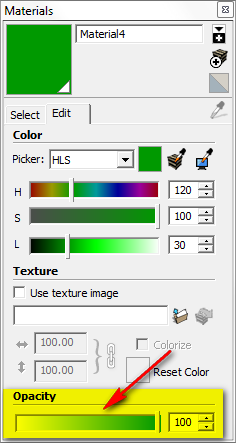
Where has the opacity slider gone? I cannot find it under the colour wheel in 'edit materials'. Anyone else find it missing?
Thanks!
Is still there ! See the image (SU8)