Script doesn't work for me, I mean it doesn't select anything. I have the menu, i can "use" the selection tool, but it doesn't select any edge. Compatibility issue with SU8 maybe?
Oops, your profile's looking a bit empty! To help us tailor your experience, please fill in key details like your SketchUp version, skill level, operating system, and more. Update and save your info on your profile page today!
Urasik Extensions | Lots of new extensions to check out Learn More
 Offline
Posts
-
RE: [Plugin] HoverSelect - v1.5a - 07 Oct 17
-
RE: Dunny Helmet
@michaliszissiou said:
You tried hard to have some thickness on the helmet, you didn't manage to have it in the end. Its wrong.
I can guess he just made an offset of the mesh, he could set thickness to it, if he wanted that. JointPushPull(the plugin used for the action) have this option.
@michaliszissiou said:
All this time spent for this, you could do lot of helmets in other apps. And much better.
There are many 3d software on the market...everybody chooses the one he thinks it's best for him. But no software will do the geometry alone, user must spend time for this.
@michaliszissiou said:
My advise , try groboto. A cheap and humble app. http://www.groboto.com/v3/
My advise: try Google Sketchup. A FREE app with a great supporting community here on Sketchucation
 http://sketchup.google.com/
Indeed groboto seems to be a great application, but criticizing other's work will is not a good way to promote it .
. -
RE: [Plugin] Proper Animation V1.08 Beta(Updated 14/11/10)
Hy! I find your plugin very useful ! I just animated some furniture with Proper Animation
The only drawback is its ergonomics, but I think it can be improved by adding Start/Stop Scenes Observer in webdialog and also Set/Get position for current selection.
Maybe a option to have a exclusive context menu (only set/get position)? -
RE: Sketchup (and Layout) icons
Hmm, you should put italic U on sketchucation.hu favicon
 It confused me on Chrome tabs
-
Sketchup (and Layout) icons
I found this http://sketchupdate.blogspot.com/2010/10/hi-res-tool-icons-for-sketchup-and.html. All icons for Sketchup and Layout in high quality(800px). Maybe somebody will find this useful.
-
RE: Floating objects after render
also see that your displacement image to not be inverted (negative) or if the software have this feature. Also, see if displacing direction in material is not negative(maxwell render accepts this feature).
-
RE: Some Artisan video tutes..
Why the movies are black after a couple of minutes? First one after 12min and second one after 6min. Something is missing? I just watched those two for now.
EDIT: -last movie is black since minute 3 (from a total of 27) -
RE: Insert video
I'm guessing that he is asking about Layout (for SU Pro). And if so, I am not aware if is possible. Anyway, there are no plugins for layout. It doesn't support extensions.
-
RE: [Plugin] Remove group materials, leave geometry material
[FEATURE REQUEST]
It's a useful plugin, until I found it, I had to remove all materials from selection using This Plugin, then reassign materials only to geometry inside group/component -often I have different materials on faces.
I would like some features to this plugin: Now, with so many plugins, the Plugins Menu gets really crowded, so submenus are welcomed. So, I was thinking if you could add a feature to this plugin to remove all materials, something like this:
REMOVE MATERIALS
>Remove CG Materials
>Remove ALL Materials
In this way, instead of having two entries for those two plugins, I would have one single menu with two child options.Also, if the inputbox could be disabled, to speed-up the usage. I never replaced CG material using the inputbox, so for me is just a unnecessary mouse click
Actually, I'm curious if anyone uses that feature.Thank you.
-
RE: How to divide complex curve in equal segments?
Thank you, simon le bon, I'm glad that I can do what I need wit the tools I already have.
-
How to divide complex curve in equal segments?
I don't know if I should put this on Plugins section.
Is there any method/plugin to divide a curve in equal segments?
I need to make a chain-like component and I'm planning to use Component Stringer for that. But, as the shape is not a simple arc, but rather a bezier curve combined with lines (and maybe arcs), I need that to be divided in segments of same length.Thank you
-
RE: [Plugin] Custom Toolbars Plugin
@dan rathbun said:
This is a common request. But it is difficult to realize. We would have to get all plugin authors to adhere to a certain standard. It is not likely this feature will be included in the ver8 update. (But it's on the future list.)
This "certain standard" is something that might limit the freedom in making the script, or is something easy to achieve and will not affect in any way the scripting manner?
Why I am asking? Because your plugin is maybe the best method to customize SU interface. And maybe if you make a call to arms, there will be some (if not all) plugin masters who will join in this
I must admit that I'd be most pleased if this would happen (I'm a little selfish, ain't I ? )
) -
RE: Snowy Pinecone - Christmas Challenge Tut
@unknownuser said:
I will when I get the chance to remake the tutorial. The Jing content was disabled when my bandwidth ran out and I don't even have access to it.

(kinda off-topic) good to know. I was tempted to use Jing some time ago (i like the way it looks). Now I'll know to listen to my instinct all the time (the instinct told me not to)

(now back) Thank you Boofredlay, I appreciate your (soon to be) effort !

-
RE: [Plugin] Plugin Loader for SketchUp
Is it just me, or Plugin Loader don't load properly .rbs files?
I tried to load BoolTools (payed plugin - it have booltools.rbs) and failed. Also failed to load from console too. It loaded after sketchup restart. As I know, rbs files are just scrambled, but the code is still there, waiting to be interpreted... it should load in same manner, shouldn't it? -
RE: Snowy Pinecone - Christmas Challenge Tut
@unknownuser said:
Thanks Pankaj.
Unfortunately the videos I made were disabled because it was a free Jing account and the bandwidth has been used up.
I will have to remake the tutorial at some time as those are now lost.I will tell you however that I used the Curviloft plugin to create the shape then copied and rotated it many times.
can you upload on youtube?
It seems a simple process, but I'd like to see it in action; I'm sure I'll learn something.
Thank you. -
RE: [Plugin] Custom Toolbars Plugin
Is this plugin being updated for SU8 ? Some new functions are missing.
And, I'm thinking if it's possible to add icons from plugins to custom toolbars. I would like to have a larger toolbar with more plugins included, rather than lots of small toolbars, some of them with a one or two icons...Thanks!
-
RE: File madness
Similar things happened to me when I used MaxwellRender and UV Mapping. When the plugin exported the geometry, it made a unique texture for each polygon in geometry. In this way I had hundreds of materials for a surface, each one with its small part of texture.
-
Toolbar icons issue?
Why are the toolbar showing like this? It doesn't affect me, but I'm wondering if it is a fix for this, or not?
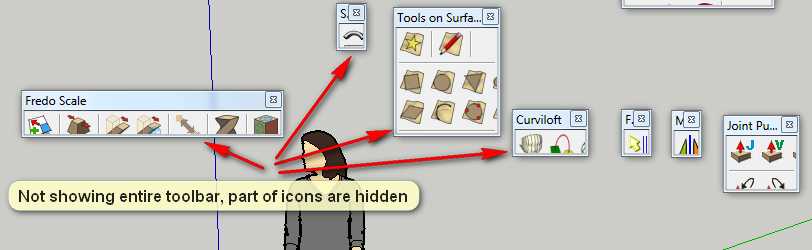
-
RE: What is this icon?
@unknownuser said:
I saw that too, believe that it toggles the shadow strings fix that fixes the shadow bug.
I did not had that bug. Is it a plugin, or a SketchUp default icon?
-
What is this icon?
Hy, I installed some plugins and I noticed this icon:

What is this?