@narayan said:
Excuse me, I noticed some "strange looking buttons on the toolbar image posted by narayan.
I marked them with red in the image, please tell me what are they and where I can find them?

Thank you.
 Offline
@narayan said:
Excuse me, I noticed some "strange looking buttons on the toolbar image posted by narayan.
I marked them with red in the image, please tell me what are they and where I can find them?
Thank you.
@gaieus said:
And the rooms would have real material from inside? (Sorry, I do not know Maxwell).
All in all, in Kerky you cannot have those kind of faces which have material on one side and another one on the other.
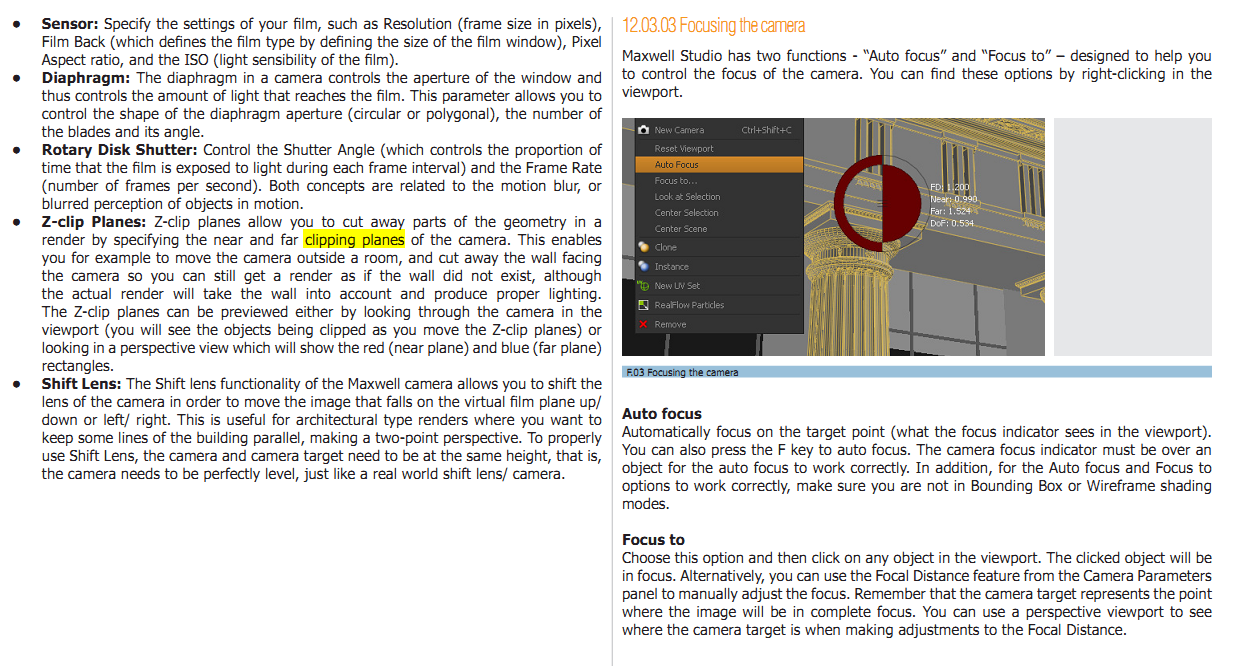
Is not about the material... is really a "clipping plane". Like sections in Sketchup, but you can't see them like that. Well, you see in front of the "photo camera" a blue square that symbolize the plane, but it doesn't interact with geometry.
See this page from Maxwell Render Manual.
this plugin has a lot of use! please continue development.
thanks 

@gaieus said:
@unknownuser said:
...My question is if Kerkythea is able to use clip-planes for camera, to clip geometry in front of camera, but that geometry to participate to rendered image...
dereeei, I cannot follow this. Hide it but display it? Or only shadow casting should "participate"?
Is like in Maxwell Render... the camera can "see" through walls, but without affecting the geometry. If you have a mirror facing the camera, you will see the actual room in that mirror, not a hole in the wall.
@heven7_floor said:
I am looking for method to bridge SU8 with notepad++, and I see this article , might I ask anyone that how notepad++ can run code by TBD 's bridge, because I use well as ever in SU7(free) ,but it can't work in SU8(free)
Thank you
Is possible, check this post: http://forums.sketchucation.com/viewtopic.php?f=169&t=6903#p137855
Maybe some of you will say that I should ask this on KT forum, but I haven't an account there and for this simple question I hope that I will got an answer here too.
My question is if Kerkythea is able to use clip-planes for camera, to clip geometry in front of camera, but that geometry to participate to rendered image.
thanks.
@tig said:
The VRML file format 'wrl' code IS quite readable and it would be possible to make a parser to read it in and then use it in creating new faces, materials or instances etc - somewhat like my olde OBJimporter.rb [that works slowly and with some flakiness]...
However, it would really be a major undertaking... So if you are serious about doing this as a project then it's unlikely to be 'free' - so PM me with your budget and I'll let you know if I think that I [or someone else] could be reasonably expected to produce such a juggernaut within a reasonable timescale...
Thanks TIG, I will discuss the matter and if it will be considered as an option, I will PM you.
%(#BF0040)[EDIT:
Don't need it anymore. It was a emergency. I did not find a suitable model, so I did it without. I had no time to model one.]
Hello, I need a nice sketchup model chair to fit with this table, if somebody wishes to share a model with me.
Thank you.

@dan rathbun said:
Sketchup 8 Pro can export VRML, can it import as well ??
No, it can't. That is why for now I'm stuck with wrl -> dae.
@tig said:
As you can already covert wrl to dae [e.g. with Blender]
I was looking for an automated process, because the VRML files are coming from a specialized engineering software that is not capable to make presentations. And there are many files and things must go fast. On the other hand, one more software used to convert this file will make the workflow slower. Now we use Cinema4D to convert wrl to dae. At first, C4D was used to make renderings, but it't time consuming to make the materials. So, I suggested Sketchup + Twilight. You must agree that TW has the fastest material editor  But I would like to get rid of third software, as I am using it only for conversion.
A quick-fix for textures was to duplicate the Textures folder from the original computer, on that one where the import is made. So, same location is present on both. Still, if there is a new texture, somebody must be sure that both directories are updated. This is why I was hoping to a automated texture search, trough network (in a specified directory).
Hello, Can I use "Stretching with orientation of scaling box" with absolute value? It seems that it works only with scale ratio.
It would be nice to work like SketchUp native scale tool (where is you scale and input 500mm, it will scale the object to have 1000mm on the scaling axis. Or to scale the object adding a certain value more (example: +50mm).
Thanks.
Hello, I need to load VRML (.wrl) files in Sketchup and now I use another software (C4D) to convert from VRML to COLLADA, then I import it into Sketchup.
I would need a VRML Loader plugin, if someone is willing to try.
VRML files are text-based files and as I could see, they store texture paths as absolute paths (eg. url "C:\Textures\mytexture.jpg" ),so if the file is moved to a different computer, It will not recognize textures unless I have the same Textures directory placed in exactly same place like on the original station.
So, for importing such files, it would be useful that if the texture is not found on the implicit location, to search for it in other defined location (eg. in "Texture Images" directory preset in SketchUp).
Thank you very much.
similar in this topic http://forums.sketchucation.com/viewtopic.php?f=11&t=33401 no solution yet.
I just installed FF4 - nice appearance, but a little disappointed in loading time. I guess I was too used with Chrome. Other bad side is a lot of "not responding" ... if cpu is a little busy, FF gets unresponsive.
I'll stick to Chrome for a while
@karinagm said:
Nice stucco wall BTW
Thanks Stucco bump is from here or twilight forum, can't remember where I found it  , but judging after file name, it was downloaded from http://www.openfootage.net/
@honoluludesktop said:
How about colonial trim and shutters,
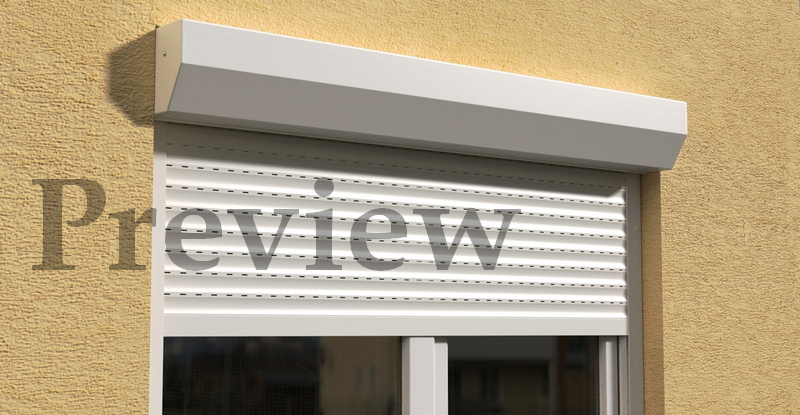
I have to use that roller-blinds model. It's a product-specific image.
Wow ! the bricks wall looks pretty cool! I thing it's a better approach than my wall.
@crankston shnord said:
Hmmm....spartan as in bare or rustic?
Yes, this is what I wanted to say... I'm not a native english speaker, I don't know if the expression means the same as in my language.
@crankston shnord said:
In fact, if you want you could post the model and I'll fool around with it a bit, see if I can come up with anything.
The window + blinds model is in my first post just after the image, feel free to download it. A cube with a hole I think is not too hard to make
@crankston shnord said:
Looks good to me! That's a nice, basic, wall, and it makes the window look very nice. Good work.
Don't you think it's a little to "spartan" ? 
My own try was this attached one, but It seems to fade somehow... nothing special, nothing dramatic, just too technical