sketchucation logo sketchucation
    • Login
    1. Home
    2. Charlie__V
    3. Posts
    Oops, your profile's looking a bit empty! To help us tailor your experience, please fill in key details like your SketchUp version, skill level, operating system, and more. Update and save your info on your profile page today!
    πŸ”Œ Smart Spline | Fluid way to handle splines for furniture design and complex structures. Download
    C
    Offline
    • Profile
    • Following 0
    • Followers 0
    • Topics 36
    • Posts 570
    • Groups 1

    Posts

    Recent Best Controversial
    • RE: SU Viewport... Stroke..Dashes..5x..10x...no go

      @dave r said:

      I just tried it on a viewport on my Win7 pro machine. I can select any of the line styles--the full list is available--and I can set any scale from the list or type my own. It works the same as for a drawn rectangle.

      Thanks Dave,

      Maybe try out the attached file when you have a minute.
      I cannot seem to get the stroke scale to change....1x....10x same/same.
      Maybe it is just on my machine?

      Charlie


      Stroke......Stroke Scale...Test

      posted in LayOut Discussions
      C
      Charlie__V
    • SU Viewport... Stroke..Dashes..5x..10x...no go

      LO 2014.....MS Windows 7Pro.

      LO.....Select SU Model Viewport...Select Stroke....Dashes(linestyle)....only one dash type stroke/style displays.....and editing the dashes scale (2x...5x...10x) has no effect.

      Anyone else experiencing this?

      Thanks,

      Charlie

      posted in LayOut Discussions layout
      C
      Charlie__V
    • RE: Solar North Toolbar -- Where is it in SU 2014?

      @fcborik said:

      Hello,

      I've just upgraded to SU 2014 pro. Fortunately, I did not uninstall SU 2013, which in this case had a
      "Solar North" toolbar. Now, I cannot find the "Solar North" toolbar on SU 2014. Furthermore, I cannot seem to locate the function. Is this a loss of functionality? If so, then SU 2014 is a degrade. Can anybody tell me where to look or what happened?

      Thanks for your help!

      Frank Borik

      Frank,
      A lot has been said about proper installation of SU plug-ins/extensions.

      That said......I cannot say.......what I suggesst....as being "safe" for SU 2014.

      I am on a PC (Windows 7 Pro)

      OS(C:)Program files (x86)...SketchUp...SketchUp2013...Tools...Copy...(Solar North File).... and (SolarNorth.rb) ................

      Now go back to.....SketchUp2014...Tools...Paste ...(Solar North File).... and (SolarNorth.rb) .....

      Close SU if open...............open SU.......View.........Toolbars........Enable Solar North

      Best,

      Charlie

      posted in SketchUp Discussions
      C
      Charlie__V
    • RE: Mini-challenge

      @jeff hammond said:

      @dave r said:

      why are you bumping this, Jeff?

      @jeff hammond said:

      because you can solve the challenge with su2014

      Buzzinga! 😎

      C

      posted in SketchUp Discussions
      C
      Charlie__V
    • RE: SketchUp 2014

      @david.p said:

      So what do I do to get at least my Space Navigator working in Sketchup 2014? It is like being amputated without.

      David,
      I downloaded the latest driver for my Space Navigator and it got me going in SU 2014.
      You may want to go to 3DConnexion site and download the latest/apropriate driver for you (OS/Device)

      Charlie

      posted in SketchUp Discussions
      C
      Charlie__V
    • RE: SketchUp 2014

      @unknownuser said:

      Cheers Charlie, the what's new link explains a lot. Kept on directing me to what's new in sketchup 2013 when clicked on the sketchup download page...

      Funny.......I have "matured/evolved" to immmediately looking for the "what's new"...before even downloading/trying new software.......not surprised I'm not alone.....πŸ˜„

      C

      posted in SketchUp Discussions
      C
      Charlie__V
    • RE: SketchUp 2014

      @dave r said:

      Well, I'm kind of surprised no one has mentioned it but SketchUp 2014 was released today. Was everyone asleep? πŸ˜†

      Thanks for the heads up Dave.

      What's New SU 2014

      C

      posted in SketchUp Discussions
      C
      Charlie__V
    • RE: Do a Doodle for Todd's Abode

      @unknownuser said:

      Thanks Charlie!

      You are quite welcome. πŸ˜‰

      I must ask....what kind of "manual roll up doors" are you installing?

      I can only imagine/guess....what I would call "city gates"....metal panels that "roll up" when one pulls a linked metal chain down on one side to ope.....other to close... (think engine hoist).

      Sorta like that??

      Charlie

      posted in Corner Bar
      C
      Charlie__V
    • RE: Do a Doodle for Todd's Abode

      @unknownuser said:

      So... I'm back.

      I'm referring to saving money, and right now, don't have a cost estimate for what it might cost to build this.

      Some specs:

      • Standing seam metal roof - 24 gauge, no screws. (to match house and garage)
      • Fiber cement lap siding (to match)
      • Vinyl windows (to match)
      • Slab on grade foundation
      • Drain stub outs for toilet and sink
      • Supply line stub-outs (I'll add toilet and sink later)
      • manual rollup doors on each end, 10'x10' (not "garage" doors)
      • 1 door, 2880. 3680 (assuming inches designation....no savings in a 28" door width)
      • Porch overhang with no porch (I'll add it later)
      • 12/12 pitch on center roof (to match garage and house)
      • 4/12 pitch on shed roofs
      • 2X6 framing, 24" on center
      • Interior posts - I would prefer just 2, but could live with 4. 6 is too many. 2 is likely (1 each span/see attached)...I would consult a local engineer.
      • 4' wide stairs to loft

      Any input is appreciated. I've attached the .skp file of you want to play around with it.

      Thanks, Todd

      [attachment=2:og7191n3]<!-- ia2 -->SketchUpScreenSnapz025.png<!-- ia2 -->[/attachment:og7191n3]

      [attachment=3:og7191n3]<!-- ia3 -->newshop-copy.skp<!-- ia3 -->[/attachment:og7191n3]


      ![18" Beam/1 Col.](/uploads/imported_attachments/zmIZ_18inchBeam_1column.JPG "18" Beam/1 Col.")


      NewShopRev1

      posted in Corner Bar
      C
      Charlie__V
    • RE: Trim multiple solids with one solid

      @airwindsolar said:

      but then I have to go through and select the box and the first sheet, trim, select the box and the second sheet, trim, etc. for the whole wall.

      If I am reading this correctly........you are selecting both entities before selecting the trim tool?
      If that is what you are doing......try selecting the trim tool before selecting any entities.....click 1st on "the box" and second on the first sheet(it will trim)....the "box"(first selection) will remain selected so just click on second sheeet(it will also trim)....click on third sheet.....and so on.
      Should be aproximately a 50% time saver. πŸ˜„

      @airwindsolar said:

      It would be really handy if I could just select the box-as-trim-boundary, then all the wall sheets, and "trim everything else selected against the first solid selected."

      I too would welcome this funtionality.

      Charlie

      posted in SketchUp Feature Requests
      C
      Charlie__V
    • RE: Newb: Does Sketch Up Model limit you to 13 views of model??

      sketchydog

      Check the status of your inserted SU models

      File......Document Setup......References (status)

      Update if not current.

      You can also Rt-Click a SU model viewport and update reference.
      (Note: Very important to update all styes/scenes before save in SU...and then update LO model reference)

      Also,
      Won't hurt to occaisionally purge the LO model from time to time.(same file path)

      Charlie

      posted in LayOut Discussions
      C
      Charlie__V
    • RE: Export to .dwg, the lines are out of scale

      Skitse,
      Have you checked .dwg your export options...perhaps under profile lines.......Export...... polylines and widthis selected?

      Charlie

      posted in Newbie Forum
      C
      Charlie__V
    • RE: Getting Model Window to have an outline?

      sketchydog,
      With the model window(viewport)selected....in the Shape/Style Tray......Select Stroke...& edit the linestyle to your liking.

      Charlie

      posted in LayOut Discussions
      C
      Charlie__V
    • RE: Applying Styles to Scenes without refreshing screen

      @matt.gordon320 said:

      I'd still love to see if there's a way to do this without having to have the style active in the view port to apply to the scenes.

      If there's any thoughts, cool, if not, I appreciate you guys reading it!

      Thanks!

      I often have a couple of scenes I call "working#1" and "working #2"
      Wkng#1 is a simple style/shadows off/minimum layers on.
      Wkng#2 is sometimes back edges or X-ray on.(also shadows off/min. layers on)

      Perhaps you can create one scene with a simple style, mostly all layers off, no shadows, and load your custom style in the above described manner? (I recognise you would rather not)

      If you scene(s) are that complex, turning off the scene thumbnails I am sure will really help reduce the load time as no rendering of the thumbnails will be required.

      Best,
      Charlie

      posted in SketchUp Discussions
      C
      Charlie__V
    • RE: Applying Styles to Scenes without refreshing screen

      Matt,
      Not sure I follow exactly.

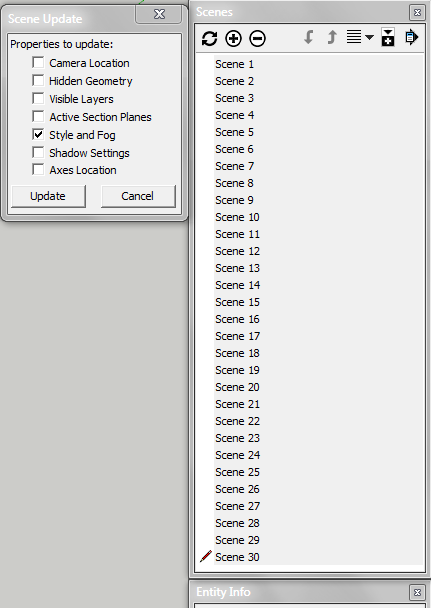
      If you want to apply a sketchy style to all of your scenes at once.

      Change your style in Scene #1

      Select Scene #1 and now scroll to Scene #30....hold down shift and select Scene #30.

      All of your scenes should be selected. (# 1 thru #30)

      Now update.........and you will have the option to update the style in all of the scenes at once.

      Hope this is what you are after.

      Edit: To go back to simple (non sketchy) style just do the same.

      Edit #2:
      Turning off the scene thumbnail generation will also speed things up considerably

      Charlie


      multiple Scene/Style Update

      posted in SketchUp Discussions
      C
      Charlie__V
    • RE: Video Card Question

      @joe wood said:

      Can I look it up in my computer specs somewhere?

      IF it is a Dell computer, (I think you mentioned it is).....find the "service tag #" on the exterior of the case.
      It would be on a small decal about the size of a return address on a USPS envelope.

      Then, simply go to the Dell site.....support....service tag#....enter sevice tag #....viola...all or most specs. should still be available specific to your build.

      Charlie

      posted in SketchUp Discussions
      C
      Charlie__V
    • RE: ObamaCare Web Site

      Come on now....be fair....when it is broken or unpopular.....call it the Affordable Care Act.....or AKA........ACA 😳

      C

      posted in Corner Bar
      C
      Charlie__V
    • RE: Running Pro and Make on a laptop with XP

      @unknownuser said:

      CHARLIE_V

      Well, I meant moving or rotating geometry. Sir, you may have given me a hint on what is my problem. So if moving while have something hidden or moving something that is part of hidden geometry may be my problem.
      Ken

      I neglected to mention perhaps a few key bits of info:

      I often lock the axis direction I am moving with the arrow keys and after doing so I enter a desired distance.
      If my memory serves me correctly........it is after typing the "distance" and hitting "Enter" = Bugsplat!

      That's just to say, I think I can move the hidden geometry and as long as I do not "lock" axis and "enter" a distance I can in fact move said geometry.(W/O Bugsplat)

      Seems to me this should not happen, but maybe someone from Trimble has some sage advise?

      Charlie

      posted in SketchUp Discussions
      C
      Charlie__V
    • RE: Running Pro and Make on a laptop with XP

      @unknownuser said:

      I mentioned that I am using this on a laptop with XP, however, I do have the same problem with Win 7 on my desktop, just not as consistently as on the XP laptop.Ken

      Same setup here, only I rarely work on my laptop (Win XP Pro) anymore as my desktop is more powerful (Win 7 Pro) (8gb ram & 1gb graphics card)
      But I have experienced the same on the laptop.

      Note: I have turned off the thumbnail creation on save.......this allows much faster saves and as I recall helped reduce the bugsplats quite a bit. (I don't mind not having the thumbnails in exchange for fast saves)

      @unknownuser said:

      Do you have the problem that after multiple moves or rotation, the program will shut down also. When it shuts down during a move or rotation, I do lose work.
      Ken

      Depends on what you mean by move/rotate:
      If you mean just navigating around the model, than no, I can freely orbit/zoom/pan etc.

      However, I can cause a Bugsplat by moving hidden geometry in certain circumstances.(& lose work)

      IE: In a current model, a certain section cut face has produced consistent Bugsplat when moving certain bits/pieces.
      I have resorted to just intersecting with model and erasing the unwanted bits, rather than attempting to move any existing hidden lines/etc.to update the model

      Charlie

      posted in SketchUp Discussions
      C
      Charlie__V
    • RE: Running Pro and Make on a laptop with XP

      @unknownuser said:

      Quick question

      I am having trouble with the Pro version crashing while in use, and crashing after a shutdown. It will shut down, than a few seconds later, I get a crash report. And the model I closed down will not be listed in the recent file lists.

      Ken

      Ken,
      Not a direct answer to your question, but I experience the same behavior running Windows 7 Pro.
      I find that if I save the model and shortly thereafter just close SU, I will get a Bugsplat.
      My work seems to always be saved (don't recall losing work after one of these situations)
      And, like you, the model is not listed in the recent file list.

      Also, the very same thing happens in LO.

      So, I have just gotten accustomed to waiting a short while before closing out of SU/LO....especially after a save.

      Hope this helps some.

      Best,
      Charlie

      posted in SketchUp Discussions
      C
      Charlie__V
    • 1
    • 2
    • 11
    • 12
    • 13
    • 14
    • 15
    • 28
    • 29
    • 13 / 29