sketchucation logo sketchucation
    • Login
    1. Home
    2. kaas
    3. Posts
    Oops, your profile's looking a bit empty! To help us tailor your experience, please fill in key details like your SketchUp version, skill level, operating system, and more. Update and save your info on your profile page today!
    ๐Ÿ”Œ Smart Spline | Fluid way to handle splines for furniture design and complex structures. Download
    K
    Offline
    • Profile
    • Following 0
    • Followers 0
    • Topics 47
    • Posts 864
    • Groups 1

    Posts

    Recent Best Controversial
    • RE: Which skp file is really linked and shown in LayOut?

      @hornoxx said:

      ...I can open the file from Skup LO (Open With SketchUp) but the opened file is located somewhere in my roaming area and somehow renamed like this: 643420376_AutoSave_filename.skp. but not in the projectยดs directory itself. How can I find out which skp file is really linked and shown in LO?..

      You have checked: file -> document setup -> references? That should show the references to the inserted files.

      If the location is in some system location and not in a project folder, the original link to the folder (maybe due to a copy-paste action, or renaming of folders etc) is broken.

      You might retrieve it by:

      1. copy the layout file somewhere
      2. rename the layout extension to zip
      3. extract the zip
      4. open the references.xml -> there you should find the original locations
      posted in LayOut Discussions
      K
      kaas
    • RE: SketchUp 2016 is here....

      @miggy said:

      ...
      I have a script that manipulates very many (20-30+) Google Earth terrain groups written back in SUv8...

      My script copies and explodes lots of groups & components. I do see a positive difference in V16 and opening / closing the outliner doesn't make any real difference.

      Maybe your v8 code hasn't been optimized? You do make use of
      model.start_operation("name of operation",true)?
      the true flag here disables the UI which could make you code run faster. Just a thought.

      posted in SketchUp Discussions
      K
      kaas
    • RE: How to Use datalist in sketchup webdialog box

      Your html & javacript code is not valid.
      The for-loops should have beginning and closing brackets.
      The options have a value but no content.

      Look for the complete syntax here:
      http://www.w3schools.com/js/js_loop_for.asp
      http://www.w3schools.com/tags/tag_option.asp

      posted in Dynamic Components
      K
      kaas
    • RE: License issues for 2016

      Very surprised but happy to say. this time it only took 2 days! Hurray.

      posted in SketchUp Discussions
      K
      kaas
    • RE: SketchUp 2016 is here....

      @rv1974 said:

      The new 'feature' Default Tray wasn't so smart decision. It steals tons of display area being pinned;
      and being on Autohide mode it doesn't show the windows I demand via shortcuts (say Cnrl+1 for Entity Info) I have to digg in with the cursor. And finally there's no option to drag this damn tray to the 2nd monitor

      I agree I prefer the old trays/panels on windows way better. The one thing that had to be fixed was the Outliner - having that one open could make your ruby plugins twice as slow.

      You should be able to drag the tray to the second monitor though.

      posted in SketchUp Discussions
      K
      kaas
    • RE: SketchUp 2016 is here....

      @jql said:

      @kaas said:

      you can leave the Outliner open when running ruby scripts. Up to v2015 that could make your ruby go very slow.

      It still runs much slower... Where did you find differences?...

      I just tested it again with a custom plugin and opening or closing the outliner doesn't make a difference in V16. It does run a lot faster in V16 though. Must be something in my crappy code thats bugging less in v16.

      I also tested it with another plugin that creates a lot of geometry as well: TIG's extrude tools - loft. The results in v15 and v16 are about the same and closing the outliner in v16 almost takes half the time.

      So my initial remark seems to be wrong: it still can take extra time if the outliner is not closed before starting a ruby plugin. Too bad it still hasn't been fixed ๐Ÿ˜ž

      posted in SketchUp Discussions
      K
      kaas
    • RE: License issues for 2016

      @jql said:

      That's why I ditched the relationship I had with my reseller here in Portugal. Most of the times the new Sketchup version was already out and they were only being informed about it by me.
      ...
      I certainly don't need Support from the reseller. Sketchucation is more support than any reseller can provide!

      Totally agree. I tried switching to Trimble directly last year but they forwarded me to a local reseller ๐Ÿ˜ž
      Still have to play more with v2016 and decide to renew the subscription or just take the extra fine somewhere in 2019.

      posted in SketchUp Discussions
      K
      kaas
    • RE: Export a model

      @djh said:

      Can one export a model so that others who don't have the program can view it? I used to do it with eDrawings.

      You know there is a free SketchUp viewer by Trimble? That way, people can just open your skp-file.

      posted in Newbie Forum
      K
      kaas
    • RE: License issues for 2016

      @jql said:

      ...It took them less than one day from the official launch so that I received the email...

      Lucky you. The last few times, the re-sellers in the Netherlands took about 3 to 4+ weeks to finally generate the codes. Day 1 and counting...

      posted in SketchUp Discussions
      K
      kaas
    • RE: SketchUp 2016 is here....

      @ashscott said:

      Banksy, is that you?
      I wish ๐Ÿ˜„

      posted in SketchUp Discussions
      K
      kaas
    • RE: SketchUp 2016 is here....

      @jql said:

      It still runs much slower... Where did you find differences? If it's in autohide the problem disappears as outliner... autohides

      I tested it with a custom stencil plugin. Lots of calculations. It had just 1% difference in time with the outliner open or closed. (406 vs 390 seconds). In v2015, the same took 800 seconds so thats quite a speed increase. Have to do more investigations to see what/where/why

      posted in SketchUp Discussions
      K
      kaas
    • RE: SketchUp 2016 is here....

      I like:

      • the speed increase in some of my ruby scripts
      • you can leave the Outliner open when running ruby scripts. Up to v2015 that could make your ruby go very slow.

      I have to get used to:

      • the tray - Must read the manual. I don't want my materials docked. I want them where I want.

      I had hoped:

      • saving a file with 'redefine thumbnail on save' still takes a lot of time. Have to keep that one disabled.
      posted in SketchUp Discussions
      K
      kaas
    • RE: A3 pdf into sketchup inkspace

      If the original pdf uses lines and not images, from inkscape you can also export as dxf. Import the dxf in SketchUp (must be pro) and you can snap to the edges and endpoints

      posted in Newbie Forum
      K
      kaas
    • RE: How to Use datalist in sketchup webdialog box

      More (visual) info is needed I think. What kind of datalist? What should it look like in the webdialog? What kind of actions must a user be able to do? etc etc.

      posted in Dynamic Components
      K
      kaas
    • RE: Modeling big city for animation.

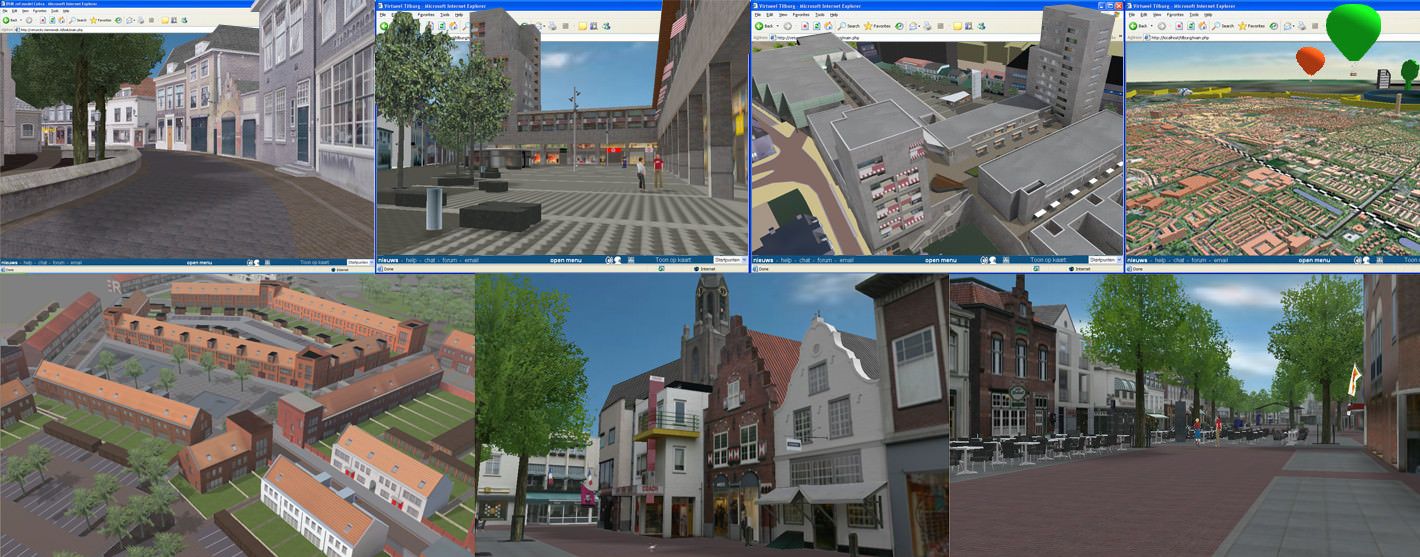
      From 2004 to 2006 my job was just what you are asking for: making 3d city models.

      Our workflow back then was (in 3dsMax):

      1. start with some sort of planning / script so you know what needs to be in 3d, what can be a billboard/panel and what can be skipped. Edit: there's a big difference in a walkthrough model and a birdseye view model.

      2. get the contours of the houses (2d dxf city data) -> maybe OpenStreetmap?

      3. take photographs yourself of all the buildings you need to model

      4. roughly model the shape of a building by doing:
        4a. model a shape using the 2d city data (contours, streets etc). The 2d city data helps here because now you have the contour and exact width of the individual buildings
        4b. Add a texture to the facade. Scale(z) the facade with the texture so its proportions are just like in the photographs
        4c. add all the 3d details that define the building (overhangs, chimneys etc)
        4d. use some sort of hierarchy in the model Name your models and textures so you can easily find something.
        4e. edit the textures in Gimp/Photoshop to remove perspective in the windows, people, bicycles etc.

      Back then we used a constant TexturePerMeter for the textures so all the textures had the same sharpness / blur. Because of the limitations of hardware we used 32 pixels per meter. With the modern graphic cards you can go much higher

      1. for the curbs and roads we used a lofting technique with tileable textures

      2. you really need trees, streetlights, streesigns, cars, decals etc etc to make it come alive

      This is a very very very brief explanation. Feel free to ask more specific questions.

      Edit: if you brief allows you to keep all the buildings white instead of textured, you will save a TON of work.
      Edit: added a picture of some of our projects in 2004-2006
      edit: think about a consistent level of detail.

      Max


      city3d.jpg

      posted in SketchUp Discussions
      K
      kaas
    • RE: Unreal 4 Engine

      @pilou said:

      Does it normal it works not in "Local" so you must have start from Internet site of UE4 ?
      I start UE from a normal icon on my taskbar. If you start the editor without an internet connection it throws an error but on the bottom of the screen there is an option for using it 'offline'.

      posted in Extensions & Applications Discussions
      K
      kaas
    • RE: Unreal 4 Engine

      @cmeed said:

      I have 2 questions you may know the answer to
      have you tried getting a textured sphere or a shere with an image on it? I tried but when UE4 compiled shaders it took ages, it took each individual face as a new texture - I've tried a few times all the same

      I did import more blobby objects into UE but.. I needed to pass them through Blender first.
      SketchUp does 'strange things' with mapping coordinates / textures on blobby objects - they seem to turn into small unique materials when exporting to obj (look into the export folder and you will see lots of small textures).
      Unreal Engine needs a second uv channel for storing the lightmaps. Sketchup can't create that 2nd channel so Unreal automatically creates it during import (if you have that option checked) by copying the first channel and re-arraging it into the 0-1 UV space(no repetition).
      Result in UE: lots of small unique materials, all with a default size lightmap which takes 'ages'.
      In short: for blobby objects, I export to obj -> import in Blender -> create a second UV channel for the lightmap with everything layed out flat, all into the 0-1 UV space -> import into UE with the option 'generate lightmaps' NOT checked -> succes

      @cmeed said:

      the other question
      I'm looking to import the whole model and not place individual items ( i do this by dragging all the meshes that have been imported onto the view port (easy)) but my scale is really off - do you know the method of setting this up on export or during import (there's an option (for .obj) to use model units or millimetres etc and a scale option in UE4)

      Internally UE uses centimeters. I normally model in mm's myself so during fbx-export from SU, in the export options I set the units to cm's.

      @cmeed said:

      tonight i've only exported as an .obj, have you used .fbx?
      (that's 3 questions)

      In SU, I export to fbx for more simple objects like walls, floors, etc
      I use obj for objects that are more complex or causing trouble in UE and run them through Blender first for applying an extra Lightmap UV channel. From Blender I export to fbx again.

      It seems complicated but once you have this workflow going its easy. Maybe have another read in my quickstart that I posted a while ago in this thread? http://sketchucation.com/forums/viewtopic.php?f=80%26amp;t=57392%26amp;start=60#p576468

      Good luck! If you have any more questions, fire away

      posted in Extensions & Applications Discussions
      K
      kaas
    • RE: Unreal 4 Engine

      @cmeed said:

      Try this.....

      I just had a look at the videos. Its nice he/she did take the effort to try to explain his/her 'workflow'. I would suggest though to look for another source of information to really get a really useful workflow going for more complex scenes, nice results and acceptable calculation times.

      posted in Extensions & Applications Discussions
      K
      kaas
    • RE: Unreal 4 Engine

      @cmeed said:

      ...I'm still trying to get a simple model to work ...

      I did several (simple) projects already with UE and SU so maybe I can help. Could you post the model?
      Also, the youtube link doesn't work for me?!

      posted in Extensions & Applications Discussions
      K
      kaas
    • RE: Unreal 4 Engine

      @pilou said:

      ...The "-http=wininet" at the end of the Properties of the Right Click on the Epic icon works fine! ..
      Nice it works now. Strange though you needed the trick. At my system (Win7X64) it just worked fine without it.

      posted in Extensions & Applications Discussions
      K
      kaas
    • 1
    • 2
    • 18
    • 19
    • 20
    • 21
    • 22
    • 43
    • 44
    • 20 / 44