sketchucation logo sketchucation
    • Login
    1. Home
    2. kaas
    3. Posts
    Oops, your profile's looking a bit empty! To help us tailor your experience, please fill in key details like your SketchUp version, skill level, operating system, and more. Update and save your info on your profile page today!
    πŸ”Œ Smart Spline | Fluid way to handle splines for furniture design and complex structures. Download
    K
    Offline
    • Profile
    • Following 0
    • Followers 0
    • Topics 47
    • Posts 864
    • Groups 1

    Posts

    Recent Best Controversial
    • RE: Basecamp London 2015

      @pixero said:

      Here are a few pics from the first day of the London Basecamp.
      I filmed some of the presentations and will try to upload them when I get home.

      Any pics or movies are really appreciated! I wish I could have been there. Hoping for a new edition at some time.

      posted in Corner Bar
      K
      kaas
    • RE: Layout: Love it or Loathe it?

      Fully agree on all points with Frederik

      posted in LayOut Discussions
      K
      kaas
    • RE: Unreal 4 Engine

      @cmeed said:

      Now.... how do we get Sketchup and Unreal to talk?

      I use Unreal & SketchUp. My goal isn't realism but a nice atmosphere. I wrote quickstart on the UE forum a while back: http://forums.unrealengine.com/showthread.php?69976-Unreal-(-amp-Sketchup)-in-the-architectural-design-process%26amp;p=293511%26amp;viewfull=1#post293511
      Maybe not the quality you desire but it will get you going and give you better idea about the SU-UE workflow.

      posted in Extensions & Applications Discussions
      K
      kaas
    • RE: Sketchup dreaming?

      ...It's normal. Maybe you can convince your boss it's overtime...

      posted in Corner Bar
      K
      kaas
    • RE: Dunster...

      @tadema said:

      Hello Kass, I'm not sure of your question. Hope I'm guessing correctly
      John

      You did John. I see it's a combination of actual detail in polygons and textures. πŸ‘

      posted in Gallery
      K
      kaas
    • Code: getting x,y position before moving the mouse??

      To get the x,y position of the mouse pointer, normally you would use

      def onMouseMove(flags, x, y, view) @ip.pick(view, x, y)

      This code relies on the mouse being moved. But, if a tool is started with a keypress, is it possible to immediately get the x,y position of the mouse pointer before actually moving the mouse?

      posted in Developers' Forum
      K
      kaas
    • RE: Help importing a dwg floor plan inside a Layout page

      @danielpiccinelli said:

      Thanks,what about linetypes, texts and colors? Will I loose everything whilst importing my dwg in sketchup?

      I'm afraid you will loose most, if not all, of that stuff. Lets hope in the next release something is done about that.

      posted in LayOut Discussions
      K
      kaas
    • RE: Dunster...

      these look beautiful! I'm curious about the scene statistics. Texture magic or polygon magic?

      posted in Gallery
      K
      kaas
    • RE: Help importing a dwg floor plan inside a Layout page

      If you're using pro:
      import dwg into sketchup -> make scene with imported lines -> open layout -> insert scene

      posted in LayOut Discussions
      K
      kaas
    • RE: Autocad 123D Catch

      Maybe try the desktop version instead?

      posted in SketchUp Discussions
      K
      kaas
    • RE: "Save changes to Untitled?"

      Save changes to untitled -> I had the same problem while I still used LightUp. At starting of SketchUp it added several components (light icons etc) and materials. To prevent this, LightUp was disabled in the preferences all the time and I would only enable it if needed. Annoying and I never understood why he wouldn't fix it.

      posted in Newbie Forum
      K
      kaas
    • RE: Layers and Image clipping

      if the birds look nice like this, maybe you could make semi transparent textures for the letters as well.
      In Gimp / Photoshop, create a 128x128 image with the color of the letters and add a 68% alpha channel layer to it. Save as image with alpha channel and use as texture in SketchUp.

      posted in SketchUp Discussions
      K
      kaas
    • RE: Layers and Image clipping

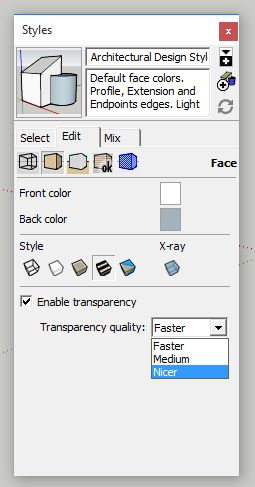
      Nicer -> see image


      nicer.jpg

      posted in SketchUp Discussions
      K
      kaas
    • RE: Layers and Image clipping

      just thinking out loud here but...
      If I remember well, transparent objects often cause some trouble.
      Does changing the transparency quality to 'nicer' improve the results?

      Maybe SketchUp is actually treating layers as stacked (transparent) layers?!??
      By putting something on another layer, it ends up in a different context / different z-buffer so to say?

      Just wildly guessing here...

      posted in SketchUp Discussions
      K
      kaas
    • RE: Windows 10

      Sorry, my mistake. I did use a live USB. It's great indeed for trying out.

      posted in Corner Bar
      K
      kaas
    • RE: Windows 10

      Thanks for your reply. I was very curious so I tested a few live-cd's. Ubuntu (desktop for developers-edition) looked nice but was really slow compared to Debian. Maybe because it's a live cd?!
      For now, I'm still looking for a way to start SketchUp64 in Wine. Will do some more searching and testing.

      An update to the sages page would be great!

      have a nice day.

      posted in Corner Bar
      K
      kaas
    • RE: Windows 10

      Very interesting - I have played around a bit with Linux (Redhat, Suse & Ubuntu) 5+ years ago and decided back then it didn't meet my needs. Much has changed of course so maybe I will have to test again. I have some questions if I may:

      • You see any difference in performance between Win & Linux?
      • You have some more info / links about the tricky installing of the 64 bit versions?
      • Which Linux flavor are you using if I may ask?
      posted in Corner Bar
      K
      kaas
    • RE: Windows 10

      @aerilius said:

      ...Both Layout and SketchUp (6 years) work well for me for daily use...

      Are you actually saying here you have both SketchUp and LayOut running without any problems on Linux?

      posted in Corner Bar
      K
      kaas
    • RE: Sketchup modelin problem

      @mistahgrizzly said:

      why when check to show hidden geometry is not showing nothing ?

      Because there's apparently nothing to show. In short:

      • In SketchUp, even irregular planes (like a wall with a hole for a window) can be just 1 element. Sometimes it's not and 'show hidden geometry' will reveal something.
      • In most 3d programs, these kind of shapes can't be made as just 1 element. They are internally split up into an assembly of triangles (like in your first picture).

      To speed up resolving your problem:

      • what kind of export format do you use from SketchUp? fbx? obj? something else?
      • in what program are you viewing the 3d model? CryEngine? something else?
      • can you add / post your sketchup model so we can have a look at it?
      posted in Newbie Forum
      K
      kaas
    • RE: Windows 10

      @juju said:

      ...there is an emulator called WINE for running windows apps on Linux.

      Google-ing for 'SketchUp Layout Linux' results in quite some posts where people only can start SketchUp with ruby disabled AND Layout doesn't work at all etc... Would be nice if Trimble would release a Linux version some day.

      posted in Corner Bar
      K
      kaas
    • 1
    • 2
    • 20
    • 21
    • 22
    • 23
    • 24
    • 43
    • 44
    • 22 / 44