I'm somehow not able to understand the functioning of the golden gauge plugin. Can anyone make a step by step tutorial for it? Reading on smustard didn't help
Oops, your profile's looking a bit empty! To help us tailor your experience, please fill in key details like your SketchUp version, skill level, operating system, and more. Update and save your info on your profile page today!
🚨 Skimp | 25% Off until March 30 Buy Now
 Offline
Posts
-
RE: Guidelines at fibonacci series spacing?
-
RE: Guidelines at fibonacci series spacing?
You guys are seriously awesome...seriously seriously aweseome..
 . If I'd met you in person, I'd be having a cup of cold coffee with dark chocolate with you guys. Thanks a ton.
 -
[req] plugin to save me from zoom section cut frustration
Can there be a plugin which gives us a warning that our objects are too away from the origin? And after that, just like ThomThom's edge tools that shows us the problematic areas, this plugin could highlight all those problematic areas in purple colour
After that, the magical lifesaver, the object's component/group axes are placed closer to them. And also, the whole model's axes is placed closer where it should be to avoid the section cutting zoom madness
-
Guidelines at fibonacci series spacing?
Can I make guidelines spaced as per fibonacci series?
I am manually doing this. I made a fibonacci calculation spreadsheet in another software, then I am manually feeding the dimensions.
-
RE: [req] random polygon division and guide points @ vertices
@fredo6 said:
@john2 said:
Is there a plugin that divides my irregularly shaped plane into multiple polygons of random size? Actually I am using the Voronoi plugin and need to speed up things.
Are you looking for a Voronoi plugin? And what do you mean "Seep up things"?
Fredo
I am using the voronoi plugin, the latest one. Well, I need polygon division quickly done automatically for a given surface. I have to manually divide it into polygons. "Seep up things?" , I wrote "Speed up things" i.e. to make the process of polygon division faster.
-
RE: [req] random polygon division and guide points @ vertices
@tig said:
To add guide-points at every selected vertex copy/paste + <enter> this in the Ruby Console.
m=Sketchup.active_model;a=m.active_entities;s=m.selection;vs=((s.grep(Sketchup;;Edge).collect{|e|e.vertices})+(s.grep(Sketchup;;Face).collect{|e|e.vertices})).flatten.uniq;m.start_operation('x');vs.each{|v|a.add_cpoint(v)};m.commit_operationIt's one step undo-able. It finds vertices from selected edges and/or faces and places a guide-point on each one... Note how it can use a 'vertex' and does not need 'vertex.position' to place the cpoint...
Is it possible to make a plugin out of this?
 It is indeed I suppose.
  Actually I find ruby console quite technical and programmo-expert sort of thing. So, that's why, Im asking for a plugin for a novice like me.
 -
[req] random polygon division and guide points @ vertices
Is there a plugin that divides my irregularly shaped plane into multiple polygons of random size? Actually I am using the Voronoi plugin and need to speed up things.
Another requirement, a plugin that places guide points at various vertices selected
-
RE: CFileException 3 - ERROR!
@tig said:
Do you get any 0.skb files left lying around ?
no
@tig said:
Do proper xxx.skb files get made ?
Yes
@tig said:
Have you tried a support email to Trimble / SketchUp team ?
No
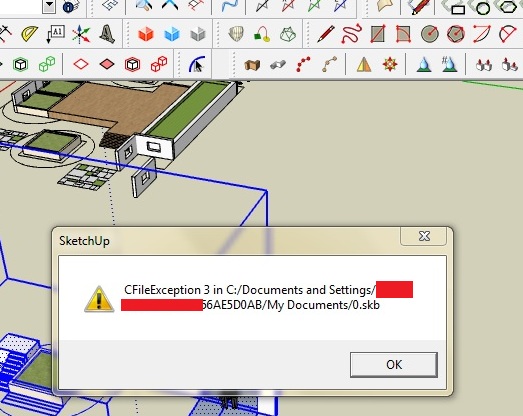
I fail to understand what is causing this. And I am not running sketchup on network. But I am facing a problem. I have to enable my wi-fi everytime to use Sketchup 2015 in order to bypass licensing error problem. I just enable my wifi adaptor, and not connect to anywhere. Is that causing this problem?
I have noticed, Su guys have made a useless "enable your laptop's wifi adaptor" so that sketchup starts easily. Else, it won't start.
-
RE: CFileException 3 - ERROR!
@tig said:
Is the SketchUp.exe set in Right-click > Context-menu > Properties > Compatibility to 'always run as administrator' ?
If not try ticking that box and restart SketchUp...Did this, but no success. I am the only user of my laptop, and using it as administrator. I did check the box next to the specified option.
@tig said:
Errors with 0.skb etc seem to occur on slow network connections, non-local folder locations or when the SKP is on say a memory-stick...
Although you have obscured some of the path I expect that is to your own folder on the drive ?
Have you checked that you, admins and SketchUp have FULL permission to write to that folder ?
Is SketchUp.exe on the drive - where your SKP is ?Sketchup.exe is on "C:\Program Files\SketchUpfresh\SketchUp 2015\SketchUp.exe"
@tig said:
What happens is that when you have 'make backup files' set you get the model's xxx.skp and the backup xxx.skb, which is the previous version of the model, when there is a save the old xxx.skb gets renamed 0.skb [or 1.skb etc if there is a name clash], then the existing xxx.skp file gets renamed xxx.skb and the model is then saved as xxx.skp, finally the unneeded 0.skb file is deleted...
This all happens in the blink of an eye.
Something somewhere is preventing the renaming [or deletion?] of the 0.skb ?
Is there a 0.skb in that folder ?Which folder are you asking? This error pops up everytime I work on Sketchup 2015.
P.S. When I was reading your answer, I got reminded of Eminem. He speaks so fast. It is amazing to hear him at first but takes time to make sense out of what he is saying. Your answer is really complex to grasp. Hats off to your indepth knowledge sir.
-
RE: CFileException 3 - ERROR!
I am getting this error with SU 2015 Make. What is wrong? Surprisingly, I saw this error for the first time ever while using sketchup. I have installed version 2014 also on my laptop but never get this error. Is there anyone who was able to fix this but never replied?

-
RE: Zoom cutting problem in make 2015-64bit
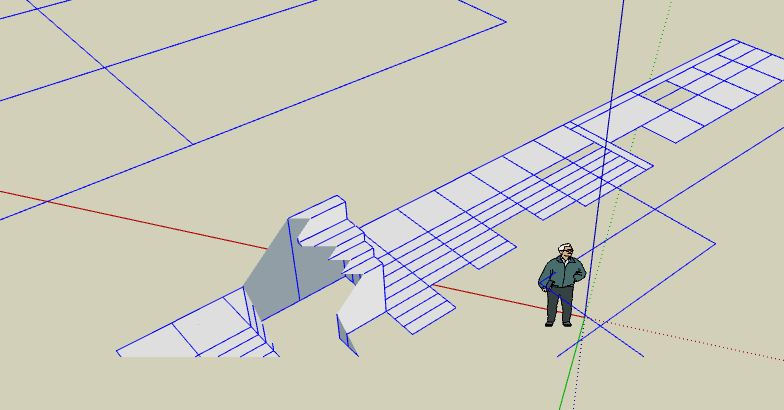
Thanks a lot TIG sir for this explanation, I'll do a double check on my model. But I seem to lose hope now ntxdave is also in the same problem as me. Maybe we both have found a bug or some common hardware problem specially with respect to 2015-64 bit version?
Yes, you guessed it right, I am working on a CAD dwg imported file. Origins I checked a lot in SU for this notoriety but didn't found any miles apart things. Interestingly, whether the modelled area was moved near or away from origin, the cutting zoom problem's intensity didn't differ.
-
Zoom cutting problem in make 2015-64bit
Is it just me or the sketchup 2015 make version has this zoom sectional cutting problem occuring more often than the previous ones? As a solution I am moving my model closer to the axis, but the problem persists.
-
RE: Parametric hole making
@jeff hammond said:
@john2 said:
Actually I am an architect. So, very bad with scripting an all. Is it possible to make a plugin or something out of this script? Please understand, I have a really hectic schedule and learning new code or language would be really stressful.

do you have a clearer example of what the outcome should be? (other than.. i have 5 holes which determine 4 holes.. etc.)
Well, I'm in the process of brainstorming design ideas, much like what Zaha hadid does using parametric software like Rhino, etc.
One thing is a perforated wall with lots and lots of holes which gives a dynamic and scattery scattery look, [pardon my words], that is given on the page suggested by Pixero sir.
Thanks a lot for the food for thought!! Hey!! rhyming
.Another one which has got me even more excited is how the walls change their angles if one of the walls is made to change its angle of inclination. It is also given on the same page, which Pixero Sir posted.
What my ambition to make in sketchup is actually in this video, a great TED talk by Greg lynn explaining organic algorithms in the field of architecture.
-
RE: Parametric hole making
@pixero said:
Here is a link to a tutorial how to make parametric holes via ruby in SketchUp.
http://sketchupfordesign.com/the-book/chapter-6-creating-geometry-using-ruby-scripting/Actually I am an architect. So, very bad with scripting an all. Is it possible to make a plugin or something out of this script? Please understand, I have a really hectic schedule and learning new code or language would be really stressful.
-
Parametric hole making
I want to make a perforated sheet of metal or anything in sketchup which follows some parametric rules. e.g.
I have 5 circular holes in a rectangular sheet
then I make 4 circular holes placed at a specific position calculated with references to the spacing of the 5 ciruclar holes that I made.
The new 4 circular holes have some mathematical relation of their radii with the 5 circles that I made earlier.
And so on...I continue to make more circular holes in the sheet. The radii of all those circles are interdependent on all the circles that I made.
So, if I change radii of one circle, the other circular holes would change in their size accordingly.
Any trick to do this quickly in sketchup?
-
RE: Better eps exports?
@krisidious said:
Have you tried just exporting dwg from Sketchup and working with the fills yourself? I know it's a pain...
 Yes bro. I have done it a lot, opening directly my autocad files that I made on autocad and filling them, same with sketchup dwg exports. But, then this question of mine becomes some paradox, I don't know, can't find the right word to describe this situation
 -
RE: Keeping internet on for SU 2015make startup?
@krisidious said:
Not sure... I don't have it. Did you have pro and then the trial ran out? Seems like you wouldn't have had enough time for your trial to run out though.
You might try installing with the internet disabled. Just a thought.
That would be pretty irritating and would push a bunch of people out of the range of Sketchup and that would be a mistake IMHO.
Actually I installed it without being connected to the internet. I should do the otherwise now, hehe, installing it while my net is still active.
@jason_maranto said:
I had the same issue when I installed using my removable USB wireless adapter -- if I removed the adapter I would get the "SketchUp cannot start due to a licensing error" message.
What I found to be true in my case was I needed some type of network hardware active in order to start SketchUp -- but did not need to be actually connected to the internet. Something to do with the SketchUp license being tied to that particular machine as identified via a MAC address.
In my case I had some Ethernet ports on my computer that I usually keep disabled (because they are not connected to anything) -- by enabling them and re-licensing SketchUp I was able to remove the USB wireless adapter and still start SketchUp (because the Ethernet ports supply the needed MAC address, even though they are not connected to anything).
Best,
Jason.You are saying really technical stuff to me. Please explain step by step what you did.
-
Keeping internet on for SU 2015make startup?
Do I always need to have my internet enabled. I always get a SketchUp cannot start because of licensing error” when my internet is turned off. If I turn on my internet and start SketchUp 2015 make version 64 bit, it starts fine.
-
RE: Better eps exports?
@krisidious said:
Not sure... I've never needed to. What do you do with the stuff in Illustrator? certainly you're not working with vector data for planning in it? If you're doing graphic work I understand. I'm not too familiar with the .eps... is it vector with color and fills? and is that the type of export you're trying to get?
Precisely, that's what eps is. It is a vector linework with fills.
A proper vectoris a say rectangle with pink fill.
Improper vector generated via sketchup is a rectangle with say 0.5 mm line weight. It has no fill, just blank. Within it, there is another rectangle with a pink fill with no lineweight. And they are grouped.
And when there are lot of rectangles, squares and triangles in a sketchup export, there is a disorganized grouping. Say, my fills in a triangle are grouped with the lines of some rectangle located many centimetres away. That's what I am facing.
The reason for not using layout is, I just want a short way from Sketchup to illustrator. Point A to Point B, that's it.
Layout is getting in between
-
RE: Plugins Not Compatible with SU2015-64bit
Can't we have a collaborative online cloud type document listing all the incompatible plugins? This is a discussion thread and the first post can have a link to a collaborative document which only SCF members can edit and report incompatible plugins.
That would be the most organized system to get things in our control. I guess the administrators can design some webby thing or somewhat like that. What say?