My last thought is that in original model was some small deviation from "coplanar" ... because as i said before, I wrapped everything in a component, I saved as new file, then opened and it cut hole by copying and by placing from Component Browser.
In original model it did not cut hole by copying, just by placing new component from Component Browser. When I copied I was on face with the cursor. I tested that by exploding the component and it merged with the face.
Oops, your profile's looking a bit empty! To help us tailor your experience, please fill in key details like your SketchUp version, skill level, operating system, and more. Update and save your info on your profile page today!
Urasik Extensions | Lots of new extensions to check out Learn More
 Offline
Posts
-
RE: [Plugin] Superglue
-
Hide rest of model generates ghosts when moving around
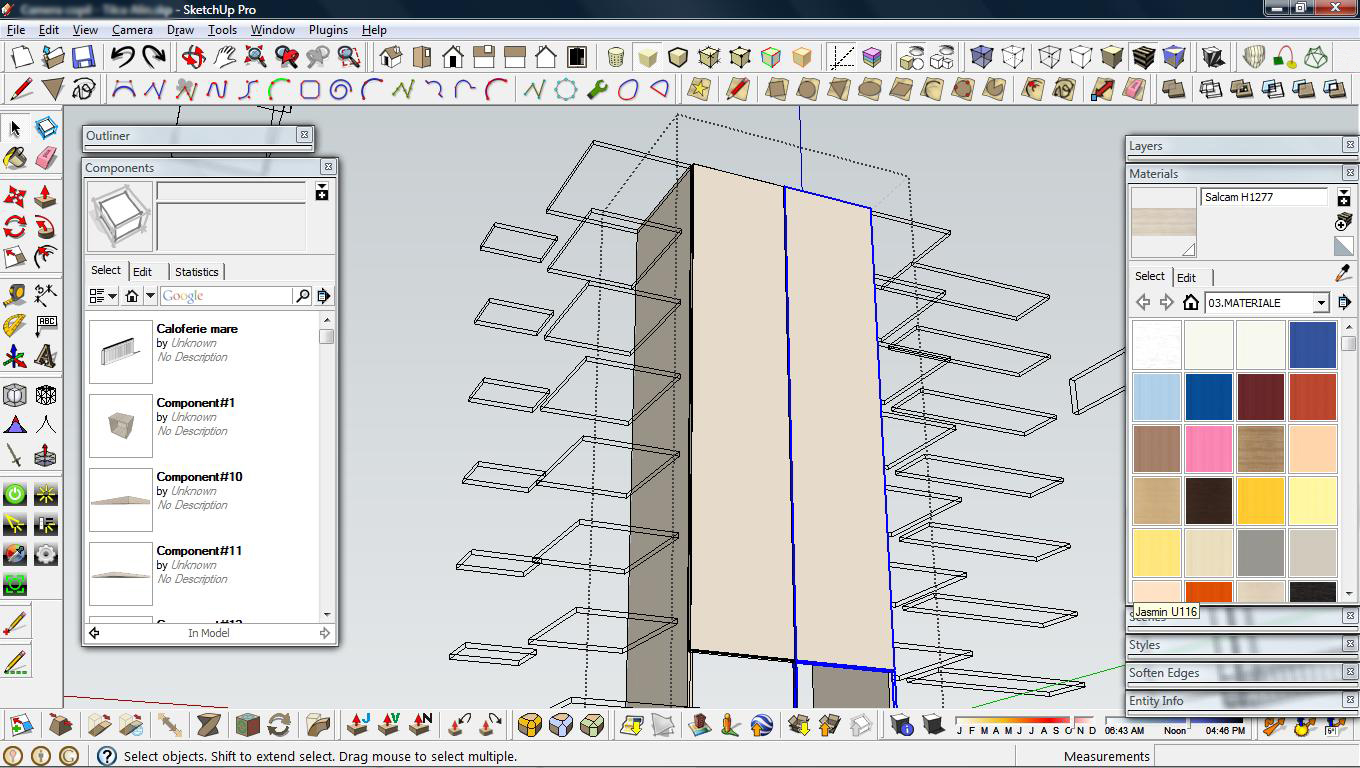
If "rest of model is hidden", shouldn't it stay hidden? I noticed ghosts when editing a component and I move around; "hide rest of model" is activated. I have nVidia 9500 GT, so I don't think is graphic card issue.
Ghosts are persistent after moving operation (about 1 second or less), this is how I could make the print-screen.
-
RE: [Plugin] Superglue
can't explain myself. I saved the model as new file, it worked there. In the original one doesn't want. I copied the model in a new sketchup window, it doesn't work.
It looks like is a sketchup glitch, rather than model-related. -
RE: [Plugin] Superglue
It seems to not work for me

I made a component that makes a hole in a face, when I take the component from Components window, it cuts hole, if I copy it from model ( + Ctrl), it doesn't cut hole. I used Superglue on it, it doesn't cut hole. Am I misusing the plugin? Why that components don't cut hole when I copy them?
-
RE: [Plugin][$] Curviloft 2.0a - 31 Mar 24 (Loft & Skinning)
One question, this version doesn't use anymore
ZLoader__Curviloft.rbfile? I downloaded it and I found just the directory inside.Thank you.
-
RE: [Plugin] Export 2d with Alpha
@thomthom said:
view.vpwidthandview.vpheighthttp://code.google.com/apis/sketchup/docs/ourdoc/view.html#vpwidth
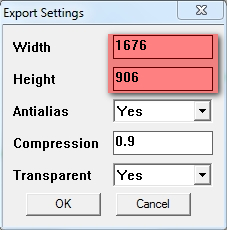
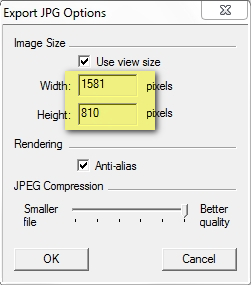
Interesting...it seems that
vpheight; widthtakes into consideration the viewport WITHOUT toolbars. Any fix for this?
-
RE: [Plugin] Export 2d with Alpha
@tig said:
The 'compression-level' affects the 'image-quality' and the 'file-size'. Perversely, the higher the number the better the file's 'quality' and the less compressed the file is; so 0.1 is low-quality, 0.5 is medium-quality, 0.9 is high-quality etc... When a file is compressed it gets smaller and therefore looses data and with that quality.
The number range is 0.0 to 1.0 [min>>>max for the quality BUT max>>>min for the compression].
It'd probably have been better [or at least more logical] if it had been called the 'quality' level, rather than the 'compression' level, because the higher the number the better the image 'quality', while the lower the number the more the image is 'compressed' and its file-size reduces...
Thank you very much, TIG! It makes all clear for me.
I tweaked myself the plugin a little, to have different values when it starts, but I could not find a way how to read Drawing area resolution. Maybe I haven't looked in SU Ruby API, in the right place... could you point a direction for me to follow? -
RE: [Plugin] Export 2d with Alpha
@thomthom said:
It's how much a JPEG will be compressed.
But the exported image is PNG
 I'm not sure that I understand. Ok, it's about compression... I asume "no compression" means 0 (zero) ? what is the maximum value that can be used?
 -
RE: [REQ] Another type of component edit ( for plants)
@justo said:
I'd like to be able to place a component, such as a plant, and not knowing its exact diameter to scale off, just enter its diameter (width) and a new name.
If you use Scale Tool for the component, just insert a value, followed by your units. Set's say 300mm It will scale on direction you choose to match 300mm
-
[Request] Batch DXF Export
I noticed that are several DXF-import plugins, but nothing to export.
Would it be possible to create a plugin for SU Free that exports DXF from selected components/groups, but each component/group to be saved as different DXF file? Also to be able to choose faces/edges/DXF version ?
Thank you very much.
-
RE: [Plugin] Export 2d with Alpha
Feature request:
Hy thomthom I use this plugin a lot and sometimes I need to work faster with it. So, if you don't mind, I would like to request some features for it.
-cross-session save of chosen parameters
-actual screen size image export
-now, if resolution doesn't match with screen, it clips out the model (is like the height of image tries to fit the screen, and clips from width). Is it possible to fit the model instead?Also, I would like to better explain to me what exactly "0.9" value from "compression" parameter means, now I let it like it is because I have no idea what values I could input and how it will change the image.
Thanks for taking this into consideration.
-
RE: Shadow settings
Some success with this issue ?
I'm just having same problem ... and I can't see any "uninstall" entry for removing Layout.
Any idea?****EDIT:
- Solved by using "Repair" feature in Installing kit.****
-
RE: Did this SketchUp Logo come up after SU8?
@hellnbak said:
But hey, what's the point of this thread anyway, Google is going to pay no more attention to anything we come up with than they pay attention to our suggestions for ways to improve their program.
It's true, but we'll keep trying ... the shamans were dancing to bring the rain and sometimes the rain came
 We are the SketchUp shamans...
-
RE: Did this SketchUp Logo come up after SU8?
If you ask me, it sucks

If SU is mostly used by people who also join SCF, why Google don't ask here for such things? We have Speed Modelling contest, so what would be so hard to make a "logo contest" ?
Also, we have SU Wishlist, bug reports... I'm disappointed about how Google develops SketchUp, by not taking into consideration users needs. -
RE: Did this SketchUp Logo come up after SU8?
@unknownuser said:
We could even make transparent icons
thomthom gave us a plugin that can help
http://forums.sketchucation.com/viewtopic.php?t=30819 -
RE: Dimensions in SketchUp don't stay in position
@tig said:
I guess the group's axes' directions and the model's axes' directions differ ?
Try exploding the group in place and immediately regrouping it so the axes reset, re-dimension and see if the dims are then fixed...
If it's a component then you can try resetting the component's axes to mimic the model's axes directions etc.
indeed, the axis were different. But I'm thinking now that the cause was a earlier mirroring, because after exploding/regrouping I changed the axis again, and everything stayed in place.
-
RE: Biplane (not a copy of a real plane)
@alejande said:
Hmmm, are you talking about a bee? Or plane? In fact, I intend to install a couple of big guns on it))
Better install a couple of bees on a gun
(btw, here on scf we are pacifists) -
RE: [Plugin][$] FredoScale - v3.6a - 01 Apr 24
inferencing problem (detailed)
Sorry for not posting a youtube movie, I just uploaded it here, because I don't have a youtube account.
-
RE: Good mouse for SketchUp?
@dave r said:
I have a 3D Navigator which I tried with SketchUp but I prefer navigating with the mouse The 3D Navigator is heavy though and makes a great paperweight.

I was thinking to get a 3D Navigator, it looked promising in adverts. You say for sketchup is not the best choice ?